

2 Hidden Bottlenecks in Large-Scale Azure Migrations
Moving a massive on-premise system to the cloud isn't just about copying VMs. Here is how to overcome the two hidden performance killers.
Join the DZone community and get the full member experience.
Join For Free“Lift and Shift” (or cloud lift) is often sold as the path of least resistance for migrating legacy systems to the cloud. The theory is simple: take your on-premises virtual machines (VMs), copy them to an IaaS provider like Azure, and enjoy immediate scalability.
However, when dealing with large-scale, mission-critical systems, the physics of the cloud are different from an on-premises data center. Assumptions made about network adjacency and connection limits can lead to catastrophic performance failures that only appear during full-load testing.
Based on a recent retrospective of a large-scale migration involving heavy batch processing and thousands of concurrent users, this article highlights two specific architectural “traps” that don’t show up in standard documentation — and how to fix them.
Trap 1: The Performance vs. Availability Paradox
In modern cloud architecture, the golden rule is availability. We are taught to spread resources across different Availability Zones (AZs). If Zone A goes down (due to a power or cooling failure), Zone B keeps the application running.
However, in legacy “cloud lift” scenarios, this best practice can kill performance.
The Scenario: Batch Processing Failure
Consider a legacy batch process that executes 1 million sequential SQL statements. On-premises, the application server and database server sat in the same rack, connected by a switch. Latency was negligible.
During the migration to Azure, the architecture followed standard HA guidelines:
- Batch server: Deployed in Zone 1
- Database server: Deployed in Zone 2 (or floating between zones)
The Result
The batch process, which had a strict SLA window, failed to complete on time. No amount of SQL tuning, index optimization, or query parallelization solved the issue.
The Root Cause: Physics
The issue wasn’t the code; it was the speed of light. The physical distance between data centers (zones) introduced network latency that was negligible for a single request but fatal when aggregated over millions of operations.
The Math of Latency
- Intra-zone latency: ~27 microseconds
- Cross-zone latency: ~470 microseconds
If your batch job runs 1,000,000 queries sequentially:
- Same-zone overhead: 1M × 27 μs ≈ 27 seconds
- Cross-zone overhead: 1M × 470 μs ≈ 7.8 minutes
That is a 17× increase in pure network wait time, unrelated to CPU or disk I/O.
The Solution: Proximity Placement Groups (PPG)
To solve this, you must explicitly trade availability for performance. Azure offers a feature called Proximity Placement Groups.
A PPG is a logical grouping that forces Azure to physically locate your VMs as close as possible — typically within the same data center hall.
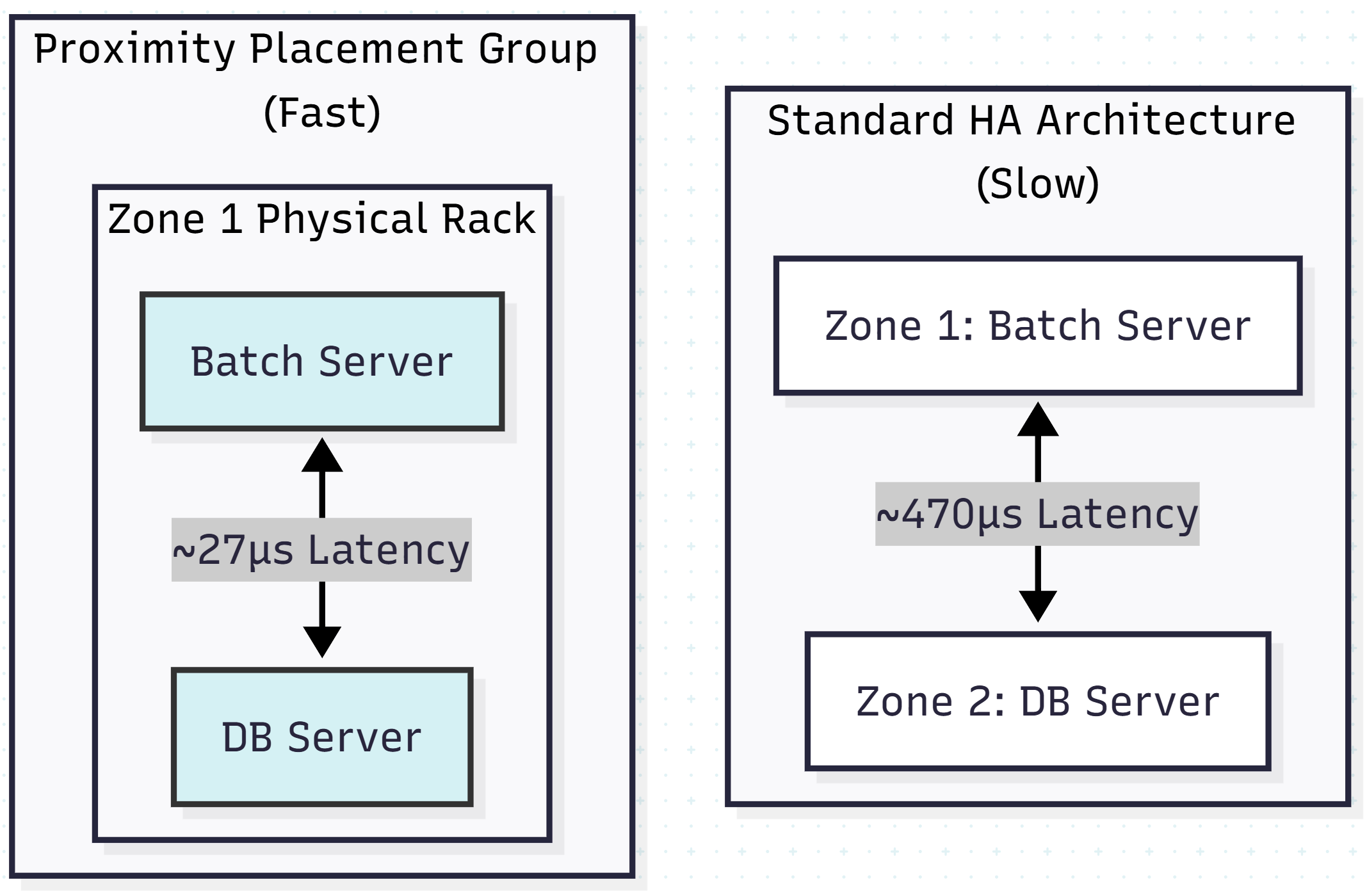
Architectural trade-off: By using a PPG, you accept that if that specific data center fails, both your app and database go down. For batch-processing windows, this is often an acceptable risk compared to missing the SLA.
Trap 2: The “Flow Count” Ceiling
When sizing a dedicated cloud connection (like Azure ExpressRoute or AWS Direct Connect), engineers typically look at bandwidth. “We have a 1 Gbps pipe, so we are fine.”
However, network appliances (firewalls, load balancers, and cloud gateways) have a second, often invisible limit: network flows.
The Scenario: Random Connection Drops
Post-migration, users reported intermittent connection errors across various applications. Bandwidth utilization was low (under 30%), yet packets were being dropped.
The Root Cause: Flow Exhaustion
A flow is defined by a 5-tuple:
(Source IP, Source Port, Destination IP, Destination Port, Protocol)
Modern SaaS applications (Office 365, Teams, OneDrive) are chatty. A single user opening a browser, syncing a file, and chatting on Teams might generate 50–60 concurrent flows.
If you have 10,000 users routing traffic through a standard VPN or ExpressRoute gateway, you aren’t just pushing data — you are maintaining hundreds of thousands of state table entries.
The Calculation
Total flows = Users × Average flows per user
10,000 users × 60 flows = 600,000 concurrent flows
If your ExpressRoute gateway SKU supports only 500,000 flows, the 500,001st connection will be dropped silently, regardless of available bandwidth.
The Solution: Traffic Offloading (Local Breakout)
You cannot simply “tune” your way out of a hard infrastructure limit. You must architect around it.
- Upgrade the SKU: Move to a higher-tier gateway (e.g., Ultra Performance) that supports more flows. This is the quick fix but incurs higher costs.
- Local breakout (split tunneling): The most robust architectural fix is to stop routing SaaS traffic through your private tunnel. Configure the client network to route trusted internet traffic (M365, Zoom, etc.) directly to the internet, bypassing the Azure gateway entirely.
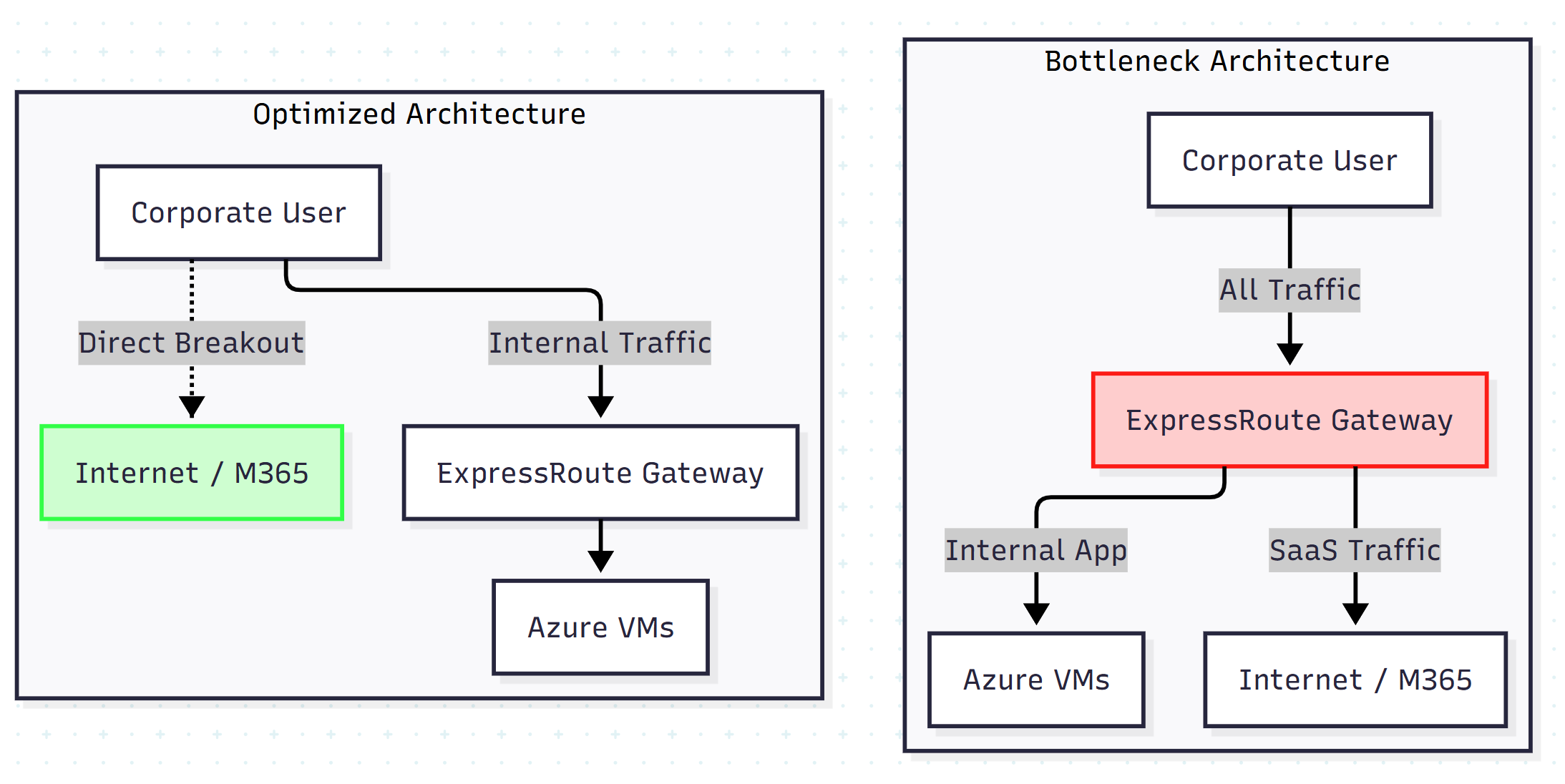
Estimating Flows Before Migration
Don’t wait for production to discover flow limits. You can estimate your current flow usage using packet capture analysis on a sample user.
Here is a Python snippet illustrating the logic to analyze a .pcap file (using Scapy) and count unique flows for a single user session:
from scapy.all import rdpcap

def count_unique_flows(pcap_file):
    packets = rdpcap(pcap_file)
    flows = set()

    for pkt in packets:
        if pkt.haslayer('IP'):
            # Define flow by 5-tuple
            src = pkt['IP'].src
            dst = pkt['IP'].dst
            proto = pkt['IP'].proto
            sport = pkt.sport if hasattr(pkt, 'sport') else 0
            dport = pkt.dport if hasattr(pkt, 'dport') else 0

            # Create a unique hashable tuple
            flow_signature = (src, dst, proto, sport, dport)
            flows.add(flow_signature)

    return len(flows)

# Usage: Run this on a 10-minute capture of a typical user
# Multiply result by total concurrent users to estimate Gateway sizing.
print(f"Unique flows detected: {count_unique_flows('sample_user_session.pcap')}")
Conclusion
Cloud lift migrations are deceptively complex. The tools to move VMs are mature, but the architectural implications of moving from a LAN to a WAN environment are often overlooked.
When designing for scale:
- Respect physics: If latency matters (e.g., batch jobs), co-locate your compute and storage physically using Proximity Placement Groups.
- Count flows, not just bits: Sizing a gateway by bandwidth alone is insufficient. Model user behavior and calculate concurrent connections to avoid hitting hard limits on network appliances.
By addressing these “invisible” constraints during the design phase, you avoid the panic of re-architecting your network in the middle of a comprehensive test phase.
Opinions expressed by DZone contributors are their own.
Comments