

Azure IOT Cloud-to-Device Communication Methods
Learning and choosing the correct cloud-to-device communication method to send a message to the device using the Azure IoT Hub to build an effective IoT system.
Join the DZone community and get the full member experience.
Join For FreeToday, managing communication between the cloud and millions of smart devices is challenging. Suppose you are managing a huge number of devices out there and you need to push some critical device state update to them all, but many of them are offline or may have spotty network issues; how do you make sure this message gets through?
The Azure IoT Hub provides three major cloud-to-device communication mechanisms: C2D messages, direct methods, and desired properties in the device twin. These are each designed for different use cases. This article presents how to effectively select these methods to build reliable, scalable, and effective IoT solutions. Knowing the details when to use each one for what scenarios will help to build robust and reliable IOT solutions.
1. Cloud-to-Device (C2D) Message
- This method is perfect when a message has to get to the device, but not instantly, and eventually with guaranteed delivery.
- When the cloud sends this message, it does not directly push to the device; instead, IoT Hub stores that message in the message queue, and it waits there until the device connects and is ready to pick up. This ensures guaranteed delivery in scenarios when the device is offline or has spotty connectivity.
- This C2D is ideal whenever guaranteed delivery is important, though it is not immediate.
Sequence Diagram
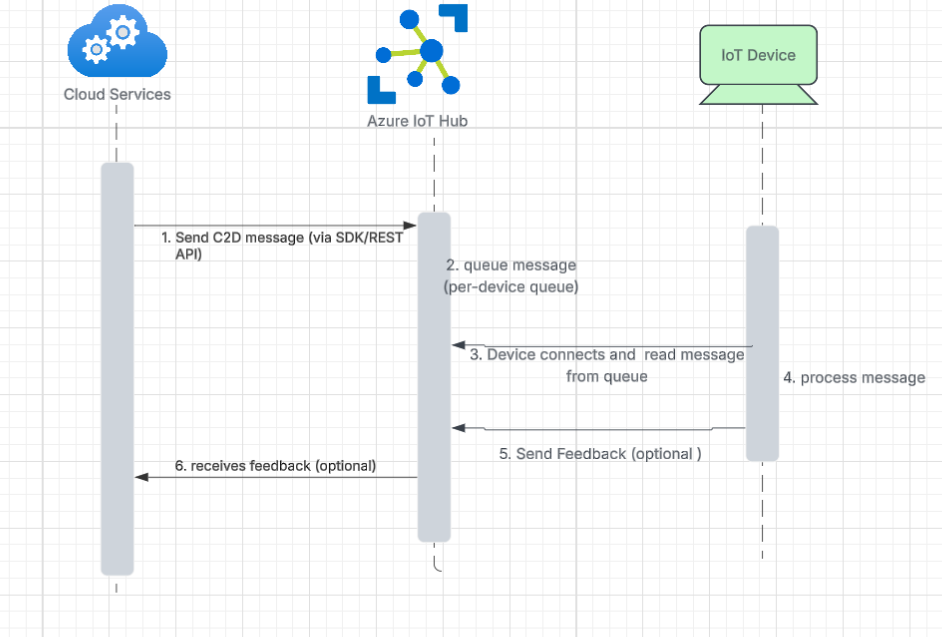
But what if waiting isn’t an option and the device needs to take action immediately? That’s when you move on to the second method: direct methods.
2. Direct Methods
- These are direct requests to the device and a response from the device interaction. This makes it perfect for situations where immediate action is needed. Think about the emergency stop on some device immediately, and you need to know when it is reached and executed.
- A limitation of direct methods is that they have throttling limits. This is important in design consideration, as scalability is a real issue if you have thousands of devices and suddenly all need to use the direct method.
- This is not best suited where the devices call a direct method every few seconds, and you scale up to thousands, you are going to have issues. It is more suited for less frequently used commands.
Sequence Diagram
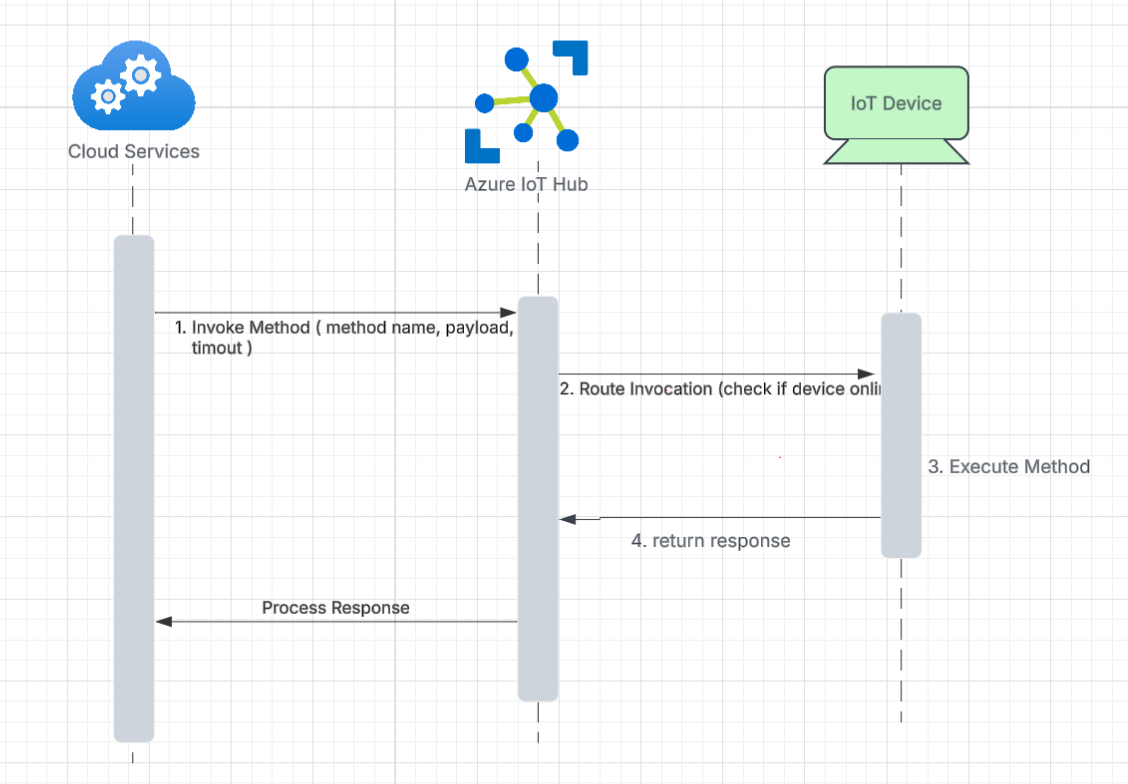
So we discussed C2D for reliability and Direct Methods for immediate actions. What about when you want to manage the configuration or state of a whole set of devices? Let's talk about the third method: desired properties in the device twin.
3. Desired Properties in Device Twin
- A device twin is a twin copy of a physical device that lives in the cloud. It stores all the device information, including its current state and properties. Think about scenarios where you're rolling out a new setting to all devices and you don't want to target each device individually, such as turning on or off some feature flag on a whole set of devices.
- The device reads the desired properties asynchronously. When the device gets online, it checks its device twin and syncs itself the way the cloud wants it to be configured. It is not immediate but eventually consistent.
- The device can report back its state to the cloud, so the cloud knows what is really happening.
- This scale massively, you just set the configuration in the cloud in the device twin for devices, and it eventually syncs to the device.
- Basically, the desired property is long-term configuration management, keeping devices in the same state as what is configured in the cloud.
Sequence Diagram
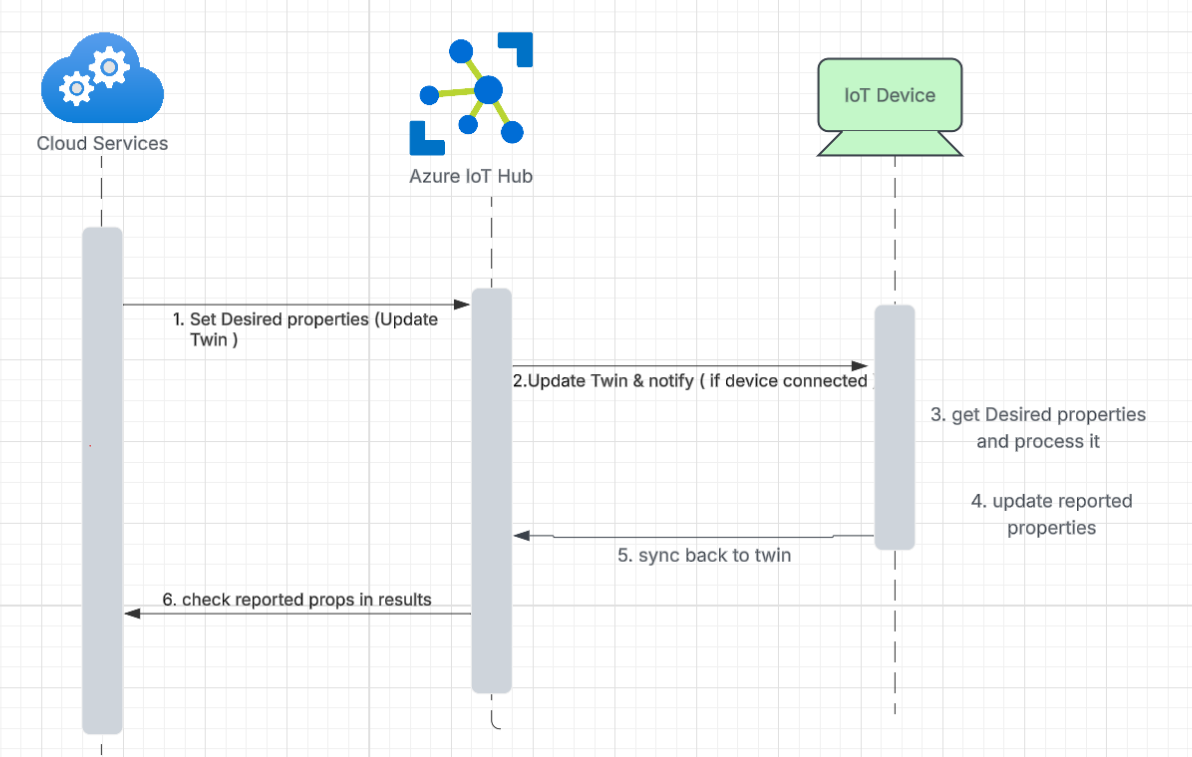
Below is the server-side and device-side code implementation on how to talk to the IoT hub to send a message using the methods that I explained above. To send any message to the IoT Hub, it is a prerequisite to have an Azure IoT Hub resource set up. Refer to this link to create an IoT Hub.
Cloud-Side Implementation for IoT Hub Cloud-to-Device Communication
import { Client, Message, DeviceMethodParams, Registry, Twin } from "azure-iothub";

export class IoTHub {
  private _client: Client | null = null;
  private _registry: Registry | null = null;

  //Replace {HubEndpoint} and {key} with your real values
  private static readonly CONNECTION_STRING: string =
    "HostName=myhubdeviot.azure-devices.net;SharedAccessKeyName=iothubowner;SharedAccessKey=<yourKeyHere>";

  /**
   * Initialize the IoT Hub Service Client and Registry
   */
  public async init(): Promise<void> {
    if (!this._client) {
      this._client = Client.fromConnectionString(IoTHub.CONNECTION_STRING);
      await this._client.open();
    }
    if (!this._registry) {
      this._registry = Registry.fromConnectionString(IoTHub.CONNECTION_STRING);
    }
  }

  /**
   * 1.Send a Cloud-to-Device (C2D) message
   */
  public async sendC2DMessage(
    deviceId: string,
    messageId: string,
    data: any,
    expiryMins: number
  ): Promise<void> {
    if (!this._client) {
      throw new Error("IoTHub client not initialized. Call init().");
    }

    const message = new Message(JSON.stringify(data));
    message.messageId = messageId;
    message.ack = "none";
    message.expiryTimeUtc = Date.now() + expiryMins * 60 * 1000;

    await this._client.send(deviceId, message);
  }

  /**
   * 2. Invoke a direct method on a device
   */
  public async invokeDirectMethod(
    deviceId: string,
    options: DeviceMethodParams
  ): Promise<any> {
    if (!this._client) {
      throw new Error("IoTHub client not initialized.Call init().");
    }

    const response = await this._client.invokeDeviceMethod(deviceId, options);
    return response.result;
  }

  /**
   * 3. Update desired properties on a device twin
   */
  public async updateDesiredProperty(
    deviceId: string,
    twinPatch: any,
    etag: string = "*"
  ): Promise<Twin> {
    if (!this._registry) {
      throw new Error("IoTHub registry not initialized. Call init().");
    }

    return await this._registry.updateTwin(deviceId, twinPatch, etag);
  }

  /**
   * Close the IoT Hub Service Client
   */
  public async close(): Promise<void> {
    if (this._client) {
      await this._client.close();
      this._client = null;
    }
    this._registry = null;
  }
}
Device-Side Handlers Implementation for IoT Hub Cloud-to-Device Communication
import { Client as DeviceClient, Message, Twin, DeviceMethodRequest, DeviceMethodResponse } from "azure-iot-device";
import { Mqtt } from "azure-iot-device-mqtt";

// Replace with your device connection string
const deviceConnectionString = "HostName=myhubdeviot.azure-devices.net;DeviceId=myDeviceId;SharedAccessKey=<deviceKey>";

async function main() {
  const client = DeviceClient.fromConnectionString(deviceConnectionString, Mqtt);

  // Open connection
  await client.open();
  console.log("Device connected to IoT Hub.");

  // 1 Handle Cloud-to-Device messages
  client.on("message", (msg: Message) => {
    const data = msg.getData().toString();
    console.log("Received C2D message:", data, "MessageId:", msg.messageId);

    // Complete the message to remove from IoT Hub queue
    client.complete(msg, (err) => {
      if (err) console.error("Error completing C2D message:", err);
    });
  });

  // 2 Handle Direct Method calls
  client.onDeviceMethod("reboot", async (request: DeviceMethodRequest, response: DeviceMethodResponse) => {
    console.log("Direct method 'reboot' invoked with payload:", request.payload);

    // Simulate device action
    const result = { status: "Device will reboot in " + request.payload.delay + " seconds" };

    await response.send(200, result, (err) => {
      if (err) console.error("Failed sending method response:", err);
      else console.log("Direct method response sent.");
    });
  });

  // 3 Handle desired property updates
  client.getTwin((err, twin: Twin) => {
    if (err) {
      console.error("Error getting twin:", err);
      return;
    }

    console.log("Twin initialized. Current desired properties:", twin.properties.desired);

    twin.on("properties.desired", (desiredChange) => {
      console.log("Desired property update received:", desiredChange);
    });
  });
}

main().catch((err) => console.error("Device error:", err));
Conclusion
Being able to choose the right IoT communication method allows engineers to build systems that are truly resilient and responsive. The next time you think about a device, think about what scenarios your system should support. Does the message need to get there eventually or right now? Or does it need to sync using the desired property over time? Answers to these questions frame your selection and ultimately determine the success of the IoT system.
Opinions expressed by DZone contributors are their own.
Comments