

Frequency for Performing Database Integrity Checks in SQL Server
This article will explore how to handle the database integrity check using SQL Server. We will check how often we can run the commands to check it.
Join the DZone community and get the full member experience.
Join For FreeIn this article, we will learn some recommendations for checking the database's integrity in an SQL Server. We will see how often we should perform an integrity check and how to automate this process.
What Is Database Integrity?
SQL Server can have problems with the tables, indexes, catalogs, etc. When we check integrity, we verify that there are no consistency errors in the database.
How Can I Check Database Integrity in a Database?
There are several commands to check the integrity of the database.
- The DBCC CHECKDB checks consistency errors in the database.
- Also, we have the DBCC CHECKTABLE, which checks the integrity of a selected table.
- In addition, we have the DBCC CHECKCATALOG that checks that there are no errors in a database catalog.
- There are other commands like the DBCC CHECKFILEGROUP and the DBCC CHECKIDENT to check the integrity of a database filegroup and the IDENTITY values (auto-numeric values).
Why the Integrity Errors Occur
These errors can be caused by hardware problems (hard drives, hardware overheating, power-outage problems) and software problems (viruses, malware, and malicious software).
How To Check the Integrity of the Databases or Their Objects
The following example shows how to check the database integrity of the database:
DBCC CHECKDBThe next example shows how to check the database integrity excluding informational messages:
DBCC CHECKDB WITH NO_INFOMSGS;Also, we have an example to show the database integrity, but excluding the indexes:
DBCC CHECKDB (stellardb, NOINDEX);In addition, we check the integrity of a table. The following example shows how to do it:
DBCC CHECKTABLE ('dbo.sales');

GO
How Often Should We Check the Database’s Integrity?
We should verify the database integrity daily if the data is critical and we have a lot of transactions per day.
If the information is not so critical and it does not change to match, we can schedule to run it weekly.
If the data is static, we can run the integrity check every month if the data is not critical.
Doing an integrity check in SQL Server consumes a lot of resources. It is recommended to run these commands at night or when not so many users are using the software.
Otherwise, the transactions and reports will take too long to execute.
How To Schedule Integrity Checks in SQL Server
For this example, we will need to have the SQL Server Management Studio (SSMS).
Open the SSMS, click the Object Explorer, and look for the SQL Server Agent>Jobs.
In Jobs, right-click and select New Job.
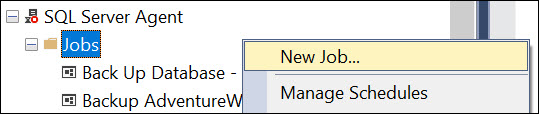
The jobs will help you to schedule the task and execute them immediately. On the General page, write a name and optionally a description for the job.

On the Steps page, press the New button to create a new job.
Write a name for the step, and in the Command textbox, write the DBCC command you want to check for integrity. Make sure that the type is Transact SQL script (T-SQL).

On the Schedule page, write a Name for the schedule. Select the Recurring Schedule type. In the Occurs option, select Daily.

Use the Maintenance Wizard To Check the Database's Integrity
There is a nice option to run the integrity check without writing code. This method uses a Wizard. To run it, in the Maintenance Plans, right-click and select Maintenance Plan Wizard.

In the SQL Server Maintenance Plan Wizard, press the Next button.

In the Select Maintenance Tasks, select Check Database Integrity and press Next.

In the Select Maintenance Task Order, we only have one option selected. Select that one and press Next.

In Databases, select the database you want to check the integrity of and press Next.

In the Select Report Options, specify the path for the report. Check the E-mail report To, if necessary.

In Complete the Wizard, press Finish.

In the Maintenance Plan Wizard Progress, press close.

Other Tools
There are also some third-party tools like the Stellar Repair for MS SQL, which can be used in case of integrity errors in the SQL Server database. These tools can be used to repair the database and maintain its integrity. The tool works at the file level and repairs the database in case of integrity errors.
Conclusion
To conclude, we can say that the integrity of SQL Server can be fixed. In this article, we explain what data integrity is, and we also learned how to detect problems using different commands. Also, we learned how often we should check the database's integrity. Basically, for critical databases, the integrity check should be done daily. In addition, we learned how to schedule the integrity checks. Finally, we learned how to repair the database using third-party tools.
Opinions expressed by DZone contributors are their own.
Comments