

How Power Automate Helps Analysts Send Alert Emails Faster and How AI Builder Takes It to the Next Level
Power Automate automates data-driven alert emails, eliminating manual dashboard checks. With AI Builder, alerts become intelligent and provides proactive decision-making.
Join the DZone community and get the full member experience.
Join For FreeWhy Alerting Is Still a Pain Point for Analysts
In most organizations, business analysts are expected to do more than just build dashboards. They are also responsible for monitoring data health, tracking operational KPIs, and alerting business users when something goes wrong — often in near real time.
Yet despite the availability of modern BI tools, alerting workflows remain surprisingly manual in many ways, such as:
- Refreshing dashboards to check for threshold breaches
- Running queries manually to detect anomalies
- Drafting and repeatedly sending emails
- Handling complaints from stakeholders about delays or missed alerts
This reactive approach does not scale and often defeats the purpose of analytics: enabling timely decision-making.
This is where Power Automate changes the game. It enables analysts — without heavy engineering support — to automate alert emails end to end. When paired with AI Builder, alerts evolve from basic notifications into intelligent insights for users.
Part 1: How Power Automate Enables Fast and Scalable Alert Emails
Event-Driven Triggers: Moving from Manual Checks to Automation
At its core, Power Automate uses a trigger-based architecture. Instead of analysts manually checking data, flows can run automatically based on predefined events such as:
- A new row added or updated in SQL Server or Dataverse
- A scheduled recurrence (hourly, daily, weekly)
- A Power BI dataset refresh
- A new file arriving in SharePoint or OneDrive
An Analyst Use Case
An analyst’s work often involves monitoring daily revenue performance to ensure the sales pipeline remains on track. Instead of manually refreshing dashboards, a Power Automate flow can be scheduled to run at 7:00 AM and query the sales pipeline table directly.
The flow aggregates total open revenue and compares it against predefined business thresholds. This automated check removes the need for manual validation and ensures consistent evaluation.
When a threshold breach is detected, the flow immediately triggers an alert email. The message is dynamically populated with current revenue figures and a brief explanation of why the alert was generated. Stakeholders are notified early in the day, enabling faster action.
As a result, analysts shift their focus from routine monitoring to investigating root causes and supporting informed decisions.
Built-In Email Actions: Alerting Without Custom Code
Once a trigger fires, Power Automate provides native connectors to send emails via Outlook or Gmail. Analysts can:
- Inject dynamic values directly from query outputs
- Format emails with HTML tables and conditional text
- Attach CSV or Excel extracts automatically
- Dynamically CC or BCC stakeholders based on data values
Why This Matters
Analysts no longer need to export data, copy and paste results, or manually draft emails. The alerting process becomes data-driven and repeatable.
For business users, this means:
- Faster notifications
- Consistent formatting
- Clear context without follow-ups
Conditional Logic: Sending the Right Alert to the Right Audience
Not all alerts deserve the same level of attention. Power Automate supports IF/ELSE conditions, switch cases, and nested logic, allowing intelligent routing.
Example logic:
- If revenue drop > 10%, send an email to leadership and post an alert in Teams
- If revenue drop is 5–10%, send an email to analysts only
- If revenue drop < 5%, log the event without sending an alert
This prevents alert fatigue — a common problem where users ignore notifications due to excessive volume.
Integration with Analytics Tools
Power Automate integrates seamlessly with:
- SQL Server and Azure SQL
- Power BI datasets and dataflows
- SharePoint lists and Excel tables
- Microsoft Teams
This allows analysts to design alerting workflows directly alongside their analytics stack rather than relying on third-party connectors.
Part 2: How AI Builder Transforms Alerts from Reactive to Intelligent
Traditional alerts answer a simple question: What happened?
With AI Builder, analysts can answer: Why does this matter, and what should we do next?
Intelligent Classification: Prioritizing What Actually Matters
AI Builder’s text classification models can be trained using historical alert data. Instead of sending generic alerts, flows can automatically classify alerts based on:
- Business impact
- Operational severity
- Functional category (e.g., Finance, Operations, Data Quality)
Practical Example
A Power Automate flow pulls data from SQL to generate alerts, which AI Builder then categorizes:
- High impact: Revenue or compliance risk
- Medium impact: Operational inefficiency
- Low impact: Informational
The classification determines who receives the alert and how urgently it is communicated.
Sentiment Awareness: Beyond Numeric Thresholds
Many alerts originate from unstructured data, such as:
- Customer feedback
- Support tickets
- Free-text operational notes
AI Builder’s sentiment analysis detects emotional tone and urgency.
Example workflow:
- A new customer complaint is logged
- AI Builder detects negative or urgent sentiment
- Power Automate escalates the alert automatically
- The email includes a sentiment score and key phrases
Alerts now include qualitative context — not just numbers.
Predictive Alerts: Acting Before Issues Occur
One of the best things about AI Builder is its prediction modeling; it allows analysts to flag potential issues based on probability rather than waiting for thresholds to be breached.
Examples include:
- Likelihood of missing SLAs
- Probability of customer churn
- Forecasted demand shortfalls
Sample alert message:
“Based on current trends, there is a 78% probability that this account will breach its SLA within 48 hours.”
These alerts shift organizations from reactive firefighting to proactive intervention.
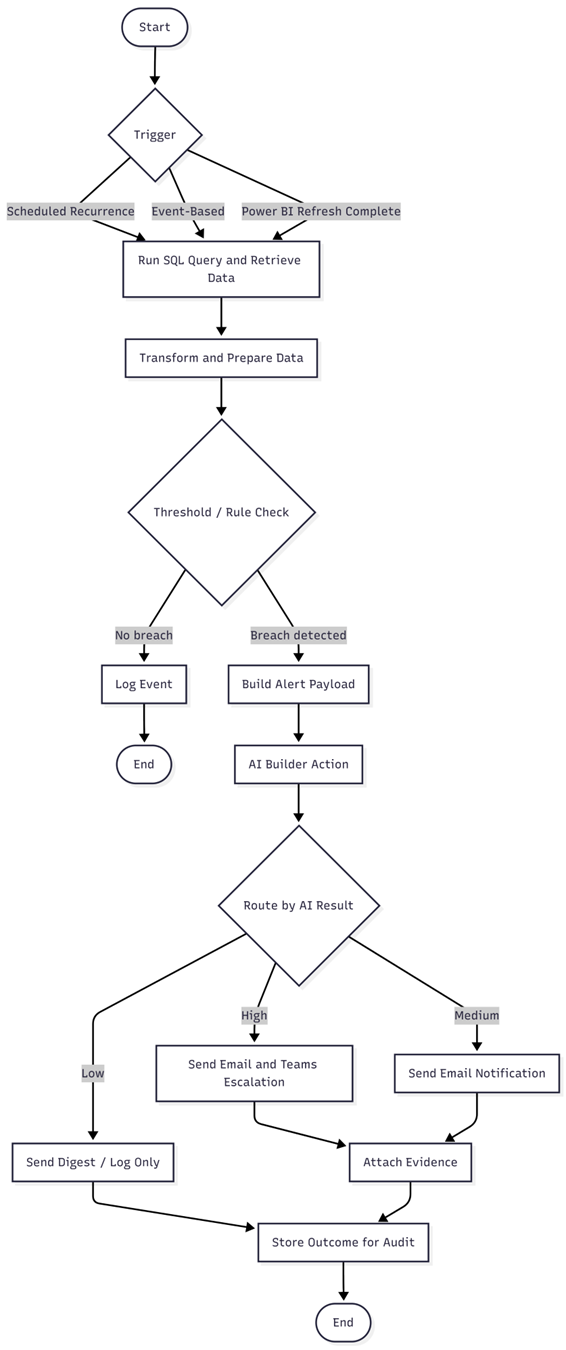
End-to-End Analyst Workflow: Power Automate + AI Builder
A typical workflow looks like this:
- Scheduled trigger executes a SQL query
- Results are evaluated against thresholds
- AI Builder classifies severity and context
- Dynamic email content is generated
- Alerts are sent via email and Teams
- Events are logged for audit and analysis
Benefits
- Faster alert delivery
- Reduced analyst effort
- Improved response times
- Built-in governance and consistency
Why This Matters for Modern Analytics Teams
Power Automate and AI Builder fundamentally change the analyst’s role:
- From manual reporting to automation orchestration
- From static dashboards to real-time insights
- From reactive notifications to predictive intelligence
This reduces dependency on engineering teams and enables analytics teams to deliver value faster and more independently.
Final Thoughts
Power Automate handles the heavy lifting of sending alerts quickly and at scale, while AI Builder adds intelligence and foresight to prioritize what truly matters. Together, they enable analysts to create AI-powered systems that function as always-on decision engines — not just periodic reports.
For teams looking to modernize analytics delivery, this setup is no longer a “nice-to-have” — it’s foundational.
Opinions expressed by DZone contributors are their own.
Comments