DZone
Thanks for visiting DZone today,
Edit Profile
  • Manage Email Subscriptions
  • How to Post to DZone
  • Article Submission Guidelines
Sign Out View Profile
  • Post an Article
  • Manage My Drafts
Over 2 million developers have joined DZone.
Log In / Join
Refcards Trend Reports
Events Video Library
Refcards
Trend Reports

Events

View Events Video Library

Related

  • MuleSoft MCP and A2A in Production: What 17 Recipes Reveal
  • MuleSoft IDP: Enhancing Efficiency and Accuracy in Data Extraction
  • From AI Chaos to Control: Building Enterprise-Grade LLM Gateways With MuleSoft Anypoint
  • Revolutionizing Scaled Agile Frameworks with AI, MuleSoft, and AWS: An Insider’s Perspective

Trending

  • Spring AI Advisors: Chat Memory, Token Tracking, and Message Logging
  • Prompt Injection Is Real, So I Built a Python Firewall for LLM Pipelines
  • How to Format Articles for DZone
  • From printTriangularNumber to Duff’s Device: Mastering Java Switch Statements Old and New
  1. DZone
  2. Software Design and Architecture
  3. Integration
  4. How to Color Excel File Using Mulesoft

How to Color Excel File Using Mulesoft

This article covers the step-by-step guide to color excel files using Mulesoft.

By 
Pankaj Badi user avatar
Pankaj Badi
·
Jul. 31, 21 · Tutorial
Likes (5)
Comment
Save
Tweet
Share
4.8K Views

Join the DZone community and get the full member experience.

Join For Free

Use-Case :

1. Payroll System: There are two payroll systems for different regions and I need to aggregate the data in the excel file in the particular folder in the SFTP location.

2. I need to color using MuleSoft there is a scenario in which the excel file should be colored according to some conditions. Suppose, Termination Date and Effective Date in that excel for a particular condition I have to fill the color in Excel file.

3.  For this, I used Java Apache POI Framework and Invoke static connector.
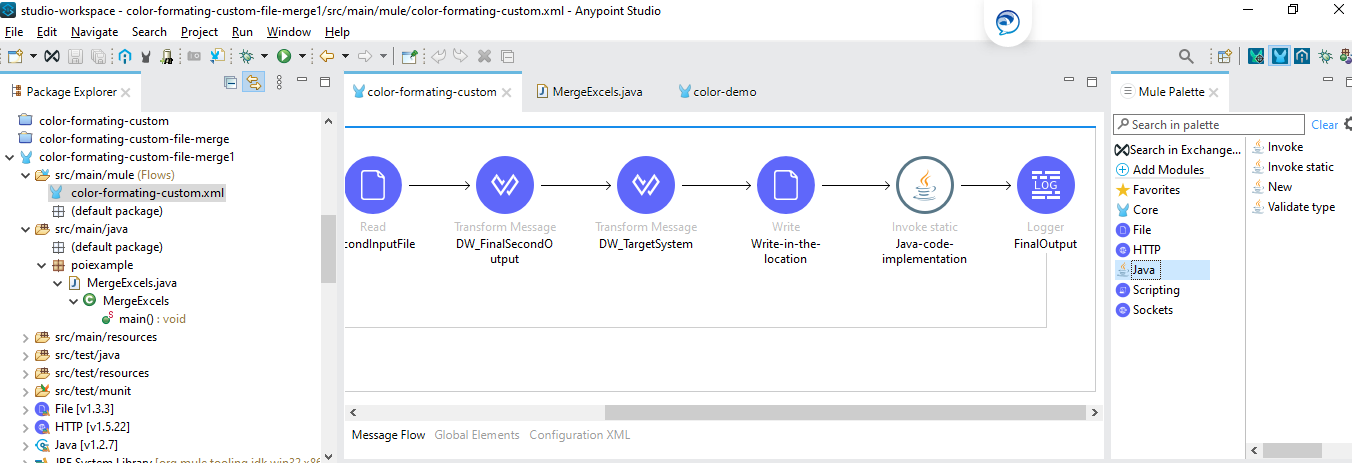
Apache POI

Configuration of invoking static.

Apcahe POI static invocation

4. Add the below dependency in your pom.xml.

XML
 
<dependency>
    <groupId>org.apache.poi</groupId>
    <artifactId>poi</artifactId>
    <version>3.17</version>
</dependency>
<dependency>
    <groupId>org.apache.poi</groupId>
    <artifactId>poi-ooxml</artifactId>
    <version>3.17</version>
</dependency>

5. There are some conditions for the particular color I need to fill in the excel file for the particular column like Termination Date and Effective Date. Suppose if TD and ED match then yellow color, if TD and ED are different then green color and TD is greater than ED then blue color in the excel for the folder which is present in SFTP location.

Color excel sheets

6.  For the particular condition I am writing the code in java.

Java coloring excel sheets

Conclusion:  

By using Java Apache POI we can able to do coloring in excel using MuleSoft.

MuleSoft

Opinions expressed by DZone contributors are their own.

Related

  • MuleSoft MCP and A2A in Production: What 17 Recipes Reveal
  • MuleSoft IDP: Enhancing Efficiency and Accuracy in Data Extraction
  • From AI Chaos to Control: Building Enterprise-Grade LLM Gateways With MuleSoft Anypoint
  • Revolutionizing Scaled Agile Frameworks with AI, MuleSoft, and AWS: An Insider’s Perspective

Partner Resources

×

Comments

The likes didn't load as expected. Please refresh the page and try again.

  • RSS
  • X
  • Facebook

ABOUT US

  • About DZone
  • Support and feedback
  • Community research

ADVERTISE

  • Advertise with DZone

CONTRIBUTE ON DZONE

  • Article Submission Guidelines
  • Become a Contributor
  • Core Program
  • Visit the Writers' Zone

LEGAL

  • Terms of Service
  • Privacy Policy

CONTACT US

  • 3343 Perimeter Hill Drive
  • Suite 215
  • Nashville, TN 37211
  • [email protected]

Let's be friends:

  • RSS
  • X
  • Facebook