

MuleSoft IDP: Enhancing Efficiency and Accuracy in Data Extraction
MuleSoft IDP uses AI to extract and structure data from documents like invoices and PDFs, helping automate workflows, reduce errors, and improve processing speed.
Join the DZone community and get the full member experience.
Join For FreeThis article will help developers, architects, and readers understand MuleSoft's Intelligent Document Processing capabilities and functionality. After reading this article, the reader will understand how to use MuleSoft Intelligent Document Processing and the different use cases where it can be used.
MuleSoft Intelligent Document Processing (IDP) helps you read and understand documents like invoices, purchase orders, and other structured or unstructured files. Using AI, it analyzes these documents and extracts key information, converting it into a clean, structured format.
It uses AWS Textract to pull data from PDFs and images, making it easy to handle different document types. The extracted information can then be seamlessly integrated with tools like Anypoint Platform, MuleSoft RPA, Salesforce Flow, and Anypoint Composer, helping automate processes and improve efficiency.
Use Cases of MuleSoft Intelligent Document Processing
In many organizations, documents such as purchase orders and invoices arrive in a variety of formats and layouts, which makes manual processing time-consuming and error-prone. MuleSoft Intelligent Document Processing (IDP) addresses this challenge by automating the extraction and processing of information from both structured and unstructured documents. Reducing repetitive manual tasks helps teams save time, improve accuracy, and scale operations efficiently as document volumes increase.
Beyond invoices and purchase orders, MuleSoft IDP can be applied across multiple industries and use cases. It is commonly used for processing healthcare documents and patient information, managing contracts, handling loan and insurance claim documents, and working with education and government records. It is also useful for organizing and extracting insights from legal documents, making it a versatile solution for any document-heavy workflow.
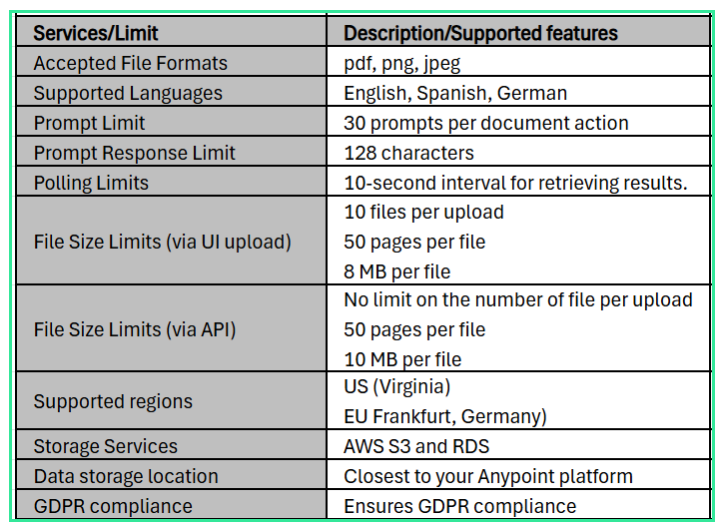
MuleSoft IDP supports commonly used file formats such as PDF, PNG, and JPEG, allowing businesses to work with both digital and scanned documents. It also supports multiple languages, including English, Spanish, and German, making it suitable for global use cases.
To ensure secure and efficient operations, MuleSoft IDP follows defined data retention policies along with certain limits and quotas. These controls help manage how long data is stored and how much processing can be performed, depending on the specific configuration and usage. For precise details, refer to MuleSoft’s official documentation.
The following are the data retention policy and limits/quotas supported by the MuleSoft Intelligent Document Processing:
The following is the data retention policy for the MuleSoft Intelligent Document Processing:
Document Action Editor
- Modified files are temporarily stored in the Document Action Editor while testing is underway.
- When the editor is closed or a new file is uploaded, the extracted data is automatically deleted.
Document Action Execution Endpoint
- Data is safely stored while it is being executed, and files are kept in an S3 bucket.
- Keeps data on successful executions for 7 days.
- Data is kept for seven days following task completion for executions that need human review. Keeps unfinished work for 60 days.
- Users are unable to set retention periods.
IDP extracts data by default using its natural language processing model (IDP NLP) in response to the preset prompts. You can choose Einstein to examine the document and extract the data when you create a document action.
Use Einstein to extract information from unstructured documents, such a driver’s license, insurance claim record or a medical record with handwriting, or to find the answer to complicated queries concerning the document, like how much an invoice will cost after taxes and other considerations.
To analyze and understand documents, MuleSoft Intelligent Document Processing (IDP) uses a combination of AI models rather than relying on a single one. Through Salesforce Einstein, it leverages multiple advanced large language and multimodal models via the Einstein Trust Layer, which ensures secure and governed access to AI capabilities.
Some of the key supported models include:
- Einstein OpenAI GPT-4o – A strong general-purpose model suitable for most document processing tasks. It performs well even with non-Latin languages and can identify layout elements like font sizes and styles. However, it has lower accuracy when reading checkboxes in forms, so prompting it clearly (for example, asking it not to assume missing data) helps improve results.
- Einstein OpenAI GPT-4o Mini – A faster model designed for more focused tasks. While it delivers quick responses, it may sometimes show less detailed reasoning. It also has limitations in accurately interpreting checkboxes in forms.
- Einstein Gemini 2.0 Flash 001 – Particularly effective for image-heavy documents, offering better accuracy in visual analysis. It provides moderate accuracy for checkbox detection, especially when documents are processed one page at a time, and supports structured outputs.
- Einstein Gemini 2.5 Flash – An improved version of the Gemini Flash model, offering faster performance and higher accuracy, especially for image-based documents and complex layouts.
In addition to these models, MuleSoft IDP uses AWS Textract to extract text, tables, and key-value pairs from documents such as PDFs and images. It may also incorporate other AI services from Salesforce and AWS to improve tasks like document classification, entity recognition, and data extraction.
By combining these models and services, MuleSoft IDP can not only extract information from documents but also understand context and structure, making the data ready for seamless integration and automation across platforms.
A document action is a multi-step procedure that scans a document, filters out fields, and returns a structured response in the form of a JSON object using several AI engines. Every document action specifies the fields to be extracted, the fields to be filtered out of the response, and the kinds of documents it accepts as input. The following are the components of document action:
- Document types: outlines the kinds of documents that are acceptable for input.
- To extract fields: specifies which document fields should be extracted.
- Fields to filter out: Specifies which response fields should be excluded.
- Confidence score: Indicates the likelihood that the value was accurately extracted by IDP.
- Prompts: Asks questions in natural language to improve the data extraction procedure.
- Reviewers: Specifies who examines documents that fall below the threshold for confidence scores.
You can set the minimum confidence score that is acceptable for each field to be extracted, mark fields as necessary, hide fields, and set up prompts to improve and hone the data-extraction process by posing natural language queries.
The probability that IDP correctly extracted the value from a document is indicated by the confidence score. A 100% confidence score, for instance, indicates that IDP extracted the value completely accurately. A 70% confidence level, on the other hand, indicates that there is a 20% possibility that the extracted value is incorrect.
Publishing to Anypoint Exchange
MuleSoft Intelligent Document Processing allows you to publish the document action into the Anypoint Exchange as an asset that provides the following endpoints.
POST/executions – This endpoint allows you to post the document to MuleSoft Intelligent Document Processing for scanning and extracting data. The following curl command can be used to post the document:
curl -H "authorization: Bearer <Bearer_token>" \
-F "file=@\"test.pdf\"" \
https://{idp_domain}.us-east-1.anypoint.mulesoft.com/api/v1/organizations/{organizationId}/actions/{documentActionId}/versions/{assetVersion}/executions
GET /executions/{executionId} – This endpoint will allow you to retrieve the execution status (Success or Manual Validation Required) with the fields and prompt response for the document that has been posted to the IDP. The following curl command can be used to retrieve IDP execution status:
curl -H "Authorization: Bearer <Bearer_Token>" \
https://<idp_domain>.us-east-1.anypoint.mulesoft.com/api/v1/organizations/{organizationId}/actions/{documentActionId}/versions/{assetVersion}/executions/{executionId}
To access the above APIs, you need to generate an authorization token. To generate an authorization (Bearer) token, you need to create a connected app in the Anypoint Platform with the scope “Execute Document Actions.” Once you have registered the connected app, it will provide the clientId and clientSecret, which can be used in the curl command below to generate the Authorization (Bearer) token.
curl -X POST -H "content-type: application/json" -d "{\"grant_type\": \"client_credentials\", \"client_id\": \"<Client_Id>\", \"client_secret\": \"<Client_Secret>\"}" \
https://anypoint.mulesoft.com/accounts/api/v2/oauth2/token
Bearer token received in the response that can be used in the above POST and GET requests.
Benefits of MuleSoft Intelligent Document Processing
The following are the benefits of MuleSoft Intelligent Document Processing:
- Reduce cost: Intelligent document processing can lower the cost by automating the manual document data extraction.
- Improve efficiency and productivity: Intelligent document processing can work around the clock and process documents more quickly than manual methods. Intelligent document processing can work around the clock and process documents more quickly than manual methods.
- Reduce human errors: By using automated extraction and validation, Intelligent document processing can reduce human error and guarantee data consistency.
- Improve accuracy: By using automated extraction and validation, Intelligent document processing can reduce human error and guarantee data consistency.
- Easy to integrate: MuleSoft IDP can be easily integrated with Robotic Automation Process (RPA) by using the REST APIs provided by the IDP.
Conclusion
In conclusion, MuleSoft Intelligent Document Processing (IDP) offers a powerful and practical way for organizations to modernize how they handle documents. By combining AI-driven extraction with seamless integration capabilities, it helps reduce manual effort, improve data accuracy, and accelerate business processes.
As businesses continue to deal with large volumes of unstructured data, solutions like IDP become increasingly important. They not only streamline operations but also support better compliance, scalability, and decision-making. By adopting MuleSoft IDP, organizations can enhance productivity, lower operational costs, and ultimately deliver a better experience to their customers.
MuleSoft Intelligent Document Processing (Invoice Processing Using MuleSoft IDP): Part I
MuleSoft Intelligent Document Processing (Invoice Processing via IDP REST APIs): Part II
MuleSoft Intelligent Document Processing: Generic Document Processing With IDP: Part III
MuleSoft Intelligent Document Processing: Generic Document Processing via IDP REST APIs: Part IV
MuleSoft Intelligent Document Processing: IDP Callback and Automation: Part V
MuleSoft Intelligent Document Processing: Supercharge Document Automation With Einstein AI: Part VI
Opinions expressed by DZone contributors are their own.
Comments