

How to Generate Fake Test Data
 CORE
·
Are you also often uninspired when you need to think of useful test data for your unit tests? Is ‘John Doe’ your best test friend? Do not worry, Java Faker comes to the rescue! In this blog, you will learn how to generate your test data.
1. Introduction
Making up test data is one of the hardest tasks when writing tests. Often you will see 123 when numbers are being used, or John Doe when a name is needed. But this also means that the test will always run with the same data. This is on the one hand a good thing because your tests needs to be stable, but on the other hand a pitty because you also want to find errors. And this is more likely when random test data is being used.
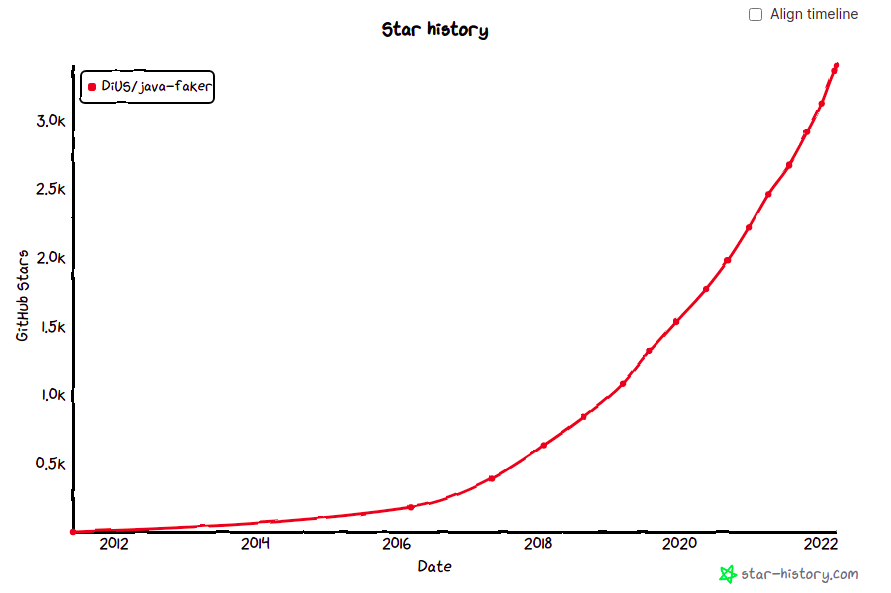
Java Faker is a library based on Ruby’s faker gem and Perl’s Data::Faker library. It will generate fake data for you. There are other Java libraries for that, but in order to see which library gains popularity, a view on the GitHub stars history can be quite useful. As you can see, Java Faker is on the rise. Besides that, it is based on existing fakers in other languages.
In this blog, you will learn how to use Java Faker. As usual, all sources being used in this blog are available at GitHub.
2. Add Dependency
As a project to experiment with, you will create a basic Spring Boot application. Just navigate to start.spring.io and create a Spring Boot application with Java 17. Java Faker can also be used with plain Java applications of course. The only thing remaining to do, is to add the javafaker dependency to the pom.
<dependency>
  <groupId>com.github.javafaker</groupId>
  <artifactId>javafaker</artifactId>
  <version>1.0.2</version>
  <scope>test</scope>
</dependency>
3. First Test
Java Faker offers many data fakers which can be used. A complete list can be found here and a demo application with some examples can be found here. In the first example you create, you create a Faker instance and from that moment on, you can choose a faker and generate data. Use the Address faker in order to generate a first name, a last name and a street name.
@Test
void addressFaker() {
    Faker faker = new Faker();

    String firstName = faker.address().firstName();
    String lastName = faker.address().lastName();
    String streetName = faker.address().streetName();

    System.out.println("First name: " + firstName);
    System.out.println("Last name: " + lastName);
    System.out.println("Street name: " + streetName);
}
The output is for example the following, but this will change on each run.
First name: Mika
Last name: Terry
Street name: Wisoky Walk
4. Locale Faker
In the previous example, you noticed that English names are generated. But what if you want more locale specific names? That is also possible, but note that not every faker is available in every language. The list for your locale can be found here. Since I am interested in the Dutch locale, the previous example can be rewritten als follows (note that the address faker is available in the NL locale). The only difference is that you need to provide the locale when instantiating the Faker.
@Test
void addressNlFaker() {
    Faker faker = new Faker(new Locale("nl-NL"));

    String firstName = faker.address().firstName();
    String lastName = faker.address().lastName();
    String streetName = faker.address().streetName();

    System.out.println("First name: " + firstName);
    System.out.println("Last name: " + lastName);
    System.out.println("Street name: " + streetName);
}
This returns the following output, which corresponds to Dutch names.
First name: Irmen
Last name: Vaassen
Street name: Severensweg
5. Random Strings With FakeValuesService
With the FakeValuesService, you can generate several strings containing random data. In the next sections, some of the features are shown.
5.1 Random Strings With Numerify
With numerify, you can generate a string containing random numbers. First, you need to create a FakeValuesService instance containing a locale and a RandomService. The method numerify will return a string where the hashes (#) are replaced with numbers. For every hash, a number is replaced.
@Test
void fakeValuesServiceNumerify() {
    FakeValuesService fakeValuesService = new FakeValuesService(new Locale("nl-NL"), new RandomService());
    String randomNumber = fakeValuesService.numerify("number##");

    System.out.println("Random number is: " + randomNumber);
}
The output is for example:
Random number is: number375.2 Random Strings With Letterify
Similar as with numerify, letterify will allow you to replace characters in a string by means of a question mark.
@Test
void fakeValuesServiceLetterify() {
    FakeValuesService fakeValuesService = new FakeValuesService(new Locale("nl-NL"), new RandomService());
    String randomLetters = fakeValuesService.letterify("somestring??");

    System.out.println("Random letters are: " + randomLetters);
}
The output is for example:
Random letters are: somestringha5.3 Random Strings With Bothify
A combination of numerify and letterify can be achieved with bothify. With bothify, you can combine random numbers and characters.
@Test
void fakeValuesServiceBothify() {
    FakeValuesService fakeValuesService = new FakeValuesService(new Locale("nl-NL"), new RandomService());
    String randomNumbersLetters = fakeValuesService.bothify("some string with numbers ## and letters ??");

    System.out.println("Random numbers and letters are: " + randomNumbersLetters);
}
The output is for example:
Random numbers and letters are: some string with numbers 10 and letters ll5.4 Random Strings With Regexify
When all of the above is not enough, you can also generate strings based on a regular expression with regexify. The next regular expression will choose one or more characters of the list a, b, or c, followed by any whitespace character and a digit.
@Test
void fakeValuesServiceRegexify() {
    FakeValuesService fakeValuesService = new FakeValuesService(new Locale("nl-NL"), new RandomService());
    String randomBasedRegex = fakeValuesService.regexify("[abc]+\\s\\d");

    System.out.println("Random string based on a pattern: " + randomBasedRegex);
}
The output is for example the following. Note that it generates ‘any whitespace character’ which in this case is an end of line character.
Random string based on a pattern: ab
9
6. Conclusion
Java Faker is an easy to use data faker generation library. It relieves you from the burden of making up test data for your tests. Moreover, it will generate other data on each run which might reveal bugs in your application. The documentation of the library could have been better, but on the other hand, the library is also easy to use, so it should not be a major problem after all.
Published at DZone with permission of Gunter Rotsaert. See the original article here.
Opinions expressed by DZone contributors are their own.