

How IoT Devices Communicate With Alexa, Google Assistant, and HomeKit — A Developer’s Deep Dive
Discover how voice assistants like Alexa, Google Assistant, and Siri communicate with IoT devices through cloud APIs, secure protocols, and smart home hubs.
Join the DZone community and get the full member experience.
Join For FreeAs software developers, we're immersed in a world of interconnected systems. From microservices orchestrating complex business logic to distributed databases humming along, the art of inter-process communication is our daily bread. Yet, there's one ubiquitous form of interaction that often feels like magic to the layperson (and sometimes to us): the seamless dance between our smart home gadgets and voice assistants like Alexa, Google Assistant, and Apple HomeKit. When you simply utter, "Alexa, dim the living room lights," and the room responds, what intricate choreography is truly unfolding in the cloud and on the edge?
It's more than just a convenience; it's a profound shift in how humans interact with technology. For us, the engineers behind the curtain, understanding this intricate communication isn't just academic. It's critical for building robust, secure, and user-friendly smart home experiences. It challenges us to bridge the digital and physical realms, crafting intuitive interfaces for the world around us.
The Grand Symphony: How Smart Assistants and IoT Devices Connect
Imagine your smart assistant (Alexa, Google Home, or Apple HomePod) as the conductor of a vast orchestra and your IoT devices – smart bulbs, thermostats, locks, etc. – as the instruments. The conductor doesn’t play each instrument directly. Instead, it sends precise instructions to a central “score manager” (the device manufacturer’s cloud service), which then relays commands to the individual instruments. At a high level, the architecture looks like a multi-layered client-server model with voice on one end and devices on the other. The general flow (with platform-specific nuances) is:
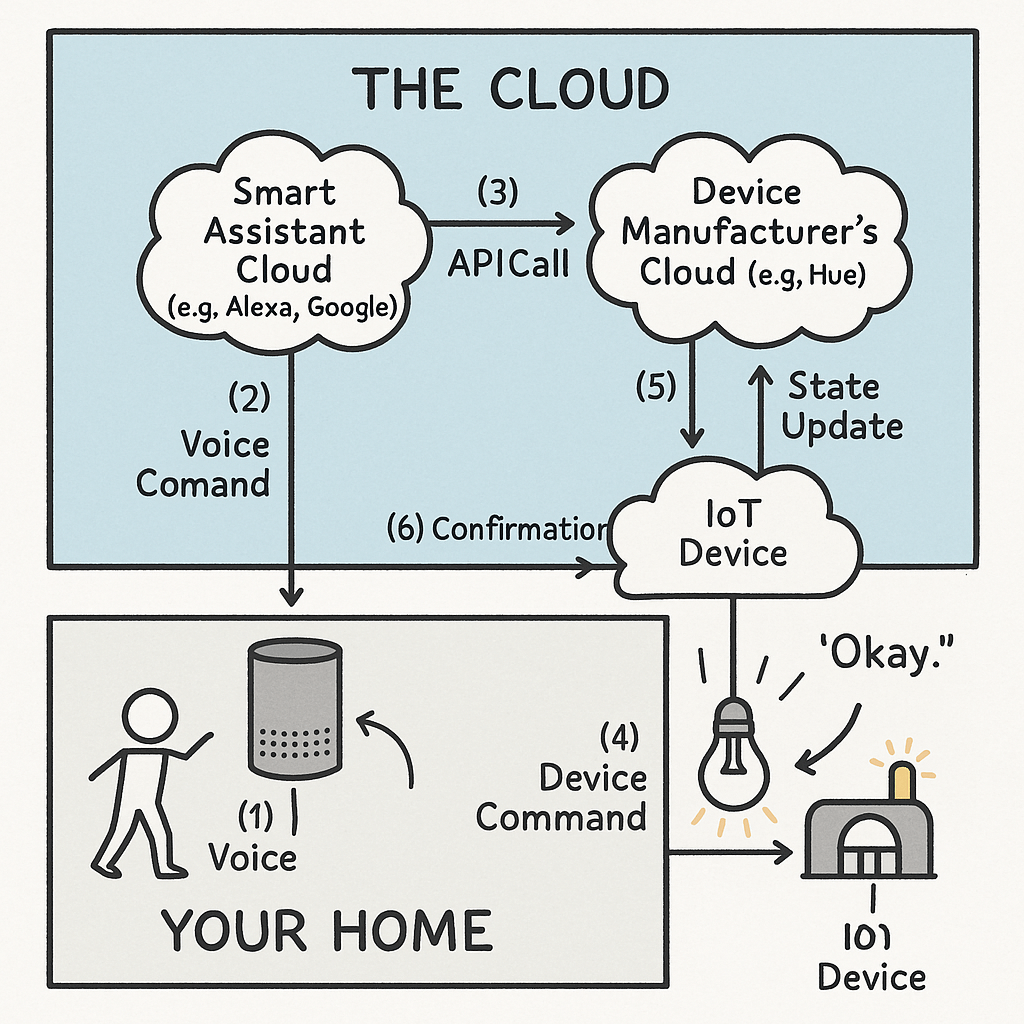
- The Spoken Word: You speak a command (e.g., “Turn on the living room lamp”). The smart speaker (Echo Dot, Home Mini, HomePod) captures your voice and immediately streams the audio to the assistant’s cloud service. This audio is typically encrypted (e.g., via TLS) before being sent up.
- From Sound to Sense: In the cloud, automatic speech recognition (ASR) transcribes your voice into text. Natural Language Understanding (NLU) then kicks in to parse intent and entities. For example, “Turn on the living room lamp” yields an intent like
TurnOnand an entity likedevice=living_room_lamp. The assistant’s NLU system converts ambiguous human language into a structured request – identifying the desired action and the target device(s). - Account Linking and Device Discovery: Now the assistant needs to map your spoken request to your specific devices. This requires a trusted link between the assistant and the device maker’s cloud. During setup, you link your device manufacturer account (Philips Hue, Ecobee, etc.) to your Alexa/Google account using OAuth 2.0 developer.amazon.com. This grants the assistant platform a secure token to act on your behalf. Once linked, the assistant will send a Discover request to the device cloud, which should return all your registered devices and their capabilities. For example, Alexa’s cloud will call the Hue cloud to get a list of your lights and report their endpoints and interfaces (e.g. On/Off, brightness, color) in a
Discover.Responsepayload developer.amazon.com. (Internally, you implement anAlexa.Discoveryendpoint that returns JSON describing each device’sendpointId,friendlyName, andcapabilitiesdeveloper.amazon.com.) - The Command Bridge: With the intent understood and the device identified, the smart assistant now issues an API call to the manufacturer’s cloud. It constructs a JSON directive (for Alexa, this might be an
Alexa.PowerController.TurnOndirective with the target endpointId) and sends it as an HTTPS POST to the manufacturer’s cloud API. In our lamp example, Alexa’s cloud sends the{ “namespace”: “Alexa.PowerController”, “name”: “TurnOn”, … }directive to the Philips Hue cloud developer.amazon.com. That cloud validates the request (via the OAuth token) and translates it into a device-specific command. - Cloud to Device – The Last Mile: The manufacturer’s cloud now relays the command down to your actual IoT device. The method varies by device:
- Wi-Fi: Many devices maintain a persistent TLS/MQTT or WebSocket connection to the cloud. The Hue cloud, for instance, pushes the TurnOn command via MQTT/WebSockets to your local Hue Bridge.
- Zigbee/Z-Wave: If the device is on a mesh (e.g. Zigbee lights on a Hue Bridge), the cloud sends the command to the bridge, which then issues a Zigbee radio signal to the bulb.
- Thread/Matter: New Matter-capable devices use an IP-based mesh. Your Matter controller (which could be an Echo or HomePod) receives the instruction, possibly via the Matter protocol, and then broadcasts it over Thread to the device.
- Bluetooth LE: Some devices use BLE. The bridge or hub relays the command over BLE to the end device.
- Action and Feedback: The device receives the command and actuates (the light turns on). Crucially, it often then reports its new state back up. For example, the Hue Bridge hears the light turn on and updates the Hue cloud. That cloud can send an asynchronous “StateReport” back to Alexa. Alexa then confirms to you, “Okay, turning on the living room lights.” This feedback loop (device → manufacturer cloud → assistant cloud) keeps the assistant’s status in sync and allows it to verbalize success. (In Alexa, you might implement the
Alexa.StateReportdirective to answer queries about current state, or push proactive reports whenproactivelyReported = truedeveloper.amazon.com.)
Simple Examples You Can Correlate
To ground this flow, consider everyday commands:
Scenario 1 – “Alexa, turn on the living room lights.”
- You: Speak the command.
- Echo Dot: Captures audio and streams it (encrypted) to Amazon’s Alexa Voice Service (AVS).
- Alexa Cloud: Recognizes a
TurnOnintent for “living room light”. It finds the linked Philips Hue account and constructs a directive like{"namespace":"Alexa.PowerController","name":"TurnOn",...}for the endpoint ID corresponding to your living room light. It sends this JSON via HTTPS to the Hue cloud developer.amazon.com. - Philips Hue Cloud: Verifies the access token, maps the endpointId to your specific bulb, and sends a persistent MQTT/HTTP command down to your local Hue Bridge.
- Hue Bridge: Receives the command and emits a Zigbee message to the bulb.
- Living Room Light: Gets the Zigbee message and switches on. It reports its new state (powerState = ON) back to the Hue bridge/cloud. The Hue cloud then sends an asynchronous
Alexa.PropertyReportback to Alexa. - Alexa: Once the state update is received, Alexa says, “Okay, turning on the living room lights.”
Scenario 2 – “Hey Google, what’s the temperature in the bedroom?”
- You: Speak the question.
- Google Home: Records voice and streams it to Google’s Assistant cloud.
- Google Assistant Cloud: Identifies a
Queryintent forBedroom Thermostat. It looks up the linked Nest/Ecobee account and calls the Smart Device Management API (e.g.GET /v1/devices/THERMOSTAT_ID/traits/TemperatureSetting/temperatureAmbient). - Nest/Ecobee Cloud: Returns the current ambient temperature (say 20.5°C).
- Google Assistant: Synthesizes the answer, “The temperature in the bedroom is 20.5 degrees Celsius,” and speaks it back.
Scenario 3 – “Siri, lock the front door.” (HomeKit)
- You: Give the command.
- HomePod/iPhone: Captures voice. HomeKit’s recognition (often on-device via a Home Hub) parses a
LockTargetintent. - HomeKit (Home Hub): If the lock is HomeKit-enabled, the hub sends a HomeKit Accessory Protocol (HAP) command directly over the LAN (Wi-Fi/Bluetooth) to the lock. (If you’re remote, the command goes via iCloud to the hub.)
- Smart Lock: Receives the HAP command and engages its mechanism to lock the door. It reports back its new state (Locked) to the Home Hub.
- Siri: Quickly confirms, “The front door is locked.” (Because it often happens locally on your hub, HomeKit commands feel very fast.)
Building the Developer Side
Behind every voice command is a developer-defined cloud service that exposes two key interfaces to the assistant platforms: a Discovery endpoint and a Control endpoint. During Discovery, the assistant platform (Alexa, Google, or HomeKit) asks “what devices do you have and what can they do?” Your service responds with a JSON listing each device’s ID, friendly name, categories, and supported capabilities (interfaces like PowerController, ThermostatController, etc.). In Alexa, this is the /smart-home/discovery route returning a Discover.Response with an endpoints array developer.amazon.com. When the user issues a command, Alexa/Google calls your Control endpoint with a directive (namespace + name + endpointId). Your code then parses the JSON, e.g. sees "namespace":"Alexa.PowerController","name":"TurnOn", and translates it into an action on your actual device (often by publishing a message to an MQTT broker, calling an IoT SDK, etc.).
@app.route('/smart-home/discovery', methods=['POST'])
def discover_devices():
    endpoints = []
    for dev in device_registry.values():
        endpoints.append({
            "endpointId": dev["id"],
            "friendlyName": dev["friendlyName"],
            "capabilities": [
                {
                    "type": "AlexaInterface",
                    "interface": "Alexa.PowerController",
                    "version": "3",
                    "properties": { "supported":[{"name":"powerState"}], "retrievable": True }
                },
                # ... other interfaces ...
            ]
        })
    return jsonify({
        "event": {
            "header": {"namespace": "Alexa.Discovery", "name": "Discover.Response", "payloadVersion": "3"},
            "payload": {"endpoints": endpoints}
        }
    })

@app.route('/smart-home/control', methods=['POST'])
def control_device():
    directive = request.json["directive"]
    name = directive["header"]["name"]
    ep_id = directive["endpoint"]["endpointId"]
    # Example: handle TurnOn/TurnOff
    if directive["header"]["namespace"] == "Alexa.PowerController":
        new_state = "ON" if name == "TurnOn" else "OFF"
        device_registry[ep_id]["state"]["powerState"] = new_state
        # (Here you'd actually send an MQTT or cloud command to the device)
        # Return a successful response:
        return jsonify({
            "context": {"properties":[{"namespace":"Alexa.PowerController","name":"powerState","value":new_state,"timeOfSample":"2025-07-14T12:00:00.000Z","uncertaintyInMilliseconds":0}]},
            "event": {"header":{"namespace": "Alexa","name": f"{name}Response","payloadVersion": "3","messageId":"abc-123"},"endpoint":{"endpointId":ep_id},"payload":{}}
        })
The above is a simplified illustration. In a real system you’d incorporate robust OAuth 2.0 token validation, input sanitization, logging, and actual IoT messaging (MQTT/CoAP/etc.). For the full, production-ready example (with more interfaces and state reporting), see my GitHub repo.
State Sync: Polling (Pull) vs. Push (Proactive Reporting)
Another key design decision is how device state stays in sync. In the pull model, the assistant platform periodically polls your cloud. When the user asks, “Is the light still on?”, Alexa makes a ReportState call to your /smart-home/control (or similar) endpoint, and you reply with the current state. This is simpler to implement but can lag if devices change state outside a voice command (e.g. someone flips a light switch).
In the push model, you configure your cloud to proactively send events to the assistant. When your device state changes (on/off, temperature change, etc.), your service immediately pushes an event like Alexa’s AddOrUpdateReport to the Alexa Events Gateway developer.amazon.com or Google’s Home Graph. The assistant then instantly updates its UI and answers. For example, if a Hue bulb is turned off manually, your backend would push that change so Alexa’s app never shows outdated “on” status. Proactive reporting yields a far snappier UX, at the cost of implementing event notifications and maintaining persistent channels (e.g. webhooks or MQTT to Alexa/Google).
The Security and Privacy Dance
In our world, security and privacy are paramount, not afterthoughts. Every step of the smart home flow must use secure protocols: the audio stream and cloud-to-cloud API calls over HTTPS/TLS, device communications often use MQTT with TLS or secure CoAP, and mesh protocols like Zigbee/Thread have built-in encryption. Account linking with OAuth 2.0 ensures the assistant never sees your password; it only gets a time-limited access token to call your API developer.amazon.com. Your IoT devices should support secure OTA firmware updates (signed by your server) so you can patch vulnerabilities. Use the principle of least privilege: a lightbulb service shouldn’t expose user contacts or location data, only the controls necessary. Protect your cloud APIs with rate limits and thorough input validation. And respect user privacy: collect only the minimal data needed, and be transparent in your privacy policy about how voice or sensor data is used.
Developer Challenges and Lessons Learned
Building smart home integrations is rewarding but fraught with pitfalls:
- Latency: Voice→cloud→cloud→device→cloud→voice is multiple hops. Optimize your cloud API (low latency endpoints) and prefer local execution when possible (e.g. HomeKit’s local control or Google’s Local Home SDK).
- Reliability: IoT devices can go offline or have flaky Wi-Fi. Your cloud service should retry commands and report errors gracefully. Implement “last seen” health checks and report degraded connectivity to the assistant (e.g. via device-health APIs).
- Certification: To put “Works with Alexa/Google Home” on your box, you’ll go through stringent certification. Amazon/Google test your skill’s performance, response times, and compliance with UX guidelines. Plan time to fix issues they uncover.
- Capability Mapping: Figuring out which Alexa/Google interfaces match your device’s features can be tricky. For example, mapping an oven’s “bake” function might use
ModeController. Consult each platform’s interface docs carefully (e.g.Alexa.ModeController,Google.Light.OnOff, etc.). - State Sync Bugs: If you set
proactivelyReported = truefor a property, your backend must send out events on every change. Missing a report can cause the assistant to show stale info. Use logging and developer consoles (Alexa Developer Console, Google Home console) to trace state updates. - Security Certifications: Some platforms require security reviews (e.g. Amazon’s IoT Device Security standards). Make sure your encryption, authentication, and data handling meet their requirements.
Debugging and Troubleshooting in a Multi-Cloud Ecosystem
When something breaks, where do you look? With multiple clouds in play, visibility is key:
- Cloud Logging: Instrument your cloud service with detailed logs (time-stamped, with correlation IDs or Alexa’s
correlationToken) for every request and response. This lets you trace a voice command from reception to device actuation. - Assistant Developer Consoles: Alexa’s and Google’s developer dashboards provide invocation logs. You can see the utterance, the parsed intent/entities, the JSON sent to your skill, and your skill’s response. These tools are invaluable for pinpointing issues in intent parsing or directive formation.
- Device Logs: If your IoT device has a console or can send its own logs to your cloud (e.g. via MQTT to AWS IoT), use that to verify it’s receiving commands and executing them. For example, log when the firmware receives a
TURN_ONmessage. - Network Sniffing: For local protocols, tools like Wireshark (or Zigbee sniffer) can show if commands reach the device over the mesh or Wi-Fi. This can isolate issues to “cloud did send it, but the radio never arrived.”
- Mocks and Stubs: During development, mock the assistant platform by sending fake JSON directives to your control endpoint. This helps you iterate on your handler logic without a live skill.
- Health Metrics: Implement “last seen” or heartbeat reporting in your devices and expose them in your cloud. If a device stops reporting, flag it so the assistant platform knows it may be offline.
The Road Ahead: Seamlessness, Intelligence, and Interoperability
The IoT-smart assistant integration landscape is rapidly evolving. Key trends to watch: Matter – an industry-wide standard for smart home devices – promises true plug-and-play between ecosystems. Alexa, Google, and Apple now all support Matter, which means in the future your device could natively speak a common “Matter” protocol to any assistant hub, greatly simplifying development.
Local Execution is gaining ground: Google’s Local Home SDK and Alexa’s Local Voice Control allow some intents to run on-device (e.g. on your smart speaker or hub) without a cloud round-trip. This reduces latency and means your lights and locks can be controlled even if the internet is down. Expect more edge-based processing in upcoming devices.
Proactive Intelligence: Assistants are getting smarter about context. By leveraging Home Graph (Google’s map of your home) and Alexa’s routines, platforms can suggest or execute actions without explicit commands. For example, “It’s 11 PM on a weekday, lock the doors?” This shifts part of the orchestration into proactive planning – a richer user experience that developers can integrate with custom events.
Multi-modal interfaces: Today’s smart displays and the next generation of voice assistants will blend voice, touch, and visual feedback. As developers, our integrations may need to account for screens (e.g. showing camera feeds on a Google Nest Hub) or rich notifications on apps.
As we move forward, our role is not just to write code but to craft reliable, secure, and delightful cross-device experiences. Embracing new standards like Matter, investing in local execution paths, and always prioritizing security will let us conduct the next generation of this IoT orchestra. The challenge is immense, but the opportunity – a truly intelligent, responsive home – is even greater.
Sources: Authoritative platform docs were referenced throughout: Amazon’s smart home skill docs (describing discovery and directives developer.amazon.com), Alexa account linking guide (OAuth requirement developer.amazon.com), and Google’s Home Graph overview (contextual device mapping developers.home.google.com), among others
Helpful Resources
Opinions expressed by DZone contributors are their own.
Comments