

Java in a Container: Efficient Development and Deployment With Docker
Docker containers make Java apps portable and consistent across environments, development, and deployment, and improve s scalability and streamline CI/CD.
 ·
·
Join the DZone community and get the full member experience.
Join For FreeThere is a specific kind of frustration reserved for Java developers who have just containerized their application. You spend hours optimizing your Spring Boot microservice, ensuring your logic is sound and that your tests pass. You wrap it in a Docker container, push it to the registry, and deploy. Then the reality sets in. Your image is 800MB, your startup time is 40 seconds, and during load testing, the container is killed silently by the OS.
In my recent work, migrating a monolithic Java application to a microservices architecture, we faced this exact triad of issues. We were treating Docker containers like lightweight virtual machines and ignoring the nuances of how the JVM interacts with container boundaries. The result was bloated infrastructure costs, slow CI/CD pipelines, and unstable production pods.
In this article, I will walk through the inefficiencies we uncovered and the specific Docker and JVM configurations that resolved them. I will detail the best practices we adopted to ensure our Java containers are both lean and resilient. This is not just about writing a Dockerfile. It is about understanding the runtime environment.
The Problem: The Fat JAR Antipattern
Our initial Dockerfile was straightforward and perhaps too straightforward. We were using a single-stage build that copied our built fat JAR into a standard JDK image.
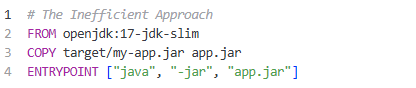
On the surface, this looks fine. However, this approach bundles every dependency, every library, and the entire JDK into a single layer. Whenever we changed a single line of code, the entire JAR was rebuilt. This invalidated the Docker cache for that layer. This meant our CI pipeline had to push hundreds of megabytes of unchanged data for every commit.
Furthermore, we were using a full JDK image in production. For running a Java application, we do not need the compiler or development tools. This unnecessary bloat increased our attack surface and memory footprint. We realized that our build strategy was optimized for simplicity rather than efficiency. This is a common trap for teams moving to containers for the first time.
Diagnosis: Analyzing Image Layers and Memory
To understand the bottleneck, we used dive. This is a tool for exploring Docker images. It revealed that 90 percent of our image size was comprised of dependencies that rarely changed. Only 10 percent was our actual application code.
Simultaneously, we noticed intermittent OOMKilled errors during peak traffic. Despite setting -Xmx512m, the container would crash when memory usage hit the limit. This mirrored the Kubernetes issues many face, but it originated in how we defined the Docker runtime limits. The JVM was not aware it was running in a constrained environment. This led it to allocate heap space based on the host memory rather than the container limit.
We realized that the Linux kernel was killing the process because the total memory usage exceeded the cgroup limit. The heap was only part of the equation. Non-heap memory usage was the hidden variable causing the crashes.
The Solution: Multi-Stage Builds and Layering
The first fix was adopting a multi-stage build. This allows us to build the artifact in one container and run it in a much smaller optimized runtime container.
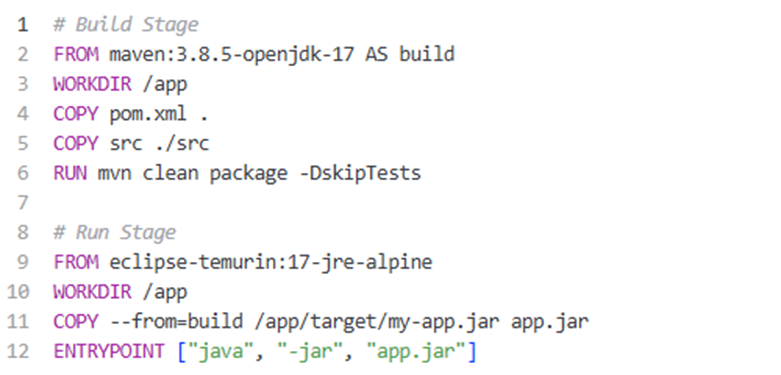
Switching to a JRE instead of a JDK reduced the base image size significantly. Using Alpine Linux further shaved off megabytes. However, we could go deeper.
Spring Boot 2.3 plus introduced layered JARs. By default, a Spring Boot JAR is organized into layers. These include dependencies, spring-boot-loader, snapshot dependencies, and application code. Dependencies change infrequently while application code changes constantly. By exploiting this, we can cache dependency layers in Docker. 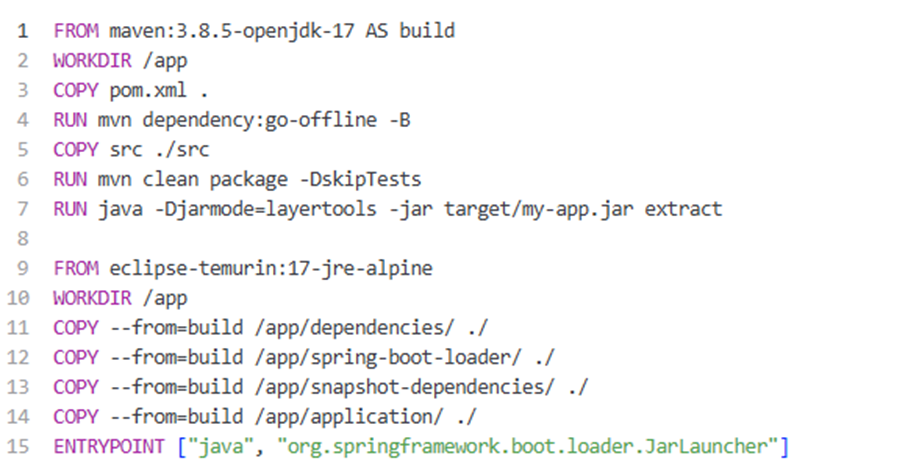
With this configuration, changing a Java class only invalidates the top application layer. The heavy dependencies layer remains cached. In our CI pipeline, this reduced build times by 60 percent and image push times by 75 percent. This improvement allowed our developers to get feedback much faster. It also reduced the bandwidth costs associated with pushing images to the registry.
JVM Awareness: Configuring for Containers
Addressing the memory crashes required tuning the JVM. Modern Java versions are container-aware, but they still need guidance to operate efficiently within Docker cgroups.
We stopped using fixed heap sizes, such as -Xmx512m. Instead, we switched to percentage-based flags. This ensures the JVM adapts when we later change the Docker memory limit without rebuilding the image.

Setting MaxRAMPercentage to 75 percent reserves the remaining 25 percent for non-heap memory. This includes threads, metaspace, and code cache. This prevents the Linux OOM killer from terminating the process when off-heap usage spikes. We also added -XX:+ExitOnOutOfMemoryError to ensure the container restarts cleanly rather than hanging in a degraded state.
We learned that the default JVM behavior assumes it has access to all host memory. This assumption is fatal in a containerized environment. The container limits are enforced by the kernel, and the JVM must respect them. Using percentage-based flags is the most robust way to ensure this respect.
Security and Best Practices
Efficiency is not just about speed and size. It is about security. Running Java as the root user inside a container is a significant risk. If an attacker exploits a vulnerability in the application, they gain root access to the container.
We added a non-root user to our Dockerfile.

Additionally, we implemented health checks directly in the Dockerfile. This allows the orchestrator to detect unresponsive applications quickly.

This configuration ensures that Kubernetes or Docker Swarm can restart unhealthy pods automatically. It reduces the mean time to recovery during incidents.
We also considered using distroless images for even greater security. These images contain only the application and its runtime dependencies. They do not include a shell or package manager. This reduces the attack surface significantly. However, debugging can be harder without shell access. We decided to stick with Alpine for now, but plan to migrate to distroless in the future.
Monitoring Container Health
Once the application was deployed, we needed to ensure it stayed healthy. We integrated Prometheus to scrape metrics from the Spring Boot Actuator endpoint. This gave us visibility into JVM memory, GC pauses, and thread counts.
We set up alerts for high memory usage and high GC pause times. This allowed us to catch issues before they caused outages. We also monitored the container restart count. A high restart count indicated instability. This metric helped us identify pods that were struggling to stay alive.
Lessons Learned and Best Practices
Our journey taught us several valuable lessons. We incorporated these into our development standards.
- Always use multi-stage builds. Single-stage builds are convenient but inefficient. Multi-stage builds produce smaller and more secure images.
- Leverage layer caching. Order your Dockerfile commands to maximize cache hits. Copy dependencies before copying source code.
- Tune JVM for containers. Use percentage-based memory flags. Never assume the JVM knows the container limits.
- Run as non-root. Reduce security risks by dropping privileges. Create a dedicated user for the application.
- Implement health checks. Allow the orchestrator to detect failures quickly. Use actuator endpoints for health checks.
- Monitor continuously. Use metrics to track container health. Set alerts for memory and GC issues.
- Test under load. Simulate production traffic in staging. Verify that memory usage stays within limits.
Conclusion
Containerizing Java applications requires more than just wrapping a JAR in a Docker image. It demands an understanding of layer caching, JVM memory management, and security contexts. By moving to multi-stage builds, leveraging Spring Boot layers, and configuring JVM flags for container awareness, we transformed our deployment process.
Our images shrank from 800 MB to under 200 MB. Build times dropped significantly and allowed for faster feedback loops. Most importantly, the silent crashes disappeared. They were replaced by stable and predictable memory usage.
If you are still using single-stage builds or fixed heap sizes, I encourage you to revisit your Docker configuration. The efficiency gains are not just incremental. They fundamentally change how resilient and cost-effective your Java infrastructure becomes. Docker got us thinking differently about deployment. Let us make sure we are using it to its full potential.
Opinions expressed by DZone contributors are their own.
Comments