

Memory Leak Due To Mutable Keys in Java Collections
Java Collections components (such as Map, List, Set) are used in our applications. When their keys are not properly handled, it will result in a memory leak.
 CORE
·
CORE
·
Join the DZone community and get the full member experience.
Join For FreeJava Collections components (such as Map, List, Set) are widely used in our applications. When their keys are not properly handled, it will result in a memory leak. In this post, let’s discuss how incorrectly handled HashMap key results in OutOfMemoryError. We will also discuss how to diagnose such problems effectively and fix them.
HashMap Memory Leak
Below is a sample program that simulates a memory leak in a HashMap due to a mutated key:
01: public class OOMMutableKey {
02:
03:    static class User {
04:
05:        String name;
06:
07:        User(String name) {
08:            this.name = name;
09:        }
10:
11:        @Override
12:        public int hashCode() {
13:            return name.hashCode();
14:        }
15:
16:        @Override
17:        public boolean equals(Object obj) {
18:            return obj instanceof User && name.equals(((User) obj).name);
19:        }
20:    }
21:
22:    public static void main(String[] args) {
23:
24:           Map<User, String> map = new HashMap<>();
25:        int count = 0;
26:
27:        while (true) {
28:            // Step 1: Create a key
29:            User user = new User("Jack" + count);
30:            map.put(user, "Engineer");
31:
32:            // Step 2: Change the key *after* insertion
33:            user.name = "Jack & Jill" + count;
34:
35:            // Step 3: Try to remove using the mutated key
36:            map.remove(new User("Jack" + count)); // does not remove the record
37:            map.remove(new User("Jack & Jill" + count)); // does not remove the record either
38:
39:            if (++count % 100_000 == 0) {
40:                System.out.println("Map size (leaked): " + map.size());
41:            }
42:        }
43:    }
Before continuing to read, please take a moment to review the above program closely.
- In line #5, ‘User’ class is defined with the ‘name’ as the member/instance variable. This class has a legitimate ‘hashCode()’ and ‘equals()’ method implementation based on the ‘name’ variable.
- In line #27, this program goes on an infinite loop (i.e., ‘while(true)’) and creates new ‘User’ objects.
- In line #29, ‘name’ variable of the ‘User’ object is set to value ‘JackX’.
- In line #30, ‘User’ object is added to the ‘HashMap’.
- In line #33 ‘name’ of the user object is changed to ‘Jack & JillX’. Basically, the key of the ‘HashMap’ is mutated (i.e. changed).
- In line 36, ‘JackX’ ‘User record is removed, and in line #37 ‘Jack & JillX’ user record is removed from the ‘HashMap’. But both of the removals will silently fail, i.e., the user object will not be removed from the ‘HashMap’. Thus, when the program is executed, HashMap will start to grow with infinite user records and eventually result in ‘java.lang.OutOfMemoryError: Java heap space’.
Why Does Mutable Key Result in OutOfMemoryError?
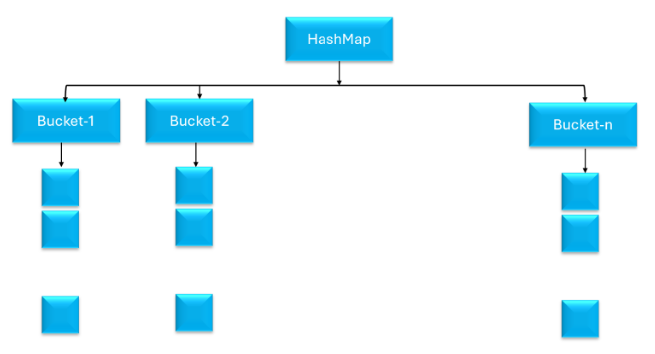
In order to understand why the above program will result in OutOfMemoryError, we need to understand how HashMap’s are implemented. In a nutshell,
- HashMap internally contains an array of buckets. Inside each bucket, it has a list of records.
- HashMap uses the ‘hashcode()’ method of the key object to determine in which bucket the record should be stored. Once the bucket is determined, the record will be placed in the appropriate list of that bucket.
- When we use the ‘get()’ method to retrieve the record, HashMap uses the same ‘hashcode()’ method of the key object to determine the bucket in which the record should be searched. Once the bucket is determined, the ‘equals()’ method is invoked on all the record keys in the list of that bucket to retrieve the appropriate record.
Equipped with this knowledge, let’s discuss what happens when the first ‘Jack1’ record is inserted into the ‘HashMap’. Based on the ‘hashcode()’ implementation in the User object, let’s say the ‘Jack1’ record gets inserted into the list in bucket#1. Once the record is stored, then the actual name is changed to ‘Jack & Jill1’ in the ‘HashMap’. So after the insertion, user record in bucket #1, contains ‘Jack & Jill1’ as the key and not ‘Jack1’
Now let’s answer the question, Why ‘map.remove(new User(“Jack” + count))’ doesn’t remove the record?
- Based on the ‘hascode()’ implementation of this ‘Jack1’ user object, HashMap will determine that the record is stored in bucket#1.
- Now HashMap will invoke the ‘equals()’ operation on all the keys that are present in list of bucket #1. ‘equals()’ operation will return ‘false’, because the actual name of this user object that is present in the list ‘Jack & Jill1’ and not ‘Jack1’
Now let’s answer the question, Why map.remove(new User(“Jack & Jill” + count))’ doesn’t remove the record?
- The ‘hashcode()’ implementation of ‘Jack & Jill1’, will return a different value, which will cause the HashMap to look up the record in a different bucket, let’s say bucket 3.
- Since in bucket #3, the record is not present, it will not be removed from the HashMap.
Tricky, isn’t it?
How to Diagnose a Mutable Key Created by Memory Leak?
You want to follow the steps highlighted in this post to diagnose the OutOfMemoryError: Java Heap Space. In a nutshell, you need to do:
1. Capture Heap Dump
You need to capture a heap dump from the application, right before the JVM throws an OutOfMemoryError. In this post, eight options to capture the heap dump are discussed. You might choose the option that fits your needs. My favorite option is to pass the ‘-XX:+HeapDumpOnOutOfMemoryError -XX:HeapDumpPath=<FILE_PATH_LOCATION>‘ JVM arguments to your application at the time of startup. Example:
-XX:+HeapDumpOnOutOfMemoryError -XX:HeapDumpPath=/opt/tmp/heapdump.hprofWhen you pass the above arguments, JVM will generate a heap dump and write it to ‘/opt/tmp/heapdump.hprof’ file whenever OutOfMemoryError is thrown.
2. Analyze Heap Dump
Once a heap dump is captured, you need to analyze the dump. In the next section, we will discuss how to do a heap dump analysis.
Heap Dump Analysis
Heap Dumps can be analyzed through various heap dump analysis tools such as HeapHero, JHat, JVisualVM… Here, let’s analyze the heap dump captured from this program using the HeapHero tool.
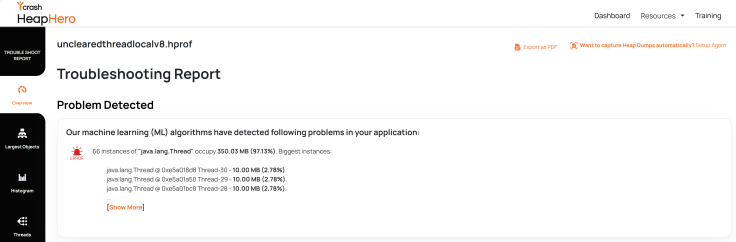
Fig: HeapHero flags memory leak using ML algorithm
The HeapHero tool utilizes machine learning algorithms internally to detect whether any memory leak patterns are present in the heap dump. Above is the screenshot from the heap dump analysis report, flagging a warning that ‘main’ thread’s local variables are occupying 99.92% and most objects are occupied in one instance of ‘HashMap’. It’s a strong indication that the application is suffering from a memory leak, and it originates from the ‘java.util.HashMap’ object.
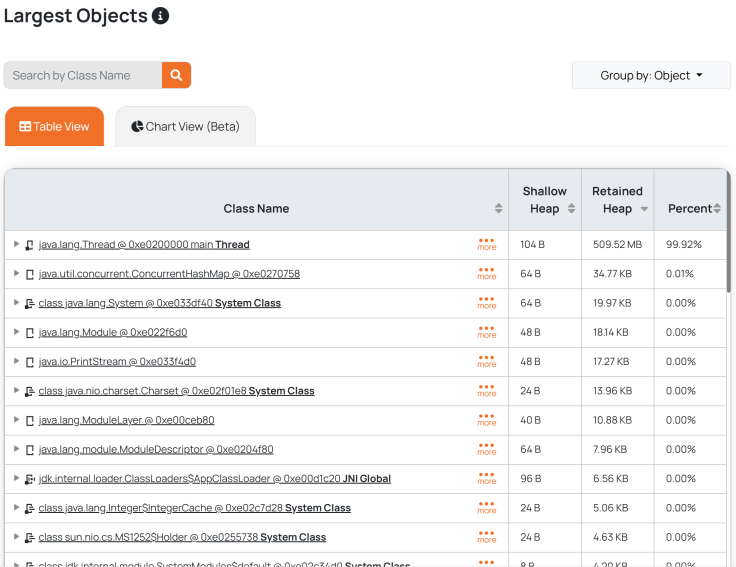
The ‘Largest Objects’ section in the HeapHero analysis report shows all the top memory-consuming objects (refer to the above screenshot). Here, you can clearly notice that the ‘main’ thread is occupying 99.92% of memory.
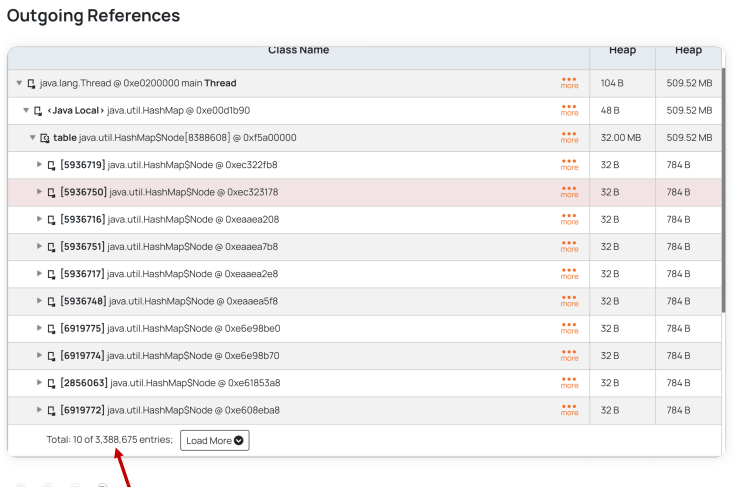
The tool also gives the capability to drill down into the objects to investigate their content. When you drill down into the ‘main’ Thread object, reported in the ‘Largest Object’ section, you can see all its child objects. From the above figure, you can see it contains 3.38 million User records. Basically, these are the objects that got added and never removed from the HashMap. Thus, the tool helps you to point out the memory-leaking object and its origin source, which makes troubleshooting a lot easier.
How to Fix Mutable Keys Memory Leaks
You can declare the key of the record to be final so that it can be changed once it’s initialized. Example:
03:    static class User {
04:
05:        final String name;
Conclusion
From this post, we can understand that the mutated key in the Collections has the potential to bring down the entire application. Thus, by not mutating the key and using tools like HeapHero for faster root cause analysis, you can protect your applications from hard-to-detect outages.
Opinions expressed by DZone contributors are their own.
Comments