

Build Smarter Next-Gen AI Apps: A Step-by-Step LangChain v0.3+ Guide
Create next-gen Artificial Intelligence applications using the LangChain Python framework — with real code, hands-on insights, and a look inside its architecture.
Join the DZone community and get the full member experience.
Join For FreeThe New Era of LLM Apps
In the last year, AI development has shifted rapidly from simple demos to robust, feature-rich applications. At the heart of this movement is LangChain, the open-source toolkit that makes it easier than ever to plug large language models into real-world data, tools, and workflows.
If you've ever wanted to move beyond the standard chatbot — say, build a custom app that can analyze documents, retrieve live data, and even call external APIs — the new LangChain has you covered. Companies like Morningstar are already using LangChain to build their Intelligence Engine, allowing analysts to query massive research databases in natural language. Meanwhile, enterprises across industries report deployment cycles that are 3-5× faster when using LangChain compared to building from scratch.
What makes LangChain particularly compelling in 2025 is its maturity. The framework has evolved from basic prompt chaining to a comprehensive ecosystem that handles everything from simple queries to complex multi-agent workflows. Whether you're building customer support bots that remember context across conversations, research assistants that pull from multiple data sources, or autonomous agents that can make decisions and take actions, LangChain provides the scaffolding to make it happen reliably.
In this guide, I'll run you through each piece, making sure you not only learn the essentials but also understand "why" the system is built this way — and more importantly, how to avoid the common pitfalls that trip up developers moving from prototype to production.
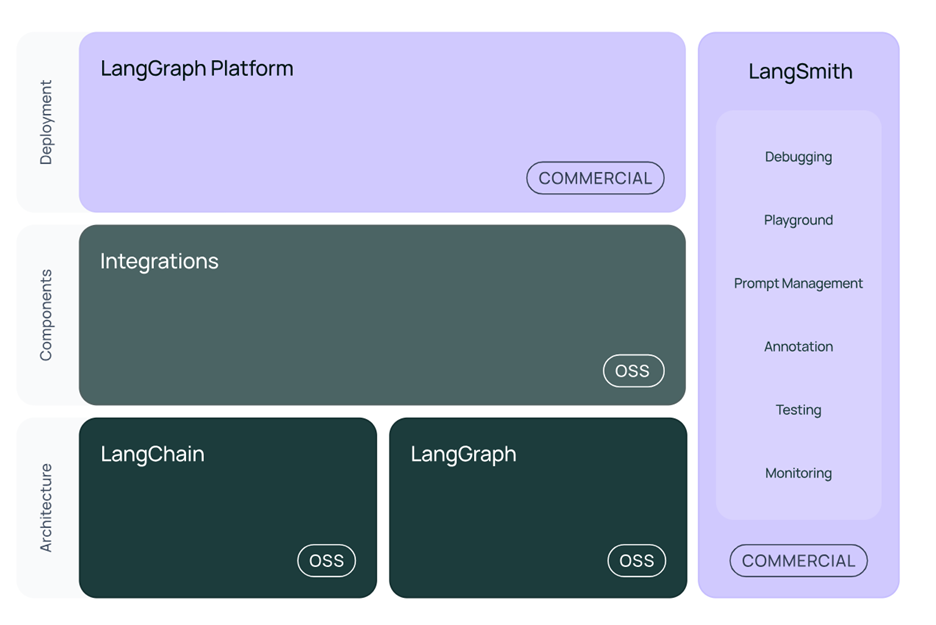
LangChain’s Modular Architecture: A Quick Look Under the Hood
Before jumping into code, let's peek at how LangChain is put together. Don't worry: no jargon, just clarity.
At its core, LangChain breaks AI-powered apps into a series of building blocks. The magic is in how these pieces fit together to help you chain complex logic, remember past interactions, and fetch information from the outside world — without starting from scratch each time.
The architecture of LangChain is modular and layered, enabling developers to flexibly compose advanced AI workflows. At its core, LangChain brings together several core components — LLMs, prompts, chains, agents, memory, retrievers, and tool integrations — to allow language models to interact intelligently with external data and perform complex reasoning.
Key Architectural Layers
- Prompts and templates: Structure and format user or system instructions for LLMs, ensuring contextually accurate output.
- Language models (LLMs): The "brain" that generates, summarizes, or transforms content—such as OpenAI's GPT, Anthropic's Claude, or local models.
- Chains: Think of these as mini-assembly lines: sequences of actions (like "ask the user for a name, fetch data, summarize result").
- Agents: These are the real heavy hitters. Agents can think, select which chain or tool to use, and make dynamic decisions to solve a problem.
- Memory: Agents and chains can remember—you store chat history, answers, or even context for more "human" feeling interactions.
- Retrievers and tools: Bridge your LLM with databases, APIs, file systems, or any data source you want.
- Orchestration layer: Coordinates communication between all modules, manages context passing, tool selection, error handling, and parallel execution in more advanced setups.
How Does It Flow in Practice?
Say you send in a user's request. LangChain can structure that with a prompt, feed it to your chosen AI model, let an agent figure out if it needs to search the web or crunch numbers, record what was said before, and then return a polished reply — all in one neat pipeline.
This architecture enables seamless chaining of actions across AI and data systems, dynamic tool-using agents that adapt to user needs, and expandability where you can add new modules, swap providers, or scale across compute environments.
Getting Started: Setting Up Your Project
You'll need Python 3.9+, your favorite code editor, and an API key from OpenAI or another supported provider. Ready? Let's go.
Install the essentials:

(If you prefer Anthropic, Cohere, or another model, swap in that package accordingly.)
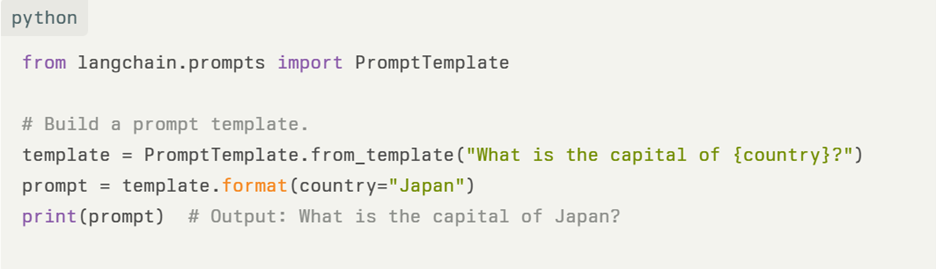
Step 1: Creating Prompt Templates
Prompts are how we ask the model to do things, but with templates, you stay consistent and flexible.
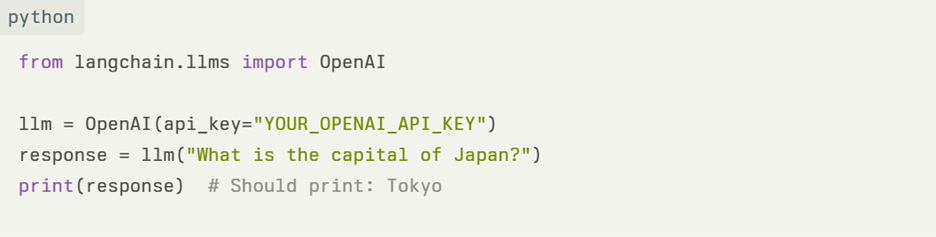
Step 2: Connecting to an LLM
Let’s bring actual “intelligence” to your app.
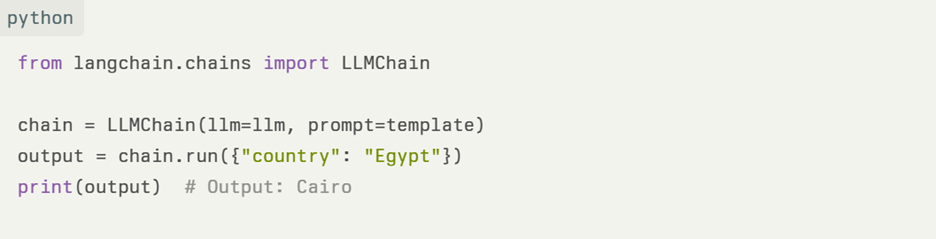
Step 3: Building a Chain
Chains make life easy by stitching together multiple actions into one workflow.
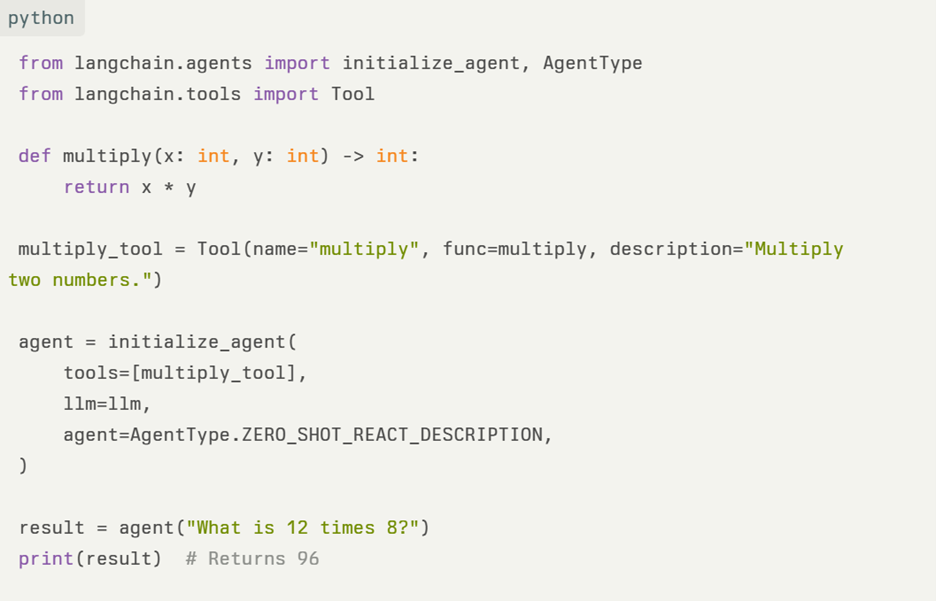
Step 4: Introducing Agents
Agents are the “smart assistants” in your toolbox, ready to figure things out on the fly.
Step 5: Making Apps Remember With Memory
Adding “memory” lets your app stay context-aware across turns, making it feel much more real.
Why LangChain Stands Out in 2025
What sets LangChain apart from alternatives like LlamaIndex or Haystack? LangChain excels at multi-step reasoning workflows where an agent might need to search the web, analyze data, and then synthesize findings — all autonomously. LlamaIndex focuses primarily on document indexing and retrieval, while Haystack emphasizes search pipelines. LangChain's strength lies in its flexibility for building complex, tool-augmented applications quickly.
The framework's 100+ integrations with tools and services mean you can connect to everything from Snowflake and Salesforce to custom APIs without writing integration code from scratch. This modularity has made it the de facto choice for building production-grade agentic systems that need to think, act, and remember.
Brief Peek: Advanced Features and Production Considerations
LangChain now supports "multimodal" workflows — so you can combine text, images, and soon even more. The 2025 updates include LangGraph for stateful, graph-based agent architectures and LangSmith for comprehensive observability and debugging.
For production deployments, consider containerizing with Docker, implementing caching for frequent queries, and using monitoring tools like Prometheus to track performance. Companies successfully running LangChain in production emphasize the importance of proper error handling, retry logic, and fallback mechanisms.
Tips for Real-World Success
- Nail your prompts: Templating your prompts not only saves headaches but makes your app more reliable.
- Guardrails matter: Carefully check user and agent input/output—this stops nasty surprises if users try to "trick" your system or feed bad data.
- Add logging: When you go beyond prototypes, trace each agent call and tool usage — it'll make debugging 100x easier.
- Test thoroughly: Use comprehensive testing, including unit tests for individual chains and integration tests for full workflows.
There you have it! With these practical steps and a solid mental model of the framework, you’re ready to build your own AI-powered, workflow-driven applications using LangChain. Whether building a personal research bot or a customer-facing tool, you now have the know-how to get creative and scale it up confidently. Happy experimenting!
Opinions expressed by DZone contributors are their own.
Comments