

Master AI Development: The Ultimate Guide to LangChain, LangGraph, LangFlow, and LangSmith
Master AI development with LangChain tools. Build, prototype and monitor LLM apps using LangChain, LangGraph, LangFlow and LangSmith diagrams included.
 CORE
·
CORE
·
Join the DZone community and get the full member experience.
Join For FreeLarge language models (LLMs) like GPT-4 and Llama 3 have become essential for creating powerful applications. However, building these applications involves challenges such as managing prompts, integrating external data, maintaining context, and ensuring scalability.
The LangChain ecosystem, including LangChain, LangGraph, LangFlow, and LangSmith, addresses these challenges at different stages of the development lifecycle. This article explores each tool, their differences, and when to use them, enhanced with diagrams.
LangChain: Simplifying LLM Application Development
LangChain is an open-source framework designed to support the creation of LLM-powered applications. It provides abstractions for tasks like calling LLMs, managing prompts, and maintaining context, allowing developers to focus on application logic rather than low-level API management. LangChain’s modular design supports integration with various LLMs and external data sources, making it versatile for building chatbots, question-answering systems, and more.
Key Features of LangChain
- LLM Support: Compatible with closed-source models like GPT-4 and open-source models like Llama 3, requiring only an API key.
- Prompts: Dynamic prompt templates enable customizable queries for different tasks.
- Chains: Sequences of tasks (e.g., LLM calls, data retrieval, response processing) that form seamless workflows.
- Indexes: Integrates with document loaders and vector databases to access external data.
- Memory: Maintains conversation history for context-aware interactions.
- Agents: Uses LLMs as reasoning engines to make dynamic decisions in workflows.
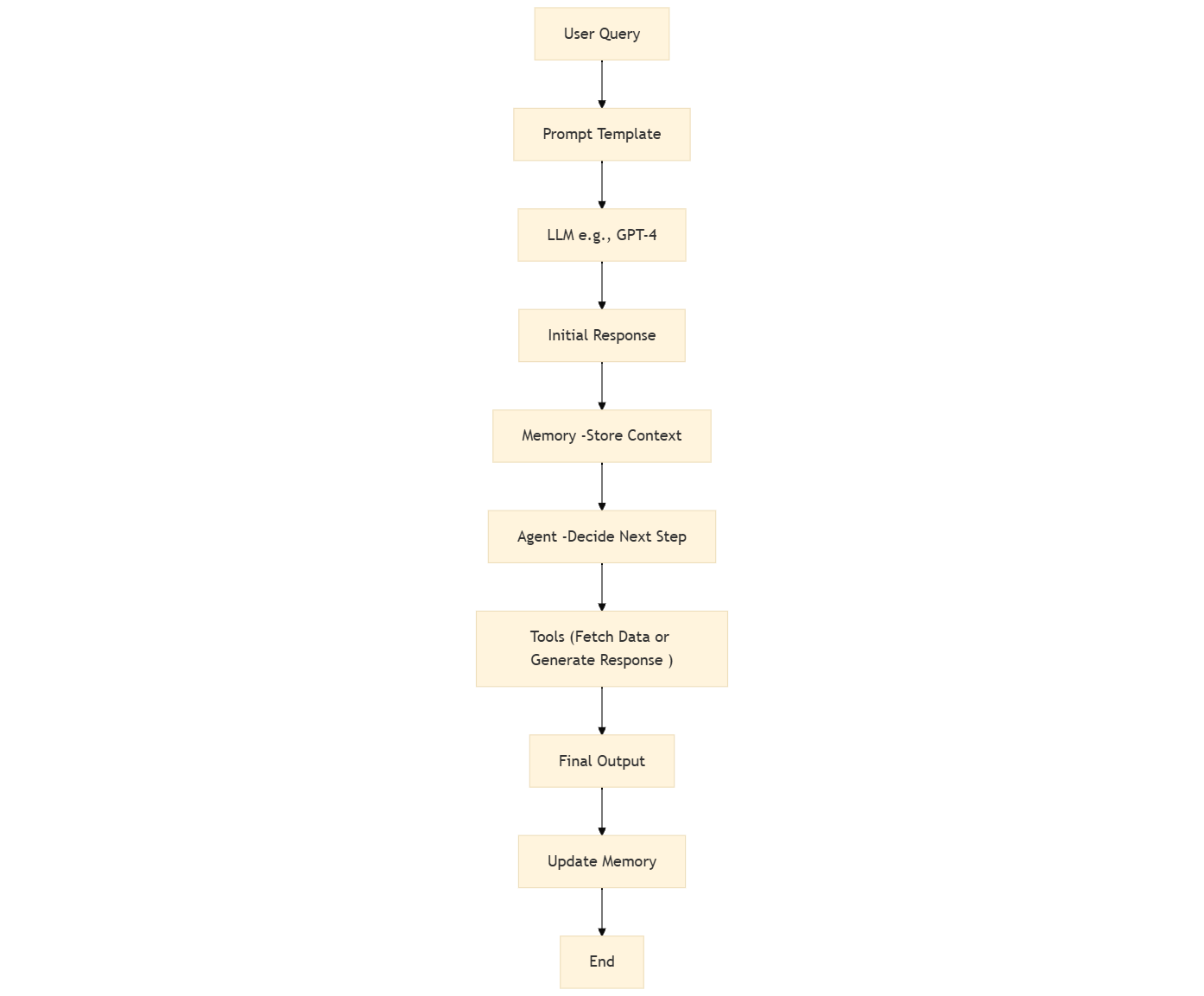
Diagram: LangChain Workflow
The following flowchart illustrates a typical LangChain workflow, showing how user input is processed through prompts, LLMs, memory, agents, and tools to produce a final output:
Example: Building an AI Application With LangChain
Consider an application that uses GPT-4 to generate an initial response, Llama 3 to refine it, an agent to decide whether to fetch external data, and memory to store interactions. Without LangChain, developers would need to manually manage API calls, memory, and agent logic, leading to complex, hard-to-maintain code:
# Manual approach (simplified)
def call_gpt4(prompt):
    # API call to GPT-4
    pass

def call_llama3(prompt):
    # API call to Llama 3
    pass

memory = {}
def update_memory(key, value):
    memory[key] = value

def agent_decision(query):
    # Logic to decide whether to fetch data or generate response
    pass

# Main logic
user_query = "What is the capital of France?"
initial_response = call_gpt4(user_query)
refined_response = call_llama3(initial_response)
decision = agent_decision(user_query)
if decision == "fetch":
    # Fetch external data
    pass
else:
    # Generate response
    pass
update_memory("last_query", user_query)
With LangChain, the same functionality is simplified:
from langchain import OpenAI
from langchain.chains import SequentialChain, LLMChain
from langchain.memory import ConversationBufferMemory
from langchain.agents import ZeroShotAgent, Tool
from langchain.prompts import PromptTemplate

# Initialize LLM
gpt4 = OpenAI(model_name="gpt-4")

# Define tools
tools = [
    Tool(
        name="Fetch Data",
        func=lambda query: f"Fetched data for {query}",
        description="Useful for fetching external data"
    )
]

# Define agent
prefix = """Answer questions using the following tools:"""
suffix = """Begin!

{chat_history}
Question: {input}
{agent_scratchpad}"""

prompt = ZeroShotAgent.create_prompt(
    tools,
    prefix=prefix,
    suffix=suffix,
    input_variables=["input", "chat_history", "agent_scratchpad"]
)

llm_chain = LLMChain(llm=gpt4, prompt=prompt)
agent = ZeroShotAgent(llm_chain=llm_chain, tools=tools)

# Define memory
memory = ConversationBufferMemory(memory_key="chat_history")

# Define chains
initial_chain = LLMChain(llm=gpt4, prompt=PromptTemplate(template="Initial response: {query}", input_variables=["query"]))
refine_chain = LLMChain(llm=gpt4, prompt=PromptTemplate(template="Refine: {response}", input_variables=["response"]))

# Combine chains
overall_chain = SequentialChain(chains=[initial_chain, refine_chain], input_variables=["query"], output_variables=["response"])

# Run the chain
response = overall_chain({"query": "What is the capital of France?"})
print(response['response'])
This example demonstrates how LangChain reduces boilerplate code, making development more efficient.
When to Use LangChain
LangChain is ideal for:
– Building applications with multiple LLMs.
– Creating complex workflows with prompts, data retrieval, and memory.
– Developing scalable, maintainable AI applications.
LangGraph: Managing Multi-Agent Workflows
LangGraph, built on LangChain, focuses on orchestrating multi-agent workflows. It uses a graph-based structure to manage interactions between agents, making it suitable for applications like task automation or research assistants where multiple agents collaborate.
Key Concepts in LangGraph
- State: A shared data structure that holds the application’s current snapshot, accessible and updatable by all agents.
- Nodes: Individual components performing tasks like LLM calls or tool interactions.
- Edges: To support dynamic and cyclical interactions, edges are connections defining the flow of execution.
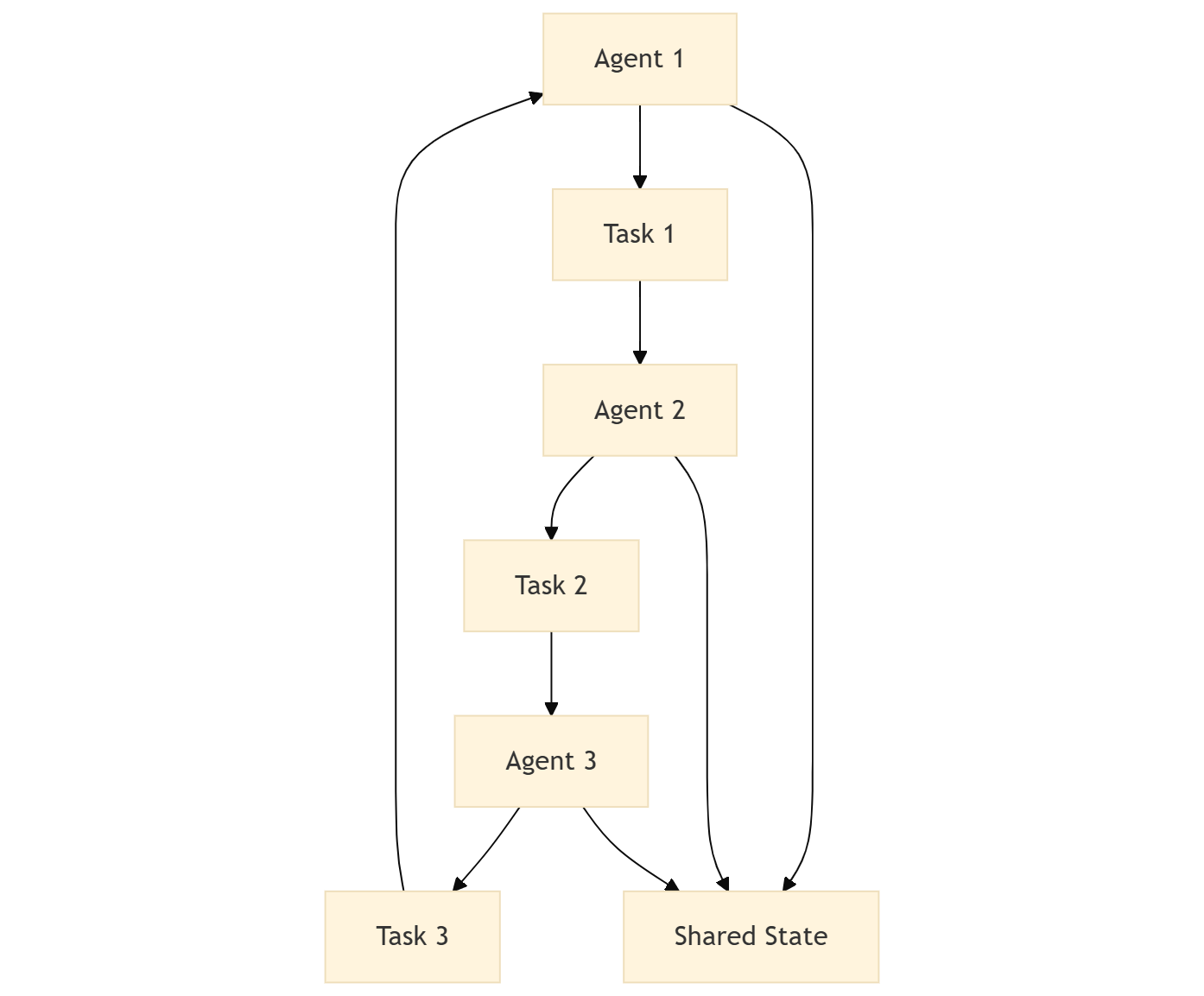
Diagram: LangGraph Agent Interactions
This graph diagram shows how agents interact through tasks and share a common state:
Example: Using LangGraph
Here’s a simple example of a LangGraph workflow with two nodes:
from langgraph.graph import Graph, Node, Edge

# Define nodes
node1 = Node(func=lambda x: x * 2, name="Double")
node2 = Node(func=lambda x: x + 1, name="Increment")

# Define graph
graph = Graph()
graph.add_node(node1)
graph.add_node(node2)
graph.add_edge(Edge(node1, node2))

# Run the graph
result = graph.run(5)
print(result)  # Output: 11 (5 * 2 = 10, 10 + 1 = 11)
When to Use LangGraph
LangGraph is best for:
– Applications with multiple collaborating agents.
– Workflows requiring dynamic or cyclical decision-making.
– Systems needing shared state management.
LangFlow: Visual Prototyping for LLM Applications
Enabling users to create LLM workflows without coding, LangFlow is a UI kind of interface built on LangChain. Its drag-and-drop interface is perfect for prototyping chatbots or data processing tools, allowing rapid experimentation.
Key Features of LangFlow
- Drag-and-Drop Interface: Visually connect components like LLMs, prompts, and tools.
- Prototyping Focus: Designed for quick experimentation, not production.
- API Access: Workflows can be accessed via APIs for integration.
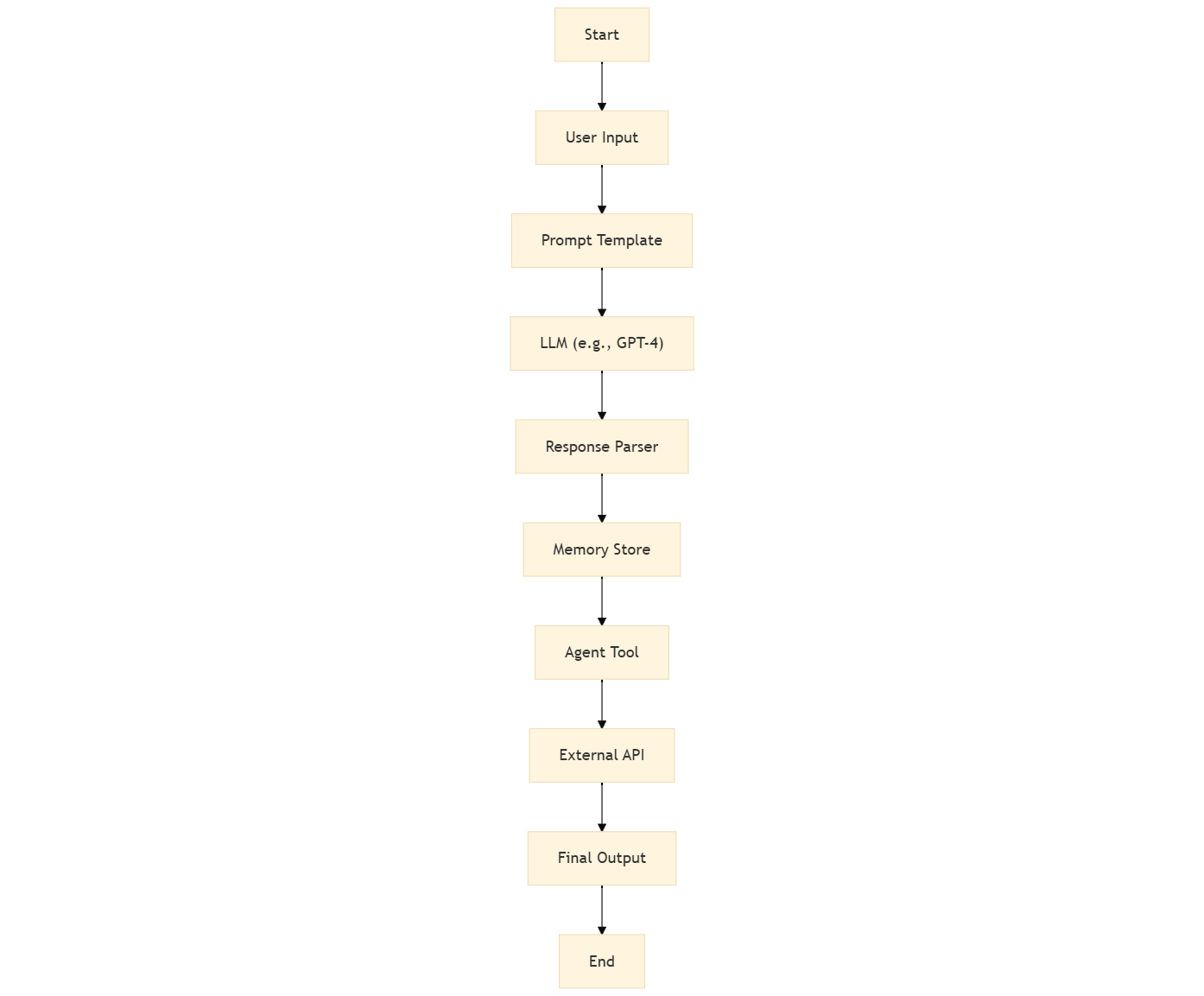
Diagram: LangFlow Workflow
This flowchart represents a sample workflow created in LangFlow:
Using LangFlow
LangFlow can be hosted on platforms like Data Stack or locally. Users can access a UI to drag and drop components, creating workflows that can be triggered via APIs. Documentation is available at LangFlow Documentation.
When to Use LangFlow
LangFlow is ideal for:
– End users, for prototyping AI applications.
– Rapid experimentation with LLM workflows.
– Creating minimum viable products (MVPs).
LangSmith: Monitoring and Evaluating LLM Applications
LangSmith supports the entire LLM application lifecycle, from prototyping to production, by providing tools for monitoring and evaluation. It tracks metrics like token usage and latency, ensuring applications perform reliably.
Key Features of LangSmith
- Monitoring: Tracks token usage, API calls, costs, error rates, and latencies.
- Evaluation: Assesses LLM and chain performance to identify issues.
- Framework Independence: Works with any LLM framework, not just LangChain.
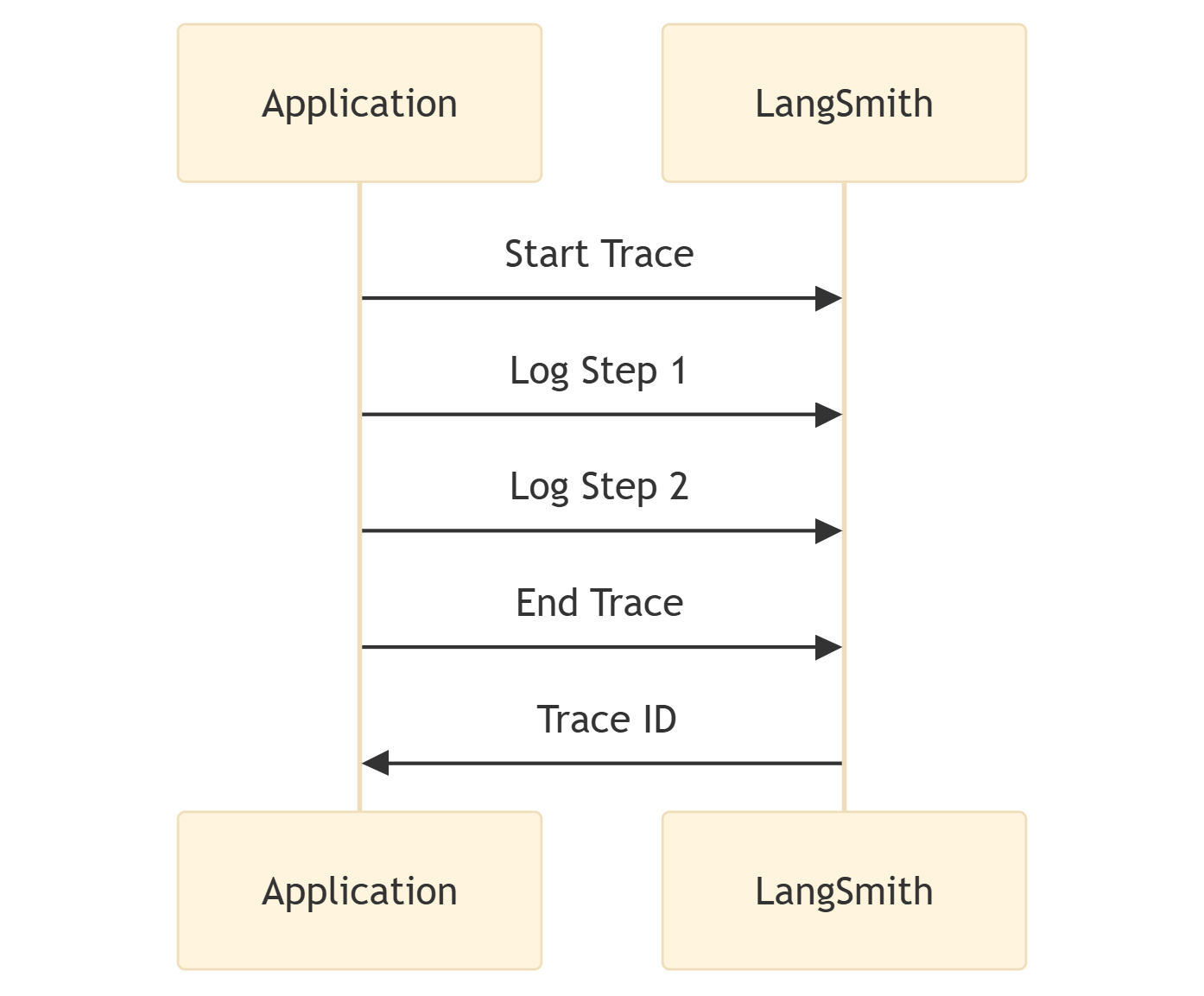
This sequence diagram (LangSmith Trace Logging ) shows how an application logs traces to LangSmith:
Setting Up LangSmith
Here’s an example of integrating LangSmith:
import os
from langsmith import traceable

# Set environment variables
os.environ["LANGSMITH_TRACING"] = "true"
os.environ["LANGSMITH_API_KEY"] = "your-api-key"

# Example function to trace
@traceable
def call_llm(query):
    return f"Response to {query}"

# Run and log
response = call_llm("What is the capital of France?")
print(response)
The LangSmith dashboard provides insights into performance metrics. More details are available at LangSmith Documentation.
When to Use LangSmith
LangSmith is suitable for:
– Complex applications needing extensive monitoring.
– Production environments requiring performance optimization.
– Teams seeking detailed insights into LLM behavior.
Comparison of LangChain, LangGraph, LangFlow, and LangSmith
| Tool | Primary Purpose | Key Features | Best Use Case | Production Ready? |
|---|---|---|---|---|
|
LangChain |
Building LLM applications |
LLM support, prompts, chains, memory, agents |
Core application logic |
Yes |
|
LangGraph |
Managing multi-agent workflows |
State, nodes, edges |
Complex agent interactions |
Yes |
|
LangFlow |
Visual prototyping |
Drag-and-drop interface, API access |
Rapid prototyping, MVPs |
No |
|
LangSmith |
Monitoring and evaluation |
Token tracking, performance metrics |
Production monitoring, optimization |
Yes |
Conclusion
The LangChain ecosystem offers a powerful suite of tools for building, prototyping, and monitoring LLM applications:
– LangChain provides a framework for core application logic.
– LangGraph excels at managing complex agent interactions.
– LangFlow enables rapid prototyping for non-technical users.
– LangSmith ensures reliability in production environments.
With elegant diagrams illustrating their workflows, these tools become easier to understand and apply, empowering developers to create sophisticated AI applications efficiently.
Reference
1. LangGraph Glossary. (n.d.). https://langchain-ai.github.io/langgraphjs/concepts/low_level
Opinions expressed by DZone contributors are their own.
Comments