

Efficient Long-Term Trend Analysis in Presto Using Datelists
To make long-term trend analysis easier, we can leverage datelists, where we store each metric value corresponding to a date in an array in a sequential manner.
Data analytics teams, plenty of times, would have to do long-term trend analysis to study patterns over time. Some of the common analyses are WoW (week over week), MoM (month over month), and YoY (year over year). This would usually require data to be stored across multiple years.
However, this takes up a lot of storage and querying across years worth of partitions is inefficient and expensive. On top of this, if we have to do user attribute cuts, it will be more cumbersome. To overcome this issue, we can implement an efficient solution using datelists.
What Are Datelists?
The most commonly used data formats in Hive are the simple types like int, bigint, varchar, and boolean. However, there are other complex types like Array<int>, Array<boolean>, and dict<varchar, varchar>, which give us more flexibility in terms of what we can achieve.
To create a datelist, we simply store the metric values from different date partitions in each index position of an array with a start_date column to indicate the date corresponding to index 0 in the array. E.g., a datelist array would look like [5, 3, 4] with start_date column value as, say, 10/1, which means the first value 5 in index 0 corresponds to the metric value that was recorded on 10/1 and so on.
If you look at the table below, you will see how traditional systems store data, where each row corresponds to each transaction that occurred. This causes redundancy, which can be avoided by transforming this data into a datelist format.
Traditional Data Storage

Datelist Data Storage
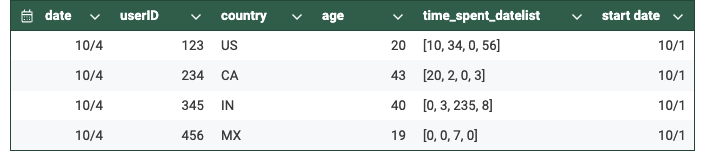
As you must have noticed, the number of rows has significantly reduced as there is no redundancy, i.e., each row within a particular date partition would have only one row per user. This is because we have aggregated all the different metric values corresponding to a user into a single array.
Designing a Datelist
Designing a datelist involves joining the metric values of a user from today’s source table with yesterday’s target table and storing the corresponding results again into the target table but into today’s partition value.
If it's a new user who has not yet been active, then we will create an empty array with all zeroes whose length would be the difference between start_date and today. Then, we would append today’s metric value to this newly created array. If the user already exists in yesterday’s partition, we simply append it to the already existing array.
For example, if start_date is 10/1, and if a user first appears on 10/3, their array would be initialized as [0, 0], and the value for 10/3 would be appended, resulting in [0, 0, 7].
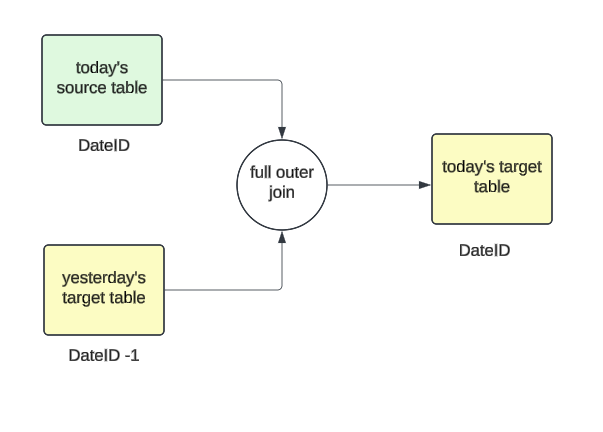
Sequence of Events
From 10/1 to 10/4, the datelist grows as follows:
On 10/1:

On 10/2:

Each day, as the data pipeline runs, the array would keep growing in length indefinitely. You can put some limits as to how long you want the array to be, i.e., if you are only interested in doing WoW analysis for the last 6 months, the array can be trimmed to fit those needs and also update the start_date value accordingly every time the job runs. But this is not really necessary as arrays are generally very efficient, so even if it's a long query, it shouldn’t cause any performance issues.
Here is a simple example of how to set up the SQL query to create a datelist in Presto:
WITH today_source AS (
    SELECT
        *
    FROM (
        VALUES
            ('2024-10-02', 123, 10),
            ('2024-10-02', 234, 45)
    ) AS nodes (ds, userid, time_spent)
),
yest_target AS (
    SELECT
        *
    FROM (
        VALUES
            ('2024-10-01', 123, ARRAY[4])
    ) AS nodes (ds, userid, time_spent)
)
SELECT
    '2024-10-01' AS dateid,
    userid,
    COALESCE(y.time_spent, ARRAY[0]) || t.time_spent AS time_spent_datelist
FROM today_source t
FULL OUTER JOIN yest_target y
    USING (userid)
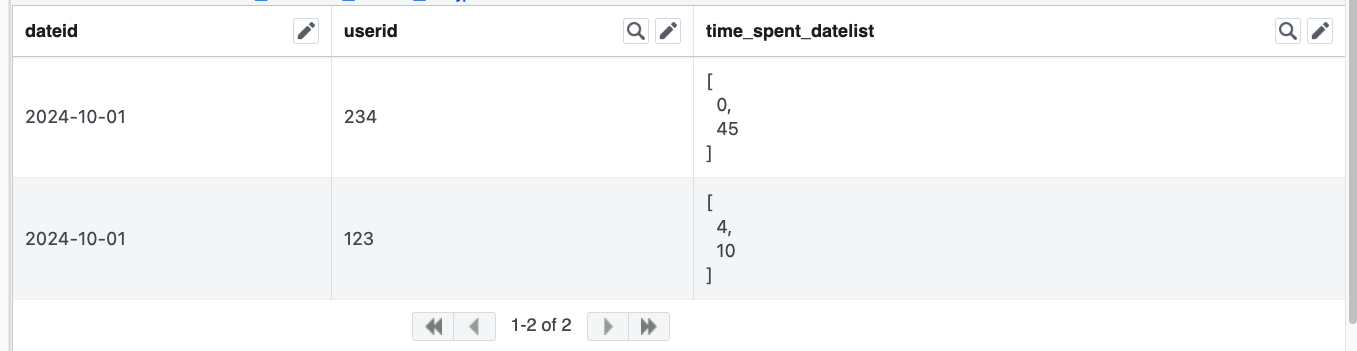
Which would yield an output like this:
Querying the Datelist Table to Calculate Ln(n = 1, 7, 28, …) Metrics
SELECT
    id,
    ARRAY_SUM(SLICE(metric_values, -1, 1)) AS L1,
    ARRAY_SUM(SLICE(metric_values, -7, 7)) AS L7,
    ARRAY_SUM(SLICE(metric_values, -28, 28)) AS L28,
    *
FROM dim_table_a
WHERE
    ds = '<LATEST_DS>'
In the above example, we look at a sample SQL query where we can easily calculate the L1, L7, and L28 results of a metric by simply querying the latest partition from the table and using a slice to get the subset of the array that we need and sum it. This helps in reducing the retention of a table just by maintaining as little as 7 days of partitions. We would be able to do an analysis that spans across years.
Benefits
- Storage savings: We get considerable storage savings as we don't have to store partitions beyond 7-10 days, as we have all the data we need to be compressed into the array, which could span across years as we store only one user per row per date partition.
- Long-term trend analysis: Simpler query, as we just fetch the data from the latest partition and sum the subset of values needed from the datelist array for long-term analysis.
- Privacy compliance: If we need to delete a user record (for example, they deactivated their account, so we can’t store/use their data anymore), then we just have to delete it from a few partitions instead of having to clean it up across various partitions, especially if it's a tenured user.
- Fast processing and reduced compute: The time complexity would be O(n), and storage would be ‘retention value’ * O(n), where n is the number of users active on the app.
Conclusion
Datelists are a valuable tool that every data engineer can take advantage of. They are easy to implement and maintain, and the benefits we get out of them are vast. However, we need to be cautious about backfills. We need to build a framework that can properly update the right index values in the array. However, once this is tested and implemented, we can simply reuse it whenever backfills are required.
Opinions expressed by DZone contributors are their own.