

Managing Private Zone Records in GCP Cloud DNS
Learn about an automated lifecycle management system for GCP Cloud DNS private zones, emphasizing its adaptability for integration with other cloud providers.
 ·
·
This article discusses an automated lifecycle management system for Google Cloud Platform (GCP) Cloud DNS private zone records, emphasizing its adaptability for integration with other cloud providers. It highlights how automation can streamline private DNS zone management, improve efficiency, and reduce manual errors. By extending this framework to various cloud environments, organizations can enhance their cloud infrastructure management while maintaining flexibility and scalability.
DNS Management Automation for GCP Cloud
Domain Name System is a hierarchical, distributed database that enables the storage and retrieval of IP addresses and other data by name. GCP Cloud DNS facilitates the publication of custom zones and records without the need to manage DNS servers and software. Private DNS zones simplify internal DNS management for Google Cloud networks, restricting DNS queries to private networks for added security.
GCP Cloud DNS is a scalable, reliable, and managed DNS service that allows users to publish their domain names to the global DNS in a secure manner. It supports both public and private DNS zones, enabling users to create, manage, and query DNS records with low latency.
GCP Cloud Private DNS provides an internal DNS solution for Google Cloud resources, allowing organizations to manage DNS records for their private networks without additional infrastructure. This enhances security by keeping DNS queries within the private network, thus protecting sensitive internal information.
Record Manager for Private GCP Cloud DNS Zone
Managing records in a private GCP Cloud DNS zone simplifies the process of controlling DNS entries for internal resources. It allows users to create, modify, and delete DNS records without needing external DNS services. This management ensures that DNS queries remain secure and confined within the private network, preventing unauthorized access. The automated lifecycle management solution helps prevent stale records, ensuring that the DNS infrastructure remains efficient and up-to-date.
Solution
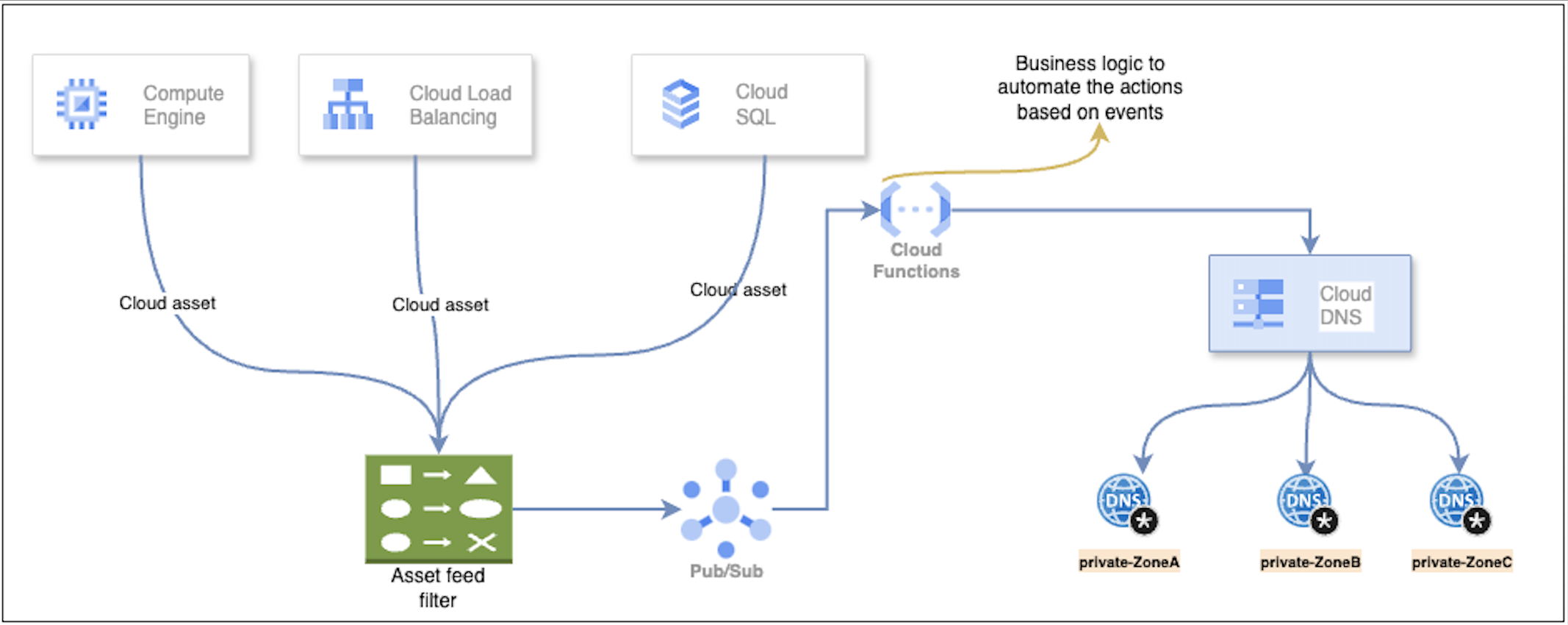
Utilizing Google Cloud Asset Feeds can streamline the automation of cloud DNS record management. These feeds track changes in cloud resources, such as their creation, modification, or deletion.
Asset Feed Creation
First, set up an asset feed in Google Cloud Asset Inventory. The asset feed will capture the resource changes for which you want to automate DNS management, such as an instance creation requiring an A-record in the Cloud DNS.
Cloud Pub/Sub
This asset feed is sent to Google Cloud Pub/Sub, which acts as the messaging service. Pub/Sub allows real-time event streaming, ensuring that the cloud resource updates are promptly captured and forwarded to the next stage.
Cloud Function Trigger
When Pub/Sub receives the asset feed, it triggers a Google Cloud Function. This function contains the core logic required to manage the DNS records.
- The Cloud Function can handle various actions based on the type of asset change:
- A-record Creation: When a new resource is provisioned (like a virtual machine instance), the function automatically creates an A-record in the specified private DNS zone, associating the resource’s IP with its domain name.
- Update of Existing Records: If an existing resource’s details change (such as an IP modification), the function can update the corresponding A-record in the private DNS zone.
- Record Deletion: When a resource is deleted or decommissioned, the function can automatically remove the stale DNS records to ensure no outdated information persists in the DNS system.
Private Cloud Zone DNS Management
The DNS records created, updated, or deleted are stored in a private zone of Cloud DNS, which allows you to manage internal DNS resolution without exposing it to the public internet. This ensures internal resources communicate effectively within your virtual private cloud (VPC) environment.
Scalability and Efficiency
The beauty of this workflow lies in its ability to scale as more cloud resources are created or modified. By automating DNS record management, organizations eliminate the need for manual intervention, reducing human error and improving efficiency.
Maintenance-Free DNS Operations
This automated approach reduces operational overhead, ensuring the DNS infrastructure remains up-to-date without the risk of stale or incorrect DNS records. As new resources are created or removed, the Cloud Function ensures the DNS is always synchronized with the current state of your cloud infrastructure.
By leveraging asset feeds, Pub/Sub, and Cloud Functions, you can automate DNS record management to ensure seamless and efficient operations across your Google Cloud environment.
Architecture Diagram
API for Configurations
APIs for configurations automate the management of cloud resources. For example, you can create asset feeds to monitor resources, set up Cloud Pub/Sub topics to receive updates, and deploy Cloud Functions to process data. These steps help manage DNS records and other cloud resources efficiently by using APIs to handle tasks like adding or deleting records based on asset changes, streamlining resource management, and improving automation.
1. Asset Feed Creation
Creates a feed to track compute instances and send updates to a Pub/Sub topic.
gcloud asset feeds create compute_instance_dns_manager \
	--content-type=resource --asset-types="compute.googleapis.com/Instance" \
	--pubsub-topic="projects/org-dns-manager/topics/compute-asset-inventory" \
	--condition-title=="Trigger based on Compute asset feed" \
	--condition-description="This feed is for DNS management for private zone A" \
	--organization <org-id>
2. Cloud Pub/Sub Creation
Creates a Pub/Sub topic to receive updates from the asset feed.
gcloud pubsub topics compute-asset-inventory
3. Cloud Function Creation
Deploys a function that processes updates from the Pub/Sub topic and manages DNS records.
gcloud functions deploy compute_instance_dns_manager \
	--region <region> \
    --project <project> \
    --runtime python310 \
    --entry-point main \
    --trigger-topic compute-asset-inventory \
    --source <gcs-storage-path>
4. Function Code
Updates DNS records based on asset changes, adding or removing records as needed.
import base64
from google.cloud import dns
import json
import re
import time

PROJECT_ID = 'your-project-id'
ZONE = 'test-zone'
DOMAIN = 'your.domain.'
TTL = 3600

env_folders = {'folder_id_for_dev': 'dev', 'folder_id_for_prod': 'prod'}
bu_folders = {'bu2_folder_id': 'bu2', 'bu1_folder_id': 'bu1'}

client = dns.Client(project=PROJECT_ID)
zone = client.zone(ZONE, DOMAIN)

# Debugging feed events
def log_event(event, context):
    if event.get('data'):
        data = base64.b64decode(event['data']).decode('utf-8')
        print(json.loads(data))

def find_existing_record(name):
    for record in zone.list_resource_record_sets():
        if name in record.name:
            print(f'Found existing record: {record.name}')
            return zone.resource_record_set(record.name, record.record_type, record.ttl, record.rrdatas)
    return None

def get_env_and_bu(data):
    bu, env = 'default', 'default'
    for ancestor in data['asset']['ancestors']:
        match = re.search(r"folders\/(.+)", ancestor)
        if match:
            env = env_folders.get(match[1], env)
            bu = bu_folders.get(match[1], bu)
    return bu, env

def process_dns_records(event, context):
    changes = zone.changes()
    valid_statuses = ['STAGING', 'DELETED']
    status, name, ip = '', '', ''

    if event.get('data'):
        data = json.loads(base64.b64decode(event['data']).decode('utf-8'))
        asset_type = ('instance' if 'Instance' in data['asset']['assetType']
                      else 'forwardingrule' if 'ForwardingRule' in data['asset']['assetType']
                      else '')

        if 'deleted' in data and data['deleted']:
            status = 'DELETED'
            name = extract_name_from_asset(data, asset_type, deleted=True)
        else:
            status = data['asset']['resource']['data'].get('status', 'STAGING')
            name = extract_name_from_asset(data, asset_type)

        bu, env = get_env_and_bu(data)

    if status not in valid_statuses:
        return True

    if status == 'STAGING':
        ip = extract_ip_address(data, asset_type)

    full_name = f'{name}.{bu}.{env}'
    if status == 'DELETED' or find_existing_record(full_name):
        print(f'Deleting record for {asset_type} {full_name}')
        changes.delete_record_set(find_existing_record(full_name))

    if status == 'STAGING' and full_name and ip:
        print(f'Adding record set for {asset_type}: {full_name} with IP {ip}')
        changes.add_record_set(zone.resource_record_set(f'{full_name}.{DOMAIN}', 'A', TTL, [ip]))

    execute_changes(changes)

def extract_name_from_asset(data, asset_type, deleted=False):
    asset = data.get('priorAsset', {}).get('resource', {}).get('data', {}) if deleted else data['asset']['resource']['data']
    if deleted and 'labels' in asset and 'dns-name' in asset['labels']:
        return asset['labels']['dns-name']

    match = (re.search(r"/instances\/(.+)", data['asset']['name']) if asset_type == 'instance'
             else re.search(r"/forwardingRules\/(.+)", data['asset']['name']))
    return match[1] if match else ''

def extract_ip_address(data, asset_type):
    resource_data = data['asset']['resource']['data']
    return (resource_data['networkInterfaces'][0]['networkIP'] if asset_type == 'instance'
            else resource_data['IPAddress'])

def execute_changes(changes):
    changes.create()
    while changes.status != 'done':
        time.sleep(0.1)
        changes.reload()
    print(f'Changes applied successfully: {changes.status}')
Record Manager at Scale
The provided structure can encounter performance bottlenecks as it scales, particularly when dealing with high volumes of data or API rate limits. To mitigate these issues, you can divide the asset feed by location, subnet, component, or event tags. This means creating more specific feeds, each focused on a particular aspect of the infrastructure, which reduces the load per feed.
Here are a few example filters that can be applied to asset feeds for managing DNS records:
1. Managing DNS Records in a Specific Subnet
Creates a feed for instances in a particular subnet to manage DNS records for that subnet.
gcloud asset feeds create compute_instance_dns_manager \
    --content-type=resource --asset-types="compute.googleapis.com/Instance" \
    --pubsub-topic="projects/org-dns-manager/topics/compute-asset-inventory" \
    --condition-title="Trigger based on Compute asset feed" \
    --condition-expression="temporal_asset.asset.resource.data.networkInterfaces[0].subnetwork.contains(us-west4)" \
    --condition-description="This feed is for DNS management for private zone A" \
    --organization <org-id>
2. Managing DNS Records Based on Tag
Creates a feed for instances with a specific tag to manage DNS records for those instances.
gcloud asset feeds create compute_instance_dns_manager \
    --content-type=resource --asset-types="compute.googleapis.com/Instance" \
    --pubsub-topic="projects/org-dns-manager/topics/compute-asset-inventory" \
    --condition-title="Trigger based on Compute asset feed" \
    --condition-expression="temporal_asset.asset.resource.data.tags.items.exists_one(r, r=='dnsmanager')" \
    --condition-description="This feed is for DNS management for private zone A" \
    --organization <org-id>
3. Combination of Subnet and Tag
Creates a feed for instances that match both a specific subnet and tag for DNS record management.
gcloud asset feeds create compute_instance_dns_manager \
    --content-type=resource --asset-types="compute.googleapis.com/Instance" \
    --pubsub-topic="projects/org-dns-manager/topics/compute-asset-inventory" \
    --condition-title="Trigger based on Compute asset feed" \
    --condition-expression="temporal_asset.asset.resource.data.tags.items.exists_one(r, r=='dnsmanager')&&temporal_asset.asset.resource.data.networkInterfaces[0].subnetwork.contains(us-west4)" \
    --condition-description="This feed is for DNS management for private zone A" \
    --organization <org-id>
These filters allow specific control over asset feed triggers based on subnet, tags, or a combination of both to effectively automate DNS management workflows.
Each asset feed should have an associated Pub/Sub topic and Cloud Function to handle the actual DNS record creation, deletion, or update based on the asset change event. However, as the number of feeds and functions grows, there is a risk of hitting API usage quotas, especially when Cloud Functions scale up in response to load.
You can request additional quotas from Google Cloud to handle API quota limits. Google imposes a hard limit on API usage, and beyond that point, the only way to scale is by further splitting the feeds and functions. For instance, you might create separate Cloud Functions for different asset types (like Compute instances, storage buckets, etc.) or for different geographical regions.
Additionally, including the project ID in DNS A-records helps in identifying the ownership of records and prevents potential naming collisions, especially in large organizations with multiple teams managing DNS entries. This practice also simplifies tracking and troubleshooting, as the project information is embedded within the DNS record itself.
Conclusion
Utilizing targeted filters for managing DNS records via Google Cloud asset feeds provides a highly flexible and scalable solution. By defining conditions based on specific subnets, resource tags, or combinations of both, organizations can automate the process of DNS record creation, updates, and deletion for private cloud zones. This approach optimizes network resource utilization and simplifies DNS management for large-scale, dynamic cloud infrastructures. By streamlining DNS operations, businesses can achieve better visibility, control, and efficiency in handling their networked assets.
In summary, scaling DNS automation in GCP using Cloud Functions, Pub/Sub, and asset feeds requires a thoughtful strategy that includes splitting workloads, monitoring quotas, and designing for flexibility. This ensures the system remains efficient and avoids common pitfalls like quota exhaustion or bottlenecked performance at scale.
Opinions expressed by DZone contributors are their own.
Comments