

MDC Logging With MuleSoft Runtime 4.4
With MDC Logging, logs can be enriched by providing more information about the event in the logs.
Join the DZone community and get the full member experience.
Join For FreeMDC stands for Mapped Diagnostic Context. Mapped Diagnostic Context enriched the logs by providing more information about the event in the logs. By default, Mule logs two entries: processor which shows the location of current events, events which shows the correlation Id of the event.
Mule Runtime 4.4 introduced Tracing module and enables you to add more information to the logs by by adding, removing, and clearing variables from the logging context for a given Mule event.
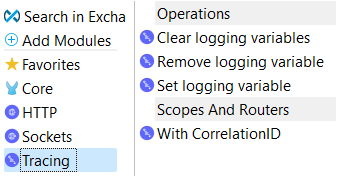
Prerequisites
There are 2 main prerequisites for using MDC logging
- Add Tracing Module to your Mule Project
- Change Pattern Layout to MDC in log4j2.xml
<PatternLayout pattern="%-5p %d [%t] [%MDC] %c: %m%n"/>Change Pattern Layout in log4j2.xml
Open log4j2.xml located at the src/main/resources of your project.
Replace [processor: %X{processorPath}; event: %X{correlationId}] with [%MDC] for Pattern Layout.
   <Appenders>
        <RollingFile name="file" fileName="${sys:mule.home}${sys:file.separator}logs${sys:file.separator}mdc-logging-example.log"
                 filePattern="${sys:mule.home}${sys:file.separator}logs${sys:file.separator}mdc-logging-example-%i.log">
            <PatternLayout pattern="%-5p %d [%t] [%MDC] %c: %m%n"/>
            <SizeBasedTriggeringPolicy size="10 MB"/>
            <DefaultRolloverStrategy max="10"/>
        </RollingFile>
    </Appenders>
Configure the Set Logging Variables
- To set logging variables, first you need to install Tracing Module in Anypoint Studio.
- Drag and Drop Set Logging variables to your mule application.
- Set variable name and value. This can be any id, query parameters, headers or any other information which help you searching or group related events.

In configuration xml, set logging variable will look like as shown below
<tracing:set-logging-variable doc:name="Set logging variable"
 doc:id="64dabc52-4712-4789-9dc9-f84b5827c86e" variableName="uuid"
 value="#[attributes.queryParams.uuid]"/>
After executing the flow, the output logs are:
INFO 2021-10-28 20:28:11,395 [[MuleRuntime].uber.28: [mule-logging-application].mule-logging-applicationFlow.CPU_LITE @3ae64de5] [{correlationId=20211028202811, uuid=1234, processorPath=mule-logging-applicationFlow/processors/2}] org.mule.runtime.core.internal.processor.LoggerMessageProcessor: Start TransactionExample
<?xml version="1.0" encoding="UTF-8"?>

<mule xmlns:tracing="http://www.mulesoft.org/schema/mule/tracing" xmlns:http="http://www.mulesoft.org/schema/mule/http"
	xmlns="http://www.mulesoft.org/schema/mule/core"
	xmlns:doc="http://www.mulesoft.org/schema/mule/documentation" xmlns:xsi="http://www.w3.org/2001/XMLSchema-instance" xsi:schemaLocation="http://www.mulesoft.org/schema/mule/core http://www.mulesoft.org/schema/mule/core/current/mule.xsd
http://www.mulesoft.org/schema/mule/http http://www.mulesoft.org/schema/mule/http/current/mule-http.xsd
http://www.mulesoft.org/schema/mule/tracing http://www.mulesoft.org/schema/mule/tracing/current/mule-tracing.xsd">
	<http:listener-config name="HTTP_Listener_config" doc:name="HTTP Listener config" doc:id="7a1a2ee2-bac5-47f8-a528-002f07839486" >
		<http:listener-connection host="0.0.0.0" port="8081" />
	</http:listener-config>
	<configuration doc:name="Configuration" doc:id="4bcc6cce-e71d-463a-ac41-71b9c67ecf81" correlationIdGeneratorExpression='#[now() as String{format:"yyyyMMddHHmmss"}]' />
	<flow name="mdc-logging-exampleFlow" doc:id="b875539a-9276-4302-822c-b871c01c850b" >
		<http:listener doc:name="Listener" doc:id="f7b5cd1d-4f14-44ca-887a-9c7ca9837dbb" config-ref="HTTP_Listener_config" path="/test"/>
		<tracing:set-logging-variable doc:name="Set logging variable" doc:id="64dabc52-4712-4789-9dc9-f84b5827c86e" variableName="uuid" value="#[attributes.queryParams.uuid]"/>
		<tracing:set-logging-variable doc:name="Set logging variable" doc:id="4afdf594-b217-4063-8e1e-023dffdc0a18" variableName="Test" value="1234343"/>
		<logger level="INFO" doc:name="Logger" doc:id="a9dc5218-e5cf-4913-8dbb-23999a90400e" message="#['Start of the flow']"/>
		<logger level="INFO" doc:name="Logger" doc:id="655909d8-7133-42db-a49a-ff7130a6d8b7" message="#[payload]"/>
	</flow>
</mule>
Check this video showing how to configure MDC logging in your Mule application.
Now, you know how to configure MDC logging for your Mule Application.
Opinions expressed by DZone contributors are their own.
Comments