

Micronaut, Quarkus, and Spring Boot Help You Develop Native Java Apps
Build Java apps securely.

Join the DZone community and get the full member experience.
Join For FreeFor decades, Java has been able to invoke native programs on an operating system. JNI (Java Native Interface) and JNA (Java Native API) are commonly used to invoke native programs (Java Native Access). In recent years, Java has gained the ability to run JVM apps natively. In other words, the JVM apps are binary executables with no dependency on the Java runtime.
Now Java apps start up in milliseconds, instead of seconds. seconds. This is a game-changer if you're scaling up to accommodate millions of requests, while saving money by adopting a serverless environment. For years, developers have chosen to use serverless environments with Node.js, Python, and Go. The ability to go serverless with Java (or Kotlin) brings the opportunity to an important developer community.
This tutorial will show you how to create a secure Java REST API with JWT authentication, protected by OAuth 2.0. Micronaut, Quarkus, and Spring Boot are three of the most popular Java frameworks. First, I'll demonstrate how to use Java to access their data. Then I'll show you how to use each framework to create and test native images. Along the way, I'll highlight some issues to be aware of in each framework and how to solve them.
Prerequisites
HTTPie (a better version of cURL)
An Okta Developer Account
Get Started with Native Java Frameworks
I created a GitHub repository you can clone and run to get started with all three frameworks quickly.
git clone https://github.com/oktadev/native-java-examples.git
This project has directories with the latest versions of Micronaut, Quarkus, and Spring Boot (at the time of this writing). I’ll show you how I created them in individual sections below.
Open the native-java-examples directory in your favorite IDE, so you have easy access to each framework’s project files.

If you want to see how to build native images in each framework, skip to the build native images for Micronaut, Quarkus, and Spring Boot section.
Install a JDK with GraalVM
You will need a JDK with GraalVM and its native-image compiler. Using SDKMAN, run the following command and set it as the default:
sdk install java 21.1.0.r11-grl
Add the native extension to the JDK:
gu install native-image
Launch a Micronaut Java API
In a terminal window, cd into the micronaut directory and run mn:run to start it.
cd micronaut
./mvnw mn:run
If you open another terminal window and try to access it with HTTPie, you’ll get a 401 Unauthorized error.
$ http :8080/hello

HTTP/1.1 401 Unauthorized
connection: keep-alive
transfer-encoding: chunked
To make it so you can access this endpoint, you’ll need to generate an OAuth 2.0 access token and update the JWKS (JSON Web Key Sets) URL to yours (in this project’s application.yml).

If you’re unsure what OIDC and OAuth 2.0 are, see our Illustrated Guide to OAuth and OpenID Connect.
Before you begin, you’ll need a free Okta developer account. Install the Okta CLI and run okta register to sign up for a new account. If you already have an account, run okta login. Then, run okta apps create. Select the default app name, or change it as you see fit. Choose Single-Page App and press Enter.
Use https://oidcdebugger.com/debug for the Redirect URI and set the Logout Redirect URI to https://oidcdebugger.com.
What does the Okta CLI do?
Take note of the clientId and issuer values. You’ll need those to get an access token and to configure each framework for JWT authentication.
Open micronaut/src/main/resources/application.yml and change the Okta URL to match yours.
micronaut:
  application:
    name: app
  security:
    enabled: true
    token:
      jwt:
        enabled: true
        claims-validators:
          issuer: https://{yourOktaDomain}/oauth2/default
        signatures:
          jwks:
            okta:
              url: https://{yourOktaDomain}/oauth2/default/v1/keys
Stop your Micronaut app with Ctrl+C and restart it with ⬆️+Return.
./mvnw mn:run
Generate an OAuth 2.0 Access Token
An easy way to get an access token is to generate one using OpenID Connect Debugger. First, you must configure your application on Okta to use OpenID Connect’s implicit flow.
Run okta login and open the resulting URL in your browser. Go to the Applications section and select the application you just created. Edit its General Settings and add Implicit (Hybrid) as an allowed grant type, with access token enabled. Then, make sure it has https://oidcdebugger.com/debug in its Login redirect URIs. Click Save and copy the client ID for the next step.
Now, navigate to the OpenID Connect Debugger website. Fill in your client ID, and use https://{yourOktaDomain}/oauth2/default/v1/authorize for the Authorize URI. The state field must be filled but can contain any characters. Select token for the response type.

Click Send Request to continue.
Once you have an access token, set it as a TOKEN environment variable in a terminal window.
TOKEN=eyJraWQiOiJYa2pXdjMzTDRBYU1ZSzNGM...
You might want to keep OpenID Connect <debugger/> open to copy your access tokens. It allows you to quickly start over and regenerate a new access token if it expires.
Test Your Micronaut API with HTTPie
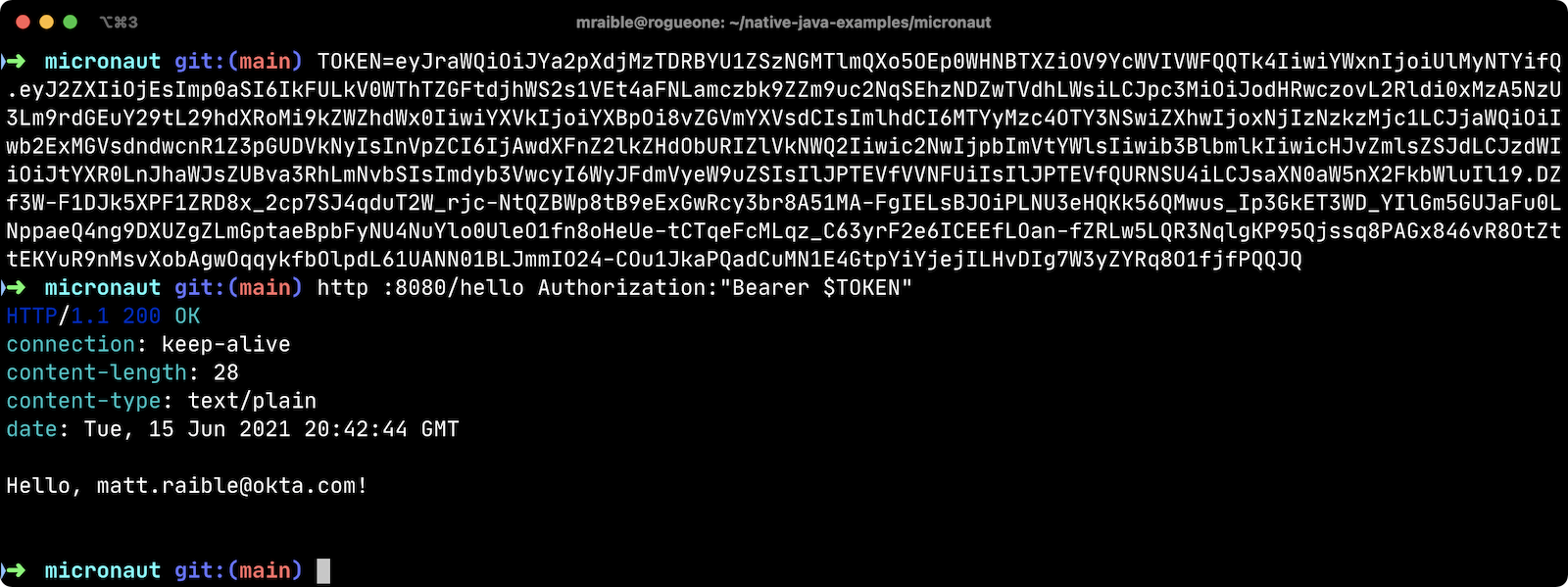
Use HTTPie to pass the JWT in as a bearer token in the Authorization header.
http :8080/hello Authorization:"Bearer $TOKEN"
You should get a 200 response with your email in it.
Build a Native Micronaut App
To compile this Micronaut app into a native binary, run:
./mvnw package -Dpackaging=native-image
This command will take a few minutes to complete. My 2019 MacBook Pro with a 2.4 GHz 8-Core Intel Core i9 processor and 64 GB of RAM took 1 min. 38 s. to finish.
Start it with ./target/app:
$ ./target/app
 __  __ _                                  _
|  \/  (_) ___ _ __ ___  _ __   __ _ _   _| |_
| |\/| | |/ __| '__/ _ \| '_ \ / _` | | | | __|
| |  | | | (__| | | (_) | | | | (_| | |_| | |_
|_|  |_|_|\___|_|  \___/|_| |_|\__,_|\__,_|\__|
  Micronaut (v3.0.1)

09:26:51.617 [main] INFO  io.micronaut.runtime.Micronaut - Startup completed in 23ms. Server Running: http://localhost:8080
You can see it starts pretty darn quick (23ms)! Test it with HTTPie and an access token. You may have to generate a new JWT with oidcdebugger.com if yours has expired.
http :8080/hello Authorization:"Bearer $TOKEN"
Make a Micronaut App from Scratch
You might be wondering, "how did you build a secure Micronaut app"? Did I just hide the complexity? No, it only takes five steps to create the same app.
1. Use SDKMAN! to install Micronaut’s CLI:
sdk install micronaut
2. Create an app using the mn create-app command and rename the project’s directory:
mn create-app com.okta.rest.app --build maven
mv app micronaut
3. Add Micronaut’s libraries for JWT security:
<dependency>
    <groupId>io.micronaut.security</groupId>
    <artifactId>micronaut-security</artifactId>
</dependency>
<dependency>
    <groupId>io.micronaut.security</groupId>
    <artifactId>micronaut-security-jwt</artifactId>
</dependency>
<dependency>
    <groupId>javax.inject</groupId>
    <artifactId>javax.inject</artifactId>
    <version>1</version>
</dependency>
4. Add a HelloController in src/main/java/com/okta/rest/controller:
package com.okta.rest.controller;

import io.micronaut.http.MediaType;
import io.micronaut.http.annotation.Controller;
import io.micronaut.http.annotation.Get;
import io.micronaut.http.annotation.Produces;
import io.micronaut.security.annotation.Secured;
import io.micronaut.security.rules.SecurityRule;

import java.security.Principal;

@Controller("/hello")
public class HelloController {

    @Get
    @Secured(SecurityRule.IS_AUTHENTICATED)
    @Produces(MediaType.TEXT_PLAIN)
    public String hello(Principal principal) {
        return "Hello, " + principal.getName() + "!";
    }

}
5. Enable and configure JWT security in src/main/resources/application.yml:
micronaut:
  ...
  security:
    enabled: true
    token:
      jwt:
        enabled: true
        claims-validators:
          issuer: https://{yourOktaDomain}/oauth2/default
        signatures:
          jwks:
            okta:
              url: https://{yourOktaDomain}/oauth2/default/v1/keys
That’s it! Now you can start the app or build the native image as shown above.
Now let’s take a look at Quarkus.
Run a Quarkus Java API
Open a terminal, cd into the quarkus directory, and run quarkus:dev to start the app.
cd quarkus
./mvnw quarkus:dev
Update the URLs in quarkus/src/main/resources/application.properties to use your Okta domain.
mp.jwt.verify.publickey.location=https://{yourOktaDomain}/oauth2/default/v1/keys
mp.jwt.verify.issuer=https://{yourOktaDomain}/oauth2/default
Test Your Quarkus API with HTTPie
Generate or copy an access token from OpenID Connect <debugger/> and use it to test your Quarkus API.
http :8080/hello Authorization:"Bearer $TOKEN"
You should see your email in the response.
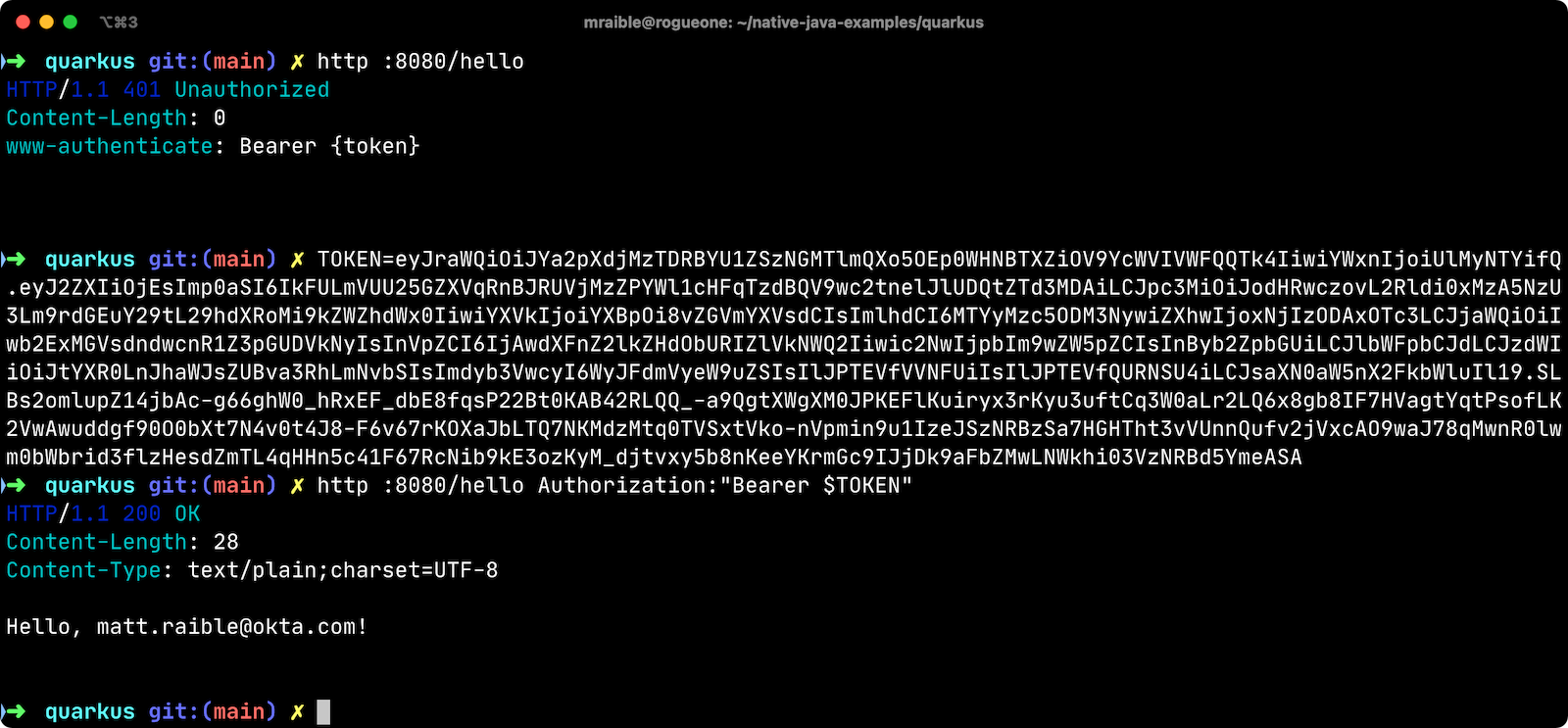
Did you notice that Quarkus hot-reloaded your application.properties file updates? Pretty slick, eh?!
Build a Native Quarkus App
To compile this Quarkus app into a native binary, run:
./mvnw package -Pnative
The native compilation step will take a bit to complete. On my 2019 MacBook Pro, it took 1 min. 18 s.
Start it with ./target/quarkus-1.0.0-SNAPSHOT-runner:
$ ./target/quarkus-1.0.0-SNAPSHOT-runner
__  ____  __  _____   ___  __ ____  ______
 --/ __ \/ / / / _ | / _ \/ //_/ / / / __/
 -/ /_/ / /_/ / __ |/ , _/ ,< / /_/ /\ \
--\___\_\____/_/ |_/_/|_/_/|_|\____/___/
2021-09-15 09:42:35,854 INFO  [io.quarkus] (main) quarkus 1.0.0-SNAPSHOT native (powered by Quarkus 2.2.2.Final) started in 0.018s. Listening on: http://0.0.0.0:8080
2021-09-15 09:42:35,855 INFO  [io.quarkus] (main) Profile prod activated.
2021-09-15 09:42:35,855 INFO  [io.quarkus] (main) Installed features: [cdi, resteasy, security, smallrye-context-propagation, smallrye-jwt, vertx, vertx-web]
Supersonic Subatomic Java (in 18ms)! Test it with HTTPie and an access token.
http :8080/hello Authorization:"Bearer $TOKEN"
Create a Quarkus App from Scratch
You can create the same Quarkus app used in this example in five steps.
1. Use Maven to generate a new Quarkus app with JWT support:
mvn io.quarkus:quarkus-maven-plugin:2.2.2.Final:create \
    -DprojectGroupId=com.okta.rest \
    -DprojectArtifactId=quarkus \
    -DclassName="com.okta.rest.quarkus.HelloResource" \
    -Dpath="/hello" \
    -Dextensions="smallrye-jwt"
2. Edit src/java/com/okta/rest/quarkus/HelloResource.java and add user information to the hello() method:
package com.okta.rest.quarkus;

import io.quarkus.security.Authenticated;

import javax.ws.rs.GET;
import javax.ws.rs.Path;
import javax.ws.rs.Produces;
import javax.ws.rs.core.Context;
import javax.ws.rs.core.MediaType;
import javax.ws.rs.core.SecurityContext;
import java.security.Principal;

@Path("/hello")
public class HelloResource {

    @GET
    @Path("/")
    @Authenticated
    @Produces(MediaType.TEXT_PLAIN)
    public String hello(@Context SecurityContext context) {
        Principal userPrincipal = context.getUserPrincipal();
        return "Hello, " + userPrincipal.getName() + "!";
    }
}
3. Add your Okta endpoints to src/main/resources/application.properties:
mp.jwt.verify.publickey.location=https://{yourOktaDomain}/oauth2/default/v1/keys
mp.jwt.verify.issuer=https://{yourOktaDomain}/oauth2/default
4. Modify the HelloResourceTest to expect a 401 instead of a 200:
package com.okta.rest.quarkus;

import io.quarkus.test.junit.QuarkusTest;
import org.junit.jupiter.api.Test;

import static io.restassured.RestAssured.given;

@QuarkusTest
public class HelloResourceTest {

    @Test
    public void testHelloEndpoint() {
        given()
            .when().get("/hello")
            .then()
            .statusCode(401);
    }

}
Last but certainly not least, let’s look at Spring Boot.
Start a Spring Boot Java API
In your IDE, update the issuer in spring-boot/src/main/resources/application.properties to use your Okta domain.
spring.security.oauth2.resourceserver.jwt.issuer-uri=https://{yourOktaDomain}/oauth2/default
Then, start your app from your IDE or using a terminal:
./mvnw spring-boot:run
Test Your Spring Boot API with HTTPie
Generate an access token using oidcdebugger.com and use it to test your Spring Boot API.
http :8080/hello Authorization:"Bearer $TOKEN"
You should see a response like the following.

But wait, doesn’t Okta have a Spring Boot starter? Yes, we do! When this post was first written, it didn’t work with GraalVM. This has been fixed in the v2.1.1 release. See this pull request for the required changes.
We’ve also published a Spring Native in Action blog post. It contains the video from our Twitch stream with Josh Long. You can watch it to see what we discovered and how we fixed things. Since then, Spring Native has improved a lot. Now, you only need to enable HTTPS!
Build a Native Spring Boot App
To compile this Spring Boot app into a native executable, you can use the Spring Boot Maven plugin:
./mvnw spring-boot:build-image
The native compilation step will take a bit to complete. On my 2019 MacBook Pro, it took 2 min. 40 s.
Start it using Docker:
$ docker run -p 8080:8080 demo:0.0.1-SNAPSHOT
2021-09-15 19:34:02.719  INFO 1 --- [           main] o.s.nativex.NativeListener               : This application is bootstrapped with code generated with Spring AOT

  .   ____          _            __ _ _
 /\\ / ___'_ __ _ _(_)_ __  __ _ \ \ \ \
( ( )\___ | '_ | '_| | '_ \/ _` | \ \ \ \
 \\/  ___)| |_)| | | | | || (_| |  ) ) ) )
  '  |____| .__|_| |_|_| |_\__, | / / / /
 =========|_|==============|___/=/_/_/_/
 :: Spring Boot ::                (v2.5.4)
...
2021-09-15 19:34:03.484  INFO 1 --- [           main] o.s.b.w.embedded.tomcat.TomcatWebServer  : Tomcat started on port(s): 8080 (http) with context path ''
2021-09-15 19:34:03.485  INFO 1 --- [           main] com.okta.rest.DemoApplication            : Started DemoApplication in 0.773 seconds (JVM running for 0.776)
Bootiful! Test your API with HTTPie and an access token.
http :8080/hello Authorization:"Bearer $TOKEN"
Start a Spring Boot App from Scratch
To create the Spring Boot app used in this example, it’s just five steps.
1. Use HTTPie to generate a new Spring Boot app with OAuth 2.0 support:
http https://start.spring.io/starter.zip \
     bootVersion==2.5.4 \
     dependencies==web,oauth2-resource-server,native \
     packageName==com.okta.rest \
     name==spring-boot \
     type==maven-project \
     baseDir==spring-boot | tar -xzvf -
2. Add a HelloController class that returns the user’s information:
package com.okta.rest.controller;

import org.springframework.web.bind.annotation.GetMapping;
import org.springframework.web.bind.annotation.RestController;

import java.security.Principal;

@RestController
public class HelloController {

    @GetMapping("/hello")
    public String hello(Principal principal) {
        return "Hello, " + principal.getName() + "!";
    }
}
3. Configure the app to be an OAuth 2.0 resource server by adding an issuer to application.properties:
spring.security.oauth2.resourceserver.jwt.issuer-uri=https://{yourOktaDomain}/oauth2/default
4. Add a SecurityConfiguration class to configure JWT authentication:
package com.okta.rest;

import org.springframework.security.config.annotation.web.builders.HttpSecurity;
import org.springframework.security.config.annotation.web.configuration.EnableWebSecurity;
import org.springframework.security.config.annotation.web.configuration.WebSecurityConfigurerAdapter;
import org.springframework.security.config.annotation.web.configurers.oauth2.server.resource.OAuth2ResourceServerConfigurer;

@EnableWebSecurity
public class SecurityConfiguration extends WebSecurityConfigurerAdapter {

    @Override
    protected void configure(HttpSecurity http) throws Exception {
        http
            .authorizeRequests(request -> request.anyRequest().authenticated())
            .oauth2ResourceServer(OAuth2ResourceServerConfigurer::jwt);
    }
}
5. Enable HTTPS for native builds by adding a @NativeHint annotation to the DemoApplication class.
import org.springframework.nativex.hint.NativeHint;

@NativeHint(options = "--enable-https")
@SpringBootApplication
You can build and test a Spring Boot native image using the steps I outlined above.
Build Native Images for Micronaut, Quarkus, and Spring Boot
To recap, Micronaut, Quarkus, and Spring Boot all support building native executables with GraalVM. Yes, there are other frameworks, but these three seem to be the most popular.
The commands to build each app are similar but not quite the same.
Micronaut:
./mvnw package -Dpackaging=native-imageQuarkus:
./mvnw package -PnativeSpring Boot:
./mvnw spring-boot:build-image
Of course, they all support Gradle too.
Startup Time Comparison
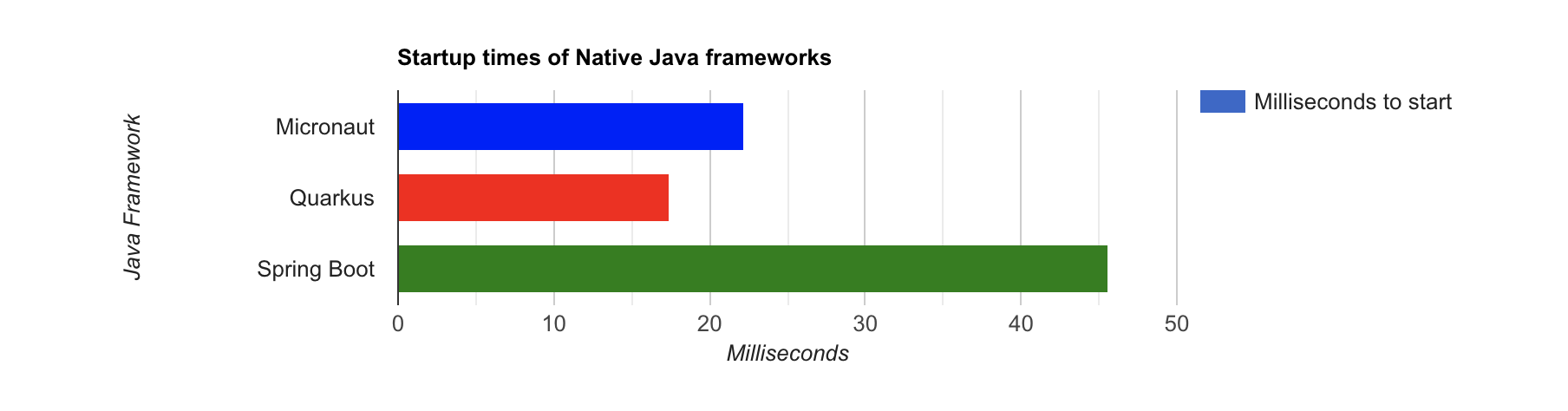
Performance comparisons are complex, but I’m going to do one anyway. Since this post is all about native Java, below is the data I gathered that shows the average milliseconds to start each native executable. I ran each image three times before I started recording the numbers. I then ran each command five times.
These numbers are from a 2019 MacBook Pro with a 2.4 GHz 8-Core Intel Core i9 processor and 64 GB of RAM. I think it’s important to note that my WiFi connection was 211 Mbps down and 176 Mbps up (according to the Speedtest app).
Table 1. Native Java Startup times in milliseconds
| Framework | Command executed | Milliseconds to start |
|---|---|---|
Micronaut |
|
22.2 |
Quarkus |
|
17.4 |
Spring Boot |
|
647.2 |
The chart below should help you visualize this comparison.
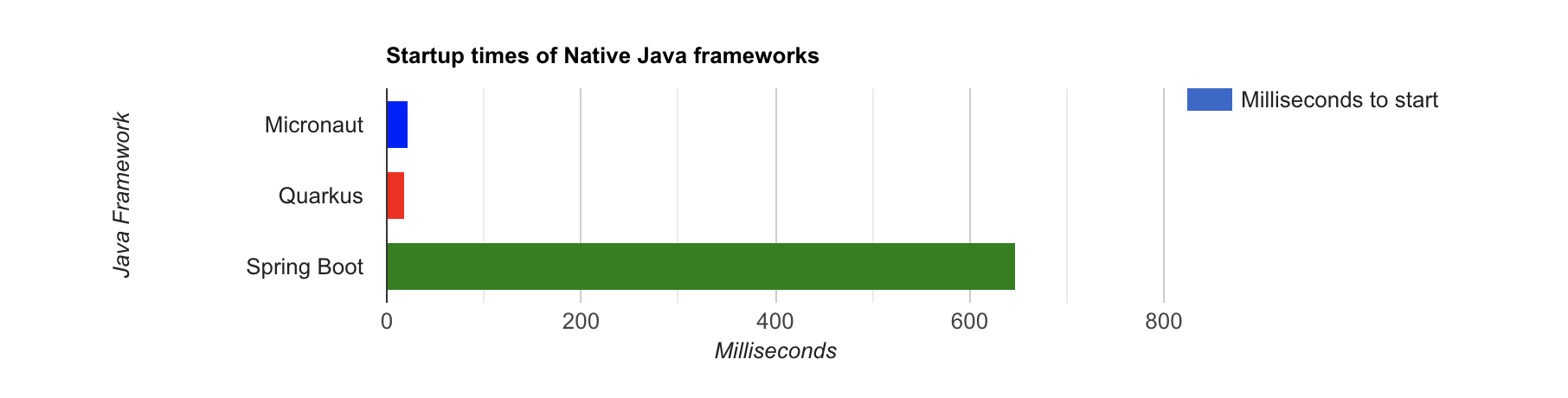
The Spring Boot startup times looked a little long, so I contacted my friend Josh Long. We did a debugging session over Zoom and discovered the longer startup times are because Spring Security is doing OIDC discovery with the issuer.
Spring Boot’s "initialization completed" time seemed to be right around 30ms. The duration between that and the "Started in …" time is the time it takes to make the call to Okta. We tried optimizing it by just using the JWKS URI. For example:
spring.security.oauth2.resourceserver.jwt.jwk-set-uri=https://dev-133337.okta.com/oauth2/default/v1/keys
This improved the startup time by over 500ms (91.6ms on average).
We also experimented with using ./mvnw package -Pnative for Spring Boot. This allows you to create a native binary and run it with ./target/demo. There’s no need for Docker with this command. Startup times are relatively the same in my and Josh’s experience.
Our hypothesis is Micronaut and Quarkus do the JWKS lookup on the first request rather than at startup. That’s how they achieve faster startup times.

We later confirmed this hypothesis with Jason Schindler (from Micronaut) and Sergey Beryozkin (from Quarkus). Follow this Spring Security issue to see when Spring Security adds lazy OIDC discovery support.
If I just take the value of the "initialization completed" time from Spring Boot, the numbers look a little more even.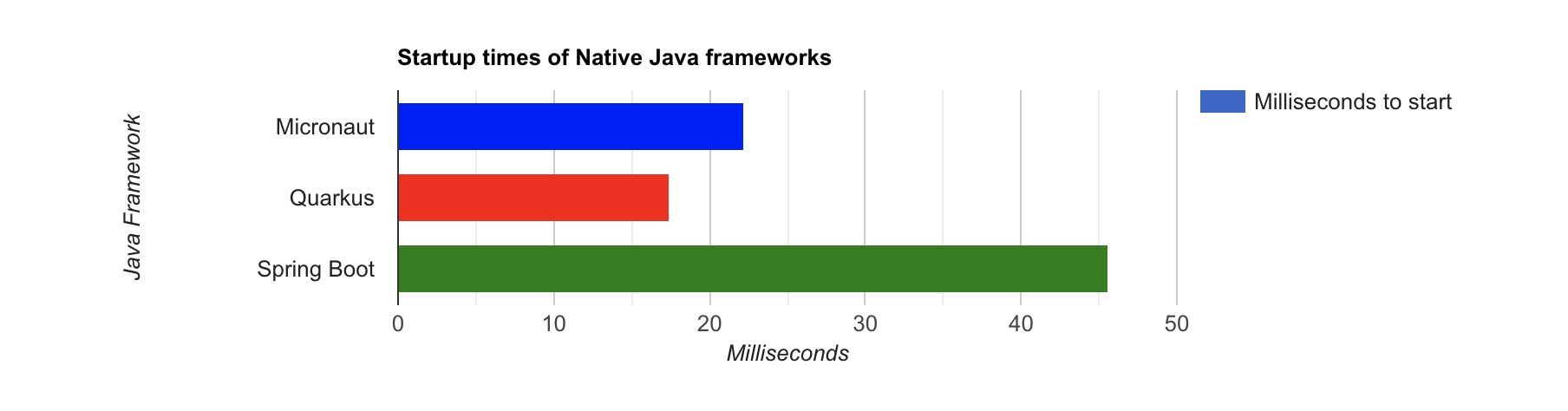
I also tested the memory usage in MB of each app using the command below. I made sure to send an HTTP request to each one before measuring.
ps -o pid,rss,command | grep --color <executable> | awk '{$2=int($2/1024)"M";}{ print;}'
I substituted <executable> as follows:
Table 2. Native Java memory used in megabytes
| Framework | Executable | Megabytes before request | Megabytes after request |
|---|---|---|---|
Micronaut |
|
29 |
62 |
Quarkus |
|
20 |
34 |
Spring Boot |
|
107 |
119 |

If you disagree with these numbers and think X framework should be faster, I encourage you to clone the repo and run these tests yourself. If you get faster startup times for Spring Boot, do you get faster startup times for Micronaut and Quarkus too?
Testing Native Images
When building native images, it’s essential to test them as part of an integration testing process. This post is already long enough, so I won’t explain how to test native images in this post. We’ll publish a post in the future that covers this topic.
I do like how Quarkus generates a NativeHelloResourceIT that’s designed specifically for this, though.
package com.okta.rest.quarkus;

import io.quarkus.test.junit.NativeImageTest;

@NativeImageTest
public class NativeHelloResourceIT extends HelloResourceTest {

    // Execute the same tests but in native mode.
}
However, this test did not help me detect an issue with my Quarkus native image when writing this post. That’s because I was lazy in writing my test and changed it to confirm a 401 instead of testing it with Quarkus' OIDC testing support.
In the meantime, see Gradle and Maven Plugins for Native Image with Initial JUnit 5 Testing Support.
Learn More About Java and GraalVM
In this post, you learned how to develop, build, and run native Java apps with Micronaut, Quarkus, and Spring Boot. You learned how to secure them with OpenID Connect and access them with a JWT access token.
If you’re a Spring Boot aficionado, I recommend you watch Josh Long’s Spring Tips: Spring Native 0.10.0 video.
You can find the source code for all the examples used in this post on GitHub in the native-java-examples repository.
Server-side apps that serve up REST APIs aren’t the only thing that’s gone native in Java. Gluon has done a lot of work in recent years to make JavaFX apps work on iOS and Android using GraalVM. See Gail Anderson's Creating Mobile Apps with JavaFX – Part 1 to learn more about this emerging technology.
In the beginning, I mentioned JNI and JNA. Baeldung has some tutorials about both:
If you liked this post, chances are you’ll like others we’ve published:
Got questions? Leave them in the comments below! You can also hit us up on our social channels: @oktadev on Twitter, Okta for Developers on LinkedIn, Twitch, and YouTube.
Changelog:
- Sep 16, 2021: Updated to use macOS binary (
./mvnw package -Pnative) when calculating memory usage for Spring Boot. See the updates in okta-blog#887. - Sep 16, 2021: Updated to use Micronaut 3.0.1, Quarkus 2.2.2.Final, and Spring Boot 2.5.4. Also added memory usage comparison. See this post’s changes in okta-blog#885 and the example app changes in native-java-examples#6.
Published at DZone with permission of Matt Raible. See the original article here.
Opinions expressed by DZone contributors are their own.
Comments