

[Part 1] Mule 4: Using SSL/TLS
The first part in a two-part series where we will configure the Mule Application to use One Way SSL and Two Way SSL.
Join the DZone community and get the full member experience.
Join For FreeThis is the first part of a two-part series in which we will configure the Mule Application to use One Way SSL and Two Way SSL.
The first part covers the overview of SSL/TLS Concepts and in the second part, we will configure the Mule Application for One Way SSL and Two Way SSL.
Security During Data Exchange
To secure the exchange of sensitive data between client and server, we use the SSL/TLS protocol.
SSL/TLS ensures data integrity and sends encrypted data over the network so that exchanged data is not interpreted by any third party during the transit of data.
Encryption
Encryption makes the data cryptic using algorithms. The encrypted data is unreadable to any unintended user if they don’t have the key to decrypt this data.
Let’s understand two types of encryption: - Symmetric Encryption and Asymmetric Encryption.
Symmetric Encryption
Let’s understand Symmetric Encryption using an example -
Client Application has to send sensitive data to the Server Application.
Client encrypts the data using a specific key and sends the data to Server Application. Server Application decrypts this data using the same key.
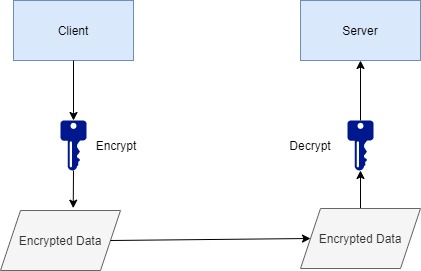
The same key is used on both sides and hence it is called Symmetric Key Encryption.
Anyone who has access to the key can decrypt the data so the key is to be kept secret.
Many different Encryption algorithms are available like DES,3DES, AES, Blowfish, etc.
Asymmetric Encryption
In Symmetric Encryption, a single key is used on both sides.
But In Asymmetric Encryption, we have a pair of two keys – a public key and private key.
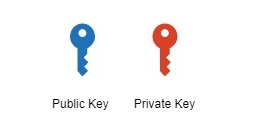
The owner keeps the private key as a secret to itself and shares the public key with others.
Data is exchanged between client and server which is encrypted/decrypted using a public/private key pair.
In our example, the server has a public key and a private key.
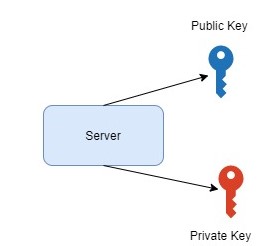
The server shares the public key with the Client.
Client encrypts the data using the public key and sends it to Server. The server uses its private key to decrypt the received data.
When Server sends the data back to the Client, it encrypts the data using its private key and sends it across. The client decrypts the received data using Server’s public key.
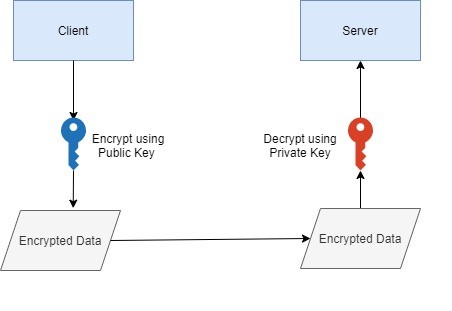
The private/public key pair is ALSO used for signing data/verifying the signature. The server will sign the data using its private key and the client will verify the signature using the server’s public key. More about the signature will be discussed further in this article.
Data Integrity Using Digest/Hash
Data Integrity is important when data is exchanged between two applications. When Client and Server exchange data, the data must not be compromised. The data should be received by each side without errors.
Let's take an example where the client wants to send data “order status-Cancelled” to Server
Client encrypts the data using Server’s public key and sends it to Server.
The server decrypts the data using its private key and the exchange is successful.
Let’s explore the failure scenario –
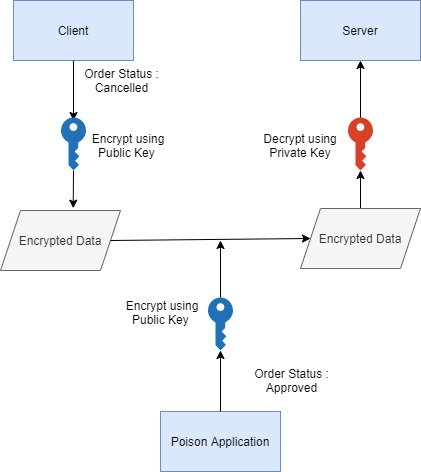
A Poison Application hacks the communication and sends “Order Status - Approved “ to Server. The poison application has also encrypted this data using Server’s public key.
Now Server receives the incorrect information, decrypts using its private key, and use it. This is a data integrity issue.
How is Data Integrity Ensured?
Data Integrity is ensured using the digest/hash of the data which is exchanged between client and server.
A Digest/Hash is created from the data – “Order status: Cancelled”.
The input of this digest/hash function is – “Order status: Cancelled” and Output is irreversible fixed-length digest
A one-way digest is created i.e. this digest cannot be used to recreate the input data.
A simple change in data will create a new digest.
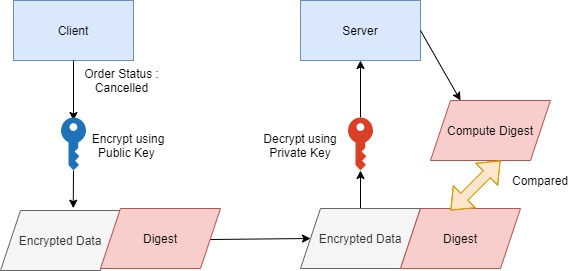
The client creates encrypted data and digests of data. Both are sent separately to the Server.
The server receives the data. It creates a digest using received data and the same algorithm.
The computed digest is compared with the received digest to see if they match.
If the poison application sends the order status as approved, the digest of this data will not match the digest received by Server.
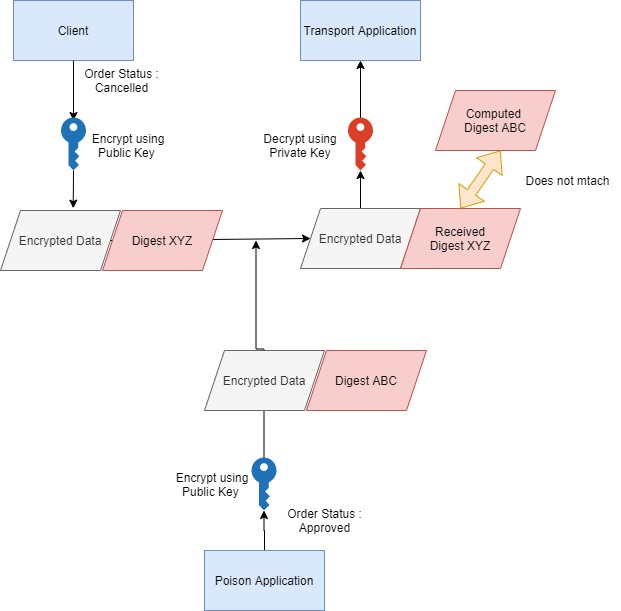
Many algorithms are available to create digest/hash like MD5 (128-bit output), SHA-1(160-bit output), SHA-256 (256-bit output), SHA-512 (512-bit output), etc.
RSA Algorithm
RSA stands for Rivest, Shamir, Adleman(the names of three developers).
RSA is a popular asymmetric cryptography algorithm which helps in taking different actions based on asymmetric keys – private and public
This cryptosystem can be used to create public and private keys of different lengths – 1024 bits, 2048 bits, 3072 bits, 4096 bits. Key lengths are always the same for public and private keys.
In RSA, both public and private keys can encrypt the message and the other side decrypts the message using the opposite key. SSL/TLS uses the RSA algorithm for encryption, decryption, and digital signatures.
The encryption strength of data depends on the key size.
In this article series, we will generate keys using RSA algorithm.
There are many other Asymmetric Algorithms like Diffie-Hellman Key Exchange, Elliptic curve cryptography, etc.
Public Key Infrastructure(PKI)
PKI consists of protocols, algorithms, and certificates. PKI allows communication based on certificates and trust.
PKI elements are –
Certificate
- Includes owner information, issuer, signature, and most importantly public key of the owner.
- Certificate/public key of any entity is to be trusted by CA
Root CA – Certificate Authority
- Its role is to sign certificates or delegate the trust to other entities known as intermediate CAs. Root CA has its own private key and public key.
- Some of the examples of Root CAs are – Verisign, GoDaddy, etc.
Intermediate CA
- Its role is to sign the owner’s certificates for e.g. Certificate of our website.
- Intermediate CA has its own private key and public key.
Certificate
Let’s understand what is a certificate?
The certificate is a file with –
- owner details
- issuer details – who has signed the certificate
- Signature of the issuer - Signature is Encrypted digest/hash and this encryption is done using a private key
- Public Key of owner
Why is a certificate needed –
- The client has to get the public key of the owner/server
- The client has to authenticate/trust the owner before using a public key e.g. if any site is claiming to be google.com, the client needs to be sure if it really is google.com?
How the client trusts? -
- Server Certificate is signed by the CA – Certificate Authority
- The client trusts CA and If CA says that the site is really google.com then the client trust the site as google.com
Self-signed Certificate
A self-signed certificate is issued and signed by the owner/server itself. The owner is vouching for its own identity.
Signature is created using the private key of the owner of the certificate
CA-signed Certificate
The server certificate is signed by Root CA/Intermediate CA. If the client trust CA, it will in turn trust the server/owner also.
Chain of Trust
- Root CA signs its own certificate.
- Intermediate CA certificate is signed by Root CA.
- Server/End User certificate can be signed directly by Root CA or it could be signed by Intermediate CA.
As Client -> trusts Root CA -> Root CA trusts Intermediate CA -> Intermediate CA trusts End User/Server Certificate
So Client trusts Server Certificate. This is known as a Chain of Trust.
Signature in Certificate
The client starts communicating with the Server only after authenticating the Server. So how is the server authenticated and what is a signature?
Let's assume that Root CA has directly signed the Server’s certificate. What does this mean?
This means the digest of the certificate is encrypted by Root CA’s private key. This encrypted digest is known as the signature of Root CA.
The client receives the encrypted digest. The client decrypts the digest using the public key of Root CA and compares it with its own computed digest(computed using the received certificate).
If they match, the client is sure that Root CA has signed it, and hence it can trust the server certificate.
Example Certificate: Wikipedia
Let’s take a glimpse of the Wikipedia certificate
Let’s go to the Wikipedia website and Click on the lock sign of the browser location bar
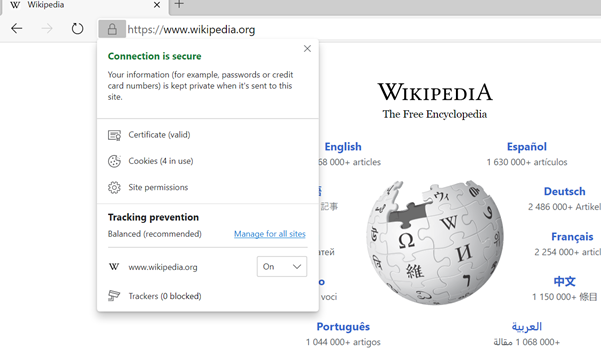
Click on the certificate to view the certificate -
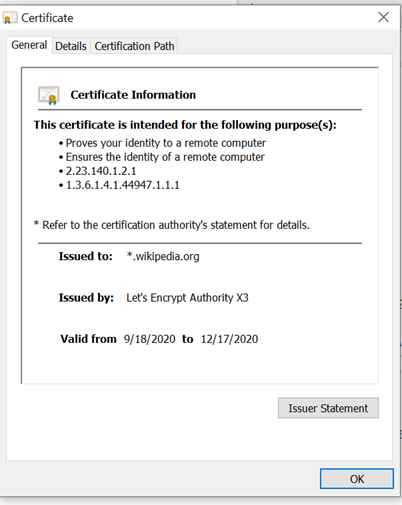
The General Tab of the certificate shows –
issued to
Issued By:- who has issued the certificate
validity period.
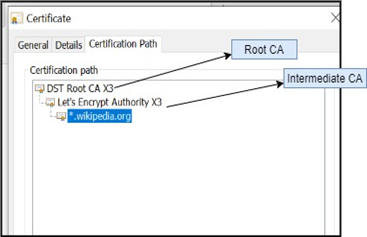
In the Certification Path tab, you can see Root CA, Intermediate CA, and the certificate is issued to the domain/ subdomain of Wikipedia.
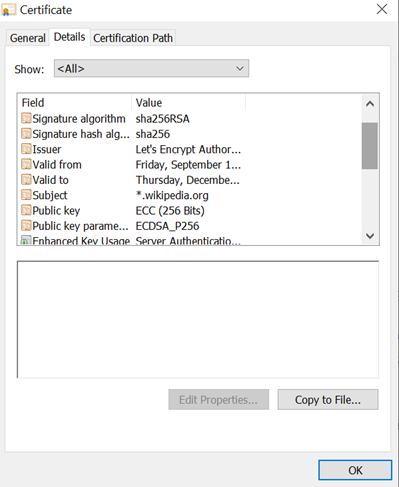
The Details tab shows a lot of information like a public key, signature algorithm, etc.
This certificate shows the signature algorithm above as SHA-256 with RSA.
This means that this certificate data digest/hash is created using SHA-256 and then it is encrypted by a private key generated using RSA. The private key is of Intermediate CA and this certificate is signed by Intermediate CA.
Certificate Verification
Let look into the process of Certificate verification by the Client.
Client access the webpage using HTTPS
The web server sends its own certificate to the client.
A client starts the verification –
- The client checks the end-user certificate
- Certificate validity period is checked
- Checks the issuer in the certificate
- The issuer info of the Server/End User Certificate will match the owner information of Intermediate CA.
- The client retrieves the public key of the Intermediate CA(from its certificate) and decrypts the signature in Server Certificate. If decryption is successful then it is trusted that Intermediate CA has signed the certificate
- Now trust is established between Server and Intermediate CA
- To trust Intermediate CA, the client finds Root CA certificate whose owner info is the same as that of issuer info of intermediate CA certificate
- Using the public key of the Root CA, the client verify the signature of the Root CA on the intermediate CA certificate
- This establishes the trust between Root CA and Intermediate CA.
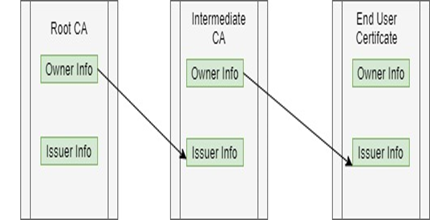
- Now client -> trusts Root CA -> Root CA trusts Intermediate CA -> Intermediate CA trusts Server Certificate.
- The client now trusts Server Certificate using this verification process.
SSL/TLS/HTTPS
SSL/TLS is a cryptographic protocol. SSL stands for Secure Sockets Layer and TLS stands for Transport Layer Security.
SSL is deprecated and TLS is used presently. Different SSL/TLS versions are available.
Using SSL/TLS, a secure communication channel is established.
- Once the TCP Session is established, the TLS session will be established.
- Client and Server negotiate Cipher Suite. A cipher suite is a set of protocols to be used in TLS communication eg. symmetric key encryption algorithm etc.
- The certificate is sent/verified
- A symmetric session key is generated.
- This process is known as SSL Handshake and more about this is described in part 2 of the article.
What is HTTPS?
- HTTPS is the use of HTTP Protocol with SSL/TLS. The client uses HTTPS to connect to the server’s web application.
KeyStore and TrustStore
Let's understand where the client and server store its private keys and certificates.
KeyStore
- A Keystore contains private keys and associated certificates having the public key
- KeyStore has its own password
- Each entry of a private key/certificate combination in Keystore has its own password
- The owner/Server retrieves a certificate from its KeyStore and present it to the other side.
TrustStore
- A trust store has a list of all certificates which client trust
- These could be certificates of Trusted CA and self-signed certificates of trusted parties
- So when a Server presents its certificate, the Client will verify it using the certificates stored in TrustStore
- TrustStore is also protected by a password.
Different Types of formats are available for Keystore/truststore for eg, JKS(Java Key Store), PKCS12, etc.
In this article series, we will use JKS
JDK’s keytool
Let's look into the tool used to generate Keystore, private keys and certificates, etc.
JDK’s keytool -
- JDK has a command-line tool known as keytool
- Install Java and use key tool to create Keystore, trust store, generate self-signed certificates, and import certificates
OpenSSL is another popular tool available. In this article series, we will be using JDK's key tool.
In this article, we have gone through SSL/TLS concepts. In the next article, we will generate private/public keys using Jdk’s key tool and we will understand /configure one way/ two way SSL/TLS for Mule Application.
Opinions expressed by DZone contributors are their own.
Comments