

Multimodal AI Architecture: Unifying Vision, Text, and Sensor Intelligence
Most Android AI features stay single-modal; this architecture fuses vision, text, and sensor inputs to deliver smarter, context-aware, privacy-conscious experiences.
Join the DZone community and get the full member experience.
Join For FreeMost Android AI features today are still single-modal
- A camera screen that does object detection.
- A chat screen that calls an LLM.
- A sensor-driven feature that runs in the background.
The real fun starts when you combine these: camera, text, sensors, history, and context. That’s where multimodal AI shines — and where architecture makes or breaks your app.
This article walks through a multimodal AI architecture for Android that unifies vision, text, and sensor intelligence while staying debuggable, testable, and production-ready.
Why Multimodal on Android?
On Android, your app can see, hear, and feel the world:
- Vision: camera frames, screenshots, gallery images
- Text and language: user input, notifications, OCR, in-app content
- Sensors and context: location, motion, Bluetooth, connectivity, battery, time, app usage
Combining these allows use cases like:
- Smart inspection apps (camera + pose + environment)
- Field service or maintenance copilots (camera + language + sensor readings)
- Shopping assistants (camera + text + location + catalog)
- Accessibility helpers (vision + speech + context)
The challenge: without a clear architecture, your app becomes a tangled mess of callbacks, ad hoc model calls, and “mystery behavior” that no one can debug.
High-Level Architecture
Think of the system as four main layers:
- Input modalities (Vision, Text, Sensors)
- Fusion and context layer
- AI services layer (On-device + Cloud)
- UX and orchestration layer (Android app)
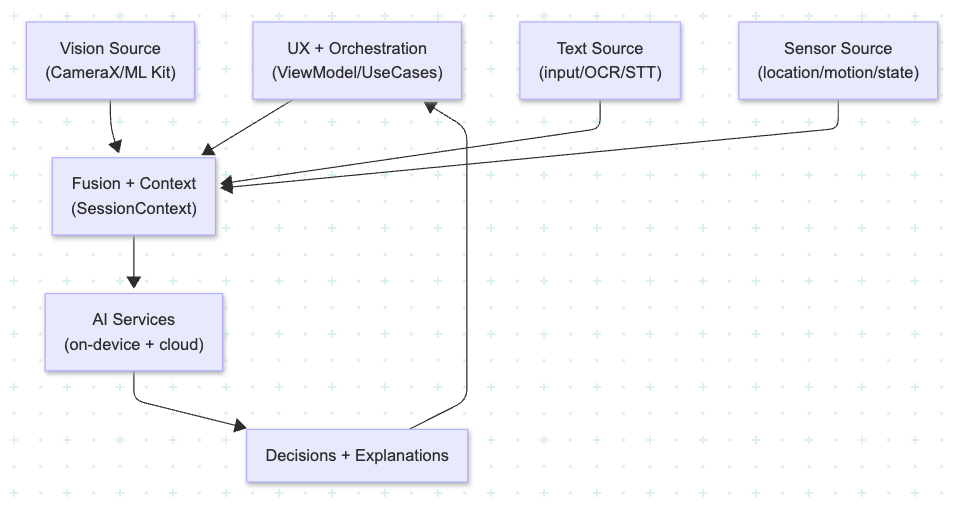
1. Input Modalities
Each modality should be isolated behind a clean interface:
- VisionSource – camera frames, gallery images, screenshots
- TextSource – user queries, OCR results, transcripts
- SensorSource – GPS, accelerometer, gyroscope, Bluetooth, network state
On Android, back these with:
- CameraX/ML Kit for vision
- EditText/Compose text fields + speech-to-text + OCR (ML Kit / on-device)
- SensorManager/Fused Location/Activity Recognition for context
Each source publishes structured events, not raw chaos:
sealed class InputEvent {
    data class VisionFrame(val bitmap: Bitmap, val timestamp: Long) : InputEvent()
    data class UserText(val text: String, val source: TextSourceType) : InputEvent()
    data class SensorSnapshot(val data: Map<String, Any>, val timestamp: Long) : InputEvent()
}
2. Fusion and Context Layer
This is the heart of multimodal AI.
You don’t want models directly wired into every input. Instead:
- Maintain a SessionContext object for the current user flow.
- Aggregate relevant signals: latest frame, last N user queries, recent sensor state, historical profile, experiment flags.
- Define fusion strategies:
- Early fusion: turn multiple raw signals into a single feature vector for a model.
- Late fusion: run separate models (vision, text, sensors) and combine outputs with a simple policy or a small “fusion model.”
Example:
- Vision model → “object: ladder, confidence 0.93”
- Sensor model → “user on a ladder/elevated height”
- Text query → “Is this safe?”
The fusion layer combines these into a risk assessment request for a safety model or rules engine. Design it so your ViewModel just does:
val decision = fusionEngine.evaluate(context, inputEvent)
instead of calling 3 – 4 different models manually.
3. AI Services Layer (On-Device + Cloud)
For Android, you usually want a hybrid approach:
- On-device AI:
- Low latency, offline, privacy-friendly.
- Use for vision (object detection, pose, OCR), simple classifiers, and embeddings.
- Cloud AI:
- Heavy LLMs, multimodal foundation models, cross-user intelligence.
- Use for explanation, reasoning, and retrieval over large knowledge bases.
Architecturally:
- Define AI services as interfaces, not static singletons:
VisionService,LLMService,ContextReasoner,RankingService, etc. - Provide multiple implementations:
OnDeviceVisionService,CloudVisionService, etc. - Use Hilt (or your DI framework) plus feature flags to swap strategies per build, cohort, or experiment.
This keeps your app flexible when the product says, “Let’s move more of this on-device for privacy.”
or “We want to A/B test the new cloud vision model.”
4. UX and Orchestration Layer
Finally, you need a place where user intent is interpreted and multimodal flows are orchestrated.
This is typically your ViewModel + UseCases layer:
- The ViewModel:
- Observes input streams (vision/text/sensors).
- Maintains the UI state: current suggestions, explanations, progress.
- Calls into fusion + AI services for decisions.
- UseCases:
- Implement flows like
AnalyzeScene,ExplainObject,GuideUserThroughTask. - Encapsulate multi-step logic (e.g., capture → detect → classify → LLM explain → suggest next step).
- Implement flows like
The UX should be explicit about what’s AI-generated vs static, and offer controls like:
- “Why am I seeing this suggestion?”
- “Improve results” feedback button
- Soft opt-outs for specific modalities (camera/location/sensors)
Practical Concerns: Performance, Battery, and Privacy
Multimodal AI is powerful — but expensive.
Performance and Battery
- Prefer event-driven models over constant polling.
- Run heavy vision models only when the camera is active and visible.
- Coalesce sensor updates; don’t process every accelerometer tick.
- Cache intermediate results (e.g., embeddings, detections) when possible.
Privacy
- Keep raw images and text on-device when feasible.
- Send only abstracted features or compressed descriptors to the cloud.
- Make it easy for users to disable certain modalities (e.g., no GPS-based personalization).
Testing and Observability
To keep this architecture sane:
- Unit test each modality adapter (vision/text/sensor) in isolation.
- Add integration tests for your fusion engine: given a bundle of signals, assert the correct request/decision.
- Log structured telemetry:
- Inputs (anonymized/summarized)
- Model calls (which model, which config)
- Outputs (scores, decisions)
- User follow-up actions (accept, dismiss, correct)
This gives you a way to debug those “it felt weird” reports from users and continuously improve the system.
Closing Thoughts
Multimodal AI on Android isn’t just about running more models — it’s about architecting how vision, text, and sensors collaborate to understand user context and deliver smarter assistance.
With clear layers (inputs → fusion → AI services → UX) and strong observability, you can ship features that feel intelligent today and are still maintainable a year from now, even as models, devices, and user expectations keep evolving.
Opinions expressed by DZone contributors are their own.
Comments