

How to Test PUT, PATCH, and DELETE API Requests Using Playwright TypeScript
Learn how to test PUT, PATCH, and DELETE API requests in Playwright TypeScript, including code examples for updating and deleting data.
 CORE
·
CORE
·
API testing is the practice of verifying that an API behaves as expected. In Agile environments, teams often perform it early in the SDLC as part of shift-left testing, enabling faster feedback and helping them identify and fix defects early.
Playwright is a modern test automation framework that’s popular among testers and developers. Built by Microsoft, it makes it easy to automate both web and API testing across multiple programming languages, all within a single tool.
In this tutorial, we will focus on testing APIs using Playwright TypeScript. By the end of this article, you should have a clear understanding of writing automation tests for PUT, PATCH, and DELETE API requests with Playwright TypeScript.
Check out the previous articles to learn how to test GET API request and verify response data with Playwright TypeScript.
What are PUT Requests?
PUT requests are commonly used to update an existing resource by replacing its current data with the data provided in the request body.
They are similar to POST requests; the Content-Type header plays an important role because it tells the server how to process the data being sent.
When a PUT request is successful, it typically returns a 200 status along with the updated resource in the response. However, this can vary by API design; some APIs may return only a status code without a response body.
How to Test PUT API Requests With Playwright TypeScript
Playwright offers a request API that lets us create and manage HTTP request contexts easily.
We’ll use the PUT /updateOrder API that updates the available order using its order ID. This API is a part of the RESTful e-commerce application available on GitHub.
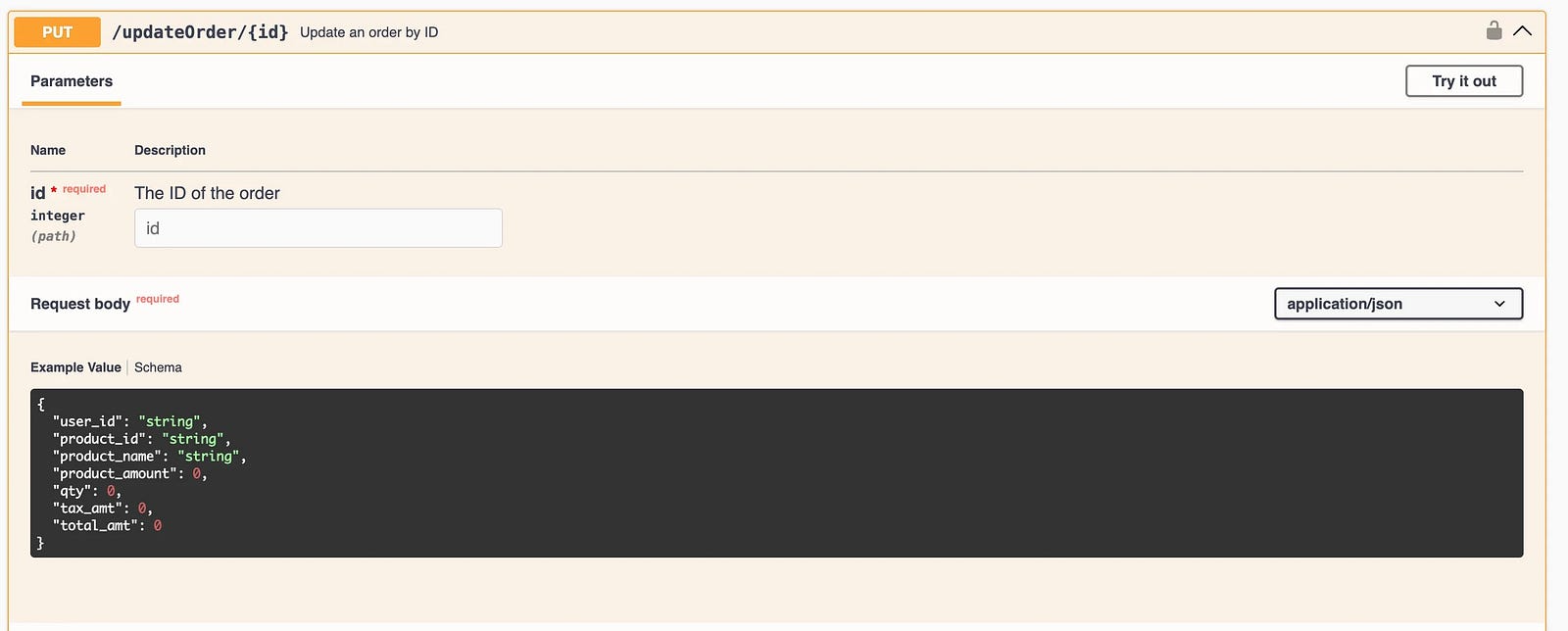
This API requires an authentication token to validate the request and authorize the update; if the token is missing or invalid, the request will fail.
The order ID needs to be passed as a path parameter so the correct order can be identified, and the updated details should be included in the request body in JSON format.
Since this is a PUT request, you must send the entire order object, not just the field being modified. Even for a small change, the full set of order data is required.
We’ll use the following test scenario to demonstrate testing the PUT API request with Playwright TypeScript:
## Test Scenario Title: Update the existing orders in the system.

### Pre-condition: Valid orders are available in the system

#### Test
1. Update all the order details of order_id "1"
2. Verify that the Status Code 200 is returned in the response
3. Assert that the order details have been updated correctly
To implement this test scenario, we’ll need to perform the following steps:
- Hit the Auth API and extract the token.
- Write a test to send the PUT API request and pass the token extracted in step 1.

Step 1: Create a Fixture to Generate and Extract the Token
We’ll need the auth token for PUT, PATCH, and DELETE API requests, so let’s create a fixture that hits the POST /auth API and extracts the token for use across other tests.
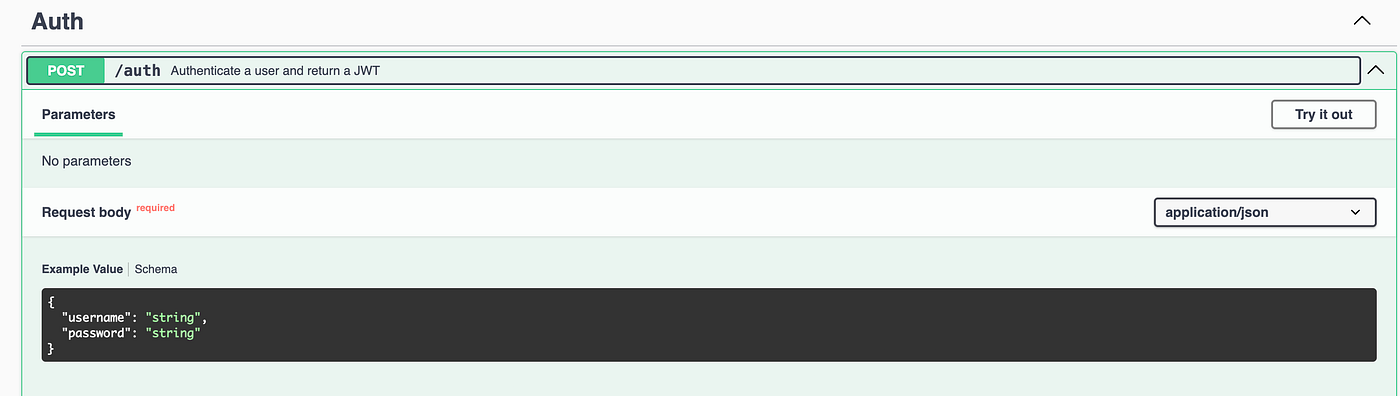
Let’s create a new fixture file auth.fixture.ts, in the fixtures folder in the project’s root directory.
import { test as base, expect } from "@playwright/test";
import dotenv from "dotenv";

dotenv.config();

type MyFixtures = {
  token: string;
};

export const test = base.extend<MyFixtures>({
  token: async ({ request }, use) => {
    const response = await request.post("http://localhost:3004/auth", {
      data: JSON.stringify({
        username: process.env.USERNAME,
        password: process.env.PASSWORD,
      }),
      headers: {
        "Content-Type": "application/json",
      },
    });

    expect(response.status()).toBe(201);
    const responseBody = await response.json();
    await use(responseBody.token);
  },
});

export { expect } from '@playwright/test';
A custom Playwright test setup is created by extending the base test object and adding a reusable token fixture. It uses the dotenv library to load environment variables like USERNAME and PASSWORD, ensuring sensitive data is not hardcoded, and defines a TypeScript type to make the token available with proper type safety.
A .env file is created containing the credentials and placed in the project’s root folder. This ensures best practices are followed and sensitive information, such as usernames and passwords, is not exposed.
As this is a demo API, the credentials used with the POST /auth endpoint are provided below. In a real-time project, the .env file should be added to the .gitignore file to ensure it is not committed to the remote repository.
#.env
USERNAME=admin
PASSWORD=secretPass123
Inside the fixture, an authentication API is called to generate a token; the response is validated, and the token is extracted and passed to the tests using the use() function.
Finally, expect is re-exported so that both test and expect can be imported from this single fixture file, keeping test imports clean and consistent.
Step 2: Updating the Order With a PUT Request and Verifying the Response
Let’s create a new spec file to update the order using the PUT /updateOrder API request.
# 5_put-test.spec.ts

import { test, expect } from "../fixtures/auth.fixture.js";

test("Update Order using PUT API Request", async ({ request, token }) => {
  const updatedOrder = {
    user_id: "89",
    product_id: "124",
    product_name: "Lindt Choclate",
    product_amount: 50,
    qty: 3,
    tax_amt: 10,
    total_amt: 160,
  };

  const id = 1;
  const response = await request.put(
    `http://localhost:3004/updateOrder/${id}`,
    {
      data: JSON.stringify(updatedOrder),
      headers: {
        "Content-Type": "application/json",
        Authorization: `${token}`,
      },
    },
  );

  const responseBody = await response.json();
  expect(response.status()).toBe(200);

  expect(responseBody).toEqual(
    expect.objectContaining({
      message: "Order updated successfully!",
      order: expect.objectContaining({
        product_id: "124",
        product_name: "Lindt Choclate",
      }),
    }),
  );
});
Code Walkthrough
- Using the auth fixture for getting the token: The test imports a custom test from the auth fixture, which automatically provides the token as part of the test context. This token is generated before the test runs and injected via Playwright fixtures, eliminating the need to manually authenticate in each test.
- Request body: The updatedOrder object represents the payload sent in the request to update an existing order. It contains the required fields for the order update request body. This object is later serialized into JSON format before being sent to the API.
- Sending the PUT request: The request.put() function is used to send an HTTP PUT request to update the order with a specific ID. The request includes the serialized request body and headers such as Content-Type and Authorization, where the token is passed for authentication. This step performs the actual API interaction to update the order in the system.
- Dynamic endpoint handling: The order ID is stored in a variable and dynamically appended to the API endpoint using template literals. This makes the test more maintainable and reusable.
- Verifying the response: The response is first converted to JSON, and the status code is validated to be 200, indicating a successful update. Then, assertions are made using expect.ObjectContaining that partially validates the response body, ensuring that the success message and updated order details match expected values.
Test Execution
Before running the test, the RESTful e-commerce application should be started using Docker by running the following command from the terminal:
docker compose -f docker-compose-ecommerce.yml up -dThe following command should be run from the terminal:
npx playwright test tests/5_put-test.spec.tsThe following test output shows that the test was executed successfully:

What Are PATCH Requests?
A PATCH request is used when we want to update only part of a resource, not the whole thing. It’s similar to a PUT request, but the main difference is that PUT expects the entire payload, whereas PATCH lets us send only the fields we want to change.
How to Test PATCH API Requests With Playwright TypeScript
We’ll use the PATCH /partialUpdateOrder API from the RESTful e-commerce application that updates the available order using its order ID.
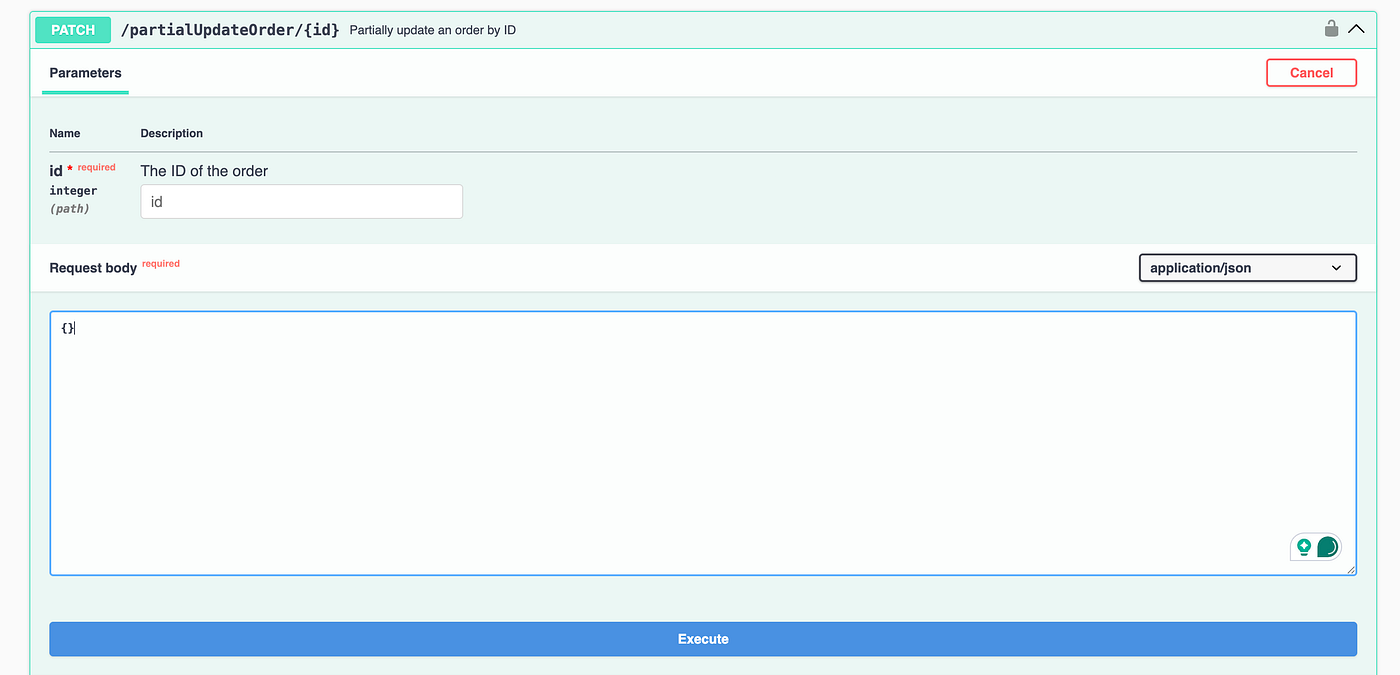
Similar to the PUT API request discussed in the earlier section of this article, the PATCH API also needs an authentication token to update the order.
As it is a PATCH request, we don’t need to send the full payload. Only the fields that require updates should be included in the request body.
Test Scenario:
## Test Scenario Title: Partially update an existing orders in the system.

### Pre-condition: Valid orders are available in the system

#### Test
1. Update the user_id and product_id for the order ID - 1
2. Verify that the Status Code 200 is returned in the response.
3. Assert that the order details have been updated correctly.
The PATCH API request requires an authorization token. We’ll use the token from the auth.fixture.ts file that we generated in the earlier section while discussing the PUT API request.
Let’s create a new spec file to partially update an order using the PATCH /partialUpdateOrder API.
# 6_patch-test.spec.ts

import { test, expect } from "../fixtures/auth.fixture.js";

test("Update Partial Order using PATCH API Request", async ({
  request,
  token,
}) => {
  const updatedOrder = {
    user_id: "98",
    product_id: "214",
  };

  const id = 1;
  const response = await request.patch(
    `http://localhost:3004/partialUpdateOrder/${id}`,
    {
      data: JSON.stringify(updatedOrder),
      headers: {
        "Content-Type": "application/json",
        Authorization: `${token}`,
      },
    },
  );

  const responseBody = await response.json();
  expect(response.status()).toBe(200);

  expect(responseBody).toEqual(
    expect.objectContaining({
      message: "Order updated successfully!",
      order: expect.objectContaining({
        user_id: "98",
        product_id: "214",
      }),
    }),
  );
});
Code Walkthrough
- Using the auth fixture for getting the token: The test uses a custom fixture that automatically provides a token, so we don’t have to call the POST /auth API every time. The token is generated before test execution and injected into the test context, ensuring secure and reusable authentication across multiple tests.
- Request body: The updatedOrder object contains only the fields
user_idandproduct_idthat need to be modified. As it is a PATCH request, there is no need to send the complete order payload; this makes the request lightweight and focused on partial updates. - Sending the PATCH request: The request.patch() function is used to send a partial update request to the API endpoint, with the order ID dynamically added to the URL. The request includes the JSON-stringified body along with the Content-Type and Authorization headers. The token is passed in the Authorization header.
- Verifying the response: The response is parsed into JSON and validated to ensure a 200 status code is returned after the PATCH API is hit successfully. This verification ensures that the operation was successful. Then, expect.objectContaining is used to validate the response body, confirming that the success message and updated fields match the expected values.
Test Execution
To run the test, the following command should be executed from the terminal:
npx playwright test tests/6_patch-test.spec.tsThe following screenshot of the test execution confirms that the test was run successfully:

What Are DELETE Requests?
A DELETE API request is used for removing a specific resource from the server. In most cases, it doesn’t return a response body.
The resource is identified using a URI, and once the request is processed, it’s permanently deleted. Because of this, DELETE operations can have side effects, like removing records from a database.
A DELETE request should be handled carefully because:
- Data deleted through a DELETE request is permanently removed and cannot be restored.
- It directly impacts the server data; hence, it is not considered a safe method.
- It may lead to inconsistencies if not managed appropriately.
- DELETE isn’t always idempotent in real-world scenarios. For example, the first DELETE request might return a 204 (No Content) indicating success, while calling it again on the same resource could return 404 (Not Found) because the resource has already been removed.
How to Test DELETE API Requests With Playwright TypeScript
We’ll use the DELETE /deleteOrder API endpoint from the RESTful e-commerce application for this demonstration. This API requires an order_id as a path parameter to identify the order to delete.
A valid authentication token must be included in the headers. On successful execution, the order is removed, and a 204 (No Content) status is returned.
Want to learn more about API Testing? Check out this tutorial to get hands-on API Testing
Test Scenario:
## Test Scenario Title: Delete existing order from the system.

### Precondition
- There should be some valid orders available in the system.

#### Test Steps:

1. Delete the order with order_id "6" using the DELETE request.
2. Verify that 204 Status Code is returned in the response.
To implement this test scenario, we need valid orders in the system, which can be created using the POST /addOrder API. Refer to the earlier tutorial on testing POST requests with Playwright TypeScript to explore different ways to generate request payloads and test the POST API request.
Test Implementation
Let’s create a new spec file to delete an order using the DELETE /deleteOrder API.
import { test, expect } from "../fixtures/auth.fixture.js";

test("Delete an order using DELETE API Request", async ({ request, token }) => {
  const id = 6;
  const response = await request.delete(
    `http://localhost:3004/deleteOrder/${id}`,
    {
      headers: {
        Authorization: `${token}`,
      },
    },
  );
  expect(response.status()).toBe(204);
});
Code Walkthrough
- Using the auth fixture for getting the token: The test imports a custom test from the auth fixture, which automatically provides a valid authentication token. This token is generated before the test runs and injected into the test context, so there’s no need to call the POST /auth API explicitly before the DELETE API.
- Sending the DELETE request: The request.delete() function is used to send a DELETE request to the API endpoint, with the ID dynamically passed in the URL to identify the order to be deleted. The request includes the Authorization header, where the token is sent to authenticate the request. No request body is required for this operation.
- Assertion: The test verifies that the response status is 204, which indicates that the request was successfully processed and the resource was deleted. Since DELETE APIs often don’t return a response body, validating the status code is sufficient to confirm success.
Test Execution
To run the test, run the following command from the terminal:
npx playwright test tests/7_delete-test.spec.tsThe following screenshot confirms that the test ran successfully:

A simple, practical approach is to call the GET API after running a DELETE request to confirm the resource has been removed from the system.
Summary
Testing PUT, PATCH, and DELETE APIs with Playwright and TypeScript helps ensure that the application handles updates and deletions correctly. While challenges such as managing test data, handling authentication, and maintaining test independence can arise, Playwright’s fixtures and built-in request handling make it easier to create clean and reusable tests.
The main advantage is the ability to validate end-to-end API behavior with clear assertions and strong TypeScript support. In my experience, the tests should be isolated, avoid unnecessary dependencies between them, and validate both status codes and response data to make the API tests more robust and maintainable.
Happy testing!!
Published at DZone with permission of Faisal Khatri. See the original article here.
Opinions expressed by DZone contributors are their own.