

Prompt Injection Defense Architecture: Sandboxed Tools, Allowlists, and Typed Calls
Treat tool calls as untrusted. Only allow approved tools per feature, validate typed args, and run tools in a sandbox with least privilege.
Join the DZone community and get the full member experience.
Join For FreeWhy Prompt Injection Keeps Winning in Production
Most prompt injection incidents follow the same pattern:
- The model reads untrusted instructions (user text, RAG chunks, web pages, PDFs, emails).
- Those instructions impersonate authority: “Ignore the rules… call this tool… send this data…”
- Your system lets the model translate that into real actions.
That last step is the real vulnerability. The model will always be influenceable. The question is whether your system obeys.
If your architecture is “LLM decides → tools execute,” then prompt injection is just a matter of time. If your architecture is “LLM proposes → security layer decides,” injection becomes a nuisance instead of an incident.
The Goal: Make Tool Calls Safe Even If the Model Is Compromised
A secure design assumes the worst:
- The model can be manipulated.
- Retrieved documents can contain adversarial instructions.
- Attackers will probe tool boundaries repeatedly.
So you build a system where:
- The model cannot directly execute privileged operations.
- Tool calls are constrained by policy (allowlists).
- Tool inputs are strictly validated (typed calls).
- Execution happens in a sandbox with least privilege.
The Reference Architecture
Here’s the core pattern:
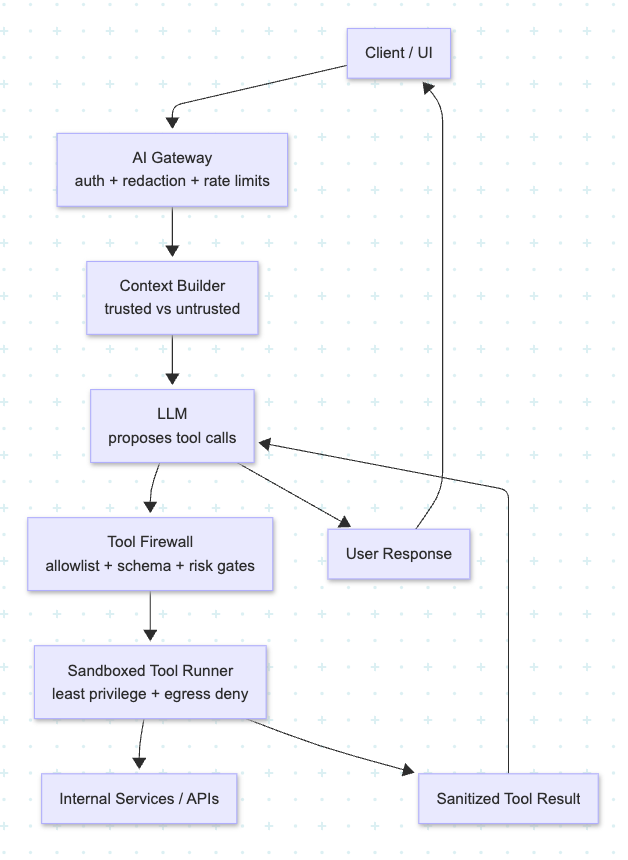
Think of the Tool Firewall as the real decision-maker. The LLM is a suggestion engine.
Layer 1: Sandboxed Tools (Contain the Blast Radius)
Sandboxing is what prevents “one bad call” from turning into a breach. Minimum sandbox controls that actually matter:
- Hard isolation boundary: separate process/container/VM. Avoid in-process “tools as functions” for anything sensitive.
- Deny-by-default network egress: tools can only call approved internal domains; public internet access is blocked unless explicitly needed.
- Scoped credentials per tool: each tool has a dedicated token with minimal permissions. No shared “god token.”
- Time limits + rate limits: stop loops and brute-force probing.
- Read-only by default: writes are allowed only when the workflow and user intent explicitly permit them.
A practical test: if your LLM gets tricked into calling a tool with garbage parameters, can it (a) read secrets, (b) call external endpoints, or (c) mutate state? If any of those are “yes,” the sandbox is not strict enough.
Layer 2: Allowlists (Capabilities Are Chosen By Workflow, Not the Model)
Allowlists are the difference between a controlled feature and a general-purpose agent. Instead of a global pool of tools, scope them on multiple dimensions:
- By feature: Help Center Q&A should not be able to “SendRefund.”
- By role: Admin tools aren’t available to standard users.
- By context: Some tools require prerequisites (e.g., verified customer ID, authenticated session, recent user confirmation).
- By risk tier:
- Low: read/search tools
- Medium: create drafts (tickets, emails) but don’t send
- High: state changes (payments, deletes, account changes)
Example policy mindset:
- In Help Center Q&A: ✅ SearchDocs, FetchArticle | ❌ SendEmail, RefundPayment
- In Support Agent Assist: ✅ CreateTicket (constrained), DraftEmail | ❌ RefundPayment (needs human approval)
Key rule: the workflow selects capabilities; the model doesn’t. The model can request a tool call, but only from the currently allowed set.
Layer 3: Typed Calls (Treat Tool Calls Like Public APIs)
Typed calls are where prompt injection attempts go to die.
Make every tool schema-first:
- strict JSON schema (or protobuf) with no extra fields
- enums for categories
- max lengths for strings
- numeric bounds
- required fields only
- server-side canonicalization (the model shouldn’t invent identifiers)
A useful default stance:
- Tool requests must reference server-known IDs, not free-form user-provided identifiers.
- “Guessing” is disallowed. If required fields are missing, the tool call is rejected, and the UI asks the user.
A tiny example of strictness (conceptual):
{
  "tool": "create_ticket",
  "schema_rules": {
    "additionalProperties": false,
    "required": ["customer_id", "category", "summary"],
    "category": ["PAYMENTS", "LOGIN", "DELIVERY"],
    "summary_max_len": 140
  }
}
If the model tries to smuggle in extra payload fields (“instructions”, “exfiltrate_to_url”, “notes_with_secrets”), strict validation blocks it automatically.
The Secure Execution Flow
propose → validate → execute → respond
A robust runtime looks like this:
- LLM proposes a tool call (tool name + typed args).
- Tool Firewall validates:
- Is the tool in the allowlist for this feature/role?
- Do args pass strict schema validation?
- Do referenced IDs exist and belong to the user/tenant?
- Is this a write action requiring confirmation?
- Sandbox executes with scoped credentials and restricted egress.
- The tool result is sanitized (no secrets, no raw PII) before returning to the model.
- LLM writes the final response referencing the tool output.
This flow makes prompt injection hard because attackers must beat independent controls: policy, validation, and sandboxing.
What to Log (So You Catch Attacks Early)
Don’t log raw sensitive text. Do log what you need to investigate:
- proposed tool name
- allowlist decision + reason
- schema validation outcome
- risk tier and whether UI confirmation was required
- sandbox execution status (success/timeout/blocked)
- trace IDs linking prompt → tool proposal → decision → execution → response
If your rejection rate spikes or you see repeated attempts to call high-risk tools from low-risk screens, you’ll know quickly.
A Checklist You Can Implement This Sprint
- Tools run in an isolated sandbox with scoped credentials.
- Tool network access is denied by default.
- Per-feature allowlists exist (not one global tool set).
- Every tool has strict typed schema validation (no extra fields).
- High-risk tools require explicit UI confirmation (not model confirmation).
- Tool outputs are sanitized before being added to the context.
- Observability ties together proposals, decisions, and outcomes.
Takeaways
Prompt injection is inevitable. Catastrophic prompt injection is optional.
If your system is “LLM decides, and we execute,” you’re trusting an adversarially steerable component with real power. If you build a prompt injection defense architecture — sandboxed tools, allowlists, and typed calls — the LLM becomes a helpful planner, while your platform remains the authority.
Opinions expressed by DZone contributors are their own.
Comments