

Private AI at Home: A RAG-Powered Secure Chatbot for Everyday Help
Secure RAG chatbot built with Spring AI with local embeddings and PostgreSQL. Hosted on Linux PCs, it ensures privacy, context‑aware answers, reproducible deployments.
Join the DZone community and get the full member experience.
Join For FreeAbstract
This article explores the design and deployment of a secure, retrieval-augmented generation (RAG)- powered chatbot tailored for family use using Spring AI. By combining Spring AI’s modular orchestration capabilities with a local vector store and embedding models, the chatbot delivers grounded, context-aware responses to everyday queries — ranging from locating personal documents to offering tech guidance. Emphasizing privacy and ease of use, the system ensures that sensitive data remains within the trusted home environment while providing intuitive, voice-enabled assistance.
To guarantee full control and data security, the chatbot is built and hosted entirely on personal infrastructure, with models and vector databases running on Linux-based home PCs. Spring AI was chosen for its cross-platform compatibility and seamless integration with JVM-based tooling, making it ideal for reproducible, secure deployments across diverse environments. This project demonstrates how modern AI frameworks can be repurposed to simplify life for non-technical users, offering a blueprint for personalized, secure, and reproducible AI solutions in domestic settings.
Key Takeaways for Readers
- System design for low-end home environments. Learn how to architect a retrieval-augmented generation (RAG) chatbot that runs smoothly on modest hardware — including Linux-based home PCs — without relying on cloud infrastructure.
- Security for your own data. Discover how to keep sensitive family documents and queries private by hosting models and vector databases locally, with full control over access and encryption.
- Zero-cost home computing setup. Explore practical ways to repurpose existing laptops or desktops into AI-powered assistants using open-source tools, Spring Boot, and Spring AI — no expensive cloud bills required.
- Ease of use for non-tech family members. Design a single point of access for everyone — whether via laptop, smartphone, or smart TV — with intuitive interfaces and voice-enabled support for everyday tasks.
- Hands-on exposure to Spring AI. Get a beginner-friendly walkthrough of Spring AI’s orchestration tools, retrievers, and chat memory — with links to source code examples and demo videos for deeper learning.
Introduction: Why a Family Chatbot?
In most households, everyday questions and tasks create small but persistent friction — especially for non-tech-savvy family members. Whether it’s locating a scanned PAN card, remembering the Wi-Fi password, figuring out how to pay an electricity bill, or setting a medicine reminder, these moments often lead to confusion, delays, or dependence on someone more tech-literate. A family chatbot addresses this by becoming a single, intuitive point of access for help — available via laptop, smartphone, or even smart TV.
Unlike generic assistants, a family chatbot is context-aware, tuned to the household’s language, habits, and documents. It doesn’t just answer questions — it understands the family’s world. Built with Spring AI and powered by RAG, this chatbot can fetch relevant information from local files and respond in a helpful, grounded way.
Most importantly, it’s personal and private: hosted on your own infrastructure, with no third-party data sharing. This ensures that sensitive documents and queries stay within the family’s trusted environment. For elders and kids alike, it offers clarity without complexity. And for the builder — like you — it’s a way to bring the power of AI home, making life easier, safer, and more connected for the people who matter most. It’s not just a chatbot — it’s a digital family helper.
Tech Stack Overview
This family chatbot is powered by a modular, RAG architecture built with Spring AI, chosen for its JVM-native design, cross-platform compatibility, and ease of orchestration. The system runs entirely on a repurposed Core i3 machine with 8GB RAM, using Arch Linux for lightweight performance and full control. Despite its age, the machine handles local inference, retrieval, and Spring Boot orchestration smoothly — thanks to efficient resource allocation and WiFi connectivity for LAN access.
At the core, Spring AI’s ChatClient orchestrates the flow between user input, retriever, and LLM. A local vector store (PostgreSQL with pgvector) indexes family documents, while embedding models (Nomic Embed Text locally) convert queries and content into searchable vectors. The chatbot uses QuestionAndAnswerAdvisor for RAG logic, ChatMemory for context retention, and optional Tool interfaces for reminders, file search, or voice input.
This stack is intentionally designed to be cloud-optional, reproducible, and secure — ideal for home environments where privacy and simplicity matter. It demonstrates how even low-end hardware can host meaningful AI experiences, making Spring AI a powerful choice for family use and hands-on learning.
System Design
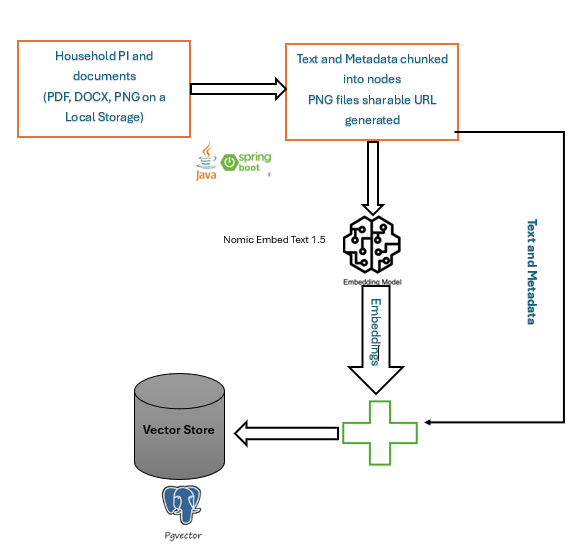
Indexing Phase
The indexing stage transforms raw family documents into searchable intelligence for the chatbot. It begins with ingestion, where a custom pipeline built in Java with Spring Boot scans folders, parses PDFs or text files, and tags metadata like document type, owner, and timestamp. This ingestion layer is modular and reproducible — ideal for mentoring juniors or scaling across home setups. This takes care of different types of available documents. However, the images are not processed, but like all other documents, Intranet links to those documents and images are generated and persisted in a structured Database so they can be downloaded on demand.
Next comes chunking, which splits large documents into smaller, semantically coherent segments. This improves retrieval precision and ensures that responses are grounded in the right context. Each chunk is then passed through the nomic-embed-text-v1.5 embedding model, which converts text into high-dimensional vectors that capture semantic meaning.
These vectors are stored in a PostgreSQL database enhanced with pgvector, chosen for its reliability, open-source nature, and compatibility with Spring AI’s VectorStoreRetriever. The entire pipeline runs on a Core i3 machine with 8GB RAM, using Arch Linux for lightweight performance and Wi-Fi connectivity for LAN access. Despite its simplicity, this setup enables fast, secure, and private indexing — making it perfect for home environments where cloud-free AI matters. The result is a responsive, context-aware chatbot grounded in your own data.
Whenever a file is added or modified, the system triggers a version-aware re-indexing process through an event-driven webhook mechanism. This ensures that the latest content is embedded, chunked, and stored accurately in the vector database, maintaining consistency and freshness across the retrieval pipeline.
Querying Phase
The querying stage is where user input transforms into intelligent, context-aware responses. It begins with query encoding, where the user’s question is converted into a high-dimensional vector using the same embedding model used during indexing — such as nomic-embed-text-v1.5. This ensures semantic alignment between the query and stored document chunks. Once encoded, the vector is passed to the retriever, which searches the vector store (PostgreSQL with pgvector) for the most relevant chunks based on cosine similarity or other distance metrics. These retrieved chunks serve as the augmentation context, grounding the response in real, user-owned data.
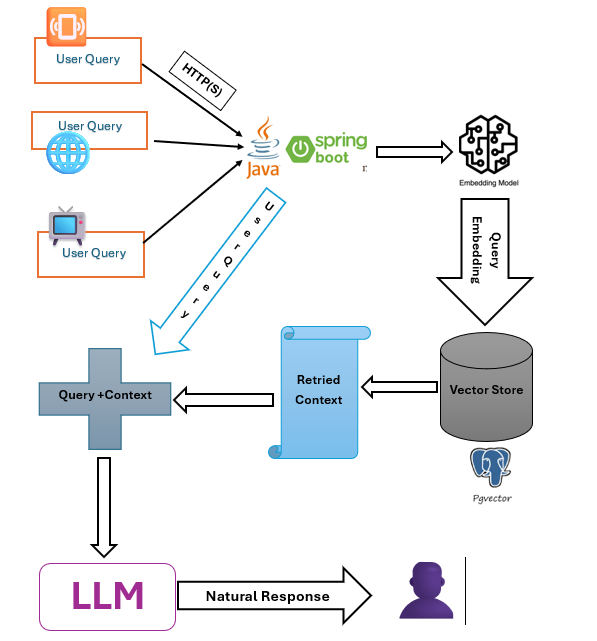
Spring AI orchestrates this flow using its Retriever and ChatClient interfaces. The retrieved context is injected into the prompt template, forming a composite input that includes both the user’s query and supporting evidence. This is then sent to the LLM (large language model) — either via OpenAI, Ollama, or a local gateway like OpenRouter — for generation. Gemma 3 is used in our setup. The model produces a response that is not only fluent but also grounded in the retrieved context, ensuring factual relevance and personalization.
This RAG loop runs efficiently on a Core i3 machine with 8GB RAM, making it ideal for home use. The result is a secure, responsive chatbot that answers with clarity and context.
Designing AI systems for home use isn’t just about cost-efficiency — it’s about accessibility, reproducibility, and trust. This project demonstrates how to architect an RAG chatbot that runs reliably on modest, repurposed hardware like old Linux laptops or desktops, without relying on cloud infrastructure or expensive GPUs.
Key Design Principles
- Local-first architecture: All components — LLM gateway, vector store, embedding model, and Spring AI orchestration — run on the user’s own machine or LAN. This ensures zero dependency on external APIs or cloud billing.
- Lightweight tooling: Spring AI’s JVM-native design allows you to use existing Java/Spring Boot setups without needing Docker, Kubernetes, or heavy orchestration layers.
- Modular deployment: Each part (retriever, model, memory, tools) is pluggable. You can start with a basic setup and scale up only if needed — perfect for mentoring juniors or onboarding family members gradually.
Hardware Setup
- Any old home PC(even with 4–8 GB RAM) can run:
- A local vector DB (PostgreSQL with pgvector)
- A lightweight embedding model (nomic embed text)
- Spring Boot app with Spring AI orchestrating RAG flow
- No GPU required: Embeddings and retrieval are fast enough for family-scale queries.
- Offline capability: With preloaded documents and local models, the chatbot can function without internet — ideal for rural or low-connectivity setups.
A Basic Spring AI RAG Example
A working example is given in https://github.com/trainerpb/simple-spring-ai-rag-example/tree/feature/article-manuscript .
We use Java 17, Spring Boot 3.5.5, along with Spring AI 1.0.3, and Maven to build the project. The following dependencies are added to get the Spring-ai and Rag libraries.
<dependency>
   <groupId>org.springframework.ai</groupId>
   <artifactId>spring-ai-advisors-vector-store</artifactId>
</dependency>
<dependency>
  <groupId>org.springframework.ai</groupId>
  <artifactId>spring-ai-starter-model-openai</artifactId>
</dependency>


<dependency>
  <groupId>org.springframework.ai</groupId>
  <artifactId>spring-ai-starter-vector-store-pgvector</artifactId>
</dependency>
And we use Apache Tika to parse the documents, such as PDFs.
<dependency>

  <groupId>org.apache.tika</groupId>

  <artifactId>tika-core</artifactId>

  <version>2.9.0</version>

</dependency>

<dependency>

  <groupId>org.apache.tika</groupId>

  <artifactId>tika-parsers-standard-package</artifactId>

  <version>2.9.0</version>

</dependency>
The RAG application is composed of several key components: RagService for orchestrating retrieval and generation, PDFService for handling document ingestion and chunking, PdfChunkIngestorOnStartup for boot-time indexing, and WebMvcController for managing user interactions. These backend services are complemented by a Thymeleaf-based HTML frontend that leverages Server-Sent Events (SSE) to stream chat responses in real time.
1. PDFService Class
This class is a Spring-managed service (@Service) responsible for converting PDF files into vector-searchable chunks for use in a Spring AI-powered RAG pipeline.
VectorStore Integration
The core Spring AI component here is the injected VectorStore, which abstracts the underlying vector database (e.g., Chroma, PostgreSQL with pgvector). It allows you to add embedded documents that can later be retrieved via semantic similarity.
private final VectorStore vectorStore
This is injected via the constructor, following Spring’s dependency injection pattern.
saveChunks(File file)
This method orchestrates the indexing flow:
- Calls loadChunkPdf() to extract and chunk the PDF.
- Adds the resulting List to the VectorStore using Spring AI’s .add() method.
- Returns the chunk list for optional verification or logging.
vectorStore.add(chunks)
This is the Spring AI ingestion point, where documents become retrievable via similarity search.
loadChunkPdf(File file)
This method handles chunking logic:
- Extracts raw text from the PDF.
- Splits it into 500-character chunks.
- Wraps each chunk in a Spring AI Document object.
These document instances are what Spring AI uses for embedding and retrieval.
extractText(InputStream pdfInputStream)
This method uses Apache Tika to extract text from the PDF. While not part of Spring AI, it feeds the pipeline with raw content for chunking and embedding.
2. RagService Class
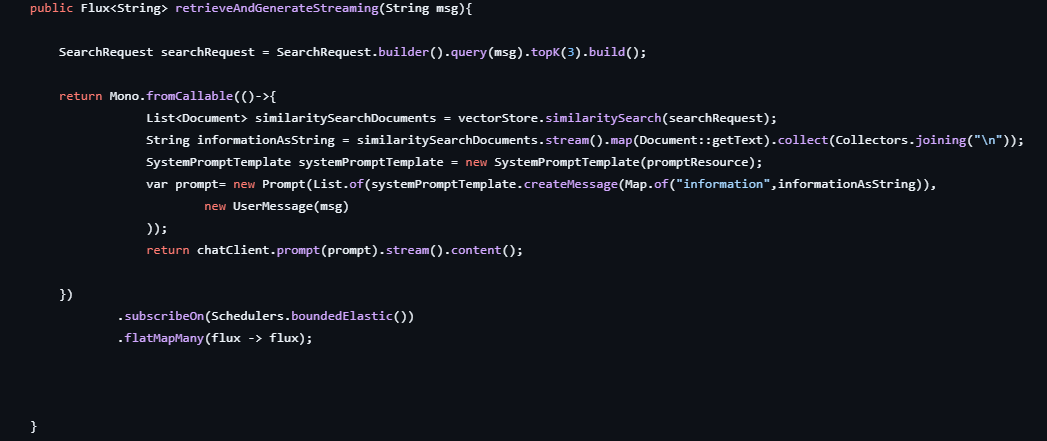
This class is a Spring-managed service (@Service) responsible for orchestrating the querying stage of a RAG application. It handles retrieval, prompt construction, and streaming response generation using Spring AI components.
Dependencies:
- ChatClient: Spring AI’s interface to interact with an LLM (e.g., OpenAI, Ollama, OpenRouter). It's built via a ChatClient.Builder, allowing flexible configuration.
- VectorStore: Abstracts the underlying vector database (e.g., PostgreSQL with pgvector), used for semantic search.
- promptResource: Loads a system prompt template from the classpath (rag-prompt.st) to guide the LLM’s response behavior.
retrieveAndGenerateStreaming(String msg)
This method powers the RAG loop:
- Builds a SearchRequest with the user query and topK=3 to fetch the most relevant chunks.
- Performs semantic search via vectorStore.similaritySearch(...), retrieving matching Document objects.
- Joins retrieved text into a single string (informationAsString) for prompt injection.
- Constructs a Prompt using SystemPromptTemplate and the user’s message.
- Calls chatClient.prompt(...), which returns a stream of generated content.
- Wraps the blocking logic inside Mono.fromCallable(...) and shifts execution to Schedulers.boundedElastic() for safe threading.
- Returns a Flux, enabling real-time streaming via Server-Sent Events (SSE) in the frontend.
3. PdfChunkIngestorOnStartup
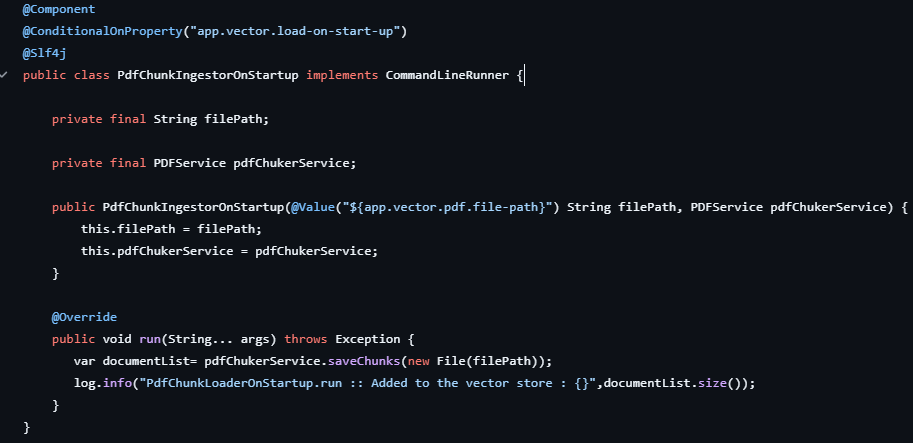
This Spring component, PdfChunkIngestorOnStartup, is responsible for automatically ingesting and indexing a PDF file into the vector store when the application starts. It is conditionally activated using @ConditionalOnProperty, based on the app.vector.load-on-start-up flag. The file path is injected from the application properties, and the PDFService handles text extraction, chunking, and vector storage. Implementing CommandLineRunner, it executes the run() method at startup, calling saveChunks() to process the specified PDF. The resulting document chunks are added to the Spring AI VectorStore, enabling semantic search. A log entry confirms how many chunks were indexed during initialization.
The property file we use is as follows:
############### Comment this property if you need to load the file on startup ##

app.vector.load-on-start-up=false

app.vector.pdf.file-path=YourLocalPath\\YourDocument.pdf

##################################- Controls whether the PDF is automatically indexed at startup.
- If load-on-start-up=true, PdfChunkIngestorOnStartup will ingest the specified file into the vector store.
# PostgreSQL configuration
spring.datasource.url=jdbc:postgresql://yourHostOrLocalhost:5432/ragdb?options=-c%20TimeZone=yourTimeZone

spring.datasource.username=yourDbUsername

spring.datasource.password=yourDbPassword

spring.datasource.driver-class-name=org.postgresql.Driver
# Spring AI OpenAI configuration
spring.ai.openai.base-url=http://localhost:1234
spring.ai.openai.api-key=""
spring.ai.openai.embedding.options.model=text-embedding-nomic-embed-text-v1.5
spring.ai.openai.chat.options.model=ai/gemma3
spring.ai.openai.chat.base-url=http://localhost:12434/engines
spring.ai.openai.chat.api-key=ignored
The Controller and UI
This method is a Spring MVC controller handler mapped to the URL path /home. When a user visits http://localhost:8080/home, the method executes and returns the string "ChatClient."
Because Thymeleaf is configured as the view resolver in the project, Spring interprets this return value not as raw text but as the logical name of a template. In this case, it will look for a file named ChatClient.html inside the src/main/resources/templates/ directory. That HTML file, written with Thymeleaf tags, will then be rendered and sent back to the browser.
Summarizing:
- @GetMapping("/home") – maps the /home URL to this method.
- return "ChatClient"; – tells Spring to render the ChatClient.html Thymeleaf template.
- The result is a dynamic HTML page (e.g., your chatbot UI) displayed when the /home endpoint is accessed.
The frontend communicates with the controller search API via SSE.
const source = new EventSource('/search/stream?q='+encodeURIComponent(userText));- When a user submits text, the browser opens a persistent connection to /search/stream.
- EventSource automatically listens for incoming data: messages from the server.
Backend (Spring WebFlux Controller)
- Your controller endpoint /search/stream returns a Flux (from RagService.retrieveAndGenerateStreaming).
- Spring serializes this as text/event-stream, sending each chunk as it’s produced by the LLM.
User Experience
- Instead of waiting for the full response, the chat UI updates progressively as the model streams output.
- This feels more natural and responsive, like a live typing effect.
SSE is a good fit here, because:
- Lightweight: Native browser support, no extra libraries.
- Reliable: Auto‑reconnect if the connection drops.
- Perfect for RAG: Streams context‑grounded answers in real time.
In short: your EventSource snippet is the bridge between the Thymeleaf chat page and the Spring AI backend, enabling smooth, real‑time streaming of chatbot responses.
User Accessibility
This RAG chatbot, built with Spring AI, is designed to be accessible across multiple devices within the same home network, ensuring a seamless and unified experience for all family members. Because it is hosted locally on Linux-based PCs, any device connected to the home Wi‑Fi — whether a laptop, smartphone, or tablet — can access the chatbot directly through a browser without additional configuration. This cross‑browser compatibility makes it simple for users to interact with the system from their preferred device, maintaining consistency in responses and functionality.
A key advantage is its ability to integrate with devices that support voice input through IME (Input Method Editors). Smart TVs, set‑top boxes, Amazon Firestick, and similar platforms often include built‑in voice recognition. By leveraging this capability, the chatbot can be voice‑commanded naturally, allowing family members to ask questions or request assistance without typing. This makes the system especially intuitive for non‑technical users, children, or elderly family members who may prefer speaking over typing.
While the current design emphasizes privacy by keeping all data within the home network, an additional layer of security — covering authentication, access control, and encryption — will be introduced later. This ensures long‑term safety and controlled access as the system evolves.
A demo video with an arbitrary PDF getting ingested and queries getting through is available in the video link https://www.youtube.com/watch?v=S2FvDpeNqZk&list=PLreY-Zt4f_bsVHo1u4mwWVtG1sDsuRWn8.
References
- Codebase - https://github.com/trainerpb/simple-spring-ai-rag-example/tree/feature/article-manuscript
- Setting up Pogtgresql - https://github.com/trainerpb/simple-spring-ai-rag-example/blob/feature/article-manuscript/README.md
- Official Spring AI docs- https://docs.spring.io/spring-ai/reference/index.html
- https://www.clarifai.com/blog/what-is-rag-retrieval-augmented-generation
Opinions expressed by DZone contributors are their own.
Comments