

Problems With Finalizer
In Java, the finalize method has been part of the language since its early days, offering a mechanism to perform cleanup activities before an object is garbage collected.
Join the DZone community and get the full member experience.
Join For FreeIn Java, the finalize method has been part of the language since its early days, offering a mechanism to perform cleanup activities before an object is garbage collected. However, using finalizers has come under scrutiny due to several performance-related concerns. As of Java 9, the finalize method has been deprecated, and its use is highly discouraged.
 Delayed Garbage Collection
Finalizers can substantially slow down the garbage collection process. When an object is ready to be collected but has the finalize method, the garbage collector must call this method and then re-check the object in the next garbage collection cycle. This two-step process delays memory reclamation, leading to increased memory usage and potential memory leaks.
This problem causes CPU utilization in two ways. The first and most obvious issue is that an object implementing the finalize method must go through two garbage collection cycles. Another less obvious issue is that the object would stay in memory for longer, causing more garbage collection cycles triggered due to insufficient memory.
If a garbage collector cannot reclaim an object long enough, the application might fail with the OutOfMemoryError, because the creation rate is significantly higher than the reclamation rate.
However, the described case is easy to spot as an application would fail. Let’s consider a more sneaky case, where the application would work but take up more resources and time on garbage collection.
public class BigObject { private int[] data = new int[1000000]; } public class FinalizeableBigObject extends BigObject {@Deprecatedprotected void finalize() throws Throwable {super.finalize();}}
Let’s introduce another class extending the BigObject, but wouldn’t implement the finalize method:
public class NonFinalizeableBigObject extends BigObject {
}
We’ll assess the creating performance for these two classes. The code just creates these objects in an infinite loop:
@Benchmark@BenchmarkMode(Mode.Throughput)@Fork(value = 1, jvmArgs = {"-Xlog:gc:file=gc-with-finalizable-object-%t.txt -Xmx6gb -Xms6gb"})public void finalizeableBigObjectCreationBenchmark(Blackhole blackhole) {final FinalizeableBigObject finalizeableBigObject = new FinalizeableBigObject();blackhole.consume(finalizeableBigObject);} @Benchmark @BenchmarkMode(Mode.Throughput)@Fork(value = 1, jvmArgs = {"-Xlog:gc:file=gc-with-non-finalizable-object-%t.txt -Xmx6gb -Xms6gb"})public void nonFinalizeableBigObjectCreationBenchmark(Blackhole blackhole) {NonFinalizeableBigObject nonFinalizeableBigObject = new NonFinalizeableBigObject();blackhole.consume(nonFinalizeableBigObject);}
Even an empty finalize method might cause quite a significant drop in performance. Any additional logic would make it even worse. We can see it from the performance tests. For now, we’re not going to analyze this code using the garbage collection logs:
| Benchmark | Mode | Cnt | Score | Error | Units |
|---|---|---|---|---|---|
| OverheadBenchmark.finalizeableBigObjectCreationBenchmark | thrpt | 6 | 23221.308 | ± 226.856 | ops/s |
| OverheadBenchmark.nonFinalizeableBigObjectCreationBenchmark | thrpt | 6 | 23807.144 | ± 117.467 | ops/s |
The test ran three iterations for twenty minutes each, in two separate forks, with one ten-second iteration for warmup. This means that overall each measurement took two hours, which should be enough to estimate relative performance for each of the tests. The rest of the tests used in this article had the same configuration.
Finalizers as a Safety Net
Using finalizers as a safety net is a reasonable idea. However, we should know all the pros and cons before doing so. Often this safety net scenario involves resources that implement the AutoCloseable interface. The finalizers, in this case, call the close method, and we can be sure that the resource will be closed at some point.
Closing a resource from the finalize method should be rare. The main way to manage resources should involve try-with-resources. In this case, we would be penalized for this even if we’re sticking to good practices all the time, as was shown in the previous example. Having an implemented finalize method would require two-step memory reclamation.
If we have cleanup logic that would contain expensive actions or throw an exception while we’re trying to close the resource twice, we can have significant performance problems. This might even lead to the OutOfMemoryError. Let’s check what would happen with the previous examples if we pause the thread for one millisecond:
public class DelayedFinalizableBigObject extends BigObject {@Overrideprotected void finalize() throws Throwable {Thread.sleep(1);}} @Benchmark@BenchmarkMode(Mode.Throughput)@Fork(value = 1, jvmArgs = {"-Xlog:gc:file=gc-with-delayed-finalizable-object-%t.txt -Xmx6gb -Xms6gb"})public void delayedFinalizeableBigObjectCreationBenchmark(Blackhole blackhole) {DelayedFinalizableBigObject delayedFinalizeableBigObject = new DelayedFinalizableBigObject();blackhole.consume(delayedFinalizeableBigObject);}
Also, let’s check the same metrics for the finalize method that throws an exception:
public class ThrowingFinalizableBigObject extends BigObject {@Overrideprotected void finalize()throws Throwable {throw new Exception();}} @Benchmark @BenchmarkMode(Mode.Throughput)@Fork(value = 1, jvmArgs = {"-Xlog:gc:file=gc-with-throwing-finalizable-object-%t.txt -Xmx6gb -Xms6gb"})public void throwingFinalizeableBigObjectCreationBenchmark(Blackhole blackhole) {ThrowingFinalizableBigObject throwingFinalizeableBigObject = new ThrowingFinalizableBigObject();blackhole.consume(throwingFinalizeableBigObject);}
As we can see, even from the point of view of performance tests, the finalize method can degrade it significantly:
| Benchmark | Mode | Cnt | Score | Error | Units |
|---|---|---|---|---|---|
| OverheadBenchmark.delayedFinalizeableBigObjectCreationBenchmark | thrpt | 6 | 142.630 | ± 1.282 | ops/s |
| OverheadBenchmark.throwingFinalizeableBigObjectCreationBenchmark | thrpt | 6 | 23100.262 | ± 632.131 | ops/s |
Identifying the Problem
As was mentioned previously, the best-case scenario for such problems is a failing application with the OutOfMemoryError. This explicitly shows the issue with memory usage. However, let’s concentrate on the more subtle issues, which degrade the performance, but don’t express themselves explicitly.
The first step is to analyze the garbage collection logs and check if there are some unusual numbers of the collection cycles. There are good tools in the market to analyze garbage collection logs. We used GCeasy for analyzing the captured garbage collection logs. Here we’re comparing the metrics taken from the garbage collection logs for the previous examples. Note that the comparisons were taken from one twenty-minute iteration:
| NonFinalizeable BigObject |
Finalizeable BigObject |
ThrowingFinalizeable BigObject |
DelayedFinalizea bleBigObject |
|
|---|---|---|---|---|
| Number of GCs | ≈60000 | ≈93000 | ≈94000 | ≈550000 |
Due to the two-step collection for the objects that implement the finalize method, the garbage collection is triggered more often. If we compare the number of cycles for NonFinalizeableBigObject and for DelayedFinalizeableBigObject we can notice an almost tenfold difference. This means that our application spends more time managing memory than on the actual logic. Additional logic makes this even worse. Throughput is a great metric to see the difference:
| NonFinalizeable BigObject |
Finalizeable BigObject |
ThrowingFinalizeable BigObject |
DelayedFinalizea bleBigObject |
|
|---|---|---|---|---|
| Throughput | ≈98% | ≈95% | ≈95% | ≈5% |
| Avg Pause GC Time | ≈0.4 ms | ≈0.5 ms | ≈0.5 ms | ≈2 ms |
| Max Pause GC Time | ≈14 ms | ≈47 ms | ≈22 ms | ≈50 ms |
DelayedFinalizeableBigObject, we spent only 5% percent of the time doing work. The rest of it was dedicated to the garbage collector. This means that from ten minutes of running time, we spent thirty seconds on actual work.
There is a part of the GCeasy report which contains the information above:
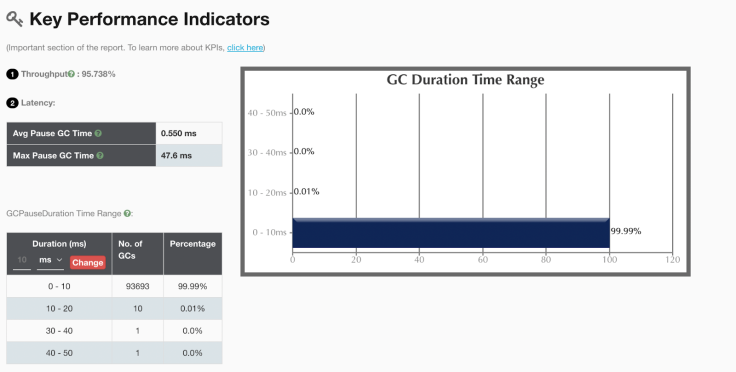
Using GCeasy API, it’s possible to set the throughput as a requirement and run the tests against it or implement real-time monitoring of the running system to notify of any drops in its value.
"gcKPI": {"throughputPercentage": 99.952,"averagePauseTime": 750.232,"maxPauseTime": 57880},
Conclusion
We should never underestimate performance issues. A couple of milliseconds wasted might amount to a significant amount of time over a year. Performance problems can not only cause spending more money which could be saved but also might affect SLA and cause more severe repercussions.
Published at DZone with permission of Eugene Kovko. See the original article here.
Opinions expressed by DZone contributors are their own.
Comments