

Program To Force Copy SAP Bex Queries
This article aims to demonstrate how you can force copy Bex query designer queries from one Infoprovider to another, which have different structures.
Join the DZone community and get the full member experience.
Join For FreeApplies To
SAP BI/BW 7.0, 7.1, 7.2, 7.3 etc. For more information.
Summary
This article aims to demonstrate how to force copy Bex query designer queries from one Infoprovider to another, which have different structures. (I.e., not all fields of the source infoprovider are present in the target infoprovider).
Introduction
In SAP BI, we all know that we can copy queries between two info providers through the T-code RSZC. However, to copy queries between these Info providers, both source and target Infoproviders must have the same structure.
But in many cases, it is not possible to copy queries between two info providers as they don't have the same no of fields or have some files missing in them.
To overcome this issue, I have created a custom program with the name "ZBI_FORCE_COPY_QUERY." by this "Z" program, we will be able to force copy the queries between two Infoproviders with different structures.
Step 1: Creating a Custom Program
Go to T-code Se38 and create a custom executable program.
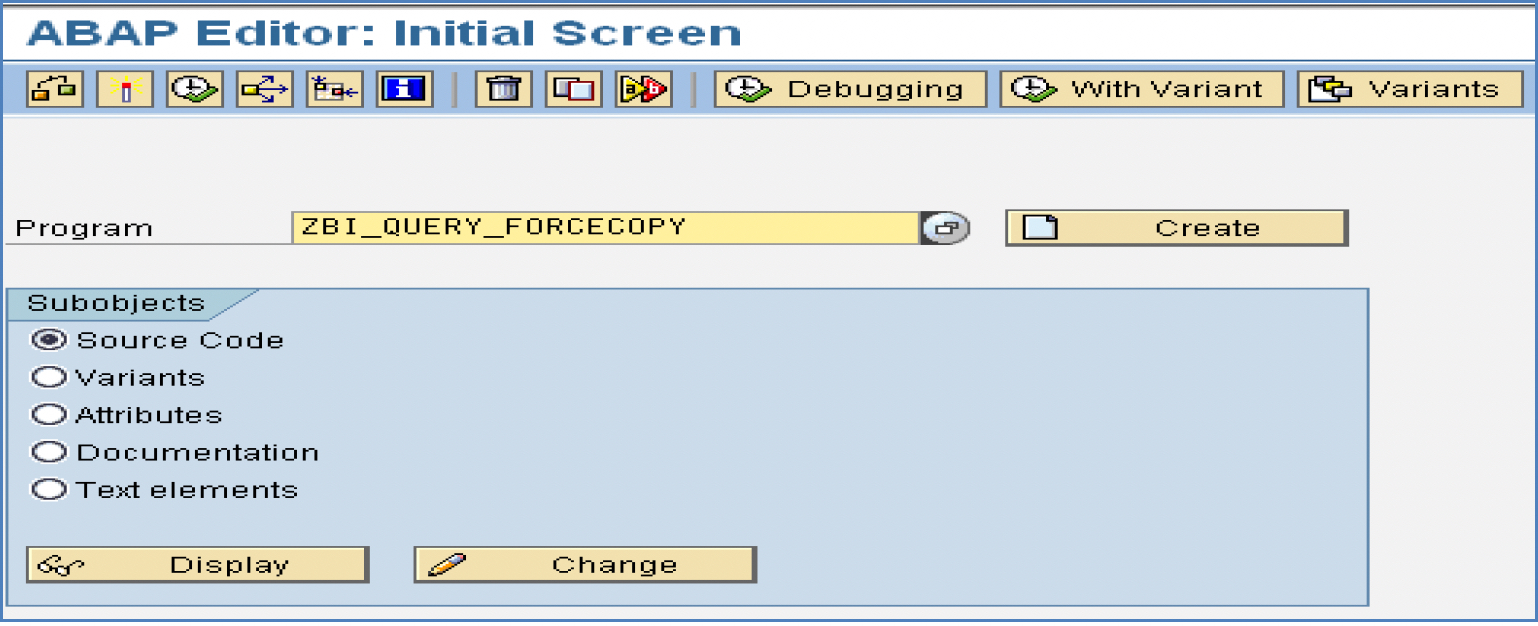
Enter the below entries in the “Selection Texts” tab.

Enter the below entries in the "Text Symbols" tab.
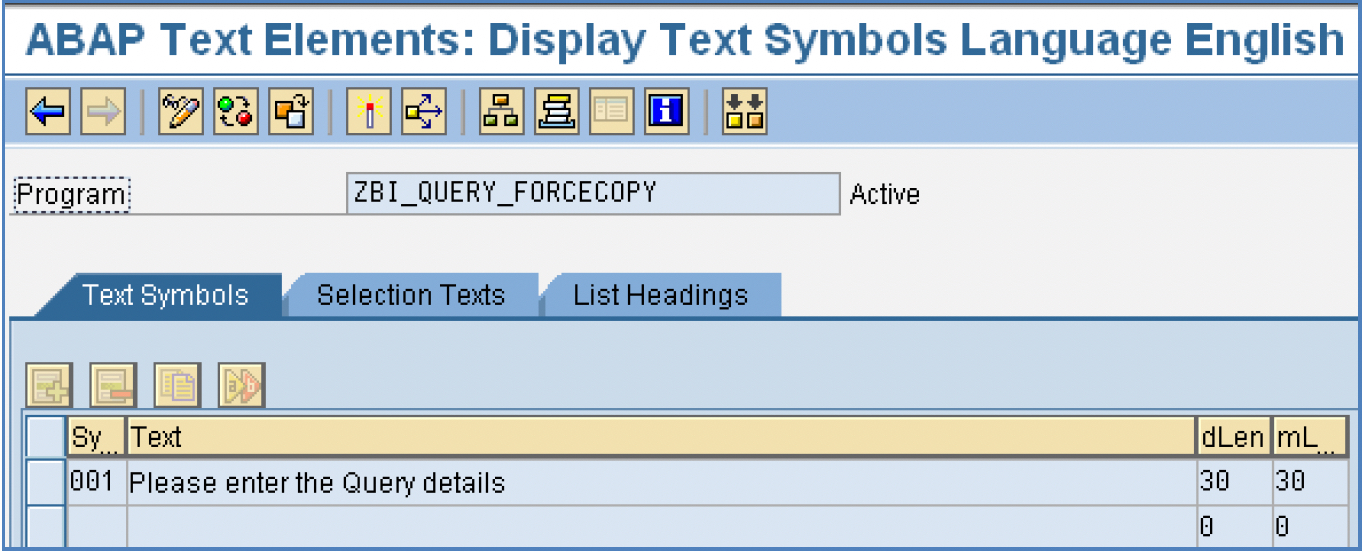
Source Code
Paste the code below and activate the program.
*________________________________________________________________________________*

*&---------------------------------------------------------------------*

*& Report ZBI_QUERY_FORCECOPY *&

 *&---------------------------------------------------------------------* *&

*& *&---------------------------------------------------------------------*

REPORT ZBI_QUERY_FORCECOPY.

TYPE-POOLS: RS, "BW global

RRMS, "message server

RSZ, "Qry definition global

RZX0, "Qry RFC interface

RZD1. "Qry definition database


TABLES: SSCRFIELDS.


TYPES: BEGIN OF TY_RSRREPDIR,

     COMPUID TYPE SYSUUID_25,

     INFOCUBE TYPE RSINFOCUBE,

     COMPID TYPE RSZCOMPID,

END OF TY_RSRREPDIR.


DATA: IT_RSRREPDIR TYPE TABLE OF TY_RSRREPDIR,

            WA_RSRREPDIR LIKE LINE OF IT_RSRREPDIR.

DATA: C_T_UID_SERVER TYPE RZX0_T_UID_SERVER_X,

             I_TARGET_INFOCUBE TYPE RSD_INFOCUBE,

             I_SOURCE_INFOCUBE TYPE RSD_INFOCUBE,

             I_SOURCE_COMPUID TYPE RSZ_UID.

DATA: I_T_COMP_RENAME type rzd1_t_comp_rename,

            WA_COMP_RENAME LIKE LINE OF I_T_COMP_RENAME.

SELECTION-SCREEN : BEGIN OF BLOCK SS01 WITH FRAME TITLE TEXT-001.

PARAMETERS : P_SQUERY TYPE RSZCOMPID DEFAULT ' ' OBLIGATORY.

PARAMETERS : P_TQUERY TYPE RSZCOMPID DEFAULT ' ' OBLIGATORY.

PARAMETERS : P_TCUBE TYPE RSINFOCUBE DEFAULT ' ' OBLIGATORY.


SELECTION-SCREEN : END OF BLOCK SS01.


START-OF-SELECTION.


SELECT COMPUID INFOCUBE COMPID FROM RSRREPDIR INTO CORRESPONDING FIELDS OF TABLE IT_RSRREPDIR WHERE OBJVERS = 'A' AND COMPID = P_SQUERY.

IF SY-SUBRC = 0.

READ TABLE IT_RSRREPDIR INTO WA_RSRREPDIR WITH KEY COMPID = P_SQUERY.

       I_TARGET_INFOCUBE = P_TCUBE.

       I_SOURCE_INFOCUBE = WA_RSRREPDIR-INFOCUBE.

       I_SOURCE_COMPUID = WA_RSRREPDIR-COMPUID.

      WA_COMP_RENAME-COMPUID = I_SOURCE_COMPUID.

      WA_COMP_RENAME-COMPID_OLD = P_SQUERY.

      WA_COMP_RENAME-COMPID_NEW = P_TQUERY.

      WA_COMP_RENAME-INFOCUBE = P_TCUBE.

APPEND WA_COMP_RENAME TO I_T_COMP_RENAME.


CALL FUNCTION 'RSZ_I_COPY_QRY_TO_CUBE_SINGLE'

EXPORTING

           I_SOURCE_COMPUID = I_SOURCE_COMPUID

           I_SOURCE_INFOCUBE = I_SOURCE_INFOCUBE

           I_T_COMP_RENAME = I_T_COMP_RENAME

           I_TARGET_INFOCUBE = I_TARGET_INFOCUBE

           I_CHECK_COMPLIANCE = ''

CHANGING

           C_T_UID_SERVER = C_T_UID_SERVER

EXCEPTIONS

            NO_AUTHORITY = 1

            NO_SOURCE_INFOCUBE_FOUND = 2

            INFOCUBE_CHECK_FAILED = 3

            ERROR_IN_COMPLIANCE_CHECK = 4

            INFOCUBES_NOT_COMPLIANT = 5

           OTHERS = 6 .

IF SY-SUBRC <> 0.

           MESSAGE ID SY-MSGID TYPE SY-MSGTY NUMBER SY-MSGNO WITH SY-MSGV1 SY-MSGV2 SY-MSGV3 SY-MSGV4.

ELSE.

          MESSAGE 'Query copied successfully' TYPE 'S'.

ENDIF.

ELSE.

         MESSAGE 'Please enter correct Query name' TYPE 'I'.

ENDIF.

END-OF-SELECTION.

*_______________________________________________________________________________*
Step 2: Program Execution
Once the program has been activated, execute the program, and you will get the below selection screen.
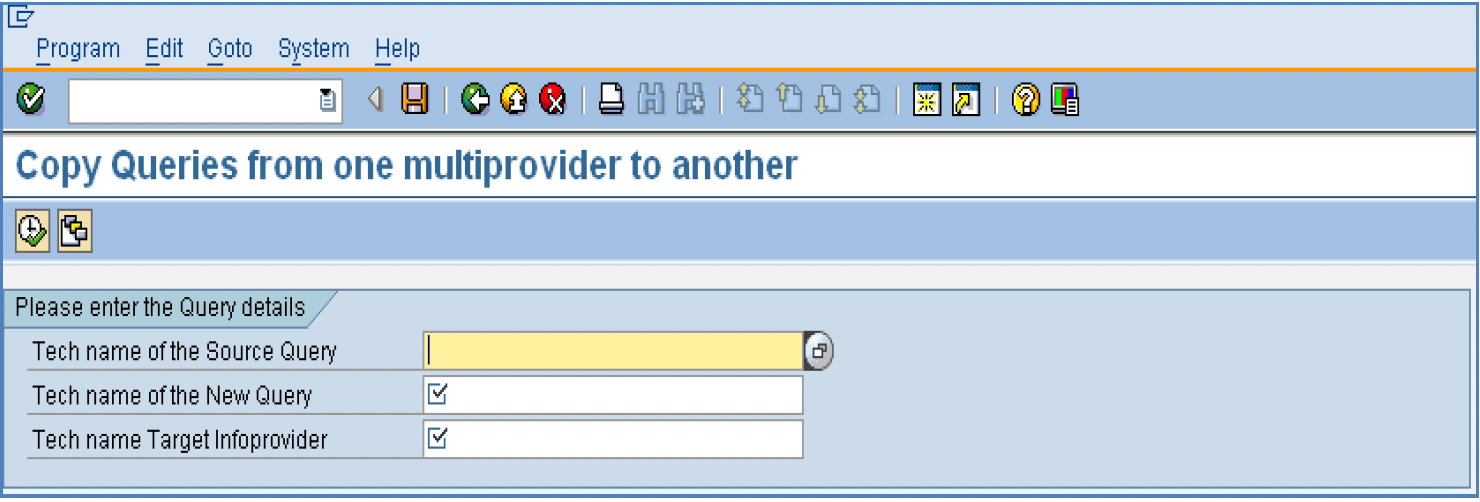
You need to input the values for the below fields present in the selection screen of the program.
- The technical name of the Source Query
- The technical name of the New Query
- Tech name Target Infoprovider
You can select the Source query name using the F4 option. Here, we have selected the query “ZZMRMBBBP1_Q0024” as the source Query built on the multi-provider “ZMRMBBBP1”.

This is how the selected query “ZZMRMBBBP1_Q0024 looks in Query Designer.

Enter the name of the new query and the DSO/Cube/Multiprovider name on which you need the Source query to be copied.
In our case, the new query name is YZOMMBPS01_Q0021, and the Multiprovider on which it should be built is ZOMMBPS01.
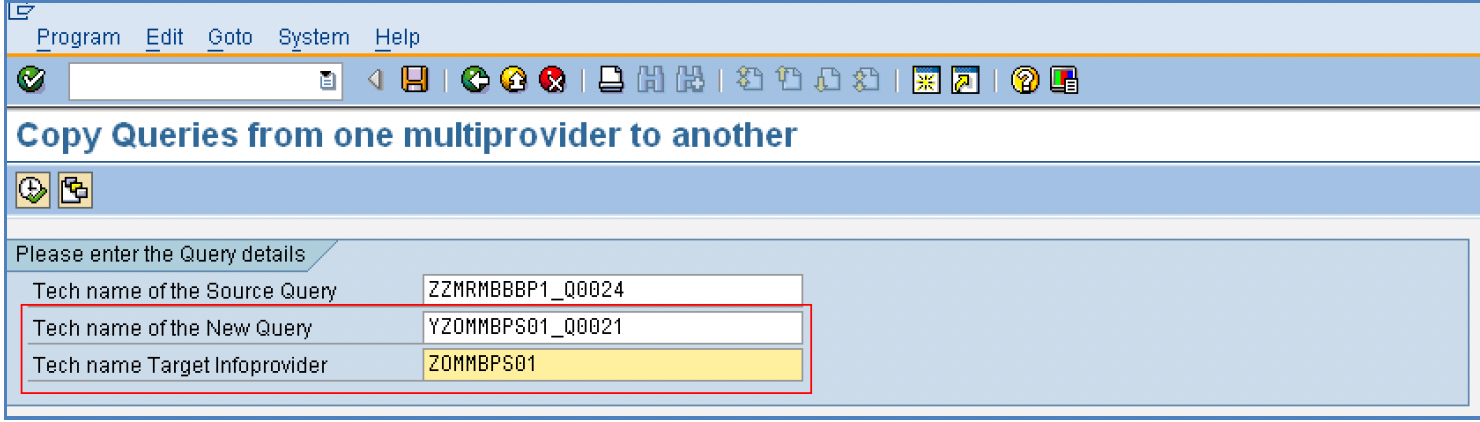
Before execution, the new query does not exist in the system.

Execute the program, and you will get the below message.

Check the new query in the query designer. It would now be present in the system.
Please Note: The program, by default, copies the same description for the new query from the source query, which can be later changed through the query designer.
Remove the fields that are not present in the new info provider and Click on save. You can now use the new query to fetch data from the new info provider.
You can also, through transaction Se93, use this program as a Custom T-code.

Disclaimer and Liability Notice From SAP
This document may discuss sample coding or other information that does not include SAP official interfaces and, therefore, is not supported by SAP. Changes made based on this information are not supported and can be overwritten during an upgrade.
SAP will not be held liable for any damages caused by using or misusing the information, code, or methods suggested in this document, and anyone using these methods does so at his/her own risk.
SAP offers no guarantees and assumes no responsibility or liability of any type with respect to the content of this technical article or code sample, including any liability resulting from incompatibility between the content within this document and the materials and services offered by SAP. You agree that you will not hold or seek to hold SAP responsible or liable with respect to the content of this document.
Published at DZone with permission of Maheshsingh Mony. See the original article here.
Opinions expressed by DZone contributors are their own.
Comments