DZone
Thanks for visiting DZone today,
Edit Profile
  • Manage Email Subscriptions
  • How to Post to DZone
  • Article Submission Guidelines
Sign Out View Profile
  • Post an Article
  • Manage My Drafts
Over 2 million developers have joined DZone.
Log In / Join
Refcards Trend Reports
Events Video Library
Refcards
Trend Reports

Events

View Events Video Library

Related

  • A Deep Dive into Tracing Agentic Workflows (Part 1)
  • TOP-5 Lightweight Linux Distributions for Container Base Images
  • Serverless Is Not Cheaper by Default
  • Recent Linux Kernel Features Relevant to System Design

Trending

  • Chaos Engineering Has a Blind Spot. Agentic AI Lives in It.
  • Good Data, Bad Metric: A Mutation Testing Pattern for Analytics Engineering
  • Building a Zero-Cost Approval Workflow With AWS Lambda Durable Functions
  • Migrate a Hardcoded LangGraph Agent to LaunchDarkly AI Configs in 20 Minutes
  1. DZone
  2. Software Design and Architecture
  3. Performance
  4. Remote Code Execution on Windows Server From a Linux Server

Remote Code Execution on Windows Server From a Linux Server

A quick tutorial on how to execute scripts on a Windows server remotely from a Linux server using the Python module Paramiko.

By 
Geetha Rangaswamaiah user avatar
Geetha Rangaswamaiah
·
Oct. 02, 20 · Tutorial
Likes (2)
Comment
Save
Tweet
Share
6.4K Views

Join the DZone community and get the full member experience.

Join For Free

Let's say a Workflow Management Framework of our choice based on the business needs works only on Linux. And let's say our jobs/scripts depend on some libraries that are only compatible with Windows. One of the solutions here could be to host the Workflow Management Framework on a Linux server and execute the jobs on a Windows server via SSH. So the jobs will be triggered on the Linux server and executed on the Windows server.

Paramiko is a Python implementation of the SSH protocol, providing both client and server functionality. It is a Python interface around SSH networking concepts. http://www.paramiko.org/

Let's get started.

Make sure SSH is enabled on both the servers.

Shell


x


1
ssh <hostname>


Install the Paramiko module on the Linux server.

Shell
x
 
1
pip install paramiko


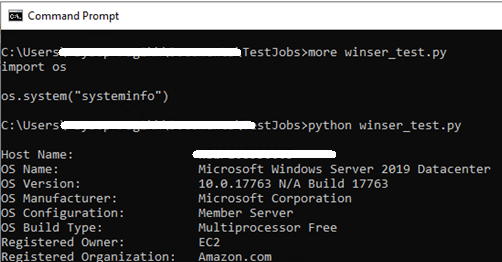
On the Windows server, create a python file (winser_test.py) and add the below sample code.

Python


xxxxxxxxxx
1


1
import os
2

          
3
os.system("systeminfo")


 command prompt


On the Linux server, create a python file (linser_test.py) and add the below client code.

Python


xxxxxxxxxx
1
18


1
# import the library
2
import paramiko
3

          
4
# initialize the ssh client
5
ssh_client = paramiko.SSHClient()
6

          
7
# enable host auto-add policy 
8
ssh_client.set_missing_host_key_policy(paramiko.AutoAddPolicy())
9

          
10
# connect to windows server
11
ssh_client.connect(hostname = <hostname>, username = <username>, password = <password>, port = 22)
12

          
13
# execute the script on windows server
14
stdin, stdout, stderr = ssh_client.exec_command('python <path_to_the_file>winser_test.py')
15

          
16
# print the standard out and error (if any) 
17
print('stdout -- ', stdout.read())
18
print('stderr -- ', stderr.read())


Now, execute the linser_test.py script and that will in turn execute the winser_test.py on the Windows server.
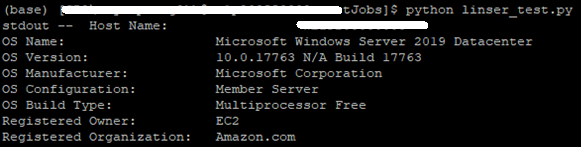
execute winsertest on windows server


Reference: http://docs.paramiko.org/en/stable/

Linux (operating system) Execution (computing)

Opinions expressed by DZone contributors are their own.

Related

  • A Deep Dive into Tracing Agentic Workflows (Part 1)
  • TOP-5 Lightweight Linux Distributions for Container Base Images
  • Serverless Is Not Cheaper by Default
  • Recent Linux Kernel Features Relevant to System Design

Partner Resources

×

Comments

The likes didn't load as expected. Please refresh the page and try again.

  • RSS
  • X
  • Facebook

ABOUT US

  • About DZone
  • Support and feedback
  • Community research

ADVERTISE

  • Advertise with DZone

CONTRIBUTE ON DZONE

  • Article Submission Guidelines
  • Become a Contributor
  • Core Program
  • Visit the Writers' Zone

LEGAL

  • Terms of Service
  • Privacy Policy

CONTACT US

  • 3343 Perimeter Hill Drive
  • Suite 215
  • Nashville, TN 37211
  • [email protected]

Let's be friends:

  • RSS
  • X
  • Facebook