

Scala: Cucumber From IntelliJ and the Command Line With SBT
Want to bring your Cucumber tests to IntelliJ or the command line? Here is how to configure your architecture to make it easy for you.
In this post, we'll see how to have Cucumber tests running in IntelliJ and the command line using SBT.
Adding Cucumber to the project and how to configure SBT multi-module won't be covered this time, as these topics are well-covered elsewhere.
Motivation
Executing Cucumber tests from IntelliJ is necessary to help during development, as you just want to start your application and run the Cucumber tests right from the IDE.
Executing Cucumber tests on the SBT command line is useful when you want to add the Cucumber tests as part of your application deployment pipeline.
From this point, "test" means "Cucumber test".
Project Architecture
This post is based on a multi-module SBT project. The separation in this architecture allows running functional tests against the same application deliverable that will be eventually running in production. The module discussed in this post is rhAcceptance:

Before choosing to go with the fat JAR approach, I tried to configure the test to execute from its natural location: PROJECT_ROOT/rhAcceptance/src/test. Having Googled it quite extensively, it seems only "Scalatests" are found by default in SBT.

There are a couple of third-party plugins that enable Cucumber tests to be run as part of the sbt test goal. I haven't used them, as I am wary of depending on third-party plugins with few contributors and, in this case, it was cheap to solve the problem in the way described below.
The alternative solution was to move the tests (PROJECT_ROOT/rhAcceptance/src/main directory) and run it as a fat JAR.

Fat JARs in SBT
In order to get the build.sbt creating a fat JAR, I used the assembly plugin. Note that assembly.sbt goes into the SBT project directory.

Below is the SBT configuration in the rhAcceptance module that creates a fat JAR named acceptance.jar
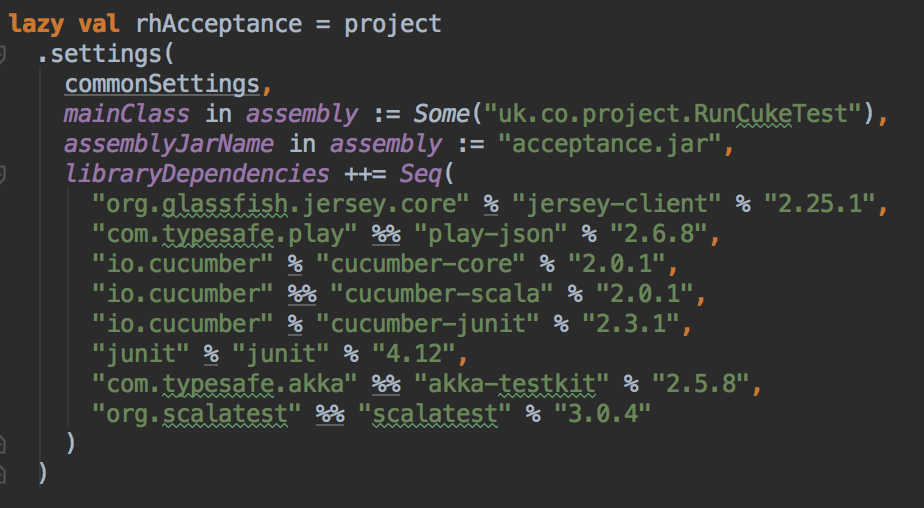
For the setup above, just run sbt assembly and the fat JAR will be created in PROJECT_ROOT/rhAcceptance/target/scala-2.12.
Cucumber From IntelliJ
Don't forget to install the plugins: "Scala", "Cucumber for Java", and "Cucumber for Scala".
Create the Cucumber runner as the main function:

Run the above main with the following configuration:

The message "Test framework quit unexpectedly" may sound like the test run failed, but we can see that they were run successfully.

Cucumber From the Command Line
Note that --glue must point to the root package where your step definitions are located.
The last argument, classpath:uk.co.myproject, is the location of your feature files. classpath is necessary to load the feature files from inside the JAR.

Now we have the same tests run successfully from IntelliJ and the command line.
Opinions expressed by DZone contributors are their own.