

Leveraging Seekable OCI: AWS Fargate for Containerized Microservices
Learn how AWS Fargate can be leveraged to deploy microservices without managing the underlying infrastructure as well as techniques to optimize performance.
Join the DZone community and get the full member experience.
Join For FreeAWS Fargate's Seekable OCI (SOCI) introduces significant performance enhancement for containerized applications by enabling lazy loading of Docker container images. This reduces startup time for Fargate tasks, particularly for large container images, and makes it ideal for applications that need rapid scaling.
AWS Fargate is a serverless compute engine that offers many different capabilities:
- Compatibility: Integrates with both Amazon ECS and Amazon EKS
- Containerization: Ability to run Docker images
- Fully managed operating system: Abstracts the operating system and reduces maintenance like patching
AWS Fargate Architecture
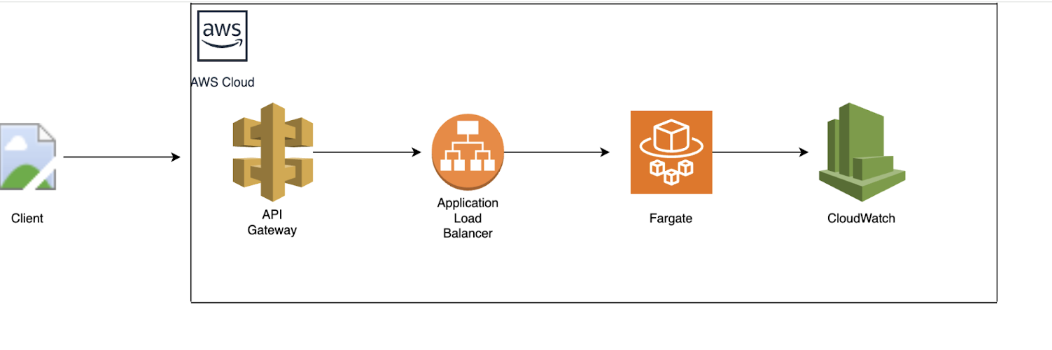
The below diagram illustrates a simple scalable architecture using AWS API Gateway, AWS Application Load Balancer, AWS Fargate, and AWS CloudWatch. The other components needed to complete this architecture would be to provision the following:
- IAM role: An IAM role that grants permissions to push the application logs to CloudWatch
- VPC integration: Fargate Clusters running in a VPC enable the definition of network interfaces and assign security groups.
- Task definitions: Define details like environment variables, launch types, ports, and Docker images that form the application
- Log configuration: Configuring Amazon CloudWatch enables the monitoring and troubleshooting of the deployed applications.
Upsides of Using AWS Fargate
- Eliminates the need to manage and patch the underlying infrastructure like the operating system as it is abstracted by AWS
- Fargate automatically scales based on the demand to handle various workloads.
- Fargate runs tasks across different AZs making the application fault tolerant.
- Faster deployment of applications
- Reduces the risk of cross-container vulnerabilities
Cost Optimization Strategies
- Right-sizing of tasks, CPU, and memory based on the requirements and auto-scaling can be utilized for further scaling needs.
- Using spot instances for fault-tolerant workloads
- Monitoring tools like AWS Cost Explorer and AWS Budgets can help to keep track of costs and can get notifications by setting up alerts.
- Automating termination of unused tasks
- Reducing the size of container images will speed up the deployment process.
- Scheduled scaling can be leveraged to turn on/off and scale up/down the running tasks based on the peak hours and off hours.
What AWS Fargate Is Tailored For
- Microservices/REST APIs: Ideal for microservices since multiple containerized applications can be deployed in a single cluster
- Batch processing: Batch workloads like data processing and image processing
- Event-driven applications: Fargate containers can be used to run applications in response to events.
Lazy Loading Container Images
There could be situations where the container is taking time to initialize and could cause a potential delay to scale up new tasks. This could be the case when the image size is large. Lazily loading the container images can help to eliminate this issue and leads to enhancing the performance of the application when there is a need for scaling.
Seekable OCI is an open-source technology developed by AWS that can launch containers faster by lazily loading the container image. SOCI works by creating an index for container images and enabling the selective retrieval of image layers instead of pulling the entire image and speeding up the start time. It indexes the content inside a container image and allows for on-demand access to specific parts of the image as needed. SOCI helps to reduce startup times and improve scalability performance. Once the SOCI indexes are created, AWS Fargate can use them while launching tasks. AWS Fargate support for SOCI is available at no additional cost and you will only be charged for storing the SOCI indexes in Amazon ECR.
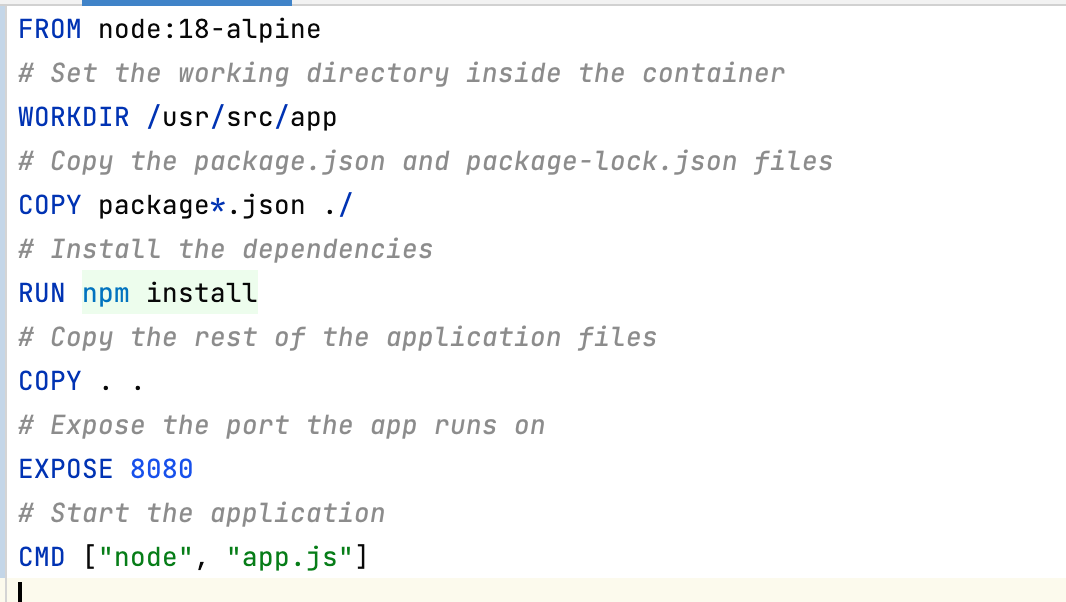
The following steps are to create a sample Docker image that can be used with Seekable OCI (SOCI) in AWS Fargate:
Step 1: Create a Sample Dockerfile
Step 2. Build and Push the Docker Image to AWS ECR
1. Authenticate Docker with AWS ECR.
aws ecr get-login-password --region <your-region> | docker login --username AWS --password-stdin <account-id>.dkr.ecr.<your-region>.amazonaws.com2. Create an AWS ECR repository.
aws ecr create-repository --repository-name soci-sample-app --region <your-region>3. Build the Docker image.
docker build -t soci-sample-app .4. Tag the Docker image.
docker tag soci-sample-app:latest <account-id>.dkr.ecr.<your-region>.amazonaws.com/soci-sample-app:latest5. Push the image to Amazon ECR.
docker push <account-id>.dkr.ecr.<your-region>.amazonaws.com/soci-sample-app:latestStep 3: Generate SOCI Index
1. Install SOCI CLI:
aws soci install2. Generate SOCI Index:
aws soci create-index --image <account-id>.dkr.ecr.<your-region>.amazonaws.com/soci-sample-app:latest3. Push the SOCI index to Amazon ECR.
aws soci push-index --image <account-id>.dkr.ecr.<your-region>.amazonaws.com/soci-sample-app:latestStep 4: Deploy the SOCI-Enabled Image on AWS Fargate
Create a Task Definition in AWS Fargate using the Amazon ECR image URL: <account-id>.dkr.ecr. <your-region>.amazonlatest. Ensure that SOCI is enabled for the image in your task definition and the same can be used to run the tasks.
Conclusion
In conclusion, SOCI with AWS Fargate is not just a performance booster but a strategic advantage for businesses looking to build resilient, scalable, and cost-effective containerized applications. Its integration into existing AWS workflows, combined with the benefits of serverless computing, makes SOCI an essential tool for anyone looking to optimize container workloads in today’s fast-paced, cloud-driven world. By implementing SOCI, organizations can future-proof their infrastructure, ensuring rapid scalability and reliable performance, while maintaining control over their cloud costs.
Opinions expressed by DZone contributors are their own.
Comments