

Send a Table-Valued Parameter to a MS SQL Stored Procedure in Mule 4
One interesting variation of sending data via table-valued parameter (TVP) is not so commonly used. Let's talk about how to get started.
Join the DZone community and get the full member experience.
Join For FreeIntroduction
Most of us have called a stored procedure in Mule to pass data to or receive data from database tables. However, one interesting variation of sending data via table-valued parameter (TVP) is not so commonly used. This article will show you how to send data in a TVP format to an MS SQL table via a stored procedure in Mule 4.
Before we proceed with the actual Mule development, let's first understand what a table-valued parameter is. As the name suggests, it is a parameter where data is sent in the form of a table, comprised of columns and rows. Within the database, table-valued parameters are declared by using user-defined table types. The main purpose of a TVP is to pass multiple values for a record, e.g. Multiple contact number values for a user record merged in the record itself. The benefit is that it associates the values, maintains the sequence, and reduces code complexity in the stored procedure.
Sending the TVP
Before you can start developing the logic for generating a TVP, you will need to import the Java module in your Mule Project. This is required as we will be invoking methods in a Java class. If you have already imported it or are familiar with the process of importing it, you can skip the next section.
In Anypoint Studio, open your configuration XML, and in Mule Palette select Add Module. You should notice the Java module under the Featured column. Drag it to the adjacent column to add it to your project.

Now that the module has been imported, we can start building the TVP. There are 3 stages involved in the process: Initialising a TVP, adding columns to it, and finally adding rows of data, after which it can be sent to the related stored procedure.
In this example, we will create AccountTeamsTable TVP for an Account record. The TVP contains 3 columns, viz. EmployeeEmail, Division, and RoleName.
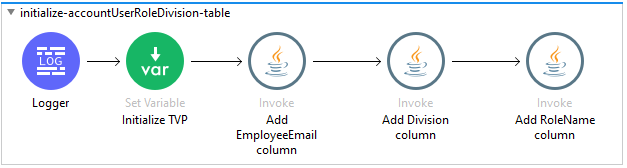
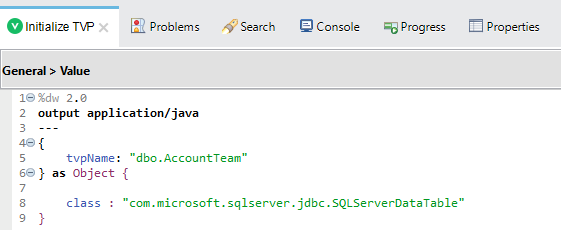
To initialize, add a variable as below, vAccountTeamsTableand define the Value as below. Here tvpName dbo.AccountTeam is the user-defined data type (UDDT) for the TVP as created within the database. The class name is com.microsoft.sqlserver.jdbc.SQLServerDataTable.
In the next stage, we add columns to our TVP. Ensure that you add columns in the same order as defined in the UDDT, or else the data values will not be aligned. In this example, we will first add EmployeeEmail column.
Add Invoke operation of the Java module to the flow and name it appropriately. Add TVP variable AccountTeamsTable to the Instance. In the Args section, add two arguments; first is the column name matching the UDDT column name and the second one is SQLType which indicates the data type of that particular column. The Class again is com.microsoft.sqlserver.jdbc.SQLServerDataTableand the Method is addColumnMetadata(String,int).
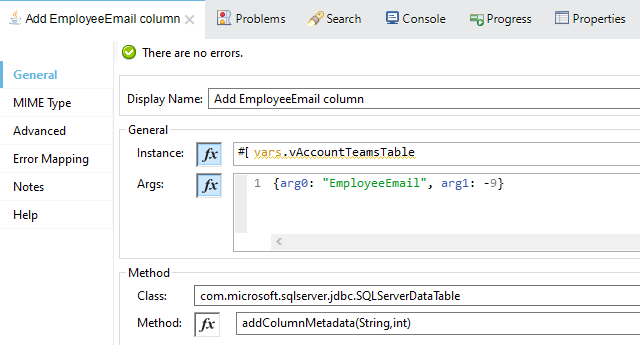
SQLType values can be found on this page. If you cannot locate it easily, search for NVARCHARand the second instance will take you to the appropriate table.
Add all the remaining columns from your TVP in a similar fashion, ensuring you maintain the sequence.
In the third stage, we need to add data into the TVP. Pass the input payload to a For Each which converts each row to the TVP type object and then adds the row to the TVP.
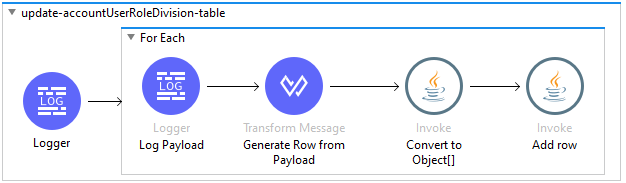
In the transform message, convert the payload record to an Array. Again ensure that sequence matches the UDDT.
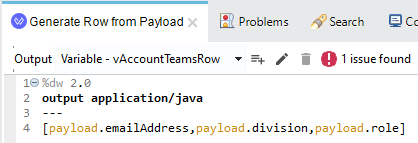
The Convert to Object[] step, also an Invoke operation of the Java module:
![Convert to Object[]](https://dz2cdn1.dzone.com/storage/temp/14183095-1606671137454.png)
Finally, the Add rowstep, an Invoke operation as well, the variable vAccountTeamsRowis added to the TVP variable vAccountTeamsTable.
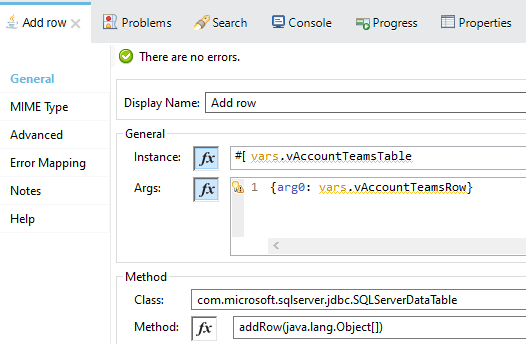
Let's test this code with the below payload:

As seen in the below debug snapshot, the TVP was properly generated and a row added for the sample value. ThecolumnMetadatamust align with the UDDT defined in the database.
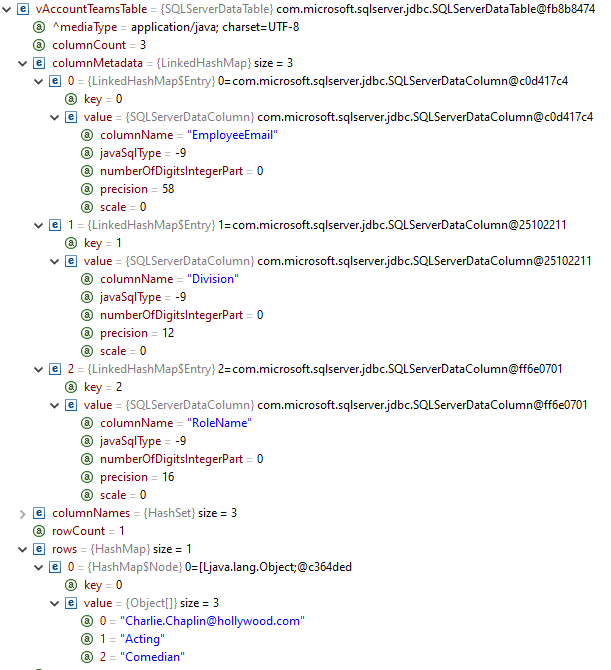
After adding all the rows, the TVP parameter can be passed to the stored procedure as any other parameter.
Opinions expressed by DZone contributors are their own.
Comments