

Strapi v5: Customization Nuances
The article explores the nuances of UI and UX customization in Strapi — an open-source headless CMS: theme configuration, interaction with the server, and CMS context.
Join the DZone community and get the full member experience.
Join For FreeStrapi is an open-source headless CMS. The library allows integration with external databases, the implementation of custom controllers, and customization of the UI to match a project's branding. According to GitHub, around 30,000 developers use Strapi CMS in their projects.
This article is primarily aimed at developers who work with or plan to integrate Strapi CMS into their applications.
You won’t find a rehash of the official Strapi v5 documentation here — instead, this post focuses on practical aspects that are rarely mentioned in public sources but can be extremely useful when using Strapi CMS in a real-world project.
UI Customization
Strapi and similar headless CMS solutions are often used to create ready-to-use admin panels. These panels allow content managers to manage content, configure role-based access, and partially support multilingual frontend applications.
Customizing the UI to reflect a client’s branding is a common use case — and one that can consume significant development hours. While some aspects of this are covered in the documentation, topics like interface localization, label overrides, and color scheme customization are only briefly touched on.
The main entry point for UI customization in Strapi is the src/admin/app.example.tsx file. After renaming it to app.tsx and rebuilding the app, Strapi will use this file as the custom context. You can see this behavior in the source code:
// PATH: packages/core/strapi/src/node/core/admin-customisations.ts

// File extension options that can be recognized as customizable context
const ADMIN_APP_FILES = ['app.js', 'app.mjs', 'app.ts', 'app.jsx', 'app.tsx'];

const loadUserAppFile = async ({ runtimeDir, appDir }) => {
  // Search for the above-mentioned files in the Strapi application directory, within the src folder
  for (const file of ADMIN_APP_FILES) {
    const filePath = path.join(appDir, 'src', 'admin', file);
    // If a file is found, the converted path is returned
    if (await pathExists(filePath)) {
      return {
        path: filePath,
        modulePath: convertSystemPathToModulePath(path.relative(runtimeDir, filePath)),
      };
    }
  }

  return undefined;
};
This logic is invoked during the build process, as shown in create-build-context.ts:
// PATH: packages/core/strapi/src/node/create-build-context.ts

const customisations = await loadUserAppFile({ appDir, runtimeDir });
const buildContext = {
  appDir,
  customisations,
};

return buildContext;
Text Blocks and Localization
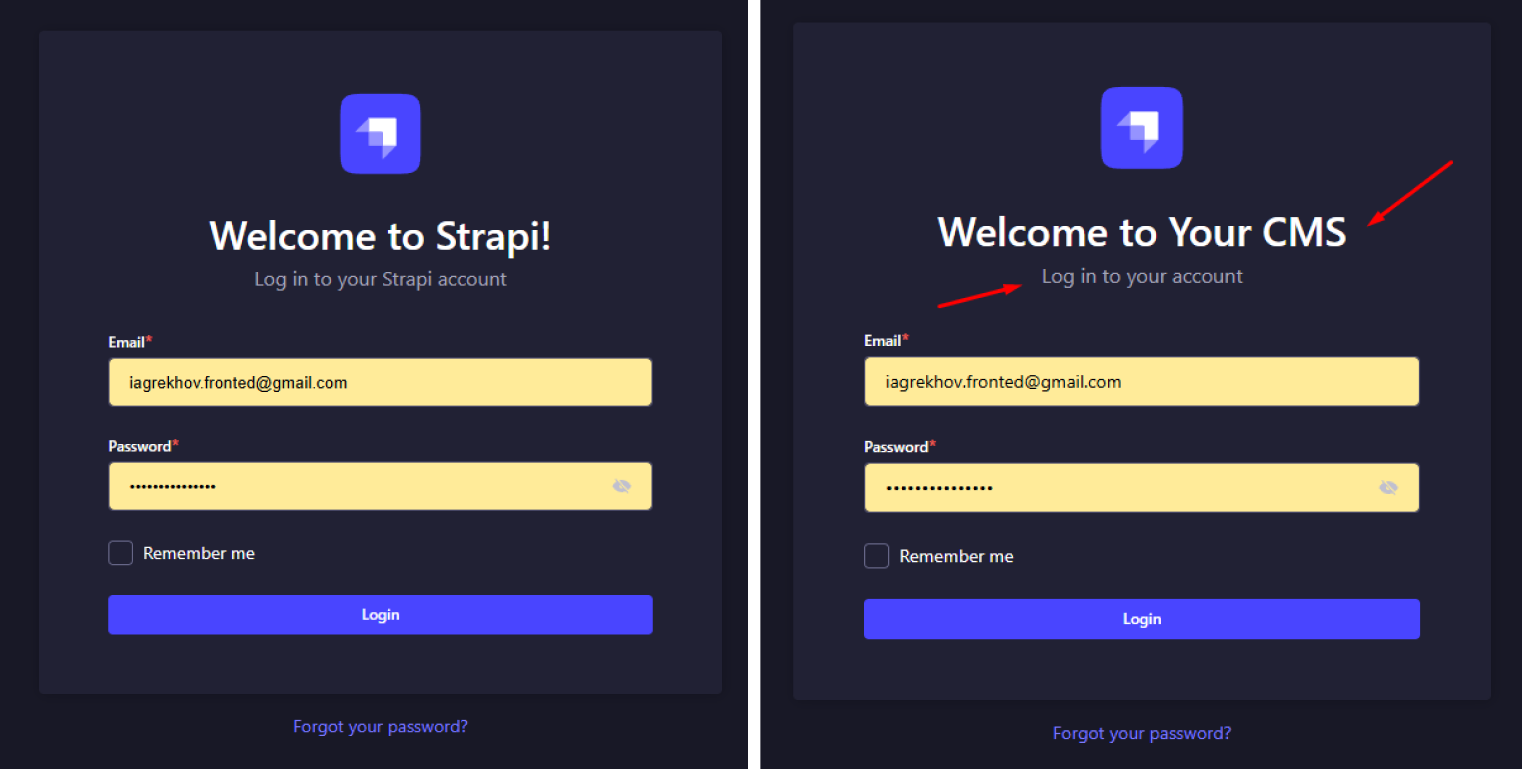
You can override UI text labels using a configuration object. For example, the screenshot above was implemented like this:
import type { StrapiApp } from "@strapi/strapi/admin";

export default {
  config: {
    locales: ["fr", "ru"],
    translations: {
      en: {
        "Auth.form.welcome.title": "Welcome to Your CMS",
        "Auth.form.welcome.subtitle": "Log in to your account",
      },
    },
  },
  bootstrap(app: StrapiApp) {},
};
By default, Strapi loads a hardcoded dictionary based on the selected locale. If custom translations are provided in the configuration file, they will override the corresponding values:
// PATH: packages/core/admin/admin/src/StrapiApp.tsx

async loadTrads(customTranslations = {}) {
  const translations = this.configurations.locales.reduce((acc, current) => {
    acc[current] = {
      ...adminTranslations[current],
      ...(mergedTrads[current] || {}),
      ...(customTranslations[current] ?? {}),
    };

    return acc;
  }, {});

  this.configurations.translations = translations;

  return Promise.resolve();
}
The merged dictionary is then used during UI rendering:
// PATH: packages/core/admin/admin/src/render.ts

const renderAdmin = async (
  mountNode,
  { plugins, customisations, features }
) => {
  await app.register(customisations?.register);
  await app.bootstrap(customisations?.bootstrap);
  await app.loadTrads(customisations?.config?.translations);
}
You can find a full list of configurable translation keys in the source directory:
// PATH: packages/core/admin/admin/src/translations
{
  "Analytics": "Analytics",
  "Auth.components.Oops.text": "Uw account is geblokkeerd.",
  "Auth.components.Oops.text.admin": "Als dit een fout is, neem dan contact op met uw beheerder.",
  "Auth.components.Oops.title": "Oeps...",
  ...
}
Color Theme
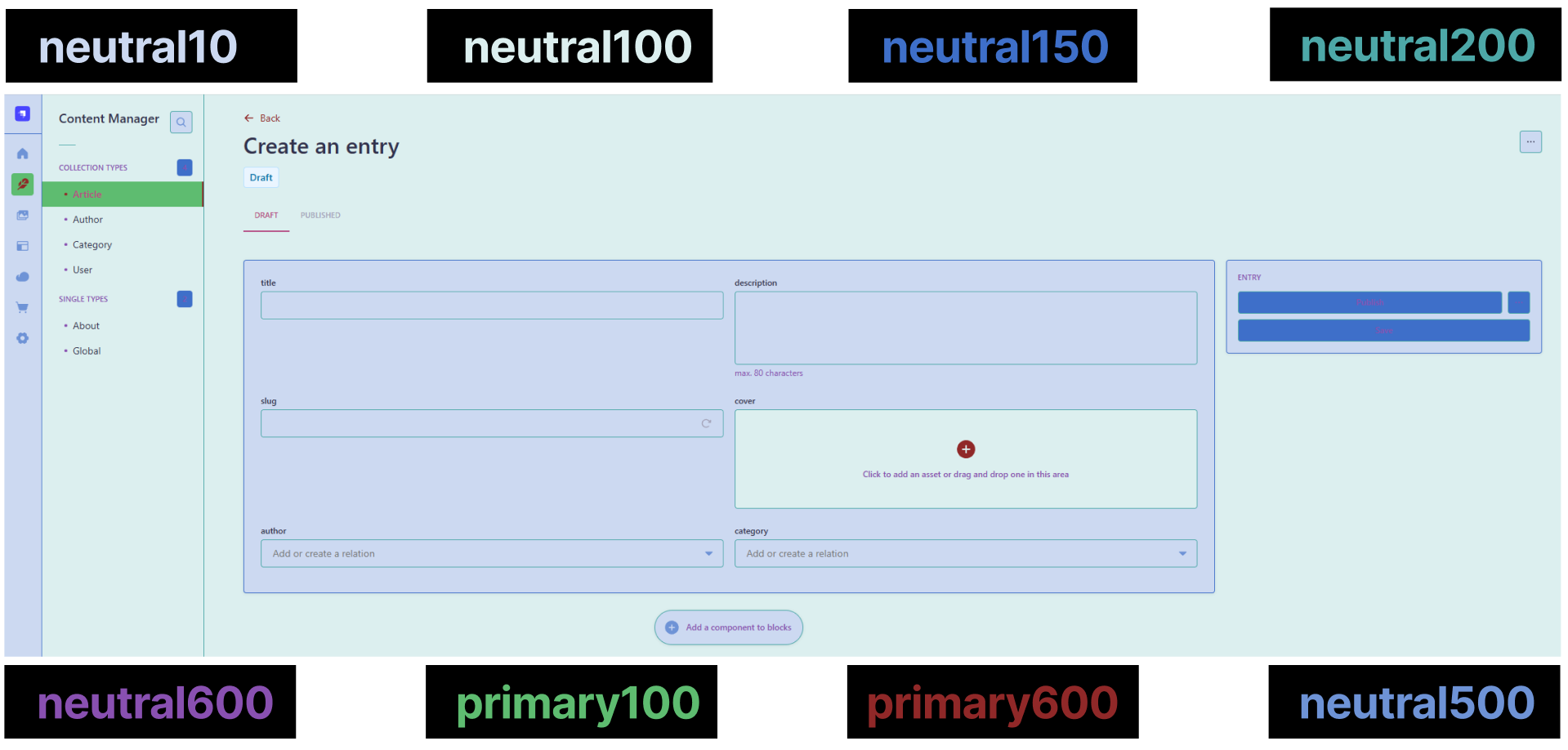
Color customization is partially documented and also explored by the GitHub user ShahriarKh. This article focuses not on how to override Tailwind variables in Strapi, but on providing a ready-to-use color map for frequent use cases.
| Tailwind Variable | Usage |
|---|---|
neutral0 |
Block backgrounds |
neutral100 |
General backgrounds |
neutral150 |
Icons, buttons, outer borders |
neutral200 |
Borders |
neutral500 |
Icons |
neutral600 |
Text |
primary100 |
Focused item background |
primary600 |
Focused item text and icons |
UX Customization
Improving the user experience in Strapi can be done by creating custom endpoints or by developing additional plugins that enhance the admin panel.
Endpoints
The documentation explains the basics of creating endpoints, but a few key details are glossed over.
Each endpoint consists of a controller and a route file. Here’s a basic example:
// PATH: strapi-article\src\api\example-controller\routes\example-controller.ts
export default {
  routes: [
    {
      method: "GET",
      path: "/example-controller",
      handler: "example-controller.exampleAction",
    },
  ],
};


// PATH: src/api/example-controller/controllers/example-controller.ts
export default {
  exampleAction: async (ctx, next) => {
    try {
      ctx.body = "ok";
    } catch (err) {
      ctx.body = err;
    }
  },
};
By default, these endpoints are private and require a valid token. A line in the documentation can be misleading:
“If you're generally interacting with localStorage, then access this directly e.g.
localStorage.getItem('myKey').”
In reality, the token is stored in an HttpOnly cookie, so it cannot be accessed from client-side JavaScript.
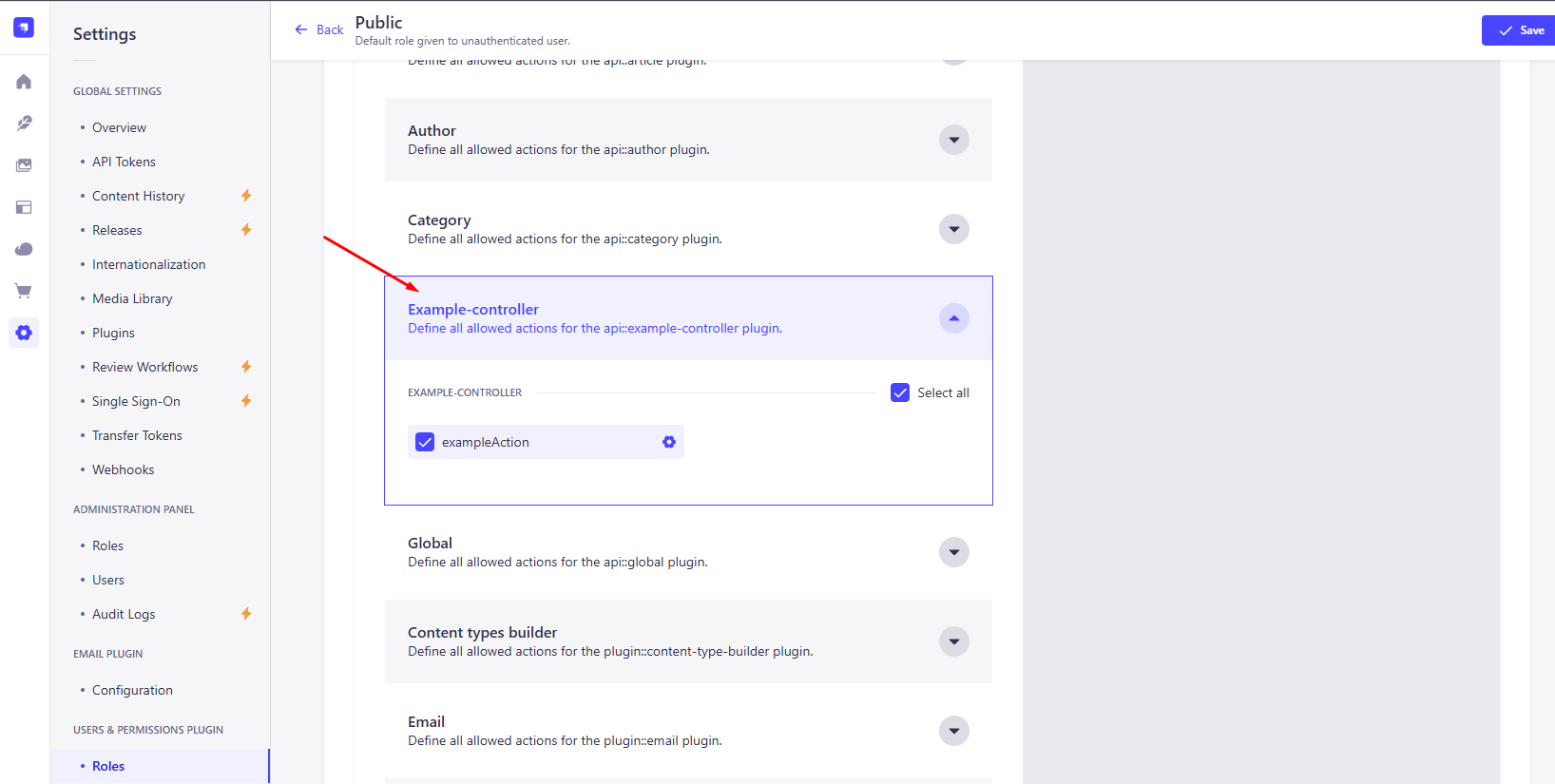
To make an endpoint accessible from within the Strapi UI, permissions need to be configured manually:
To make it public (no token required), add:
config: {
  auth: false,
}
Plugins
Developing new interface elements may raise questions about plugin-to-Strapi communication and context access.
Plugin: Server Communication
To access Collection or Single types, use the useFetchClient() hook:
import { useFetchClient } from '@strapi/strapi/admin';
import { useEffect } from 'react';

const ExampleButton = () => {
  const { get, put } = useFetchClient();

  useEffect(() => {
    const load = async () => {
      try {
        const allLocales = await get('/content-manager/collection-types/example-type?populate=*');
      } catch (error) {
        console.error('Error loading locales:', error);
      }
    };

    load();
  }, []);
};
However, useFetchClient() can’t retrieve deeply related data.
For example, if example-type is linked to example-type-level1, which is in turn linked to example-type-level2, then no populate setting will give you the full nested dataset.
To resolve this, create a custom controller to aggregate the data and query it from the plugin using tools like axios:
import axios from 'axios';
import { useEffect } from 'react';

const ExampleButton = () => {
  useEffect(() => {
    const fetchData = async () => {
      try {
        const response = await axios.get('/api/example-controller');
      } catch (error) {
        console.error('Error loading data:', error);
      }
    };

    fetchData();
  }, []);
};
Plugin – Context
After significant changes were introduced in Strapi v5 compared to Strapi v4, the documentation related to accessing context has become partially outdated.
If you need to retrieve data from fields of Collection or Single Types, you can use the hook unstable_useContentManagerContext():
import { unstable_useContentManagerContext as useContentManagerContext } from '@strapi/strapi/admin';

const ExampleButton = () => {
	const { id, model, form } = useContentManagerContext();
}
id– a unique identifier of the record in the table (documentId).model– the UID of the current model (content type).form– an object from which you can access the initial field values, the updated values after editing, and whether the form is editable. In most cases, interactions with the context are performed through theformobject.
Conclusion
Using headless CMS solutions can significantly reduce the time a team spends developing an admin panel. This article focused on some of the challenges of customizing and extending Strapi CMS. I hope the provided solutions help reduce the amount of developer hours needed and allow teams to deliver a highly customized product to their clients.
You can find the repository with examples from this article here.
Happy coding!
Opinions expressed by DZone contributors are their own.
Comments