

Structure JavaScript Code
We will learn how to structure JavaScript code using Revealing Module pattern.
 CORE
·
CORE
·
Join the DZone community and get the full member experience.
Join For FreeIntroduction
Modern JavaScript frameworks like Angular, Vue, etc. have a built-in mechanism to structure JavaScript code. When not using these frameworks, we can use simple techniques to structure our JavaScript. In this post, I will show you one of them using the Revealing Module pattern.
This pattern is very popular and there are a great many resources online utilizing this design and here I will try to share a simple implementation of the same.
Why Structure JavaScript Code
Encapsulated and modular-based JavaScript code promotes reusability and is better for maintenance.
To avoid spaghetti JavaScript all over the code base, a Revealing Module pattern shall be used to structure JavaScript code.
Following are some of the benefits of using this pattern:
- “Modularize” code into re-usable objects.
- Variable/functions taken out of the global namespace.
- Expose only public members.
- 'Cleaner' way to expose public members.
Revealing Module Structure
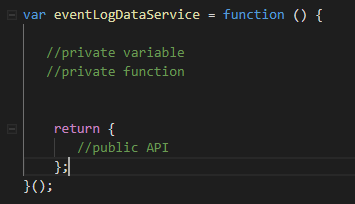
Here is an example of kind of the standard format and structure for the Revealing Module pattern.
Initial Setup
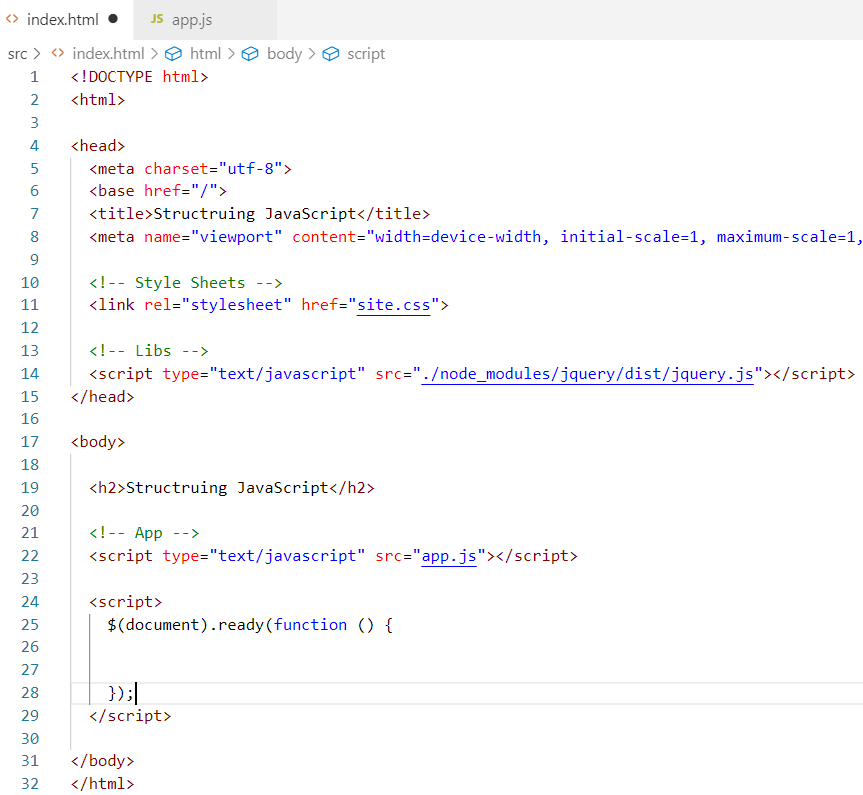
Before we dive into JavaScript code, let’s talk about the initial development environment setup. I am using a very basic JavaScript project for the demo, it just has a single HTML page, some CSS styles, and a basic dev server. For more information, please check the Basic Front-end Dev. Environment Setup post. This will set up a starting point for us to move forward.
At this point, I have some HTML and an empty app.js file.
App JavaScript Code
Let’s start with the application itself. Following the structure mentioned above, here is the shell for our application.
var app = function () {
//private members
//public API
return {
};
}();
Now, let’s add some functionality to our app:
xxxxxxxxxx
var app = function () {
//private members
title = 'Structure JavaScript';
displayTitle = function(){
alert(this.title);
}
displaySite = function(){
alert('site info...');
}
//public API
return {
title:title,
displayTitle: displayTitle
};
}();
Here, I added one property, title and two functions, displayTitle() and displaySite(). Then in the public API section, I exposed the title property and one function. Notice that I did not expose the displaySite function and this illustrates a private function that shall not be accessible from outside of this code block.
Next, I added the following code in the document.ready in index.html as shown below:
xxxxxxxxxx
<script>
$(document).ready(function () {
console.log(app.title);
app.displayTitle();
app.displaySite();//this will not work
});
</script>
Now, if you run the npm start command and go to browser page, you will see that the first two lines works and the third line app.displaySite() does not work, which is expected.
So, this is the general idea of this pattern. It helps us organize our JavaScript code while not polluting the global namespace.
Next, let’s see how we can use this pattern to consolidate AJAX calls.
Consolidating AJAX Calls
In order to eliminate scattered Ajax calls throughout the code, we can use Revealing Module Pattern to consolidate Ajax calls.
Developers can create a data-services script and use Ajax promises for success and failure scenarios via callbacks.
Typically a project will have more than one data service and not repeat the boilerplate Ajax code. we can refactor the actual Ajax calling part into another JavaScript object called, ajaxService and, you guessed it right, we can use the Revealing Module pattern for this service as well.
ajaxService will be a low-level implementation detail and it will handle all types of Ajax calls. While Data-Services will use the ajaxService to perform data-related operations.
ajaxService Implementation
Here is a simple implementation of ajaxService (ajaxService.js). It just has one method which takes some input and returns a promise which calling code can then use for making Ajax calls.
xxxxxxxxxx
var ajaxService = function () {
makeAjaxRequest = function (httpMethod, url, data, async, cache) {
if (typeof async == "undefined") async = true;
if (typeof cache == "undefined") cache = false;
var ajaxObject = $.ajax({
type: httpMethod.toUpperCase(),
url: url,
data: data,
datatype: 'json',
async: async,
cache: cache,
beforeSend: function (request) {
request.setRequestHeader("content-type", "application/json")
}
});
return ajaxObject;
}
//public API
return {
makeAjaxRequest: makeAjaxRequest
};
}();
DataService Implementation
I created another JavaScript file called dataService.js with the following code:
xxxxxxxxxx
var dataService = function () {
let getUsersUrl = 'https://reqres.in/api/users?page=2';
let createUserUrl = 'https://reqres.in/api/users';
getUsers = function () {
//return a promise
return ajaxService.makeAjaxRequest('GET', getUsersUrl, null)
}
createUser = function (userObject) {
return ajaxService.makeAjaxRequest('POST', createUserUrl, userObject);
}
//public API
return {
getUsers: getUsers,
createUser: createUser
};
}();
It is also using the Revealing Module pattern and the code is simple. This service uses ajaxService internally. Note that I am using a publicly available test backend on the internet and making Ajax calls to it. You can use your own REST API by replacing the endpoints (URLs).
App.js Code Update
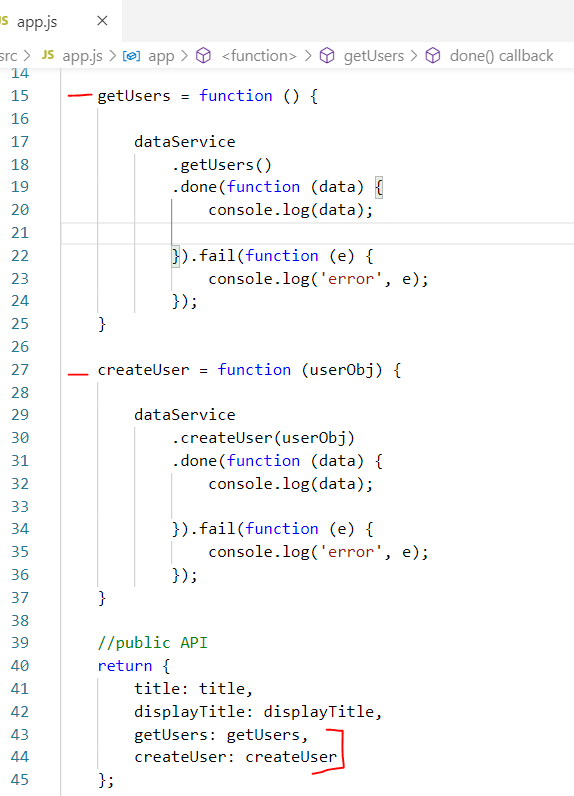
I created new methods in app.js file and these methods use dataService for their operations.
Application Bootstrap
I also referenced these JavaScript files in the index.html page and updated the ready function as shown below:
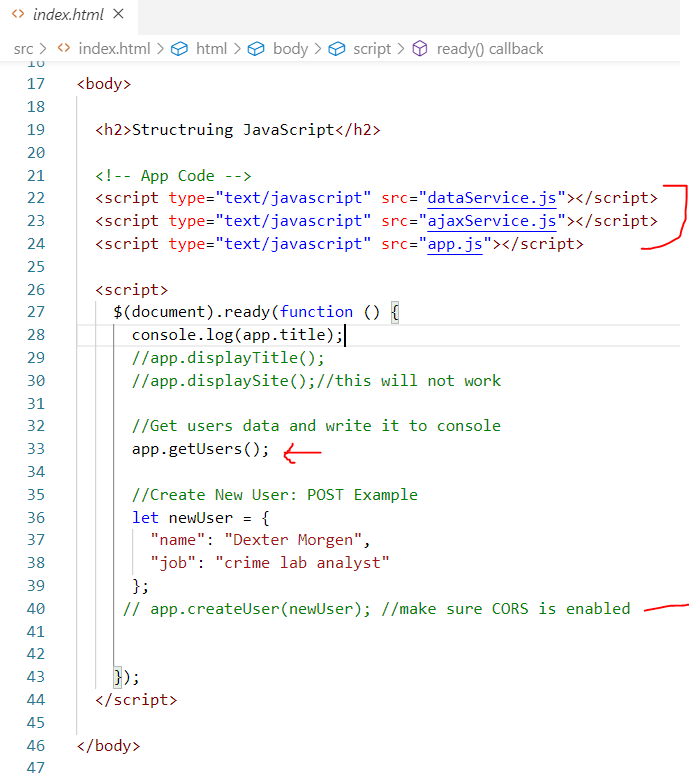
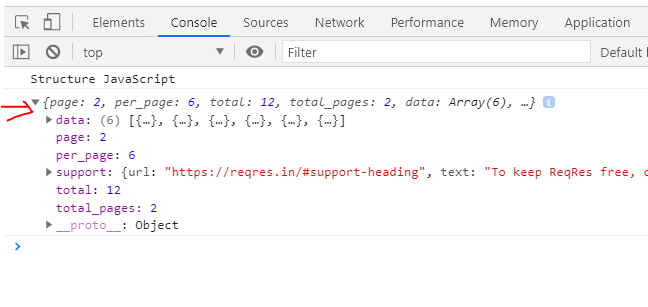
and here is the console output of these operations:
Summary
The Revealing Module pattern can help structure JavaScript code. It has limitations, but for simple codebases, this can work very well. You can download the demo code from this git repo. Let me know if you have any comments or questions. Till next time, Happy Coding!
Published at DZone with permission of Jawad Hasan Shani. See the original article here.
Opinions expressed by DZone contributors are their own.
Comments