

Twilio Connector In Mule 4
In this article, see a tutorial that explains how to install the Twilio Connector in Mule 4.
Join the DZone community and get the full member experience.
Join For Free
What Is Twilio?
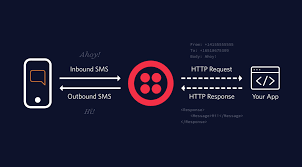
Twilio is a cloud-based administration (IaaS) that empowers groundbreaking correspondence between cell phones, applications, administrations, and frameworks all through the business to conquer any hindrance between traditional correspondences.
Note: To utilize the Twilio connector, you should have a functioning twilio.com account, either as a trial or paid. Click the following link to create a Twilio account.
Twilio Connector in Mule 4
The Twilio platform serves the APIs for content informing (text messaging), VoIP, and voice calls. The any-point connector for Twilio gives availability to the Twilio content informing API.
This connector gives an API to sending and getting instant messages, to begin with, Twilio, pursue the means underneath to access their free sandbox administration to send SMS instant messages. You can arrange the Twilio connector in Anypoint studio with your API qualifications.
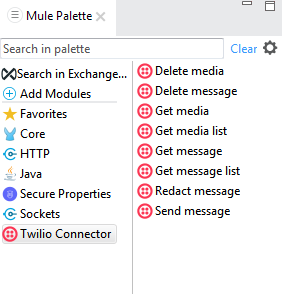
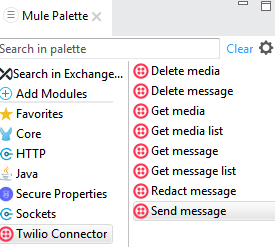
Select an operation:
- Delete Media
- Delete Message
- Get Media
- Get Media List
- Get Message
- Get Message List
- Redact Message
- Send Message
It looks like in the format as shown below:
How to Install Twilio Connector in Mule 4
Step 1
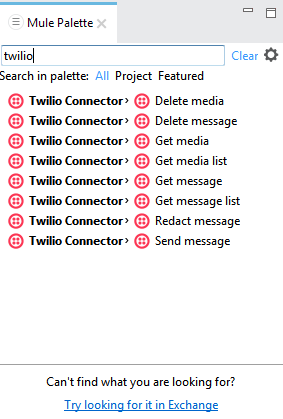
Go to the studio palette and click the search tab and enter the connector name that you want like Twilio.
Step 2
Click the below link i.e Try looking for it in Exchange in the studio.
Step 3
Click and log in your any-point platform account it will redirect to exchange.
Step 4
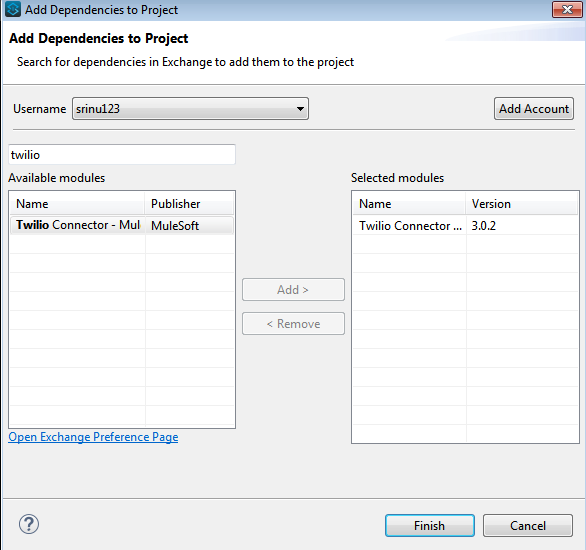
Select your module and install it.
Step 5
Peruse the prompts and install the connector.
Step 6
Now, Able to look in the mule palette for activities of the Twilio connector.
Note: The underneath previews are portrayed about how to introduce Twilio connector in Mule 4.
Example for Twilio Connector in Mule4
Utilize the Twilio connector (send message operation) and send an example message to the mobile device.
Step1
Create a new Mule project on the studio as shown, namely as Twilio.
Step2
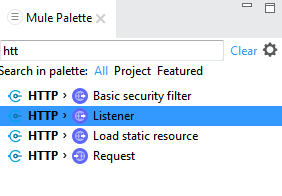
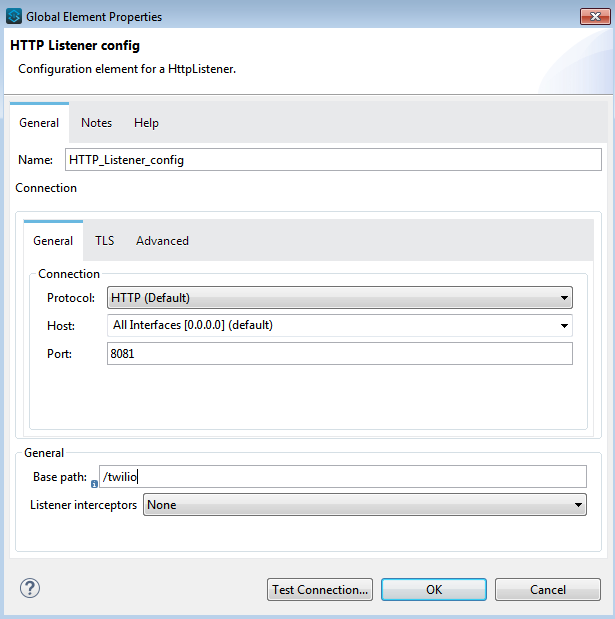
Go to the palette and drag the HTTP listener connector to get a solicitation (request) for your servers and give the host and port number. The host is localhost and the port number is 808. Test your connection and see if the port is being used or not and test it effectively.
Step3
Set the HTTP listener path as /Twilio.
Step4
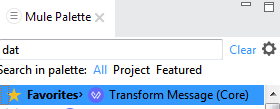
Drag the data weave component to validate our Twilio details.
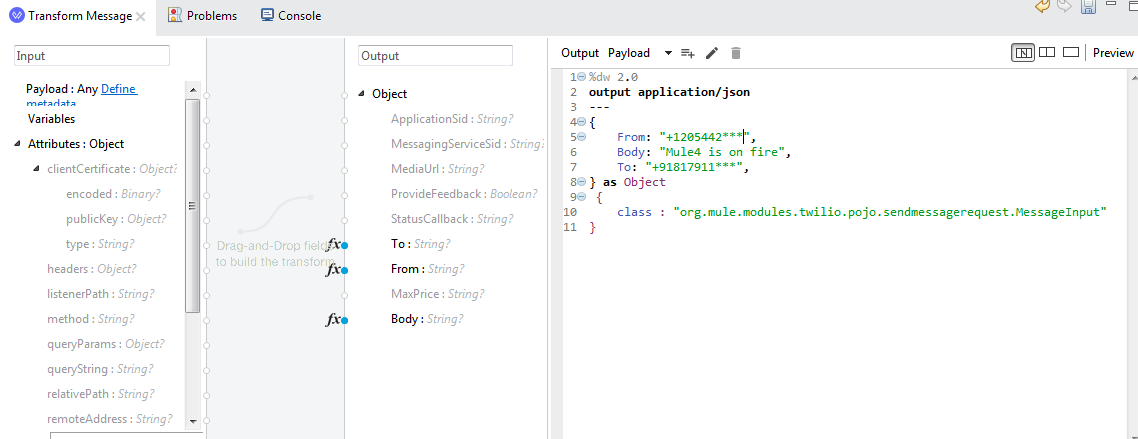
Note: The beneath preview depicts the fields we need to validate and if we need to fill those fields.
Step5
Now, drag the Twilio Connector as a send message operation from the palette on the studio and click on the additional (add) configuration and give the Account SID and Auth Token qualities (values), which are accessible in the Twilio account dashboard.
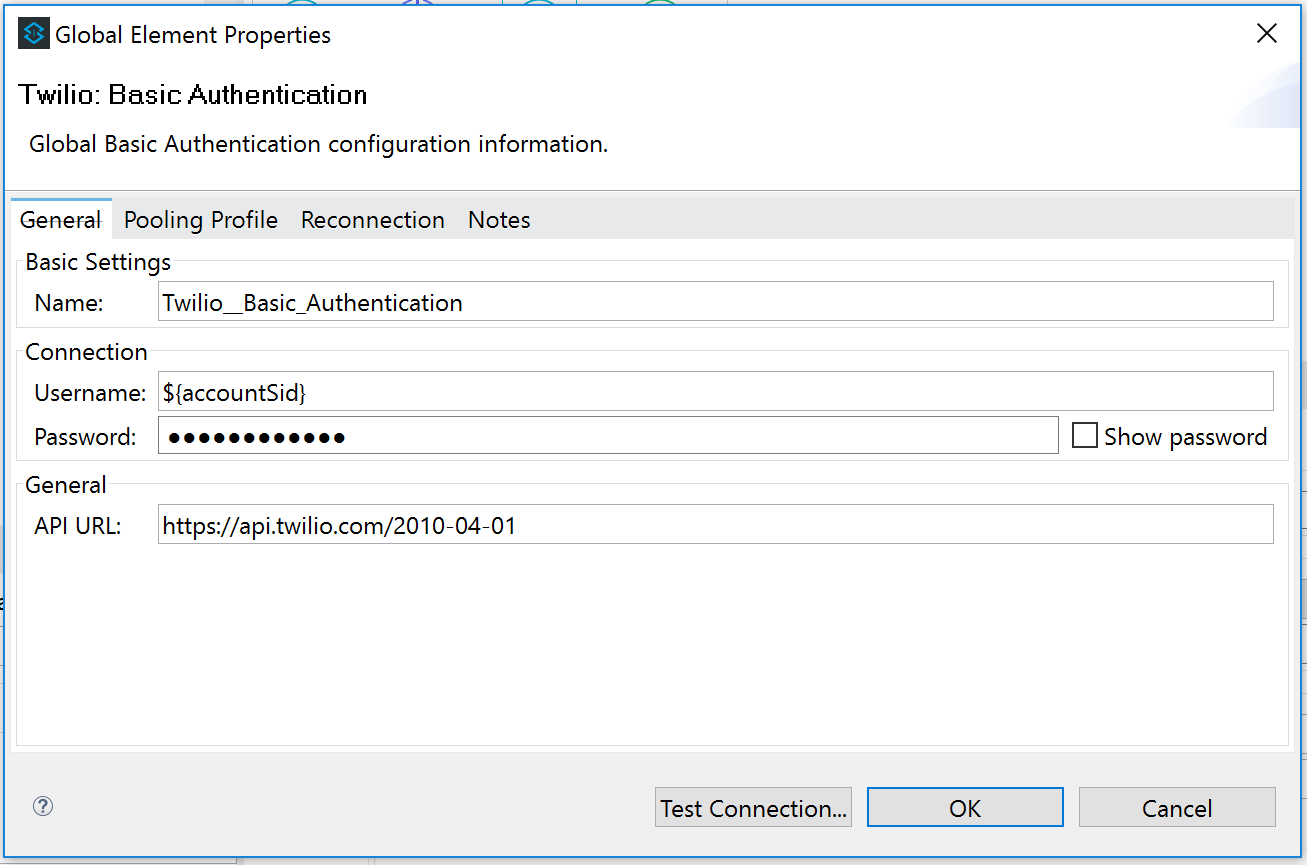
Step6
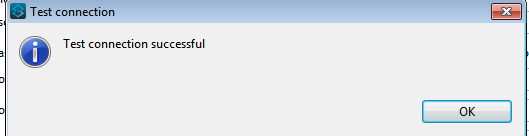
Next, check the test connection. The test connection ought to be effective, as shown below.
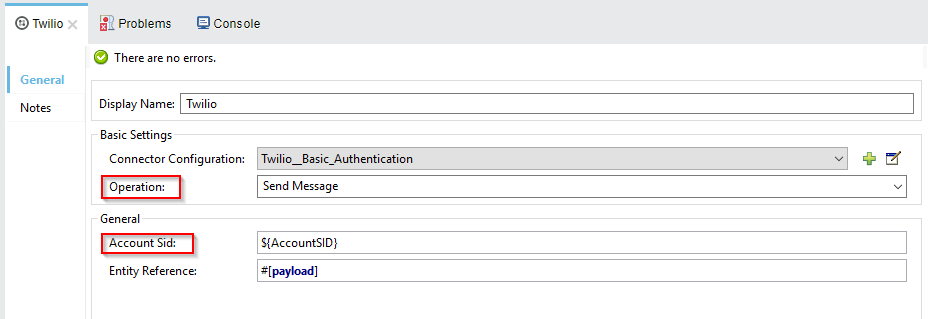
 Next, you need to configure the below things in Twilio Connector.
Step 7
Next, we need to show the payload as a type of JSON arrangement, utilizing the data weave segment.
Step 8
Right-click on the canvas and select Run project.
![Image title]() Step 9
Step 9
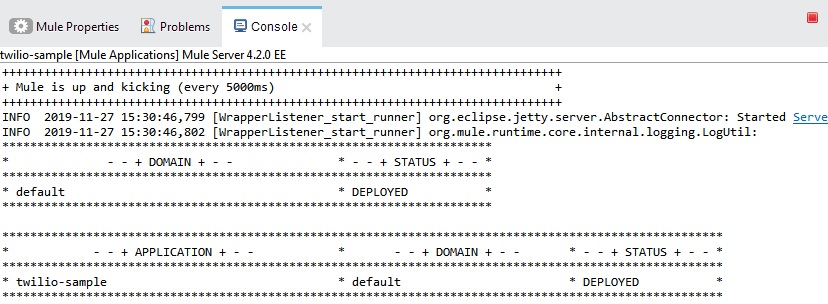 Step 9
Open the Postman and hit your service URL request as shown.
Post method: http://localhost:8081/Twilio
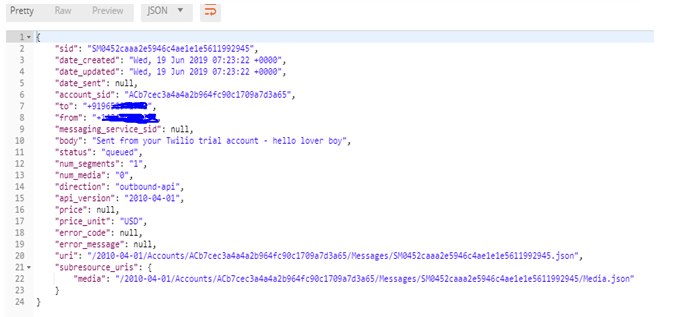
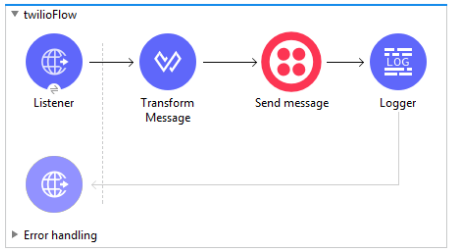
Now, we look at the entire flow of a Mule project i.e Twilio-sample.
Note: The message you sent in the body in transform message, i.e data weave, is recieved by the mobile number that you specified.
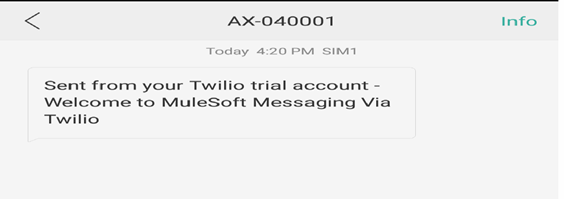
Note: Try to use your account (Twilio) with a registered mobile number, or you won't get a message.
Twilio Body
To: The number registered in Twilio account use that Number (+91787*******).
From: This Number was given by Twilio (+14245*******).
Body: “Mule-4 is on fire”.
Example
Note: Try to use Your Twilio account details in the below code, otherwise, you may get an error.
<?xml version="1.0" encoding="UTF-8"?>
<mule xmlns="http://www.mulesoft.org/schema/mule/core" xmlns:doc="http://www.mulesoft.org/schema/mule/documentation" xmlns:ee="http://www.mulesoft.org/schema/mule/ee/core" xmlns:http="http://www.mulesoft.org/schema/mule/http" xmlns:java="http://www.mulesoft.org/schema/mule/java" xmlns:twilio-connector="http://www.mulesoft.org/schema/mule/twilio-connector" xmlns:xsi="http://www.w3.org/2001/XMLSchema-instance" xsi:schemaLocation="http://www.mulesoft.org/schema/mule/core http://www.mulesoft.org/schema/mule/core/current/mule.xsd  http://www.mulesoft.org/schema/mule/http http://www.mulesoft.org/schema/mule/http/current/mule-http.xsd  http://www.mulesoft.org/schema/mule/ee/core http://www.mulesoft.org/schema/mule/ee/core/current/mule-ee.xsd  http://www.mulesoft.org/schema/mule/twilio-connector http://www.mulesoft.org/schema/mule/twilio-connector/current/mule-twilio-connector.xsd">
   <http:listener-config name="HTTP_Listener_config" doc:name="HTTP Listener config" doc:id="003f8177-ab97-44be-8eee-2c93a4ef61f4">
      <http:listener-connection host="0.0.0.0" port="8081" />
   </http:listener-config>
   <twilio-connector:config name="Twilio_Connector_Config" doc:name="Twilio Connector Config" doc:id="80bb7380-2a28-4141-a12e-d6ad33a9d486" property_username="AC3a59ce8a7f7a2ad**********" property_password="8e1089f9d39ec933*********">
      <twilio-connector:connection />
   </twilio-connector:config>
   <flow name="twilioFlow" doc:id="40bafb7f-93bb-4211-bfca-a3c9164a3878">
      <http:listener doc:name="Listener" doc:id="544a1f18-9ef8-473f-85cd-3de37504dbaf" config-ref="HTTP_Listener_config" path="/twilio" />
      <try doc:name="Try" doc:id="5e1cf1d3-8ea8-4128-bce1-96e93551ed20">
         <ee:transform doc:name="Transform Message" doc:id="731aeb47-d979-4c4f-8369-c00984970148">
            <ee:message>
               <ee:set-payload><![CDATA[%dw 2.0

output application/json

---

{

From: "+12054****",

Body: "Mule4 is on fire",

To: "+918179****",

} as Object

{

class : "org.mule.modules.twilio.pojo.sendmessagerequest.MessageInput"

}]]></ee:set-payload>
            </ee:message>
         </ee:transform>
         <error-handler>
            <on-error-propagate enableNotifications="true" logException="true" doc:name="On Error Propagate" doc:id="a16647b5-1a8e-43da-9897-2e0ee1301731">
               <ee:transform doc:name="Create error response" doc:id="753e3859-d0eb-4160-bfb2-92d7410dd44d">
                  <ee:message />
                  <ee:variables>
                     <ee:set-variable variableName="errorInfo"><![CDATA[%dw 2.0

output application/java

---

{

"errorCode": 400,

"errorType": "Mapping",

"errorMessage": "Failed to transform the request. Error description is : " ++ (error.description as String)

}]]></ee:set-variable>
                  </ee:variables>
               </ee:transform>
            </on-error-propagate>
         </error-handler>
      </try>
      <try doc:name="Try" doc:id="870b32ca-f7f8-44db-8082-7f153e3b210c">
         <twilio-connector:send-message doc:name="Send message" doc:id="1a61c985-fba9-4007-8447-4b81d8fca8f0" account-sid="AC3a59ce8a7f7a2ad29db7a****" config-ref="Twilio_Connector_Config" />
         <error-handler>
            <on-error-propagate enableNotifications="true" logException="true" doc:name="On Error Propagate" doc:id="2b91e443-9fc1-41df-8a4b-a67cfcde738d">
               <ee:transform doc:name="Set error infor variab" doc:id="997a8f4e-7a4b-4845-a7c1-7faaab1c1518">
                  <ee:message />
                  <ee:variables>
                     <ee:set-variable variableName="errorInfo"><![CDATA[%dw 2.0

output application/java

---

{

"errorCode": 500,

"errorType": "Technical",

"errorMessage": "Twilio service unavailable. Error description is : " ++ (error.description as String)

}]]></ee:set-variable>
                  </ee:variables>
               </ee:transform>
            </on-error-propagate>
         </error-handler>
      </try>
      <logger level="INFO" doc:name="Logger" doc:id="0b23a14b-f980-416f-82b4-a074a7ef4f6f" message="#[payload.body]" />
      <error-handler>
         <on-error-continue enableNotifications="true" logException="true" doc:name="On Error Continue" doc:id="366dac4f-ca19-46c8-b96d-4116ebd3e207">
            <ee:transform doc:name="Create error response" doc:id="b7802fc0-f69a-4e45-ac0b-4a794b1767cb">
               <ee:message>
                  <ee:set-payload><![CDATA[%dw 2.0

output application/json

---

{

"errorCode": vars.errorInfo.errorCode,

"errorType": vars.errorInfo.errorType,

"errorMessage": vars.errorInfo.errorMessage

}]]></ee:set-payload>
               </ee:message>
               <ee:variables />
            </ee:transform>
         </on-error-continue>
      </error-handler>
   </flow>
   <flow name="twilioFlow1" doc:id="f9262bbf-3622-4610-a04a-cfc675c41ac1">
      <http:listener doc:name="Listener" doc:id="b0c4eeef-4832-4125-8f5b-e925474a35fb" config-ref="HTTP_Listener_config" path="/get" />
      <try doc:name="Try" doc:id="fad6bb29-d80d-4631-8d41-e6c970c3adec">
         <twilio-connector:get-message doc:name="Get message" doc:id="78b30905-fab1-417b-a0fb-b15d3c0c84fa" account-sid="AC3a59ce8a7f7a2ad29db7a3d90e1a75e1" message-sid="SMb1eb9143b10b4c55aa18831802266417" config-ref="Twilio_Connector_Config" />
         <error-handler>
            <on-error-propagate enableNotifications="true" logException="true" doc:name="On Error Propagate" doc:id="703168fc-ccc8-4f43-8721-f5ae1bbba6e0">
               <ee:transform doc:name="Set error infor variab" doc:id="d2ea332c-a82c-46de-a537-8ebd51d6d46b">
                  <ee:message />
                  <ee:variables>
                     <ee:set-variable variableName="errorInfo"><![CDATA[%dw 2.0

output application/java

---

{

"errorCode": 500,

"errorType": "Technical",

"errorMessage": "Twilio service unavailable. Error description is : " ++ (error.description as String)

}]]></ee:set-variable>
                  </ee:variables>
               </ee:transform>
            </on-error-propagate>
         </error-handler>
      </try>
      <logger level="INFO" doc:name="Logger" doc:id="819bf560-f8c5-4f3d-b577-a71e594e5d80" message="#[payload.body]" />
      <error-handler>
         <on-error-continue enableNotifications="true" logException="true" doc:name="On Error Continue" doc:id="b11e49ce-d58f-489e-acc7-374f830765d7">
            <ee:transform doc:name="Create error response" doc:id="04b7d665-7698-4163-b473-7747d5b3c680">
               <ee:message>
                  <ee:set-payload><![CDATA[%dw 2.0

output application/json

---

{

"errorCode": vars.errorInfo.errorCode,

"errorType": vars.errorInfo.errorType,

"errorMessage": vars.errorInfo.errorMessage

}]]></ee:set-payload>
               </ee:message>
               <ee:variables />
            </ee:transform>
         </on-error-continue>
      </error-handler>
   </flow>
   <flow name="twilioFlow2" doc:id="7629f290-0fe5-4713-a16f-76da5fa274dc">
      <http:listener doc:name="Listener" doc:id="a5293d0f-916c-47c5-ab41-933c95387a39" config-ref="HTTP_Listener_config" path="/delete" />
      <try doc:name="Try" doc:id="a391fb65-8122-4a2c-81a1-4fe732d4f9e5">
         <twilio-connector:delete-message doc:name="Delete message" doc:id="5090a63c-b0e5-45ca-b70f-a51700576973" account-sid="AC3a59ce8a7f7a2ad29db7a3d90e1a75e1" message-sid="SM79d895cfb5124c16b4da2c1f25d890bd" config-ref="Twilio_Connector_Config" />
         <error-handler>
            <on-error-propagate enableNotifications="true" logException="true" doc:name="On Error Propagate" doc:id="182f9914-8635-4099-8f4c-628ce218e028">
               <ee:transform doc:name="Set error infor variab" doc:id="0246dfab-b1ca-481a-ae9b-621a3038954a">
                  <ee:message />
                  <ee:variables>
                     <ee:set-variable variableName="errorInfo"><![CDATA[%dw 2.0

output application/java

---

{

"errorCode": 500,

"errorType": "Technical",

"errorMessage": "Twilio service unavailable. Error description is : " ++ (error.description as String)

}]]></ee:set-variable>
                  </ee:variables>
               </ee:transform>
            </on-error-propagate>
         </error-handler>
      </try>
      <logger level="INFO" doc:name="Logger" doc:id="493a77ae-05a2-42d6-94bb-459c945e4e21" message="deleted" />
      <error-handler>
         <on-error-continue enableNotifications="true" logException="true" doc:name="On Error Continue" doc:id="a3757fdf-3e37-455c-93b0-00d573694b3f">
            <ee:transform doc:name="Create error response" doc:id="39611b96-e0d1-482b-9c54-aedbe02f262f">
               <ee:message>
                  <ee:set-payload><![CDATA[%dw 2.0

output application/json

---

{

"errorCode": vars.errorInfo.errorCode,

"errorType": vars.errorInfo.errorType,

"errorMessage": vars.errorInfo.errorMessage

}]]></ee:set-payload>
               </ee:message>
               <ee:variables />
            </ee:transform>
         </on-error-continue>
      </error-handler>
   </flow>
   <flow name="twilioFlow3" doc:id="0498e94d-5d07-495f-9c10-80c29eeb245a">
      <http:listener doc:name="Listener" doc:id="bf864d20-076f-45dc-a277-22cbd2526990" config-ref="HTTP_Listener_config" path="/getmessagelist" />
      <try doc:name="Try" doc:id="3247edc1-5124-41a6-b3dd-0810632e193a">
         <twilio-connector:get-message-list doc:name="Get message list" doc:id="6ee90d30-1f19-4f96-b85b-101d94820e9d" account-sid="AC3a59ce8a7f7a2ad29db7a3d90e1a75e1" to="+918179115109" from="+12054420887" config-ref="Twilio_Connector_Config" />
         <error-handler>
            <on-error-propagate enableNotifications="true" logException="true" doc:name="On Error Propagate" doc:id="d555785d-6349-497d-a4c2-bad90c437189">
               <ee:transform doc:name="Set error infor variab" doc:id="da3476a8-0f06-4b92-9437-820c4c3fc684">
                  <ee:message />
                  <ee:variables>
                     <ee:set-variable variableName="errorInfo"><![CDATA[%dw 2.0

output application/java

---

{

"errorCode": 500,

"errorType": "Technical",

"errorMessage": "Twilio service unavailable. Error description is : " ++ (error.description as String)

}]]></ee:set-variable>
                  </ee:variables>
               </ee:transform>
            </on-error-propagate>
         </error-handler>
      </try>
      <logger level="INFO" doc:name="Logger" doc:id="6aa06bcc-036a-419c-b148-690f919d4d00" message="#[payload]" />
      <error-handler>
         <on-error-continue enableNotifications="true" logException="true" doc:name="On Error Continue" doc:id="f39c4009-2dbd-4f8e-b165-0200f380510d">
            <ee:transform doc:name="Create error response" doc:id="9ffe847f-49a9-4767-bf47-298f41a7bcd2">
               <ee:message>
                  <ee:set-payload><![CDATA[%dw 2.0

output application/json

---

{

"errorCode": vars.errorInfo.errorCode,

"errorType": vars.errorInfo.errorType,

"errorMessage": vars.errorInfo.errorMessage

}]]></ee:set-payload>
               </ee:message>
               <ee:variables />
            </ee:transform>
         </on-error-continue>
      </error-handler>
   </flow>
</mule>
Conclusion
Mule 4 comes with a lot of improvements and enhancements i.e operations on Twilio have changed to connectors in Twilio Module. In Mule 3, there is only one connector, and we have to select an operation.
Opinions expressed by DZone contributors are their own.
Comments