

Understanding Recursive Queries in Postgres
Learn more about recursive queries in Postgres.
Postgres provides us a way to write queries that are recursive in nature and fetch the data until the termination condition is met. This can be achieved using Common Table Expressions (CTEs).
Using the WITH clause, we can create a temporary table scope of which is bound to that query itself. If we can combine this with the RECURSIVE clause, we can write some pretty cool stuff like finding the topmost parent, traveling salesman problem or as simple as printing the numbers recursively, as shown below:

First, we will see how this basic example works. This query has 3 parts,
SELECT 1 as n #line 2
This is the initial value, and our working table would be populated with this.
SELECT n + 1 FROM print_numbers WHERE n < 5 #line 4
This is the recursive part. As you can see, we are referring to the print_numbers itself and this would get values from the working table, which I mentioned. This query would continue running till the termination condition is met ie. n should be less than 5 and it is important to avoid infinite loops.
SELECT n FROM print_numbers #line 6
This is the actual query, which is doing nothing but selecting all the values of column n from print_numbers CTE.
Ok so now that we have the basics, I will show you 2 places where we are using these recursive queries.
1. Given an entity name, find all its ancestors
Schema Structure
| id |                     name | parent |
|----|--------------------------|--------|
|  1 |                Apple Inc | (null) |
|  2 |               Google Inc | (null) |
|  3 |              Apple India |      1 |
|  4 |             Google India |      2 |
|  5 |            Apple Chennai |      3 |
|  6 |          Apple Bangalore |      3 |
|  7 | Apple Chennai - Ascendas |      5 |
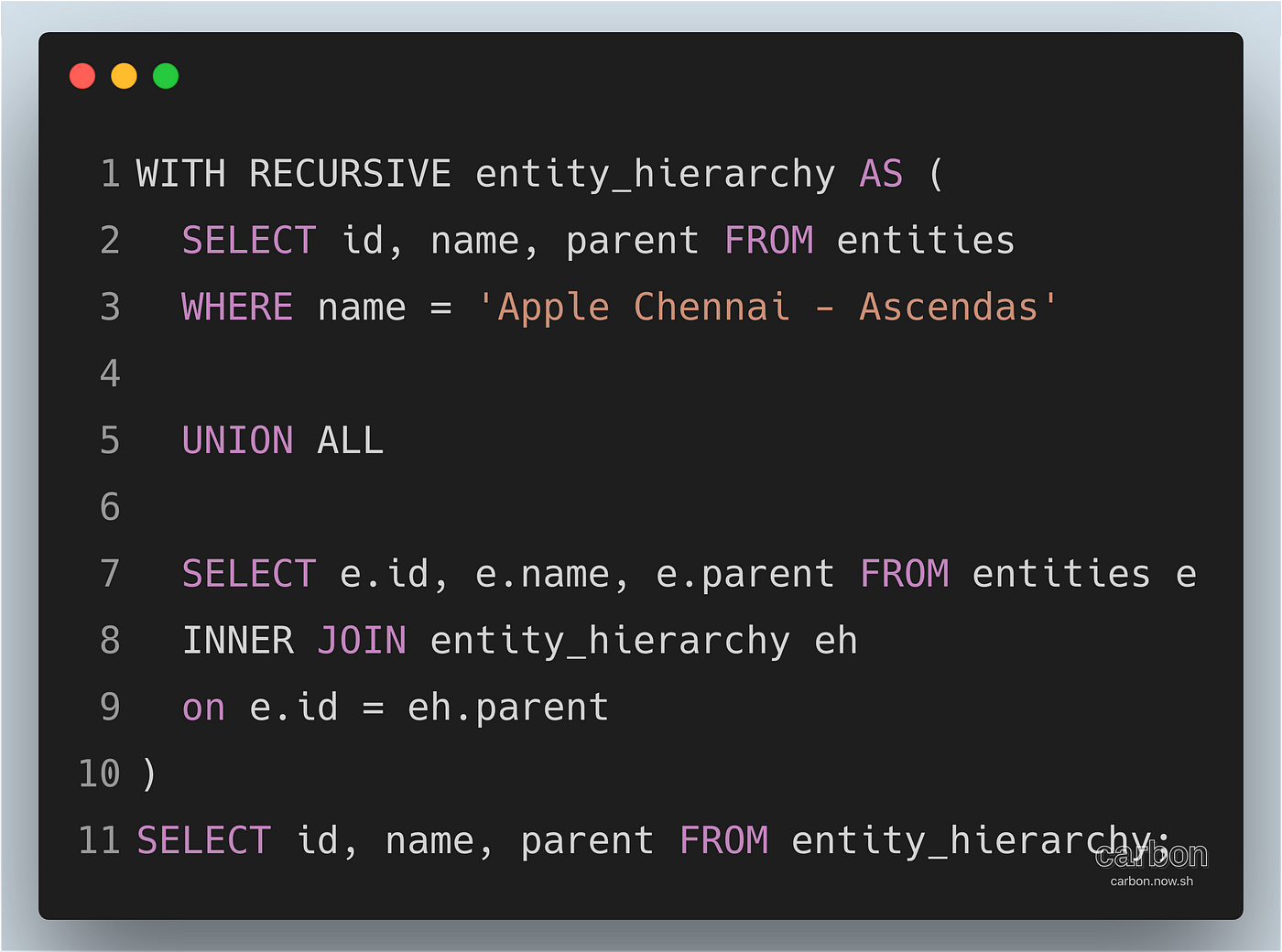
Ok. Now to the query. Given “Apple Chennai — Ascendas”, we have to fetch all its ancestors,
Output:
| id |                     name | parent |
|----|--------------------------|--------|
|  7 | Apple Chennai - Ascendas |      5 |
|  5 |            Apple Chennai |      3 |
|  3 |              Apple India |      1 |
|  1 |                Apple Inc | (null) |
Again, this should be straightforward with the initial value, termination condition, and the final select query. The only catch is about the recursive part, which I will explain. To understand it, we will start from the base query.
Base query result:
| id |                     name | parent |
|----|--------------------------|--------|
|  7 | Apple Chennai - Ascendas |      5 |
Refer to this SQL Fiddle to play with the query:
http://sqlfiddle.com/#!17/85aaa/3
But our use case was slightly more complicated than this, which we will see next.
2. Fetch all the entities with the topmost parent
This means our output should be something like entity_id and its corresponding topmost parent's id. So it would be:
| id | parent_id |
|----|-----------|
|  1 |         1 |
|  2 |         2 |
|  3 |         1 |
|  4 |         2 |
|  5 |         1 |
|  6 |         1 |
|  7 |         1 |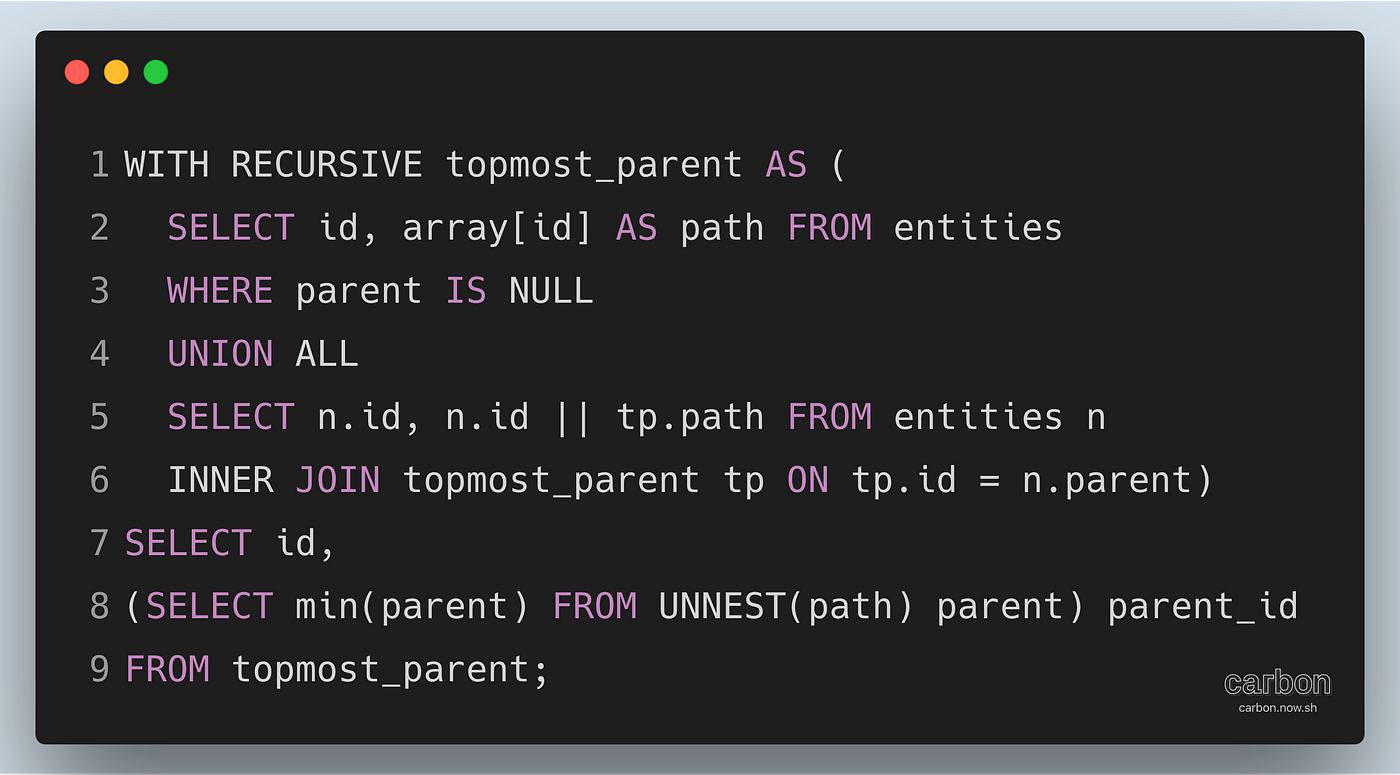
As I mentioned, we are appending the id at each level to path column (#line 5), and finally, we are getting the minimum element from the path column (#line 8) as the topmost parent id.
I hope this is useful in learning about common table expressions.
Thanks!
Published at DZone with permission of Prasanna Venkataraman. See the original article here.
Opinions expressed by DZone contributors are their own.