

Using Spring Data Redis in Spring Boot 2.0 to Write a Custom Query
See how to use Spring Data Redis in Spring Boot 2.0 to write a custom query.
Join the DZone community and get the full member experience.
Join For FreeBrief Introduction
- Redis (Remote Dictionary Server) is an in-memory data structure project implementing a distributed, in-memory key-value database with optional durability. Redis supports different kinds of abstract data structures, such as strings, lists, maps, sets, sorted sets, HyperLogLogs, bitmaps, streams, and spatial indexes.
- Spring Boot is Spring's convention-over-configuration solution for creating stand-alone, production-grade Spring-based Applications that you can "just run". It is preconfigured with the Spring team's "opinionated view" of the best configuration and use of the Spring platform and third-party libraries so you can get started with minimum fuss. Most Spring Boot applications need very little Spring configuration.
- Spring's data access framework addresses common difficulties developers face when working with databases in applications. Support is provided for all popular data access frameworks in Java: JDBC, iBatis/MyBatis, Hibernate, Java Data Objects (JDO), Java Persistence API (JPA), Oracle TopLink, Apache OJB, and Apache Cayenne, among others.
Downloading and Installing Redis
- For Linux, you can easily download the latest version (5.0) from here.
- If you use Windows 10, you can benefit docker images, which is accessible from here.
and then run it:
$ docker run -d --name redis -p 6379:6379 redis6379 is a default port that you can change it to whatever you want.
If you use Windows 7, you can just use Redis version 4.0 and below BUT NOT the latest version (5.0). An .msi and a zip file of Redis version 4.0.2 is downloadable from here.
After installing the .msi version, you will see a redis-server and redis-cli, which respectively will run the server and the client module of Redis.
Staring Spring Boot Project
For starting a new Spring Boot project if you use maven simply you need a pom.xml like below:
<?xml version="1.0" encoding="UTF-8"?>
<project xmlns="http://maven.apache.org/POM/4.0.0" xmlns:xsi="http://www.w3.org/2001/XMLSchema-instance"
    xsi:schemaLocation="http://maven.apache.org/POM/4.0.0 https://maven.apache.org/xsd/maven-4.0.0.xsd">
    <modelVersion>4.0.0</modelVersion>

    <groupId>org.springframework</groupId>
    <artifactId>gs-spring-boot</artifactId>
    <version>0.1.0</version>

    <parent>
        <groupId>org.springframework.boot</groupId>
        <artifactId>spring-boot-starter-parent</artifactId>
        <version>2.1.6.RELEASE</version>
    </parent>

    <dependencies>
        <dependency>
            <groupId>org.springframework.boot</groupId>
            <artifactId>spring-boot-starter-web</artifactId>
        </dependency>
    </dependencies>

    <properties>
        <java.version>1.8</java.version>
    </properties>


    <build>
        <plugins>
            <plugin>
                <groupId>org.springframework.boot</groupId>
                <artifactId>spring-boot-maven-plugin</artifactId>
            </plugin>
        </plugins>
    </build>

</project>
For a clear code, I suggest using Lombok. For more information, see this.
<dependency>
   <groupId>org.projectlombok</groupId>
   <artifactId>lombok</artifactId>
   <version>1.18.0</version>
   <optional>true</optional>
</dependency>
Preparing Project for Redis
An easy way to connect your Spring Boot project to Redis is using Spring Data Redis, so we need to add it to pom.xml:
<dependency>
   <groupId>org.springframework.boot</groupId>
   <artifactId>spring-boot-starter-data-redis</artifactId>
</dependency>
We have two options as a connector:
Lettuce
Jedis
If you choose Lettuce, you don’t need to add any other dependency to Maven because Spring Data, by default, uses this, and it’s embedded on the above dependency. So we choose what is easier.
For enabling Spring Data Redis repository, we need to have a configuration class that must be annotated with @Configuration and @EnableRedisRepositories.
In this class, we must declare RedisTemplate bean, which CRUD repository used it for integrating with Redis. We will also use it to do custom queries.
You can easily use LettuceConnectionFactory() to create a factory, or if you want to have an extra configuration, like choosing server address and port, you must use RedisStandaloneConfiguration() like below:
@Bean
public LettuceConnectionFactory redisConnectionFactory() {

    RedisStandaloneConfiguration redisStandaloneConfiguration = new RedisStandaloneConfiguration(hostName, port);
    return new LettuceConnectionFactory(redisStandaloneConfiguration);

}
When you are creating restTemplate, you can configure serialize and deserializing, and we use JdkSerializationRedisSerializer for this purpose:
@Bean
public RedisTemplate<?, ?> redisTemplate() {

    RedisTemplate<String, Object> template = new RedisTemplate<>();
    RedisSerializer<String> stringSerializer = new StringRedisSerializer();
    JdkSerializationRedisSerializer jdkSerializationRedisSerializer = new JdkSerializationRedisSerializer();

    template.setConnectionFactory(redisConnectionFactory());

    template.setKeySerializer(stringSerializer);
    template.setHashKeySerializer(stringSerializer);

    template.setValueSerializer(jdkSerializationRedisSerializer);
    template.setHashValueSerializer(jdkSerializationRedisSerializer);

    template.setEnableTransactionSupport(true);
    template.afterPropertiesSet();


    return template;

}
Implementing DAO
First of all, we need to make some entity classes, which would map to Redis datastructures. For this purpose, we need to annotate class with @RedisHash.
Also, for defining the id field, we use @Id. If you want to index some other fields other than id, you can annotate it with @Indexed, which could also be a list or map.
@Data
@NoArgsConstructor
@RedisHash("User")
public class User implements Serializable{

    @Id
    private Long id;

    private String name;
    private String surname;
    private String age;


    public User(Long id, String name, String surname, String age) {

        this.id = id;
        this.name = name;
        this.surname = surname;
        this.age = age;

    }
}
Implementing Repositories
Fortunately, Spring Data has implemented CRUD methods for us. We can easily use them just by creating an interface, which extends CrudRepository.
By using this feature of Spring Data, we could also declare more complicated queries than findById() or Save().
A list of supported keywords is here: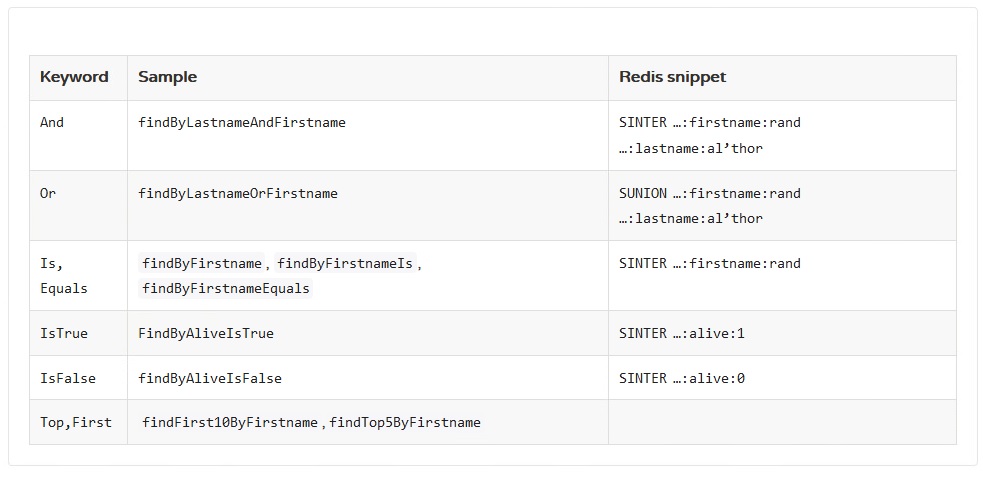
For more information, please see this.
If you want to have more custom queries, you can do it yourself with the usage of redisTemplate, like this:
@Repository
public class UserDaoImpl implements UserDao {

    @Autowired
    UserRepository userRepository;

    @Autowired
    RedisTemplate redisTemplate;

    private static final String KEY = "user";

    public Boolean saveRule(User user) {
        try {
            Map ruleHash = new ObjectMapper().convertValue(user, Map.class);
            redisTemplate.opsForHash().put(KEY, user.getName(), ruleHash);
            return true;

        } catch (Exception e) {
            e.printStackTrace();
            return false;
        }
    }

    public User findByName(String name) {

        Map userMap = (Map) redisTemplate.opsForHash().get(KEY, name);
        User user = new ObjectMapper().convertValue(userMap, User.class);
        return user;
    }

}
And of course our controller is something like this:
@RestController
@RequestMapping("/api")
public class UserController {


    @Autowired
    AuthorizationService authorizationService;


    @RequestMapping(value = "/addUser", method = RequestMethod.POST)
    public ResponseEntity<String> addUser(@RequestBody User User) {

        ModelMapper modelMapper = new ModelMapper();
        User user = modelMapper.map(User, User.class);


        Boolean result = authorizationService.saveRule(user);
        if (result) {
            return ResponseEntity.ok("A new user is saved!!!");
        } else {
            return ResponseEntity.ok("An error occured!!!");
        }

    }


    @RequestMapping(value = "/findUser", method = RequestMethod.POST)
    public ResponseEntity<User> findUser(@RequestBody User User) {

        ModelMapper modelMapper = new ModelMapper();
        User user = modelMapper.map(User, User.class);

        User result = authorizationService.findByName(user.getName());

        return ResponseEntity.ok(result);


    }
Source Code
The sample application source code is available on my GitHub in this repository:
https://github.com/omidhaghighatgoo/SpringBoot-SpringData-Redis
Opinions expressed by DZone contributors are their own.
Comments