

Versioned Caching: A Practical Pattern for High-Performance Lookup Data
A practical guide to versioned caching for static lookup data using cache-control headers, local storage, and data version synchronization between client and server.
Join the DZone community and get the full member experience.
Join For FreeIntroduction to the Problem
In modern web applications, there are different types of data that the client consumes from the server: dynamic data (like product listings or shopping carts), user-specific data, and static lookup data. Lookup data might include lists such as countries, regions, currencies, ZIP codes, or dropdown configurations that rarely change but must be available on every client session. Usually, to store and retrieve such data, a distributed cache is used, for example, Redis (from my practice). However, in large systems with dozens of endpoints and high-throughput requirements, even a distributed cache can become a performance bottleneck.
That is exactly the situation I faced on one of my past projects, and in this article, I will share with you the approach we used to build a more efficient caching strategy using HTTP cache headers and versioning.
The Core Idea
The limitation of traditional server-side caching is that the client still must fetch data over the network each time he needs it. With a smaller amount of static data, this might not be so obvious, but in case there are lots of various lists, this issue can impact performance, add latency, and unnecessary load.
To deal with it, we decided to use cache headers to let the browser cache responses directly. This approach allows lookup data to live in the browser’s cache and can be reused across sessions until it expires. Let’s look at some key points about cache headers and their use:
- The server adds a cache-control header instructing the browser to store the response.
- The request URL is used as a cache key for its response.
- The server can define TTL (time-to-live) for each cached response.
- There is no built-in way to clear the browser’s cache directly from the server. Only expiration can invalidate it.
This approach eliminates unnecessary load and frequent server calls for static data, but at the same time introduces a new challenge: how to handle revalidation and when data actually changes.
Handling Versioning
The main complication with browser caching is ensuring that users see the most relevant data when something changes on the backend side. Since the server cannot directly clear the cache in the browser, we came up with a versioning system to deal with cache invalidation. Here are some important components of it that we implemented in practice:
- Data storage: Static data was stored in the Azure Cosmos DB. Only developers were allowed to change it, and only by using manual operations.
- Versioning management: Whenever someone adjusted the static data in the database, they also needed to increment the version value for the data they changed. To track these values, we used Azure App Configuration as a key-value store. Each dataset (for example, countries or currencies) had its own specific version number stored there.
- Client requests: Client fetched all data version values using a specific dedicated endpoint (we will talk about it later) and then stored them in the local browser storage. Then, for each lookup call, it added the version number as a parameter to the URL, for example, like this:
/static/countries?version=42. This version parameter ensured that as soon as the version number changed, the client started to call another unique URL, preventing us from using already cached and outdated data from a URL with a lower version number.
Cache Revalidation
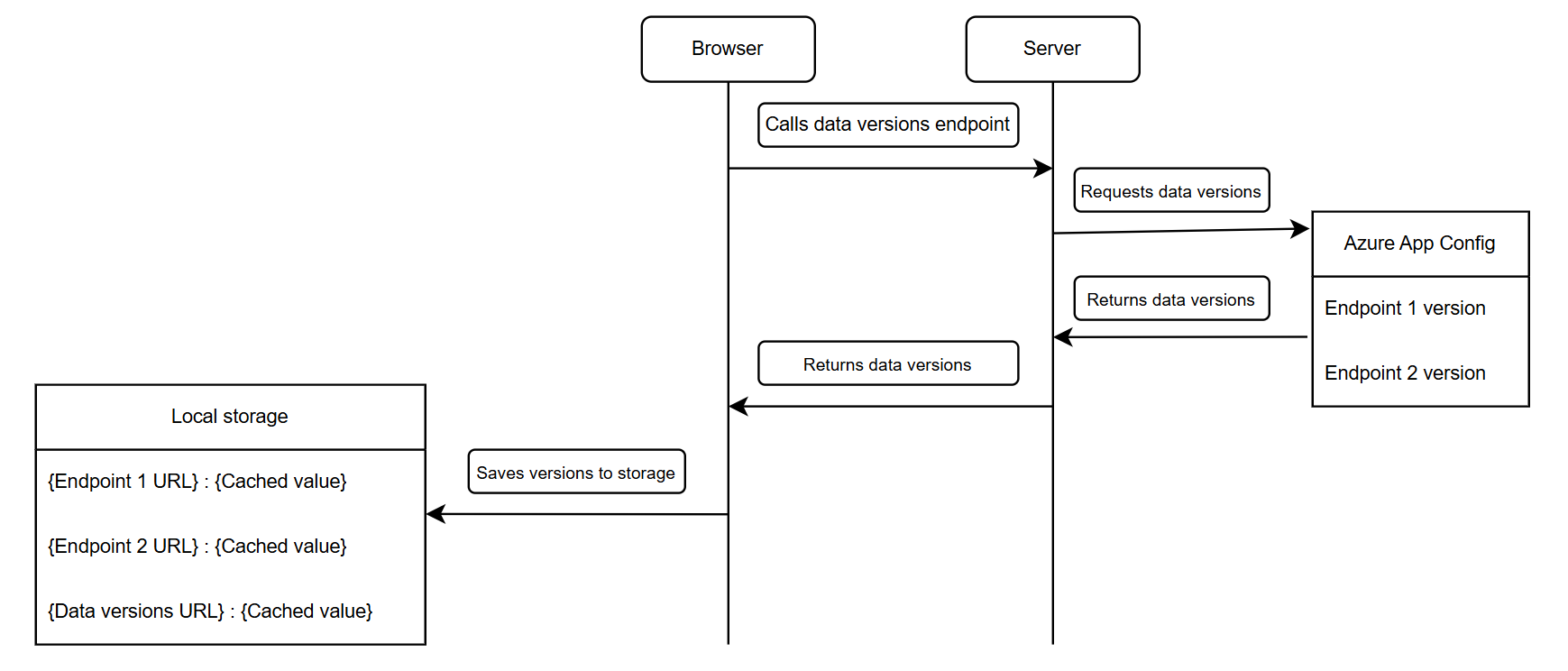
As soon as the versioning mechanism was in place, the next question was how to ensure that the client has relevant stored versions without adding more complexity and network load. To solve this, we introduced a new lightweight endpoint /static/versions that returned a list of all datasets’ versions, for example:
{
  "countries": 42,
  "currencies": 17,
  "regions": 9
}
When the web application loaded, it called this endpoint and saved updated versions to the localStorage along with the current timestamp. After that, the client just needs to append the saved version to the respective lookup endpoint parameter, as I showed before, and they are going to be cached locally for the TTL that was set by the server. In my case, we set it for 24 hours.
To detect changes in static data, the browser refreshed the versions endpoint on a fixed schedule, every hour. Its response had a short TTL (around one hour) so that the browser could automatically revalidate it.
Here is a diagram that shows the overall flow:
Trade-Offs and Possible Improvements
The main trade-off of this approach is the staleness window, when clients may still use outdated lookup data after it has been changed on the server. In our case, this window was 1 hour, which was acceptable for most cases, but there are other ways to increase responsiveness.
One possible option is to use event-driven refreshes. When developers update a dataset, the backend could expose an updated version flag (similar to Azure App Configuration’s sync-token), allowing clients to detect configuration changes immediately. Clients just need to listen to this event, refresh stored data versions, and append new versions to URLs.
Another way to shorten the staleness window is to refresh versions by some browser event. For example, the user returns to the tab, or the internet connection is restored. This might be the most client-friendly way of getting the most relevant data without changing the underlying caching logic.
Conclusion
By combining HTTP cache headers with versioned URLs, we achieved a caching strategy that is both simple and highly efficient. In our research, after introducing this behavior, the number of calls to the lookup endpoint decreased by over 90%. Even with a small and configurable (by using TTL) staleness window, this approach reduced network load and page responsiveness without adding extra complexity. It can be used with any rarely changing but frequently used static data.
Opinions expressed by DZone contributors are their own.
Comments