

Building a Voice-Controlled Graph Assistant With Neo4j, LiveKit, and OpenAI
Build a voice assistant that lets you ask natural-language questions to a Neo4j graph database and hear the answers spoken back.
 CORE
·
CORE
·
Natural language interfaces to databases have become increasingly practical, but most examples stop at typed queries.
In this article, we'll add a voice layer, allowing users to speak questions to a knowledge graph and hear the answers spoken back. We'll walk through the full design of a voice assistant that queries a Goodreads book graph using Neo4j Aura, LiveKit Agents, and OpenAI, with the agent running from a Jupyter notebook on a local machine. A previous article showed how to load the Goodreads dataset.
The full source code is available on GitHub.
The Architecture
The application is built from cloud services and a Jupyter notebook that acts as the voice agent worker, as shown in Figure 1.
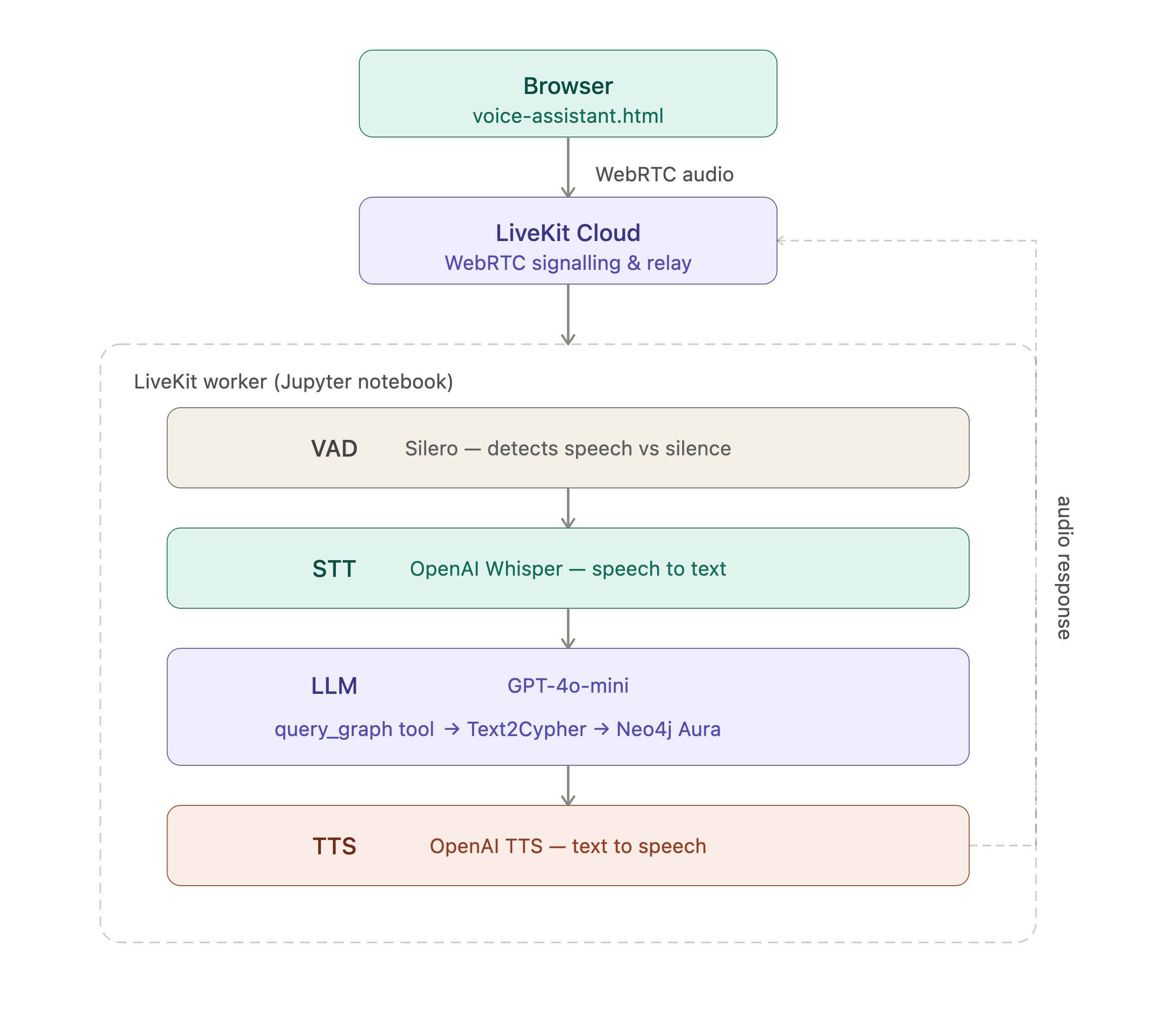
The user speaks into a browser page. LiveKit Cloud handles the WebRTC signaling and relays the audio to the worker. The worker runs a VoicePipelineAgent that detects speech with Silero's VAD (Voice Activity Detection), transcribes it with OpenAI Whisper, passes the text to GPT-4o-mini, and converts the response back to speech with OpenAI's TTS (Text-to-Speech). GPT-4o-mini is instructed not to answer book questions from its own knowledge.
Instead, it calls a query_graph tool that translates natural language into Neo4j's Cypher query language, executes it against Neo4j Aura, and returns the results. Two separate GPT-4o-mini instances are involved: one inside the Text2CypherRetriever to generate Cypher, and another inside the LiveKit agent that manages the conversation and tool calls.
A typical exchange looks like this:
User:  How many books are in the database?
Agent: There are 10,000 books in the Goodreads database.

User:  Who wrote The Hobbit?
Agent: The Hobbit was written by J.R.R. Tolkien.

User:  What other books has J.R.R. Tolkien written?
Agent: J.R.R. Tolkien has also written The Lord of the Rings and The Letters of Father Christmas, among others.

User:  What books are similar to The Hobbit?
Agent: I found no matching data in the graph for that question.
The exact results will depend on the contents of your graph.
Dependency Management: A Critical Detail
The application uses two Python packages that share an openai dependency but disagree on the version. neo4j-graphrag with its [openai] extra pins openai<2, while livekit-agents requires openai>=2. Installing both with their extras causes a conflict that breaks the install.
The solution is to install neo4j-graphrag without its extra:
pip install neo4j_graphragThis means pip never sees the openai<2 constraint, because that constraint is declared on the optional extra rather than the base package. We'll install openai separately and both packages will then work correctly. In practice, the OpenAILLM class imported successfully with the package versions used in this article.
The full install is pinned in the Jupyter notebook for reproducibility. The --no-deps flag is important, as it prevents pip from pulling in transitive dependencies that might reintroduce version conflicts. We're declaring the full dependency closure explicitly, which is more work upfront but produces a stable environment.
The Data
We'll use the Goodreads dataset, which models books, authors, and similarity relationships. The relevant schema is:
(Author)-[:AUTHORED]->(Book)
(Book)-[:SIMILAR_TO]->(Book)
Book nodes carry title, publication_year, average_rating and ratings_count properties. Author nodes carry name and average_rating. One thing worth noting is that both publication_year and average_rating are stored as strings in this dataset, not numbers. We'll come back to why this matters when we look at the schema prompt.
The Schema Prompt
The Text2CypherRetriever from neo4j-graphrag takes a natural language question and uses an LLM to generate a Cypher query. The quality of that Cypher depends heavily on the schema prompt.
A minimal schema that just describes nodes and relationships is not enough. Testing revealed several failure modes that required explicit rules, as follows:
schema = """
You are querying a Goodreads book graph.

Nodes:

Author:
- name
- average_rating

Book:
- title
- publication_year
- average_rating
- ratings_count

Relationships:

(:Author)-[:AUTHORED]->(:Book)
(:Book)-[:SIMILAR_TO]->(:Book)

Important rules:

1. For highest rated books, query Book.average_rating directly.
   Do not use Author.average_rating.

2. For book similarity, use SIMILAR_TO relationships.

3. Do not create relationships that are not listed.

4. Always return properties, not entire nodes.

5. Always alias every returned property using AS.
   Example: RETURN b.title AS title, b.average_rating AS average_rating

6. Always filter out null values before sorting.
   Example: WHERE b.average_rating IS NOT NULL

Cypher syntax reminders:
- To find the top N results by a property, use ORDER BY and LIMIT, not subqueries.
- Never use SQL syntax such as SELECT, MAX(), FROM or WHERE with subqueries.
- Example for books by an author: MATCH (a:Author {name: "Name"})-[:AUTHORED]->(b:Book)
  RETURN b.title AS title, b.publication_year AS publication_year
- Example for highest rated: MATCH (b:Book) WHERE b.average_rating IS NOT NULL
  RETURN b.title AS title, b.average_rating AS average_rating
  ORDER BY b.average_rating DESC LIMIT 10
- publication_year is stored as a string. Use toInteger() when sorting or comparing by year.
  Example: MATCH (b:Book) RETURN MAX(toInteger(b.publication_year)) AS most_recent_year
- average_rating is stored as a string. Use toFloat() when comparing numerically.
  Example: MATCH (b:Book) WHERE toFloat(b.average_rating) >= 3.5
  RETURN b.title AS title, b.average_rating AS average_rating
"""
Several design decisions are worth highlighting:
- Worked examples outperform abstract rules. Rules like "use ORDER BY and LIMIT" help somewhat, but providing a concrete example for each query pattern reliably produces correct Cypher where rules alone do not. In testing, GPT-4o-mini responded more reliably to concrete examples than to abstract rules alone.
- Data type hints are essential. Without the
toInteger()andtoFloat()hints, queries like "what is the most recent publication year?" return poor results because the LLM generatesMAX(b.publication_year), which performs a lexicographic comparison on string values, giving results like'99'ahead of'2023'. Making the string storage explicit in the schema and showing the cast function prevents this. - The schema is not the right place for off-topic handling. Experimenting with adding a rule to the LLM to return a plain English refusal for off-topic questions didn't work well. This was because the
Text2CypherLLM started returning plain English for on-topic questions too, andneo4j-graphragwraps the generated query in anEXPLAINcall for safety validation, so a non-Cypher response caused a syntax error. Off-topic handling belongs in the agent's conversational instructions, not the schema.
The Agent Instructions
The agent's conversational instructions control a different GPT-4o-mini instance that drives the conversation and decides when to call tools. These are separate from the schema prompt.
instructions = (
    "You are a voice assistant for a Goodreads book graph database. "
    "You have no knowledge of books yourself. "
    "You MUST call the query_graph tool for EVERY question without exception. "
    "Never answer from memory. Never skip the tool call. "
    "Keep answers short and conversational. "
    "Never use markdown - plain spoken sentences only."
)
Two things matter here. First, instructing the model that it should assume it has no knowledge of books prevents it from answering from training data. GPT-4o-mini has been trained on enormous quantities of book data and will confidently answer questions about J.K. Rowling or Agatha Christie without touching the graph at all, unless we explicitly remove that option. Second, the instruction to avoid markdown matters because the TTS engine reads the output verbatim, such as asterisks, bullet points, and code fences, all of which sound wrong when spoken aloud.
The query_graph Tool
The query_graph function is decorated with @function_tool(), which registers it with the LiveKit agent framework so GPT-4o-mini can call it as a tool. The retriever call is wrapped in asyncio.to_thread so the synchronous retriever does not block the async event loop:
@function_tool()
async def query_graph(self, question: str) -> str:
    """Answer a question about books by querying the Goodreads graph.

    Args:
        question: The user's natural language question about books.
    """
    logger.info(f"Query: {question}")

    try:
        result = await asyncio.to_thread(
            self._retriever.search, question
        )
        cypher = result.metadata["cypher"]
        logger.info(f"Cypher: {cypher}")

        data = []
        with self._driver.session() as session:
            for record in session.run(cypher):
                data.append(record.data())

        if len(data) > 5:
            data = data[:5]

        if not data:
            return "I found no matching data in the graph for that question."

        logger.info(f"Data: {data}")
        return clean_for_voice(str(data))

    except Exception as e:
        logger.error(f"Query error: {type(e).__name__}: {e}")
        return "I encountered an error querying the graph."
The returned data is capped at five records before being passed back to the LLM. This prevents timeout errors that occur when the LLM receives a large payload and takes too long to summarize it, which causes the LiveKit TTS stage to time out waiting for a response.
The clean_for_voice helper strips markdown characters from the response before it reaches TTS:
def clean_for_voice(text):
    cleaned = (
        text
        .replace("**", "").replace("*", "")
        .replace("```", "").replace("`", "")
        .replace("|", " ").replace("---", "")
    )
    lines = [l.strip() for l in cleaned.splitlines() if l.strip()]
    result = " ".join(lines)
    if len(result) > 800:
        result = result[:800] + "... and more."
    return result
Avoiding Pickling With %%writefile
Running a LiveKit agent worker inside Jupyter creates a common Python multiprocessing problem. When the worker starts a new job, it serializes the entrypoint function and any objects it references so they can be dispatched to a worker process. Python's pickle mechanism reconstructs objects by importing the module in which they are defined, but notebook cells execute in Jupyter's interactive namespace rather than a normal Python module.
As a result, functions, classes, and closures defined only in notebook cells often cannot be imported correctly by worker processes, causing serialization failures.
The solution is to write the agent code to a plain Python file using the %%writefile magic in Jupyter, as follows:
%%writefile agent_core.py

import asyncio
# ... full agent code here ...

async def entrypoint(ctx: JobContext):
    # ...
Then import from that file in the worker cell, as follows:
from agent_core import entrypoint

async def main_worker():
    opts = WorkerOptions(
        entrypoint_fnc = entrypoint,
        ws_url = LIVEKIT_URL,
        api_key = LIVEKIT_API_KEY,
        api_secret = LIVEKIT_API_SECRET,
    )
    worker = Worker(opts)
    worker_task = asyncio.create_task(worker.run())
    try:
        await worker_task
    except asyncio.CancelledError:
        pass
The %%writefile cell must be re-run every time the kernel restarts, before the worker cell is executed. Because agent_core.py is a regular file on disk, Python can import and pickle it normally.
The Voice Interface
Rather than building a frontend, we'll use LiveKit's sandbox token server. In the LiveKit Cloud dashboard, we'll navigate to Settings and enable the token server. This gives us a sandbox ID in the form token-server-xxxxxx. A small HTML page, as shown in Figure 2, connects to LiveKit using this sandbox ID, enabling the browser's microphone and playing back the agent's audio.
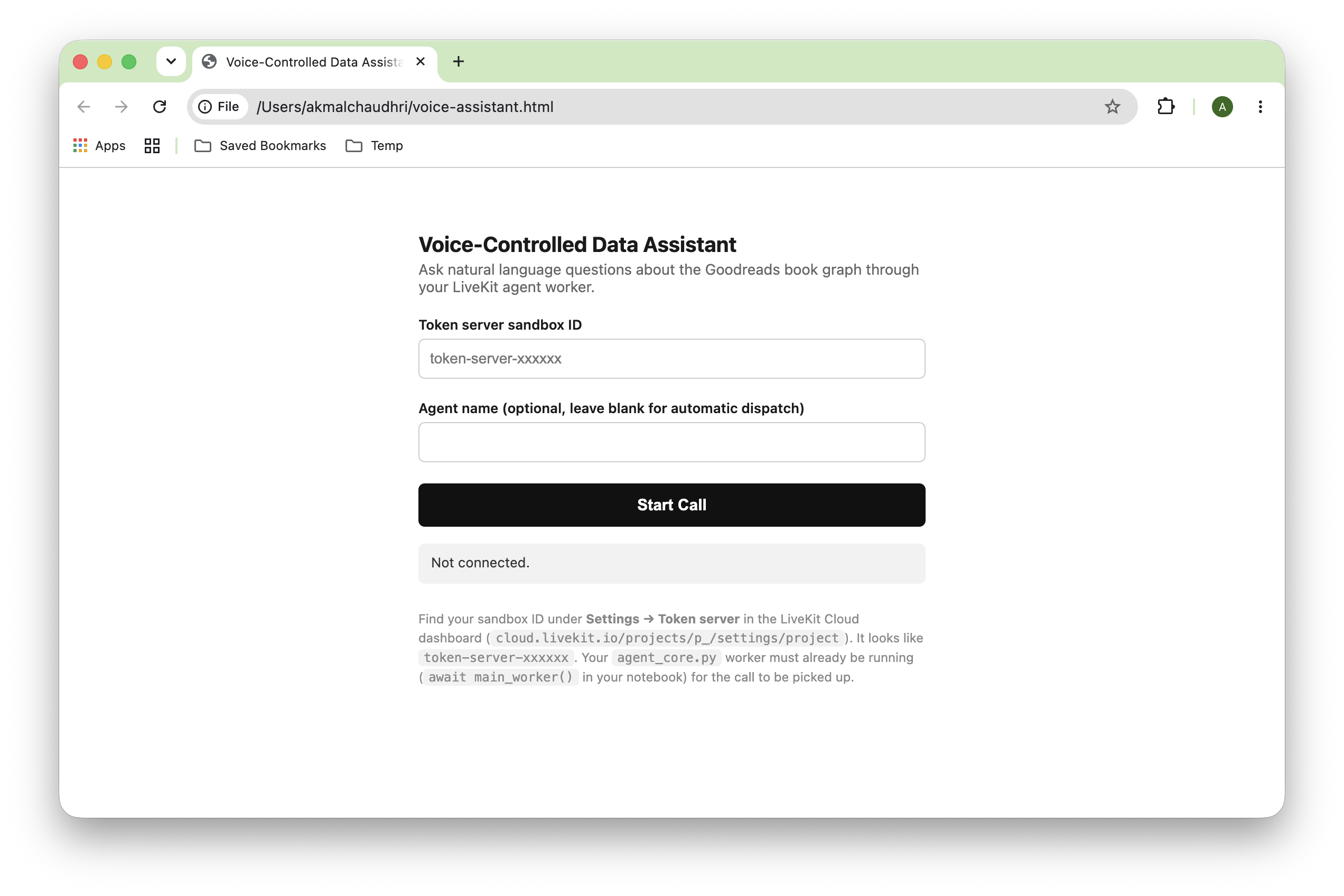
Figure 2. Voice-Controlled Data Assistant
With the worker running in Jupyter and this page open in a browser, clicking Start Call connects to LiveKit Cloud, which dispatches the job to the worker. The agent greets us and waits for questions.
Logging
Jupyter outputs from async workers can be noisy. Setting the root logger to ERROR and then explicitly enabling only the application loggers gives clean, readable output:
logging.basicConfig(level = logging.ERROR, stream = sys.stdout, force = True)

logging.getLogger("graph-agent").setLevel(logging.INFO)
logging.getLogger("graph-agent-core").setLevel(logging.INFO)
This shows exactly the lines we need during a session:
INFO:graph-agent:Starting LiveKit worker...
INFO:graph-agent-core:Job started for room: voice-controlled-wwq03zji
INFO:graph-agent-core:Graph retriever initialized.
INFO:graph-agent-core:Connected to room: voice-controlled-wwq03zji
INFO:graph-agent-core:Query: How many books are in the database?
INFO:graph-agent-core:Cypher: MATCH (b:Book) RETURN COUNT(b) AS book_count
INFO:graph-agent-core:Data: [{'book_count': 10000}]
INFO:graph-agent-core:Query: Who wrote The Hobbit?
INFO:graph-agent-core:Cypher: MATCH (a:Author)-[:AUTHORED]->(b:Book {title: "The Hobbit"}) RETURN a.name AS author_name
INFO:graph-agent-core:Data: [{'author_name': 'J.R.R. Tolkien'}]
INFO:graph-agent-core:Query: What other books has J.R.R. Tolkien written?
INFO:graph-agent-core:Cypher: MATCH (a:Author {name: "J.R.R. Tolkien"})-[:AUTHORED]->(b:Book) RETURN b.title AS title, b.average_rating AS average_rating
INFO:graph-agent-core:Data: [{'title': 'The Hobbit', 'average_rating': '4.25'}, {'title': 'Le lettere di Babbo Natale', 'average_rating': '4.21'}, ...]
INFO:graph-agent-core:Caller left - ending session
INFO:graph-agent-core:Session finished.
INFO:graph-agent-core:Room disconnected
Running the Application
The complete setup requires these cloud services, all of which have free tiers:
- Neo4j Aura – connection URI, username, and password from console.neo4j.io/graphacademy
- OpenAI – API key from platform.openai.com
- LiveKit Cloud – cloud URL, API key and API secret from cloud.livekit.io
Credentials are read from environment variables so they never appear in notebook cells. Create these environment variables:
export NEO4J_URI=neo4j+s://xxxx.databases.neo4j.io
export NEO4J_USER=your_username_here
export NEO4J_PASSWORD=your_password_here

export OPENAI_API_KEY=your_openai_key_here

export LIVEKIT_URL=your_livekit_url_here
export LIVEKIT_API_KEY=your_livekit_key_here
export LIVEKIT_API_SECRET=your_livekit_secret_here
With environment variables set, the workflow is as follows:
- Run all notebook cells from top to bottom.
- Open
voice-assistant.htmlin a new browser or browser tab. - Paste the LiveKit sandbox ID and click Start Call.
- Ask questions about the book graph.
Finally, interrupt the kernel to stop the worker, then run the teardown cell to close the Neo4j driver cleanly.
What Works and What to Watch For
The application handles a wide range of questions correctly. Count queries, author lookups, similarity searches, and rating comparisons worked consistently in testing once the schema prompt included the type cast hints. A few observations from testing:
- Zero ratings slip through null filters. Some books have
average_ratingof'0.00'rather than null, so they pass theIS NOT NULLfilter and appear in results for queries. This is a data quality issue rather than a code issue, but it can produce surprising results. AddingAND toFloat(b.average_rating) > 0to relevant queries addresses it. - Incorrect years appear in date range queries. The dataset also contains some obviously wrong
publication_yearvalues, such as years like'10'and'206'that appear to be data entry errors. ThetoInteger()cast handles these correctly and sorts them accurately, but the results will include these records unless they are filtered. - Schema coverage determines question coverage. The
Text2Cypherapproach works best when questions map closely to the graph schema. Questions about genres, publishers, or series will fail gracefully because these properties don't exist in this dataset, and the agent will report that no matching data was found, which is the correct behavior.
Robustness Considerations
The application works well as a demo, but it's worth understanding where the boundaries are before putting it in front of others:
- Silence and background noise. These are handled well by Silero VAD, which is specifically designed to distinguish speech from ambient sound, music, and breathing. If no one is speaking, the pipeline simply doesn't fire. This is the most robust part of the stack.
- Garbled or misheard speech. This is handled gracefully at the session level, as Whisper is tolerant of accents and background noise, and even when it produces an odd transcription, the
exceptblock inquery_graphcatches any resulting execution error and returns a clean spoken message rather than crashing the session. What it won't do is distinguish between a misheard question and a genuinely unanswerable one, which could be confusing to users. - Response latency. This is the weakest area. The pipeline makes four sequential network calls: Whisper, GPT-4o-mini, Neo4j Aura, and OpenAI TTS, and each adds latency. On Neo4j Aura, graph queries occasionally take several seconds. There is no timeout on the
asyncio.to_threadcall wrapping the retriever, so a slow query will stall the pipeline silently. The user hears nothing while this happens, which makes the session feel frozen. LiveKit eventually reports this as a"failed to generate LLM completion"warning in the logs. - Rapid consecutive questions. In a single-user voice session, concurrent requests are unlikely because the agent is normally speaking before the next question can be asked. However, the behavior of the shared retriever instance when accessed concurrently via
asyncio.to_threadhasn't been evaluated, so this remains an untested scenario rather than a documented failure mode. - Session drops. These are handled correctly. The
disconnected_futurepattern in the entry point ensures the driver closes cleanly when the caller leaves or the connection drops. Any in-flight query at the time of disconnection runs to completion, and its result is silently discarded, which is the right behavior.
For a more robust deployment, the three most impactful additions would be a timeout on the retriever call, a brief spoken acknowledgment while the query runs (so the user knows the session is still alive), and a retry with backoff on transient STT timeouts. None of these require structural changes to the notebook.
Going Further With a Fully Local Implementation
In this article, we use several cloud services, but the same architecture can be made fully local. For example, Ollama can host local LLMs that replace GPT-4o-mini for both Text2Cypher generation and conversational responses, local Whisper-based services such as vox-box can provide STT (Speech-to-Text) and Kokoro can provide TTS (Text-to-Speech). Running livekit-server --dev locally replaces LiveKit Cloud for development deployments.
However, the challenge is that each of these services needs to be running before the agent starts; each has its own install process and configuration, and some, particularly local TTS, require system-level dependencies like espeak-ng that vary by platform. What takes a few environment variables and a simple install in the cloud version becomes four or five services to manage in separate terminals, with version constraints and native dependencies to resolve along the way. For a demo or prototype, the cloud approach is considerably simpler. A fully local setup makes sense when data cannot leave the machine or when the goal is to understand each component in isolation.
Summary
We've built a voice interface to a graph database using a pipeline that keeps the orchestration straightforward: LiveKit handles WebRTC and the voice pipeline, OpenAI handles transcription and synthesis, and neo4j-graphrag handles the translation from natural language to Cypher. The interesting engineering is in the details, such as resolving the dependency conflict by avoiding the [openai] extra, separating schema instructions from conversational instructions, using %%writefile to sidestep Jupyter's pickling limitations, and providing worked Cypher examples and type cast hints to get reliable query generation.
The result is a working voice assistant that queries a real graph database from a browser with no custom frontend code beyond a single HTML file. More importantly, it demonstrates that reliable graph question answering depends less on model size and more on careful schema design, prompt engineering, and operational details.
The full source code is available on GitHub.
Opinions expressed by DZone contributors are their own.