

Wasm Inside Neo4j: Building the Example That Didn't Exist
A Rust VADER sentiment analyzer compiled to WebAssembly, embedded inside a Neo4j Java UDF, and callable directly from Cypher using wasmtime-java.
 CORE
·
CORE
·
Join the DZone community and get the full member experience.
Join For FreeIn a recent DZone article, Running Sentiment Analysis Inside Neo4j With a Java Plugin, we explored several approaches to running sentiment analysis inside the Neo4j database engine. One of those approaches — embedding a Wasm runtime inside a Java UDF — was described like this:
Theoretically, we could embed a Wasm runtime such as
wasmtimeinside a Java UDF and execute the VADER Wasm module from within Neo4j, getting Wasm's sandbox guarantees inside Neo4j's plugin model. It's technically feasible but no published working example appears to exist and the complexity cost is high relative to the alternatives. An interesting idea to watch, but not practical today.
This article builds that working example.
We'll show how to embed a real VADER sentiment analyzer compiled to Wasm inside a Neo4j Java UDF, returning a full polarity score map callable directly from Cypher. We'll cover the tools and inspection techniques needed to understand what the Wasm compiler generates and why the Java calling convention looks the way it does.
The full source code is available on GitHub.
What We're Building
We're embedding a wasmtime Wasm runtime inside a Neo4j Java UDF using wasmtime-java, a community JNI binding for the Wasmtime runtime. It's not an official Bytecode Alliance product, but it ships prebuilt native libraries for all major platforms and is sufficient for this proof-of-concept. A Rust function compiled to WebAssembly rides inside the plugin JAR alongside the Java code. When Cypher calls the UDF, Java initializes the Wasm runtime, loads the binary, and invokes the Rust function — all inside the Neo4j JVM process with no external API calls and no network round-trips.
Note: This article was tested specifically against wasmtime-java 0.19.0. The API used here is version-specific; newer releases or alternative JVM Wasm runtimes may expose different interfaces and calling conventions.
Prerequisites
You'll need the following installed if you wish to follow along. We're using Apple Silicon (ARM64) as our development platform, so we'll note where the setup differs from other platforms.
Java
We're using OpenJDK 21 (tested with 21.0.12.1). Install it using your platform's package manager or download it directly from adoptium.net.
On macOS via Homebrew:
brew install openjdk@21On Ubuntu/Debian:
sudo apt install openjdk-21-jdkOn Windows, download and run the installer from Adoptium.
Confirm your Java version:
java -versionYou should see a Java 21 runtime. If you're on Apple Silicon, also confirm you're running a native ARM64 JVM with:
uname -mYou should see arm64. Not running under ARM64 will likely break the wasmtime-java JNI library loading.
Maven
We're using Maven 3.9.6. On Apple Silicon, be cautious about installing Maven via Homebrew as, at the time of writing, the Homebrew Maven formula pulls in OpenJDK 26 as a dependency, which conflicts with a Java 21 installation. If your package manager installs an incompatible JDK alongside Maven, verify the runtime with mvn -version and configure JAVA_HOME as necessary. Installing Maven manually is the safest approach:
cd ~
curl -O https://archive.apache.org/dist/maven/maven-3/3.9.6/binaries/apache-maven-3.9.6-bin.tar.gz
tar xzf apache-maven-3.9.6-bin.tar.gz
Then add Maven to your PATH and make it persist across terminal sessions:
echo 'export PATH="$HOME/apache-maven-3.9.6/bin:$PATH"' >> ~/.zshrc
source ~/.zshrc- On Linux, add the same line to
~/.bashrcinstead. - On Windows, download the zip from maven.apache.org and add the
binfolder to your systemPATHvia System Properties.
Confirm Maven is using Java 21:
mvn -versionYou should see Java version: 21 in the output.
Rust
We're using Rust 1.96.0. Install via rustup if not already present:
curl --proto '=https' --tlsv1.2 -sSf https://sh.rustup.rs | shOn Windows, download and run rustup-init.exe from rustup.rs.
To pin to the specific Rust version we tested with:
rustup toolchain install 1.96.0
rustup default 1.96.0
Then add the WASI target:
rustup target add wasm32-wasip1This target works identically across macOS, Linux, and Windows.
WABT
The WebAssembly Binary Toolkit gives us wasm-objdump for inspecting Wasm binaries. We tested with version 1.0.41.
On macOS:
brew install wabtOn Ubuntu/Debian:
sudo apt install wabtOn Windows, download the latest release from github.com/WebAssembly/wabt/releases.
wit-bindgen
This is the interface types generator for WebAssembly. There are two distinct version numbers to be aware of: the wit-bindgen-cli command-line tool and the wit-bindgen Rust crate used as a dependency inside the Wasm module. These can differ. We tested with CLI version 0.59.0 and Rust crate version 0.40.0 (specified in Cargo.toml). The generated binary identifies the crate version through the export name cabi_realloc_wit_bindgen_0_40_0. Install the pinned CLI version via Cargo on all platforms:
cargo install wit-bindgen-cli --version 0.59.0Confirm it's installed:
wit-bindgen --versionNeo4j Desktop
We're using Neo4j Desktop with a local database instance. Download from Neo4j for Desktop.
The pom.xml in this article is pinned to Neo4j 2026.07.0 — update the neo4j.version property to match your own Desktop installation.
wasmtime-java Platform Support
The wasmtime-java library ships prebuilt JNI native libraries for:
- macOS aarch64
- macOS x86_64
- Linux aarch64
- Linux x86_64
- Windows x86_64
No additional setup is needed, as Maven pulls the correct native library for your platform automatically.
Version Summary
For reference, here are all the component versions used in this article:
| Component | Version |
|---|---|
| OpenJDK | 21.0.12.1 |
| Maven | 3.9.6 |
| Rust | 1.96.0 |
| WABT | 1.0.41 |
| wit-bindgen CLI | 0.59.0 |
| wit-bindgen crate | 0.40.0 |
| vader_sentiment crate | 0.1.1 |
| wasmtime-java | 0.19.0 |
| Neo4j | 2026.07.0 |
Getting the Code
Clone the repository before following along. All source files are provided so you don't need to create them manually.
cd ~
git clone --filter=blob:none --sparse https://github.com/VeryFatBoy/neo4j.git
cd neo4j
git sparse-checkout set wasm-udf
mv wasm-udf ../wasm-udf
cd ../wasm-udf
Project Structure
Before creating any files, here's the final layout we're building toward. There are two separate projects:
- A Rust crate that compiles to Wasm.
- A Maven project that hosts the Neo4j UDF.
First, the Rust crate:
sentimentable/
├── Cargo.toml
├── src/
│   └── lib.rs
└── wit/
    └── sentimentable.wit
Second, the Maven project:
neo4j-wasm-udf/
├── pom.xml
└── src/
    └── main/
        ├── java/
        │   └── com/example/
        │       ├── WasmUDF.java
        │       └── SentimentUDF.java
        └── resources/
            ├── add.wat
            ├── add.wasm
            └── sentimentable.wasm
The Wasm binaries in resources/ are bundled into the plugin JAR at build time. The Rust crate and Maven project are kept separate, and the Wasm binary is the handoff point between them.
The project layout is also shown in Figure 1.
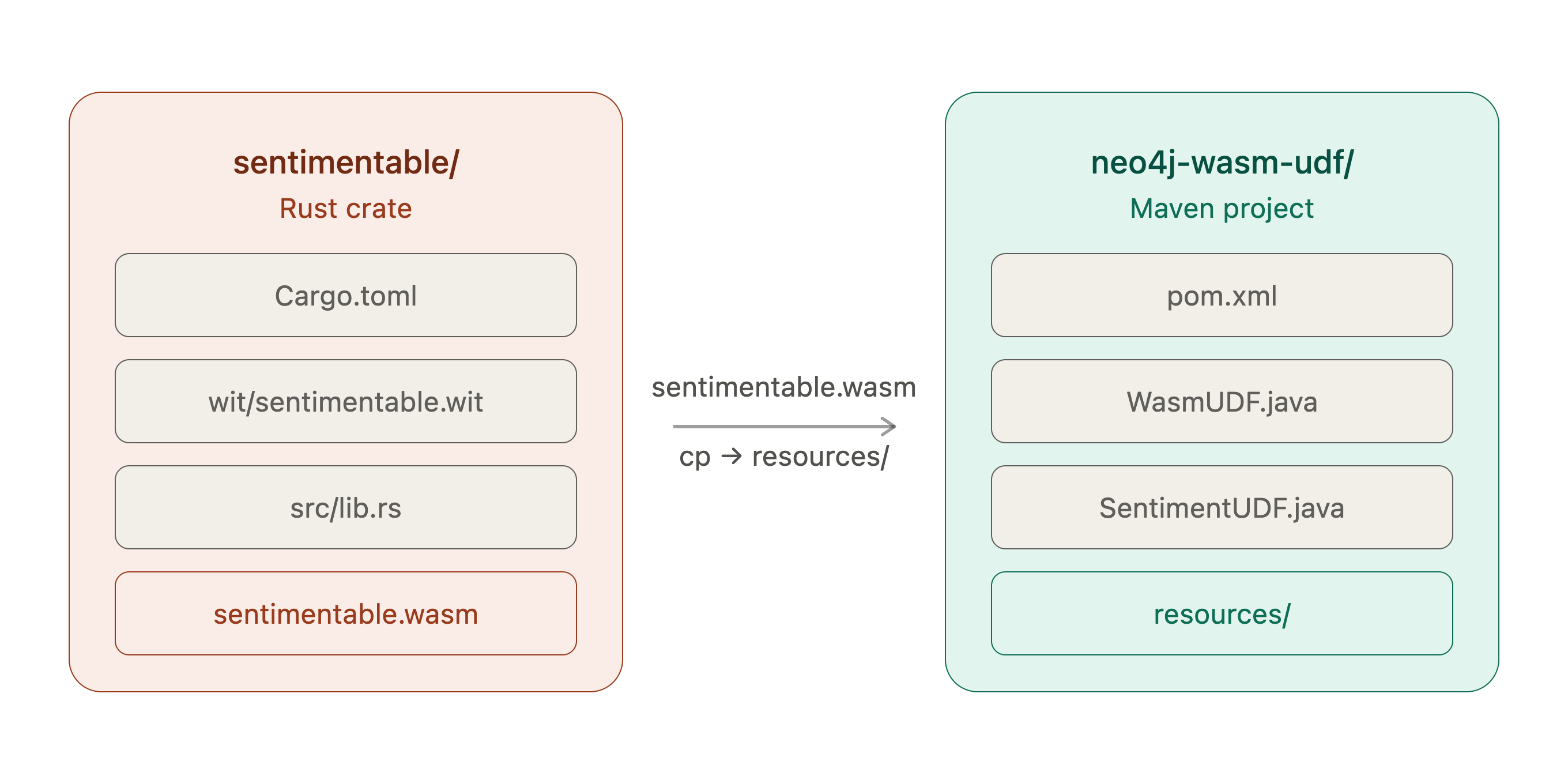
Figure 1. Two-Project Layout
How the Wasm Plumbing Works
Before diving into the code, it's worth understanding the three layers that make this possible.
Core Wasm and WASI
WebAssembly defines a portable binary format and a stack-based execution model. On its own, it only understands numbers, such as integers and floats. When a Wasm module needs system capabilities, like memory allocation or I/O, it uses WASI (WebAssembly System Interface), a standardized set of system calls that a host runtime implements. Our Rust code targets wasm32-wasip1, which means it compiles to Wasm with WASI preview 1 system calls. The wasmtime runtime implements those calls on the host side.
wasmtime-java
This library wraps the wasmtime Wasm runtime in a JNI binding, making it callable from Java. It ships prebuilt native libraries for all major platforms, so adding it as a Maven dependency is all that's needed — no separate wasmtime installation required. The Java API lets us load a Wasm binary, set up a WASI context, and call exported functions directly.
wit-bindgen and the String ABI
Core WebAssembly functions operate on Wasm value types such as integers and floats. WIT (WebAssembly Interface Types) and the Component Model provide higher-level interface types such as strings, tuples, and records; wit-bindgen generates the lowering and lifting code needed to represent those types at the Wasm boundary. For strings, it uses a pointer-and-length convention: the caller allocates memory inside the Wasm module using a generated cabi_realloc function, writes the string bytes there and passes the memory address and byte length as two integers. The Rust code reads the string from that address. For return values, the lowering strategy depends on the type, which we'll see when we inspect the generated binary.
With those three pieces in place, the calling chain looks like this:
Cypher query
    -> Neo4j routes to @UserFunction
        -> Java initializes wasmtime engine + WASI context
            -> Java allocates string in Wasm memory
                -> Java calls exported Wasm function
                    -> Rust executes VADER scoring
                -> Java reads result from Wasm memory
            -> Java returns Map<String, Double> to Neo4j
    -> Neo4j returns result to Cypher
Graphically, the calling chain is also shown in Figure 2.
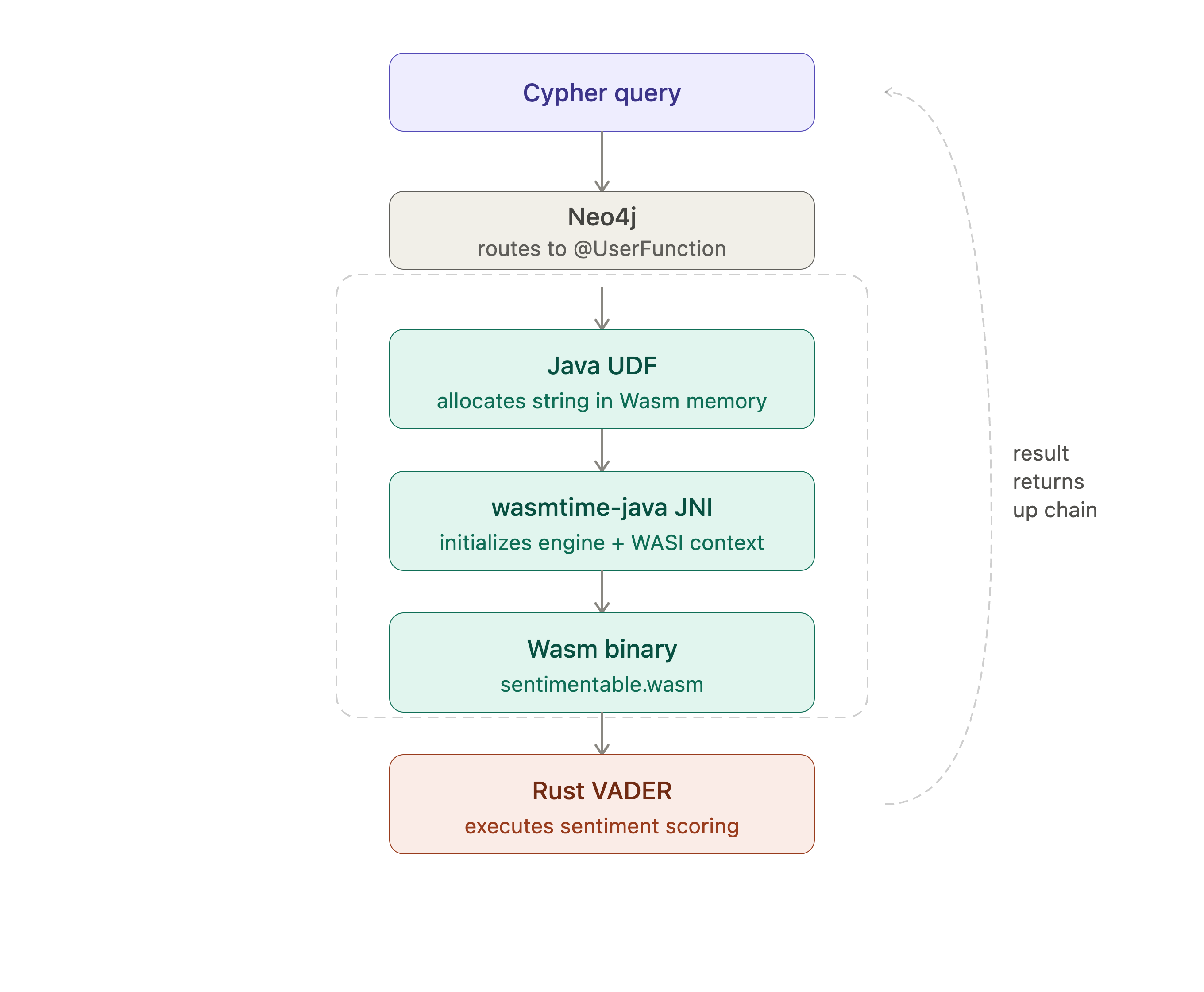
Figure 2. Calling Chain
We built up to this through two simpler stepping-stone cases:
- Case 1: A trivial integer addition to prove the chain works.
- Case 2: A single compound score to introduce string passing and WASI.
The full walkthrough of both, including the WasmUDF.java implementation is in a technical report on the GitHub repo.
The Maven Project
<project xmlns="http://maven.apache.org/POM/4.0.0"
         xmlns:xsi="http://www.w3.org/2001/XMLSchema-instance"
         xsi:schemaLocation="http://maven.apache.org/POM/4.0.0
         http://maven.apache.org/xsd/maven-4.0.0.xsd">
    <modelVersion>4.0.0</modelVersion>

    <groupId>com.example</groupId>
    <artifactId>neo4j-wasm-udf</artifactId>
    <version>1.0-SNAPSHOT</version>
    <packaging>jar</packaging>

    <properties>
        <maven.compiler.source>21</maven.compiler.source>
        <maven.compiler.target>21</maven.compiler.target>
        <project.build.sourceEncoding>UTF-8</project.build.sourceEncoding>
        <neo4j.version>2026.07.0</neo4j.version>
    </properties>

    <dependencies>
        <dependency>
            <groupId>org.neo4j</groupId>
            <artifactId>neo4j</artifactId>
            <version>${neo4j.version}</version>
            <scope>provided</scope>
        </dependency>
        <dependency>
            <groupId>io.github.kawamuray.wasmtime</groupId>
            <artifactId>wasmtime-java</artifactId>
            <version>0.19.0</version>
        </dependency>
    </dependencies>

    <build>
        <plugins>
            <plugin>
                <artifactId>maven-compiler-plugin</artifactId>
                <configuration>
                    <source>21</source>
                    <target>21</target>
                </configuration>
            </plugin>
            <plugin>
                <groupId>org.apache.maven.plugins</groupId>
                <artifactId>maven-shade-plugin</artifactId>
                <version>3.5.1</version>
                <executions>
                    <execution>
                        <phase>package</phase>
                        <goals><goal>shade</goal></goals>
                        <configuration>
                            <artifactSet>
                                <excludes>
                                    <exclude>org.neo4j:*</exclude>
                                </excludes>
                            </artifactSet>
                            <shadedArtifactAttached>false</shadedArtifactAttached>
                        </configuration>
                    </execution>
                </executions>
            </plugin>
        </plugins>
    </build>
</project>
Two things worth noting here:
org.neo4j:neo4jis declared asprovidedscope — Neo4j is already present in the database JVM at runtime, so we exclude it from the bundled JAR.- We use
maven-shade-pluginrather thanmaven-jar-pluginto produce a fat JAR that bundleswasmtime-javaand its native libraries alongside our code.
Update the neo4j.version property to match your own Neo4j Desktop installation.
Case 3: Full Polarity Map
VADER produces four scores: compound, positive, negative, and neutral. In this case, we update the Rust function to return all four and the Java UDF to return them as a Map<String, Double> — matching the return shape of the Java VADER UDF from the previous article.
The sentimentable.wit File
We change the return type from a single f32 to a tuple of four f32 values:
package local:sentimentable;

world sentimentable {
    export sentimentable: func(input: string) -> tuple<f32, f32, f32, f32>;
}
We use a tuple rather than a named record. Both would work, but a tuple is simpler on the Java side — we read four consecutive f32 values from memory at known offsets without needing to decode field names.
The lib.rs File
wit_bindgen::generate!({
    world: "sentimentable",
});

struct Component;

impl Guest for Component {
    fn sentimentable(input: String) -> (f32, f32, f32, f32) {
        lazy_static::lazy_static! {
            static ref ANALYZER: vader_sentiment::SentimentIntensityAnalyzer<'static> =
                vader_sentiment::SentimentIntensityAnalyzer::new();
        }
        let scores = ANALYZER.polarity_scores(input.as_str());
        (
            *scores.get("compound").unwrap_or(&0.0) as f32,
            *scores.get("pos").unwrap_or(&0.0) as f32,
            *scores.get("neg").unwrap_or(&0.0) as f32,
            *scores.get("neu").unwrap_or(&0.0) as f32,
        )
    }
}

export!(Component);
Build:
cd ~/wasm-udf/sentimentable
cargo build --target wasm32-wasip1 --release
Inspecting the Binary
Let's check the exports first:
wasm-objdump -x target/wasm32-wasip1/release/sentimentable.wasm | grep "^Export" -A 6Four exports should be present: memory, sentimentable, cabi_realloc, and cabi_realloc_wit_bindgen_0_40_0.
Now let's find the type signature of the sentimentable function. Find the sig index:
wasm-objdump -x target/wasm32-wasip1/release/sentimentable.wasm | grep "func\[9\]" | head -1Then look it up:
wasm-objdump -x target/wasm32-wasip1/release/sentimentable.wasm | grep "type\[9\]"You should see:
- type[9] (i32, i32) -> i32The signature is (i32, i32) -> i32 . This is the key difference between returning a single scalar and returning a tuple: wit-bindgen uses a direct f32 return for a single value, but switches to an indirect result pointer when returning a tuple. What's written at that pointer is four f32 values (16 bytes) at consecutive 4-byte offsets. The Java side reads all four.
This illustrates an important distinction between the WIT interface definition and the generated core Wasm ABI. The WIT signature and the Wasm-level signature are different layers: wit-bindgen lowers WIT types to a core Wasm ABI, and the lowering strategy depends on the return type. A single scalar such as f32 is returned directly as a Wasm value. A tuple is returned indirectly through linear memory, with the caller receiving a pointer to where the values were written. The Java calling code must match the generated ABI rather than the WIT definition, which is why inspecting the binary with wasm-objdump before writing the Java wrapper is essential.
Figure 3 shows the memory layout.
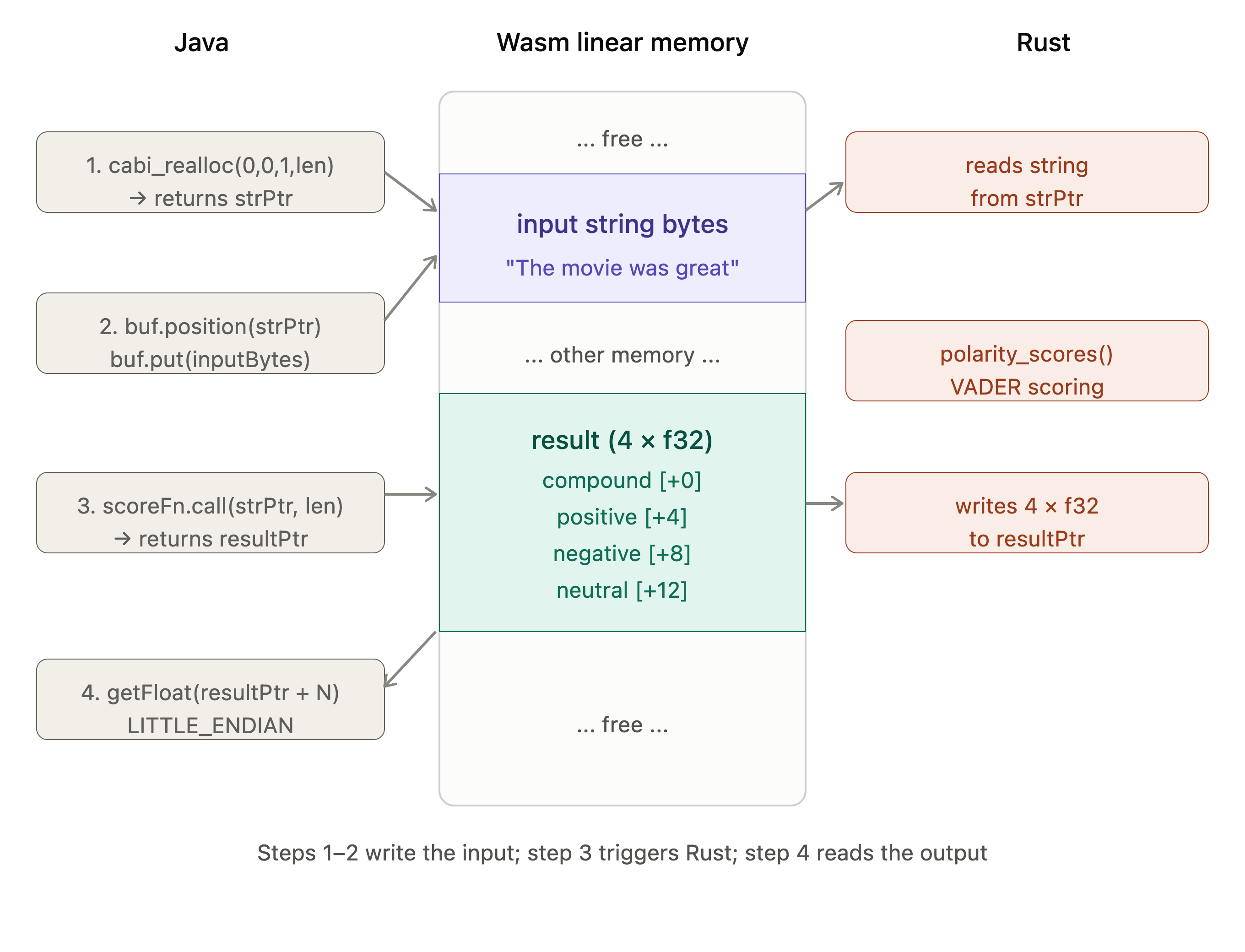
Figure 3. Memory Layout.
Figure 4 compares Cases 2 and 3.
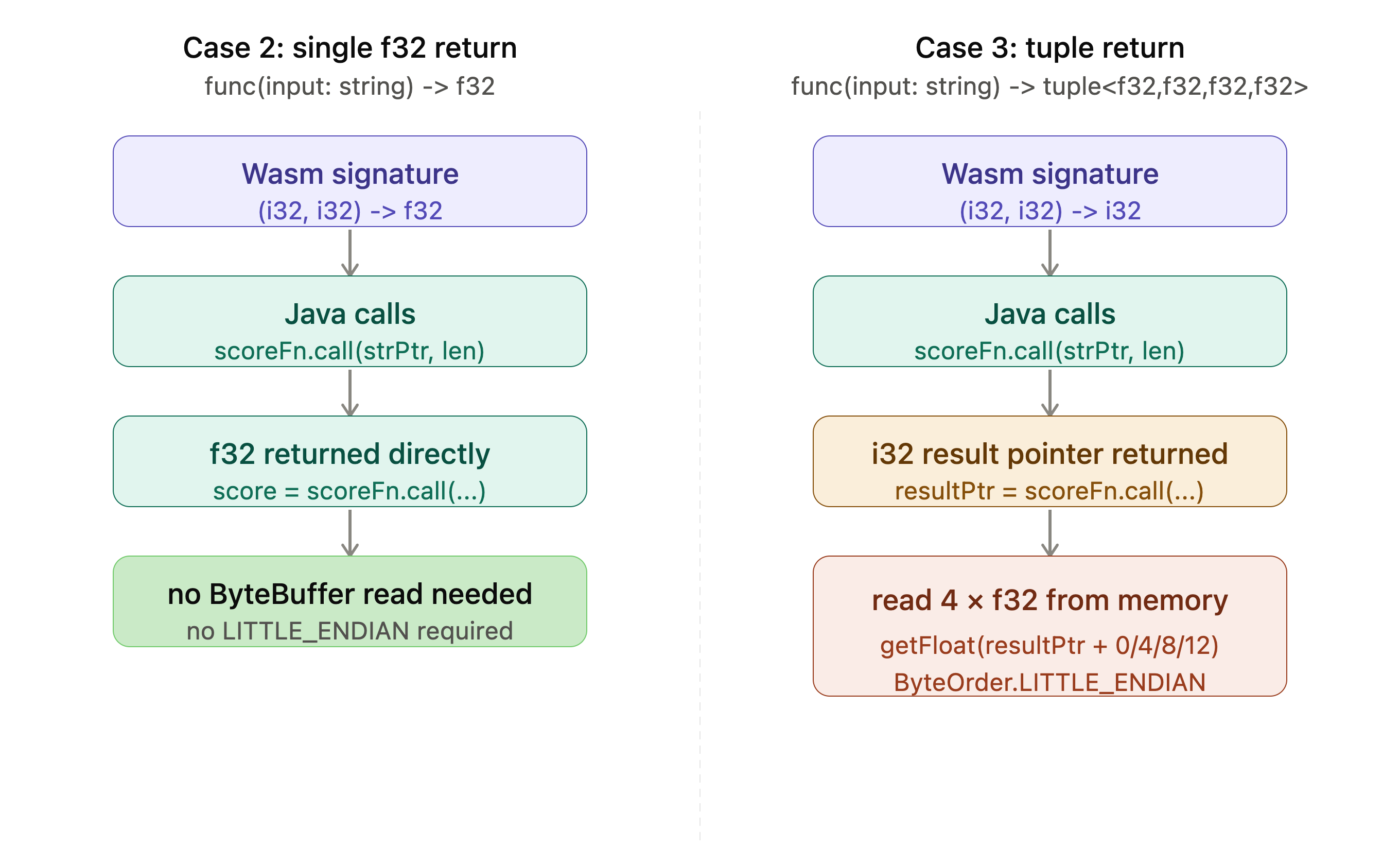
Figure 4. Case 2 vs. Case 3 ABI Comparison
The SentimentUDF.java file
package com.example;

import io.github.kawamuray.wasmtime.Engine;
import io.github.kawamuray.wasmtime.Func;
import io.github.kawamuray.wasmtime.Linker;
import io.github.kawamuray.wasmtime.Memory;
import io.github.kawamuray.wasmtime.Module;
import io.github.kawamuray.wasmtime.Store;
import io.github.kawamuray.wasmtime.WasmFunctions;
import io.github.kawamuray.wasmtime.WasmValType;
import io.github.kawamuray.wasmtime.wasi.WasiCtx;
import io.github.kawamuray.wasmtime.wasi.WasiCtxBuilder;
import org.neo4j.procedure.Description;
import org.neo4j.procedure.Name;
import org.neo4j.procedure.UserFunction;

import java.io.InputStream;
import java.nio.ByteBuffer;
import java.nio.ByteOrder;
import java.nio.charset.StandardCharsets;
import java.util.HashMap;
import java.util.Map;

public class SentimentUDF {

    @UserFunction("com.example.wasm.sentiment")
    @Description("Scores text using VADER sentiment analysis compiled to Wasm. Returns compound, positive, negative, neutral.")
    public Map<String, Double> sentiment(@Name("text") String text) throws Exception {

        if (text == null || text.isBlank()) {
            return Map.of("compound", 0.0, "positive", 0.0, "negative", 0.0, "neutral", 1.0);
        }

        byte[] wasmBytes;
        try (InputStream is = SentimentUDF.class.getResourceAsStream("/sentimentable.wasm")) {
            if (is == null) throw new RuntimeException("sentimentable.wasm not found in resources");
            wasmBytes = is.readAllBytes();
        }

        WasiCtx wasi = new WasiCtxBuilder().inheritStdout().inheritStderr().build();

        try (Store<Void> store = Store.withoutData(wasi);
             Engine engine = store.engine();
             Module module = Module.fromBinary(engine, wasmBytes);
             Linker linker = new Linker(engine)) {

            WasiCtx.addToLinker(linker);
            linker.module(store, "", module);

            Memory memory = linker.get(store, "", "memory").get().memory();

            Func reallocFn = linker.get(store, "", "cabi_realloc").get().func();
            WasmFunctions.Function4<Integer, Integer, Integer, Integer, Integer> realloc =
                WasmFunctions.func(store, reallocFn,
                    WasmValType.I32, WasmValType.I32, WasmValType.I32, WasmValType.I32,
                    WasmValType.I32);

            byte[] inputBytes = text.getBytes(StandardCharsets.UTF_8);
            int len = inputBytes.length;
            int strPtr = realloc.call(0, 0, 1, len);

            ByteBuffer buf = memory.buffer(store);
            buf.position(strPtr);
            buf.put(inputBytes);

            Func sentimentFn = linker.get(store, "", "sentimentable").get().func();
            WasmFunctions.Function2<Integer, Integer, Integer> scoreFn =
                WasmFunctions.func(store, sentimentFn,
                    WasmValType.I32, WasmValType.I32,
                    WasmValType.I32);

            int resultPtr = scoreFn.call(strPtr, len);

            // read four f32 values at 4-byte offsets: compound, pos, neg, neu
            ByteBuffer resultBuf = memory.buffer(store);
            resultBuf.order(ByteOrder.LITTLE_ENDIAN);
            float compound = resultBuf.getFloat(resultPtr);
            float positive = resultBuf.getFloat(resultPtr + 4);
            float negative = resultBuf.getFloat(resultPtr + 8);
            float neutral  = resultBuf.getFloat(resultPtr + 12);

            Map<String, Double> result = new HashMap<>();
            result.put("compound", (double) compound);
            result.put("positive", (double) positive);
            result.put("negative", (double) negative);
            result.put("neutral",  (double) neutral);
            return result;
        }
    }
}
The return type is (Map<String, Double> ), the null guard returning a neutral map and the four getFloat() reads at consecutive 4-byte offsets from the result pointer.
Build and Deploy
Copy the Wasm binary, build and deploy:
cp ~/wasm-udf/sentimentable/target/wasm32-wasip1/release/sentimentable.wasm \
   ~/wasm-udf/neo4j-wasm-udf/src/main/resources/

cd ~/wasm-udf/neo4j-wasm-udf
mvn -q clean package

cp target/neo4j-wasm-udf-1.0-SNAPSHOT.jar \
  ~/Library/Application\ Support/neo4j-desktop/Application/Data/dbmss/<your-dbms-id>/plugins/
Stop Neo4j, restart it, and run the verification queries.
Positive sentence:
RETURN com.example.wasm.sentiment('The movie was great') AS scores;Result:
{
  "compound": 0.624893307685852,
  "positive": 0.577464759349823,
  "negative": 0.0,
  "neutral": 0.4225352108478546
}
Capitalization test:
RETURN com.example.wasm.sentiment('The movie was GREAT!') AS scores;Result:
{
  "compound": 0.7290259003639221,
  "positive": 0.6307692527770996,
  "negative": 0.0,
  "neutral": 0.3692307770252228
}
Empty string guard:
RETURN com.example.wasm.sentiment('') AS scores;Result:
{
  "compound": 0.0,
  "positive": 0.0,
  "negative": 0.0,
  "neutral": 1.0
}
All three cases behave correctly.
Summary
We set out to build the working example that our previous article said didn't exist. Here's what we showed.
We embedded a real VADER sentiment analyzer compiled to Wasm inside a Neo4j Java UDF, returning a full polarity map — compound, positive, negative and neutral — matching the return shape of the Java VADER UDF from the previous article. The wit-bindgen tuple ABI writes four f32 values to consecutive memory addresses; the Java side reads them back with a LITTLE_ENDIAN ByteBuffer. All four scores are correct, capitalization sensitivity works, and the empty string guard returns a sensible neutral map.
The result is a workable integration pattern rather than a universal replacement for a native Java implementation. With the per-call initialization used in this proof of concept, the approach is best suited to low-frequency workloads where Wasm isolation and portability justify the additional complexity. For high-throughput workloads, the natural next step is to benchmark and reuse the Wasmtime engine and compiled module while keeping execution state appropriately isolated between calls.
In the next article, we'll look at running TypeSafe AI's Jev inside Neo4j for calibrated sentiment decisions. Stay tuned!
The full source code is available on GitHub.
Opinions expressed by DZone contributors are their own.
Comments