

Difference Between Observable and Promise in Angular 8
Introduction
Observable and Promise both provide us with abstractions that help us deal with the asynchronous nature of applications.
Promise
Promises work with asynchronous operations. They either return a single value (i.e the promise resolves) or an error message (i.e the promise rejects).
Another important thing to remember regarding promises is that a request initiated from a promise is not canceled.
Disadvantages of Promise:
- User could not cancel a request to the API.
- User could not retry a failed call.
- As our application gets bigger, promises become hard to manage.
Observable
An Observable is an array or a sequence of events over time. It has at least two participants, the creator (the data source) and the subscriber (subscription where data is being consumed). Compared to a promise, an observable can be canceled.
RxJS is all about unifying the ideas of promise callbacks and data flow and making them easier to work with. Observables provide operators, like map, forEach, reduce...similar to an array.
There are also powerful operators like retry(), reply(), retryWhen(), delay().
Prerequisites
- Basic knowledge of Angular.
- Visual Studio Code must be installed.
- Angular CLI must be installed.
- Node JS must be installed.
Backend
Here, with the backend-related code, we will use SQL Server.
The very first step is to create a database.
Step 1
Let’s create a database on your local SQL Server. I hope you have installed SQL Server 2017 in your machine (you can use SQL Server 2008, 2012, or 2016, as well).
create database country
Step 2
Create a Country table using the following code:
xxxxxxxxxx
CREATE TABLE tbl_Countries
(
CountryID INT
,CountryName VARCHAR(50)
,TwoCharCountryCode CHAR(2)
,ThreeCharCountryCode CHAR(3)
);
INSERT INTO tbl_Countries VALUES
(1,'Afghanistan','AF','AFG')
,(2,'Aland Islands','AX','ALA')
,(3,'Albania','AL','ALB')
,(4,'Algeria','DZ','DZA')
,(5,'American Samoa','AS','ASM')
,(6,'Andorra','AD','AND')
,(7,'Angola','AO','AGO')
,(8,'Anguilla','AI','AIA')
,(9,'Antarctica','AQ','ATA')
,(10,'Antigua and Barbuda','AG','ATG')
,(11,'Argentina','AR','ARG')
,(12,'Armenia','AM','ARM')
,(13,'Aruba','AW','ABW')
,(14,'Australia','AU','AUS')
,(15,'Austria','AT','AUT')
,(16,'Azerbaijan','AZ','AZE')
,(17,'Bahamas','BS','BHS')
,(18,'Bahrain','BH','BHR')
,(19,'Bangladesh','BD','BGD')
,(20,'Barbados','BB','BRB')
,(21,'Belarus','BY','BLR')
,(22,'Belgium','BE','BEL')
,(23,'Belize','BZ','BLZ')
,(24,'Benin','BJ','BEN')
,(25,'Bermuda','BM','BMU')
,(26,'Bhutan','BT','BTN')
,(27,'Bolivia','BO','BOL')
,(28,'Bonaire, Sint Eustatius and Saba','BQ','BES')
,(29,'Bosnia and Herzegovina','BA','BIH')
,(30,'Botswana','BW','BWA')
,(31,'Bouvet Island','BV','BVT')
,(32,'Brazil','BR','BRA')
,(33,'British Indian Ocean Territory','IO','IOT')
,(34,'Brunei','BN','BRN')
,(35,'Bulgaria','BG','BGR')
,(36,'Burkina Faso','BF','BFA')
,(37,'Burundi','BI','BDI')
,(38,'Cambodia','KH','KHM')
,(39,'Cameroon','CM','CMR')
,(40,'Canada','CA','CAN')
,(41,'Cape Verde','CV','CPV')
,(42,'Cayman Islands','KY','CYM')
,(43,'Central African Republic','CF','CAF')
,(44,'Chad','TD','TCD')
,(45,'Chile','CL','CHL')
,(46,'China','CN','CHN')
,(47,'Christmas Island','CX','CXR')
,(48,'Cocos (Keeling) Islands','CC','CCK')
,(49,'Colombia','CO','COL')
,(50,'Comoros','KM','COM')
,(51,'Congo','CG','COG')
,(52,'Cook Islands','CK','COK')
,(53,'Costa Rica','CR','CRI')
,(54,'Ivory Coast','CI','CIV')
,(55,'Croatia','HR','HRV')
,(56,'Cuba','CU','CUB')
,(57,'Curacao','CW','CUW')
,(58,'Cyprus','CY','CYP')
,(59,'Czech Republic','CZ','CZE')
,(60,'Democratic Republic of the Congo','CD','COD')
,(61,'Denmark','DK','DNK')
,(62,'Djibouti','DJ','DJI')
,(63,'Dominica','DM','DMA')
,(64,'Dominican Republic','DO','DOM')
,(65,'Ecuador','EC','ECU')
,(66,'Egypt','EG','EGY')
,(67,'El Salvador','SV','SLV')
,(68,'Equatorial Guinea','GQ','GNQ')
,(69,'Eritrea','ER','ERI')
,(70,'Estonia','EE','EST')
,(71,'Ethiopia','ET','ETH')
,(72,'Falkland Islands (Malvinas)','FK','FLK')
,(73,'Faroe Islands','FO','FRO')
,(74,'Fiji','FJ','FJI')
,(75,'Finland','FI','FIN')
,(76,'France','FR','FRA')
,(77,'French Guiana','GF','GUF')
,(78,'French Polynesia','PF','PYF')
,(79,'French Southern Territories','TF','ATF')
,(80,'Gabon','GA','GAB')
,(81,'Gambia','GM','GMB')
,(82,'Georgia','GE','GEO')
,(83,'Germany','DE','DEU')
,(84,'Ghana','GH','GHA')
,(85,'Gibraltar','GI','GIB')
,(86,'Greece','GR','GRC')
,(87,'Greenland','GL','GRL')
,(88,'Grenada','GD','GRD')
,(89,'Guadaloupe','GP','GLP')
,(90,'Guam','GU','GUM')
,(91,'Guatemala','GT','GTM')
,(92,'Guernsey','GG','GGY')
,(93,'Guinea','GN','GIN')
,(94,'Guinea-Bissau','GW','GNB')
,(95,'Guyana','GY','GUY')
,(96,'Haiti','HT','HTI')
,(97,'Heard Island and McDonald Islands','HM','HMD')
,(98,'Honduras','HN','HND')
,(99,'Hong Kong','HK','HKG')
,(100,'Hungary','HU','HUN')
,(101,'Iceland','IS','ISL')
,(102,'India','IN','IND')
,(103,'Indonesia','ID','IDN')
,(104,'Iran','IR','IRN')
,(105,'Iraq','IQ','IRQ')
,(106,'Ireland','IE','IRL')
,(107,'Isle of Man','IM','IMN')
,(108,'Israel','IL','ISR')
,(109,'Italy','IT','ITA')
,(110,'Jamaica','JM','JAM')
,(111,'Japan','JP','JPN')
,(112,'Jersey','JE','JEY')
,(113,'Jordan','JO','JOR')
,(114,'Kazakhstan','KZ','KAZ')
,(115,'Kenya','KE','KEN')
,(116,'Kiribati','KI','KIR')
,(117,'Kosovo','XK','---')
,(118,'Kuwait','KW','KWT')
,(119,'Kyrgyzstan','KG','KGZ')
,(120,'Laos','LA','LAO')
,(121,'Latvia','LV','LVA')
,(122,'Lebanon','LB','LBN')
,(123,'Lesotho','LS','LSO')
,(124,'Liberia','LR','LBR')
,(125,'Libya','LY','LBY')
,(126,'Liechtenstein','LI','LIE')
,(127,'Lithuania','LT','LTU')
,(128,'Luxembourg','LU','LUX')
,(129,'Macao','MO','MAC')
,(130,'Macedonia','MK','MKD')
,(131,'Madagascar','MG','MDG')
,(132,'Malawi','MW','MWI')
,(133,'Malaysia','MY','MYS')
,(134,'Maldives','MV','MDV')
,(135,'Mali','ML','MLI')
,(136,'Malta','MT','MLT')
,(137,'Marshall Islands','MH','MHL')
,(138,'Martinique','MQ','MTQ')
,(139,'Mauritania','MR','MRT')
,(140,'Mauritius','MU','MUS')
,(141,'Mayotte','YT','MYT')
,(142,'Mexico','MX','MEX')
,(143,'Micronesia','FM','FSM')
,(144,'Moldava','MD','MDA')
,(145,'Monaco','MC','MCO')
,(146,'Mongolia','MN','MNG')
,(147,'Montenegro','ME','MNE')
,(148,'Montserrat','MS','MSR')
,(149,'Morocco','MA','MAR')
,(150,'Mozambique','MZ','MOZ')
,(151,'Myanmar (Burma)','MM','MMR')
,(152,'Namibia','NA','NAM')
,(153,'Nauru','NR','NRU')
,(154,'Nepal','NP','NPL')
,(155,'Netherlands','NL','NLD')
,(156,'New Caledonia','NC','NCL')
,(157,'New Zealand','NZ','NZL')
,(158,'Nicaragua','NI','NIC')
,(159,'Niger','NE','NER')
,(160,'Nigeria','NG','NGA')
,(161,'Niue','NU','NIU')
,(162,'Norfolk Island','NF','NFK')
,(163,'North Korea','KP','PRK')
,(164,'Northern Mariana Islands','MP','MNP')
,(165,'Norway','NO','NOR')
,(166,'Oman','OM','OMN')
,(167,'Pakistan','PK','PAK')
,(168,'Palau','PW','PLW')
,(169,'Palestine','PS','PSE')
,(170,'Panama','PA','PAN')
,(171,'Papua New Guinea','PG','PNG')
,(172,'Paraguay','PY','PRY')
,(173,'Peru','PE','PER')
,(174,'Phillipines','PH','PHL')
,(175,'Pitcairn','PN','PCN')
,(176,'Poland','PL','POL')
,(177,'Portugal','PT','PRT')
,(178,'Puerto Rico','PR','PRI')
,(179,'Qatar','QA','QAT')
,(180,'Reunion','RE','REU')
,(181,'Romania','RO','ROU')
,(182,'Russia','RU','RUS')
,(183,'Rwanda','RW','RWA')
,(184,'Saint Barthelemy','BL','BLM')
,(185,'Saint Helena','SH','SHN')
,(186,'Saint Kitts and Nevis','KN','KNA')
,(187,'Saint Lucia','LC','LCA')
,(188,'Saint Martin','MF','MAF')
,(189,'Saint Pierre and Miquelon','PM','SPM')
,(190,'Saint Vincent and the Grenadines','VC','VCT')
,(191,'Samoa','WS','WSM')
,(192,'San Marino','SM','SMR')
,(193,'Sao Tome and Principe','ST','STP')
,(194,'Saudi Arabia','SA','SAU')
,(195,'Senegal','SN','SEN')
,(196,'Serbia','RS','SRB')
,(197,'Seychelles','SC','SYC')
,(198,'Sierra Leone','SL','SLE')
,(199,'Singapore','SG','SGP')
,(200,'Sint Maarten','SX','SXM')
,(201,'Slovakia','SK','SVK')
,(202,'Slovenia','SI','SVN')
,(203,'Solomon Islands','SB','SLB')
,(204,'Somalia','SO','SOM')
,(205,'South Africa','ZA','ZAF')
,(206,'South Georgia and the South Sandwich Islands','GS','SGS')
,(207,'South Korea','KR','KOR')
,(208,'South Sudan','SS','SSD')
,(209,'Spain','ES','ESP')
,(210,'Sri Lanka','LK','LKA')
,(211,'Sudan','SD','SDN')
,(212,'Suriname','SR','SUR')
,(213,'Svalbard and Jan Mayen','SJ','SJM')
,(214,'Swaziland','SZ','SWZ')
,(215,'Sweden','SE','SWE')
,(216,'Switzerland','CH','CHE')
,(217,'Syria','SY','SYR')
,(218,'Taiwan','TW','TWN')
,(219,'Tajikistan','TJ','TJK')
,(220,'Tanzania','TZ','TZA')
,(221,'Thailand','TH','THA')
,(222,'Timor-Leste (East Timor)','TL','TLS')
,(223,'Togo','TG','TGO')
,(224,'Tokelau','TK','TKL')
,(225,'Tonga','TO','TON')
,(226,'Trinidad and Tobago','TT','TTO')
,(227,'Tunisia','TN','TUN')
,(228,'Turkey','TR','TUR')
,(229,'Turkmenistan','TM','TKM')
,(230,'Turks and Caicos Islands','TC','TCA')
,(231,'Tuvalu','TV','TUV')
,(232,'Uganda','UG','UGA')
,(233,'Ukraine','UA','UKR')
,(234,'United Arab Emirates','AE','ARE')
,(235,'United Kingdom','GB','GBR')
,(236,'United States','US','USA')
,(237,'United States Minor Outlying Islands','UM','UMI')
,(238,'Uruguay','UY','URY')
,(239,'Uzbekistan','UZ','UZB')
,(240,'Vanuatu','VU','VUT')
,(241,'Vatican City','VA','VAT')
,(242,'Venezuela','VE','VEN')
,(243,'Vietnam','VN','VNM')
,(244,'Virgin Islands, British','VG','VGB')
,(245,'Virgin Islands, US','VI','VIR')
,(246,'Wallis and Futuna','WF','WLF')
,(247,'Western Sahara','EH','ESH')
,(248,'Yemen','YE','YEM')
,(249,'Zambia','ZM','ZMB')
,(250,'Zimbabwe','ZW','ZWE');
Now, let's add Store Procedures.
Step 3
Create a Stored Procedure with the following code:
xxxxxxxxxx
CREATE Proc searchCountryByName
@VALUE nvarchar(50)
AS
BEGIN
select * from [dbo].[tbl_Countries] where CountryName LIKE '' + @VALUE + '%'
END
Web API
Create an ASP.NET Core application with the following steps.
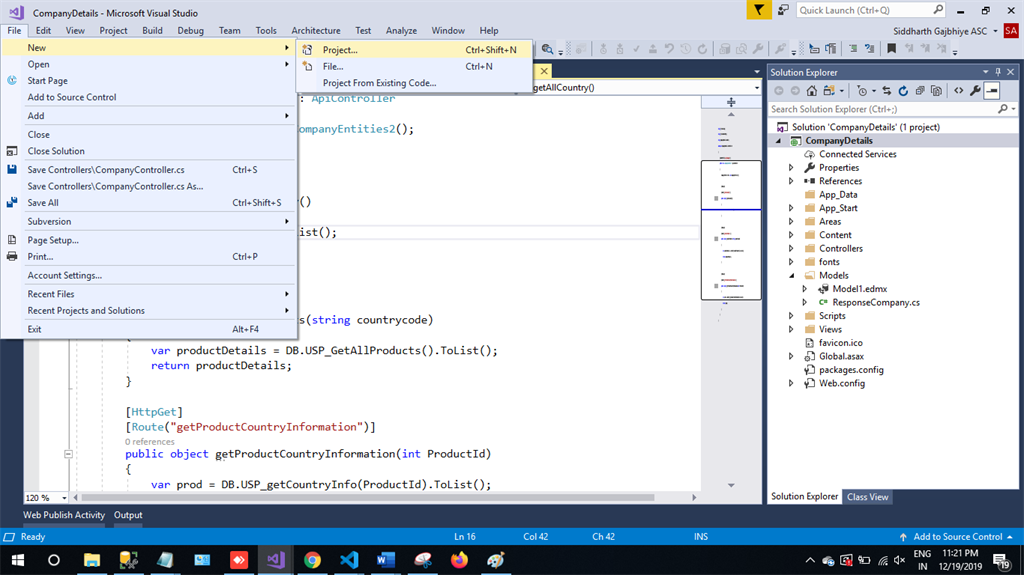
Step 1
In Visual Studio 2019, click on File -> New -> Project.
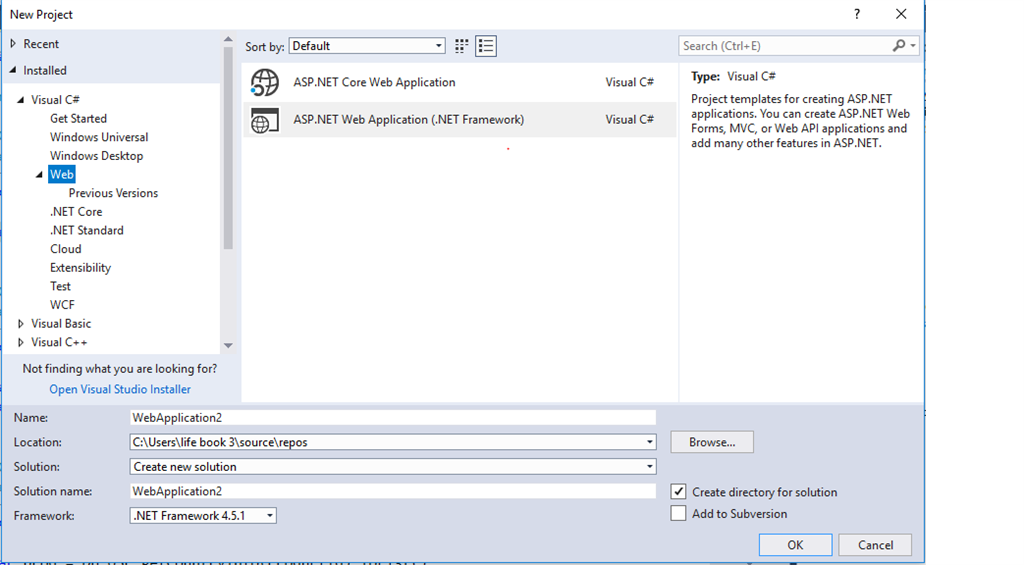
Step 2
Choose the Create option and select ASP.NET web application.
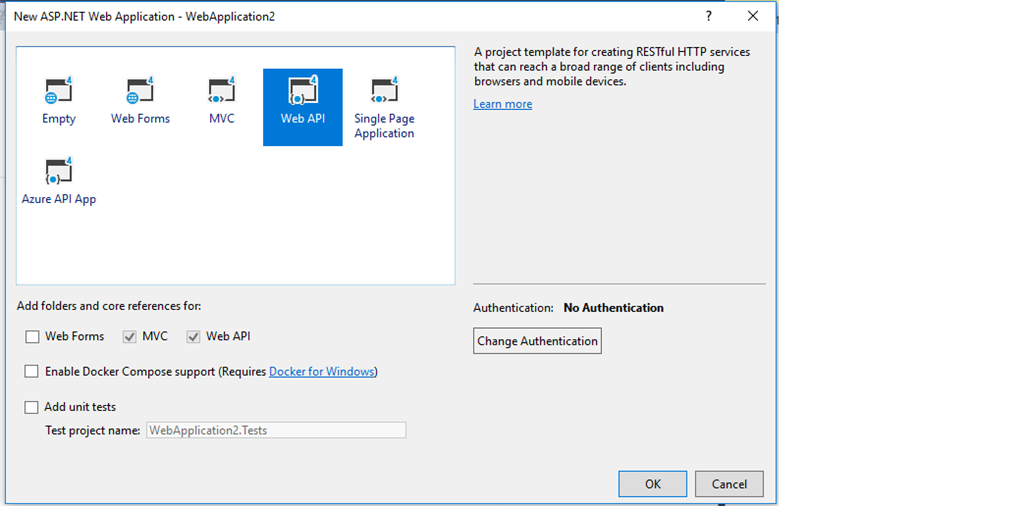
Step 3
Select Web API and click OK.
Step 4
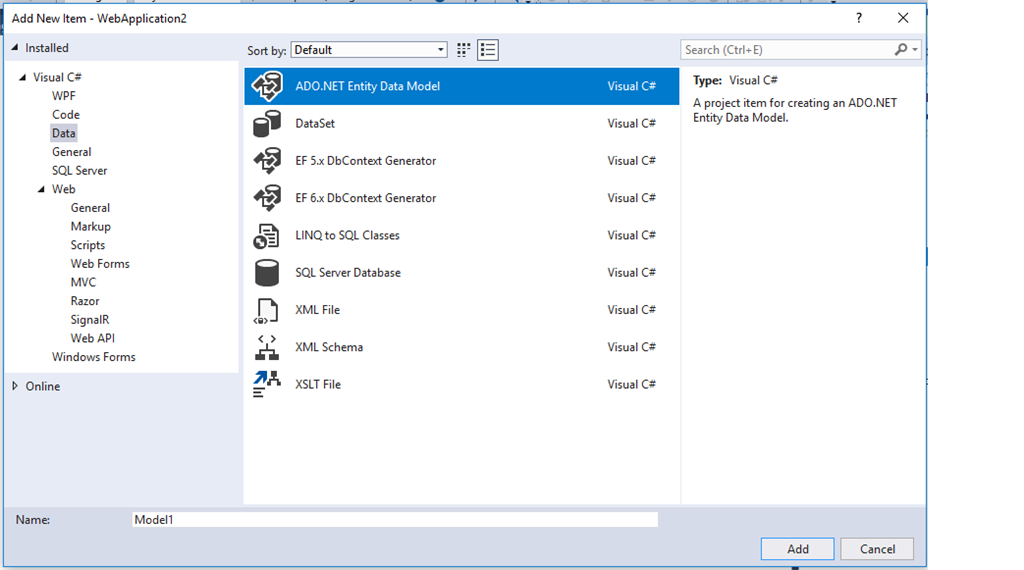
Now, right-click on the controller and add a new item.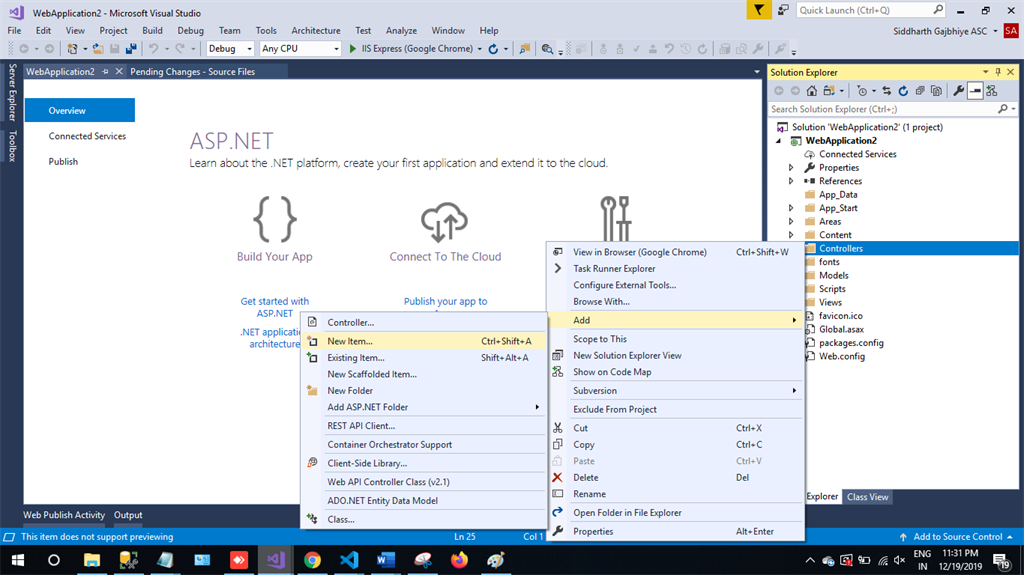
Step 5
Choose Ado.NET Entity Data Model, and then click on Add.
Step 6
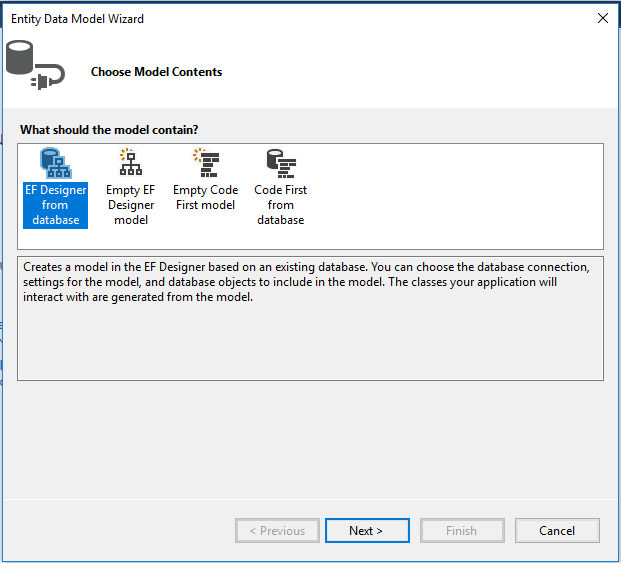
The next step is EF Designer, just click on Next.
Step 7
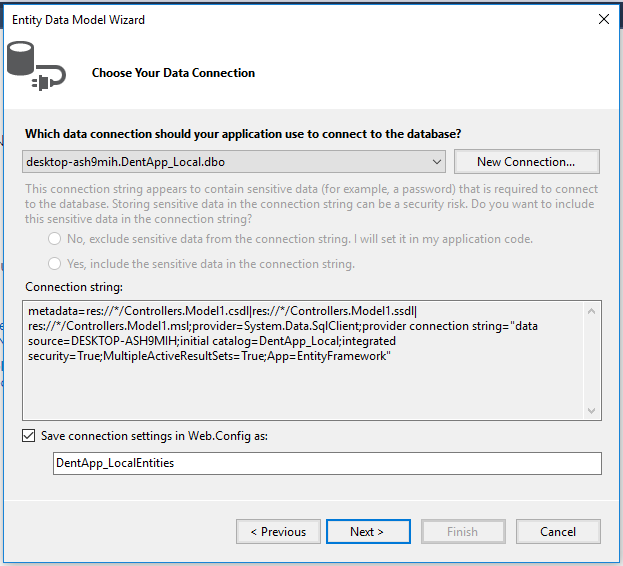
A new pop-up will show. Click on Next. If yours isn't established, then click on a new connection
Step 8
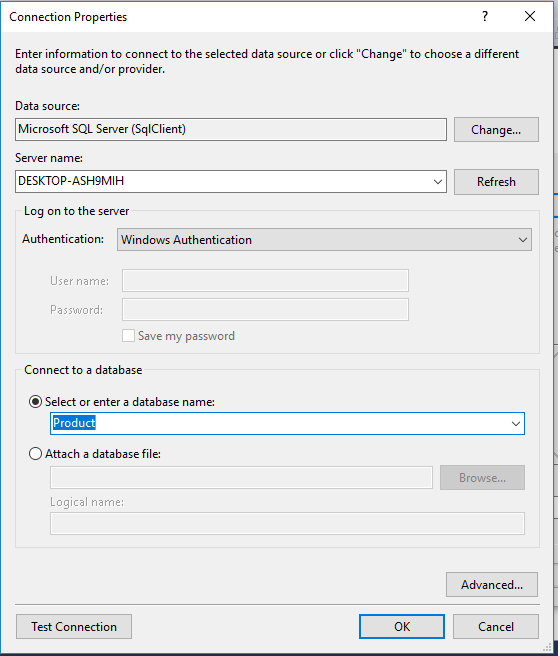
Copy your database connection server name and paste it in the server name textbox. You will see all the databases. Select your database and click on OK.
Step 9
Here, in the new screen, select your tables and store the procedure. Then, click on finish:
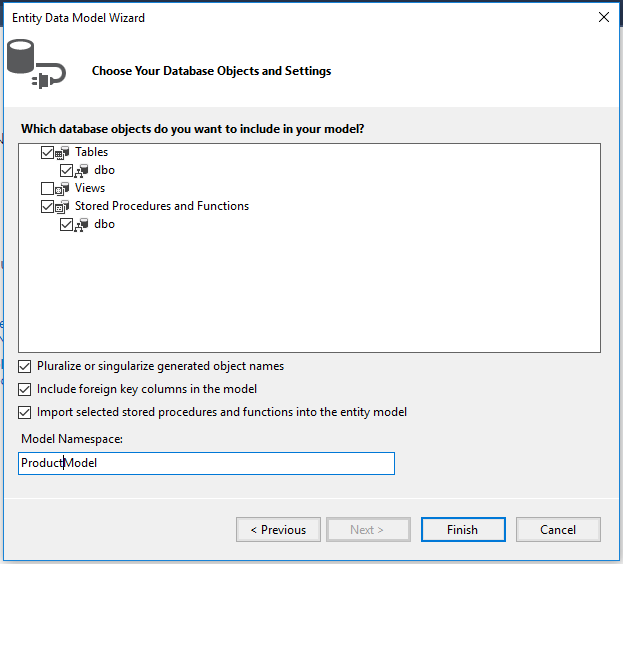
Our next step is to right-click on the Controllers folder and add a new controller. Name it "CountryController" and add the following namespace in the CountryController.
Complete CountryController code
xxxxxxxxxx
using System.Linq;
using System.Web.Http;
using CompanyDetails.Entities;
namespace CountryDetails.Controllers
{
[RoutePrefix("api/Country")]
public class CountryController : ApiController
{
CountryEntities5 DB = new CountryEntities5();
[HttpGet]
[Route("getSearchedCountry")]
public object getSearchedCountry(string keyword)
{
var countryResult = DB.searchCountryByName(keyword).ToList();
return countryResult;
}
}
}
Frontend
Step 1
Let's create a new Angular project using the following NPM command,
xxxxxxxxxx
ng new observablevspromise
Step 2
Now, let's create a new component for "Observable " by using the following command:
xxxxxxxxxx
ng g c observable-example
Step 3
Now, let's create a new component for "Promise" by using the following command,
xxxxxxxxxx
ng g c promise-example
Here, I am creating two different components one for observable example and another for promise. First, we will see the example for Promise.
Step 4
Now, open the promise-example.component.html file and add the following code:
xxxxxxxxxx
<div style="text-align: center;">
<h1>
Example of Fetching data using Promise
</h1>
<div>
<h2>
Country Name Search
</h2>
<input #term type="text" (keyup)="searchCountryUsingPromise(term.value)">
<div>
<li *ngFor="let result of country">
{{result.CountryName}}
</li>
</div>
</div>
</div>
Step 5
Now, open the promise-example.component.ts file and add the following code in this file:
xxxxxxxxxx
import { Component, OnInit } from '@angular/core';
import { CountryService } from '../country.service';
@Component({
selector: 'app-promise-example',
templateUrl: './promise-example.component.html',
styleUrls: ['./promise-example.component.css']
})
export class PromiseExampleComponent implements OnInit {
country: any;
constructor(private _countryService:CountryService) { }
ngOnInit() {
}
public searchCountryUsingPromise(keyWord){
this._countryService.getSearchedCountry(keyWord).toPromise()
.then((data:any) =>{
console.log(data);
this.country =data;
});
}
}
Step 6
The next step is to create a service.
xxxxxxxxxx
ng g s country.service.ts
Now, open the country.service.ts file and add the following code in this file:
xxxxxxxxxx
import { Injectable } from '@angular/core';
import { HttpClient } from '@angular/common/http';
@Injectable()
export class CountryService {
employees: any[];
private url = '';
private baseUrl = "http://localhost:49661/";//Replace it with your http address and port
constructor(public http: HttpClient) {
}
getSearchedCountry(keyWord) {
this.url = this.baseUrl + 'api/Country/getSearchedCountry?keyword='+keyWord;
return this.http.get<any[]>(this.url);
}
}
Step 7
Open file app.module.ts and paste the following code:
xxxxxxxxxx
import { BrowserModule } from '@angular/platform-browser';
import { NgModule } from '@angular/core';
import { FormsModule, ReactiveFormsModule } from '@angular/forms';
import { AppComponent } from './app.component';
import { HttpClientModule } from '@angular/common/http';
import { TrackbyComponent } from './trackby/trackby.component';
import { ObservableExampleComponent } from './observable-example/observable-example.component';
import { PromiseExampleComponent } from './promise-example/promise-example.component';
import { CountryService } from './country.service';
@NgModule({
declarations: [
AppComponent,
TrackbyComponent,
ObservableExampleComponent,
PromiseExampleComponent
],
imports: [
BrowserModule,
FormsModule,
ReactiveFormsModule,
HttpClientModule
],
providers: [CountryService],
bootstrap: [AppComponent]
})
export class AppModule { }
Step 8
Now, open the app.component.html file and add the following code:
xxxxxxxxxx
<app-promise-example></app-promise-example>
Now, it's time for the output:
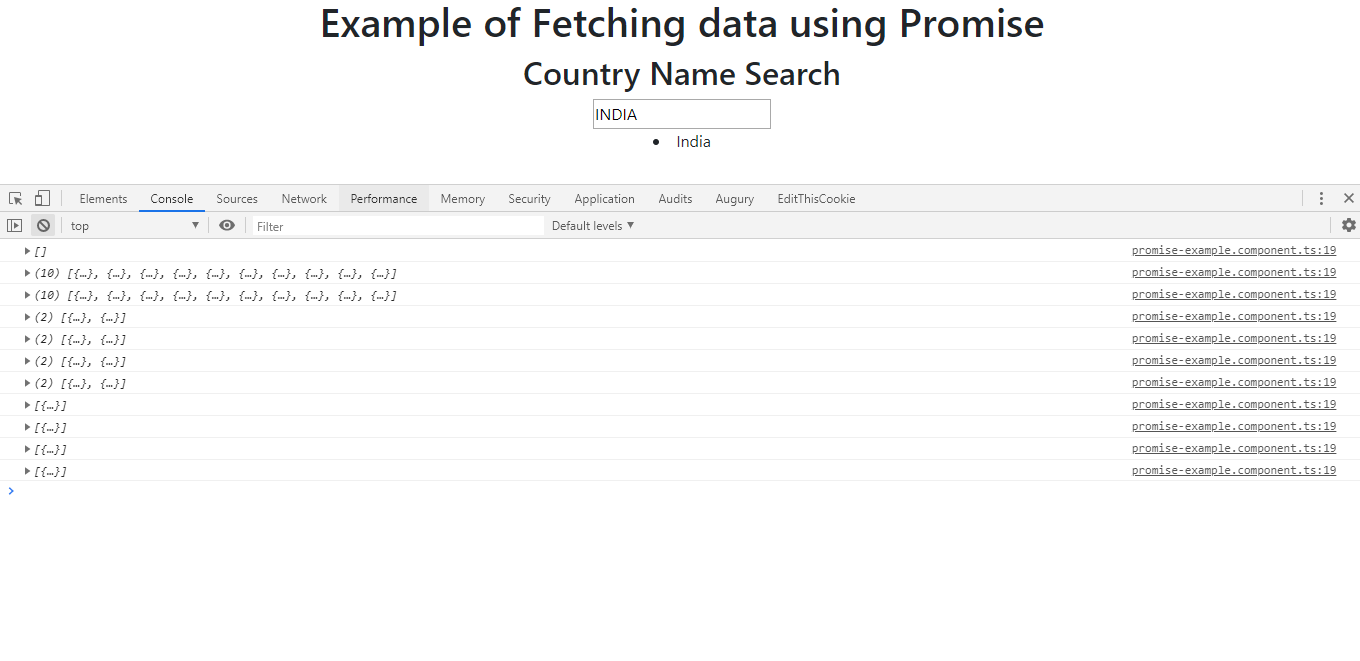
As we can see, whenever I am typing the key, it's hitting the API every time (i.e it's going to the server every time and getting the data).
Example of Observable:
Step 9
Now, open the observable-example.component.html file and add the following code in the file:
xxxxxxxxxx
<div style="text-align: center;">
<h1>
Example of Fetching data using Observable
</h1>
<div>
<h2>
Country Name Search
</h2>
<input type="text" [formControl]="term">
<div>
<li *ngFor="let result of country">
{{result.CountryName}}
</li>
</div>
</div>
</div>
Step 10
Now, open the observable-example.component.ts file and add the following code:
xxxxxxxxxx
import { Component, OnInit } from '@angular/core';
import { CountryService } from '../country.service';
import { FormControl } from '@angular/forms';
import 'rxjs/add/operator/debounceTime';
import 'rxjs/add/operator/distinctUntilChanged';
@Component({
selector: 'app-observable-example',
templateUrl: './observable-example.component.html',
styleUrls: ['./observable-example.component.css']
})
export class ObservableExampleComponent implements OnInit {
country: any;
constructor(private _countryService:CountryService) { }
private term =new FormControl();
ngOnInit() {
this.term.valueChanges
.debounceTime(400)
.distinctUntilChanged()
.subscribe(searchText=>{
this._countryService.getSearchedCountry(searchText).subscribe((result)=>{
console.log(result);
this.country =result;
})
})
}
}
Step 11
Replace the app.component.html file with the following code:
xxxxxxxxxx
<app-observable-example></app-observable-example>
Now, its time for the output for Observable:
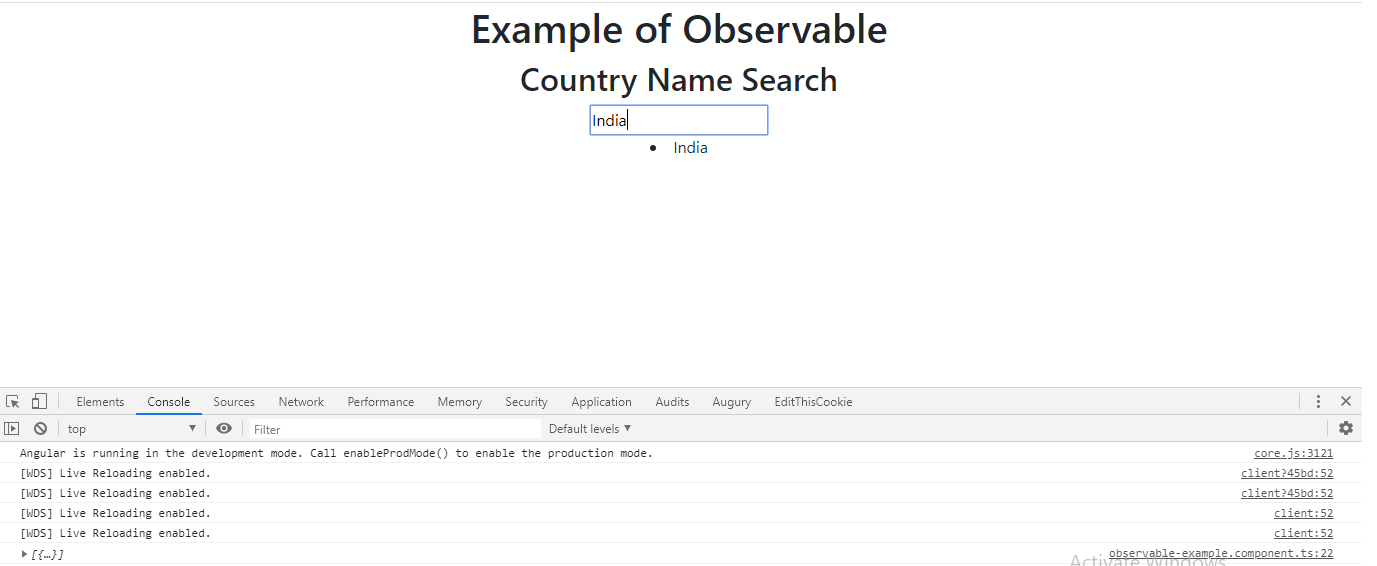
As we can see, as soon as I press the key, it's hitting the API every 400 milliseconds, so rather than hitting it on every keypress, it's hitting every 400-milliseconds using the debounceTime operator in RxJS
So, with the help of RxJS operators, we can achieve this so that it can improve our application performance.
Conclusion
In this article, we have seen the difference between Observable and Promise in Angular 8 application.
Please give your valuable feedback/comments/questions about this article. Please let me know how to improve it.
Opinions expressed by DZone contributors are their own.