

Why I Switched From Ubuntu To OpenSUSE
After years of relying on Ubuntu and derivatives like Linux Mint, I decided I'd had enough of customizations like the Snap package tool and Network Manager.
I've been using different flavors of Ubuntu for years, including its upstream parent, Debian, and derivatives like Linux Mint, but the more-recent additions like the Snap package tool and the flakiness of Network Manager led me to make the switch once and for all. It's been a great move.
Though I have a Macbook for work, I've preferred Linux over Windows and macOS for my daily driver for the past 10 years. I do a mix of coding, writing, system testing, and a wide range of activities that make Linux fast and easy. When I need tools like VScode, bridge utilities for advanced network configurations, video-editing software, and plain old email, Linux is fast and comfortable.
But when Ubuntu introduced the Snap package manager, I started getting less certain about my Linux environment. I grudgingly accepted the shift from managing my network with /etc/network/interfaces to /etc/netplan/50-config.yaml, but managing packages with both apt and snap made me nervous. I set up network bridges so VMs and LXCs I run using KVN have addresses on my lab subnet. Network Manager is clunky for this, and networkd is less transparent than I'd like.
As these issues grew, I started casting about for an alternative. I started with Debian 11, which is solid and more traditional under the covers than Ubuntu (it's also .deb-based), but I wanted still more. I used to work for SUSE and was familiar with using the enterprise server, and decided to use Leap 15.4 — the point release open-source version — instead of Tumbleweed, the rolling release version.
Installing openSUSE
Right from the installer, I felt more comfortable. The openSUSE live .iso install process isn't the fastest in the world, but it provides the ability to make specific system configurations before the first boot. Tasks like partitioning, assigning a static IP, enabling openssh-server, switching from Network Manager to the wicked network manager, and other capabilities are straightforward and appealed to me as a more experienced Linux user.
During the installation, I was offered the choice of desktop environment, including KDE, Gnome, and server. That's a nice touch. It's hard to over-estimate the value of being able to make all these system choices and settings right out of the gate.
Running openSUSE Leap
On first boot, my new Linux system was stable and familiar. Gnome is a solid desktop and it works just as it did under Ubuntu — with a couple convenient differences. Gnome Tweaks is installed by default, for example. Video codecs had to be installed separately but, fortunately, they can be added (along with other features) using community-built one-click installers.
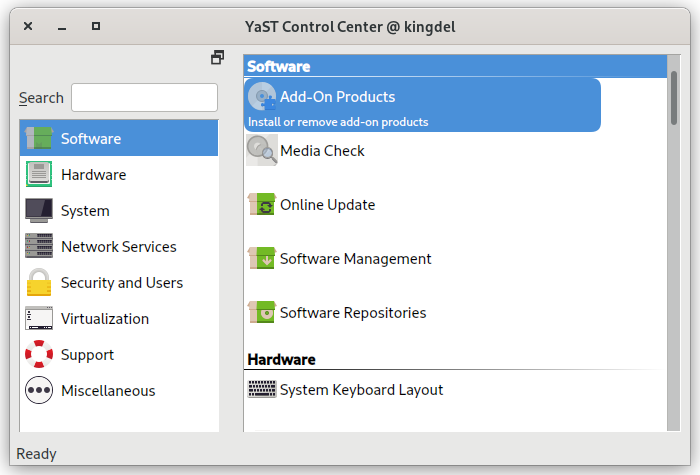
All my other familiar Gnome tools were available, including the terminal, Firefox, Evolution, Libre Office, and typical packages I use without thinking about them. When it came to installing other software, though, I turned to YaST, openSUSE's system-management tool. It's much more powerful than the standard Gnome Settings tool (and Tweaks) and does a lot more than a simple package manager.
For example, I typically run KVM. YaST includes a virtualization tool that installs hypervisor tools — libvirt, virt-manager and KVM or Xen — in basically one click. The same tool can configure Virt Manager and Docker. The software manager also includes patterns, which are groups of packages that can install desktop environments (a lot are offered), file servers, development environments, and much more in one step. This makes deploying more complex, multifaceted configurations quick and confident.
Finally, the default install uses the btrfs file system, which makes it possible to easily take system snapshots, among other things. Yes, this is possible to use it on other Linux distros, but openSUSE makes it feel like a core capability, which it is. As someone who tests a lot of software, it's nice to be able to jump back to a snapshot of my system.
Final Thoughts
Making the switch from a .deb-based system to an .rpm-based system can seem intimidating, but moving from Ubuntu to openSUSE Leap was painless and brought with it a host of improvements. I feel like my system is more responsive to my way of working, offers a range of capabilities when I need some help, and generally stays out of my way. After all, that's why I choose to run Linux in the first place.
Opinions expressed by DZone contributors are their own.