

A SonarQube Plugin for Kotlin: Creating the Plugin
After parsing the code and creating the checks, this series on SonarQube plugins goes into coding up an actual plugin for custom-developed violations.
This is the third post in a series about creating a SonarQube plugin for the Kotlin language:
- The first post was about creating the parsing code itself.
- The second post detailed how to use the parsing code to check for two rules.
In this final post, we will be creating the plugin proper using the code of the 2 previous posts.
The Sonar Model
The Sonar model is based on the following abstractions:
Plugin
Entry-point for plugins to inject extensions into SonarQube
A plugin points to the other abstraction instances to make the SonarQube platform load them
AbstractLanguage
Pretty self-explanatory. Represents a language: Java, C#, Kotlin, etc.
ProfileDefinition
Define a profile which is automatically registered during sonar startup
A profile is a mutable set of fully configured rules. While not strictly necessary, having a Sonar profile pre-registered allows users to analyze their code without further configuration. Every language plugin offered by Sonar has at least one profile attached.
RulesDefinition
Defines some coding rules of the same repository
Defines an immutable set of rule definitions into a repository. While a rule definition defines available parameters, default severity, etc. the rule (from the profile) defines the exact value for parameters, a specific severity, etc. In short, the rule implements the role definition.
Sensor
A sensor is invoked once for each module of a project, starting from leaf modules. The sensor can parse a flat file, connect to a web server... Sensors are used to add measure and issues at file level.
The sensor is the entry-point where the magic happens.

Starting to Code the Plugin
Every abstraction above needs a concrete subclass. Note that the API classes themselves are all fairly decoupled. It’s the role of the Plugin child class to bind them together.
class KotlinPlugin : Plugin {

    override fun define(context: Context) {
        context.addExtensions(
                Kotlin::class.java,
                KotlinProfile::class.java,
                KotlinSensor::class.java,
                KotlinRulesDefinition::class.java)
    }
}
Most of the code is mainly boilerplate, but for ANTLR code.
Wiring the ANTLR Parsing Code
On one hand, the parsing code is based on generated listeners. On the other hand, the sensor is the entry-point to the SonarQube parsing. There’s a need for a bridge between the two.
In the first article, we used an existing grammar for Kotlin to generate parsing code. SonarQube provides its own lexer/parser generating tool (SonarSource Language Recognizer). A sizeable part of the plugin API is based on it. Describing the grammar is no small feat for any real-life language, so I preferred to design my own adapter code instead.
AbstractKotlinParserListener
Subclass of the generated ANTLR KotlinParserBaseListener. It has an attribute to store violations, and a method to add such a violation.
Violation
The violation only contains the line number, as the rest of the required information will be stored into a KotlinCheck instance.
KotlinCheck
Abstract class that wraps an AbstractKotlinParserListener. Defines what constitutes a violation. It handles the ANTLR boilerplate code itself.
This can be represented as the following:

The Sensor
The general pseudo-code should look something akin to:
FOR EACH source file
    FOR EACH rule
        Check for violation of the rule
        FOR EACH violation
            Call the SonarQube REST API to create a violation in the datastore
This translates as:
class KotlinSensor(private val fs: FileSystem) : Sensor {

    val sources: Iterable<InputFile>
        get() = fs.inputFiles(MAIN)

    override fun execute(context: SensorContext) {
        sources.forEach { inputFile: InputFile ->
            KotlinChecks.checks.forEach { check ->
                val violations = check.violations(inputFile.file())
                violations.forEach { (lineNumber) ->
                    with(context.newIssue().forRule(check.ruleKey())) {
                        val location = newLocation().apply {
                            on(inputFile)
                            message(check.message)
                            at(inputFile.selectLine(lineNumber))
                        }
                        at(location).save()
                    }
                }
            }
        }
    }
}
Finally, the Run
Let’s create a dummy Maven project with two classes, Test1 and Test2 in one Test.kt file, with the same code as last week. Running mvn sonar:sonar yields the following output:
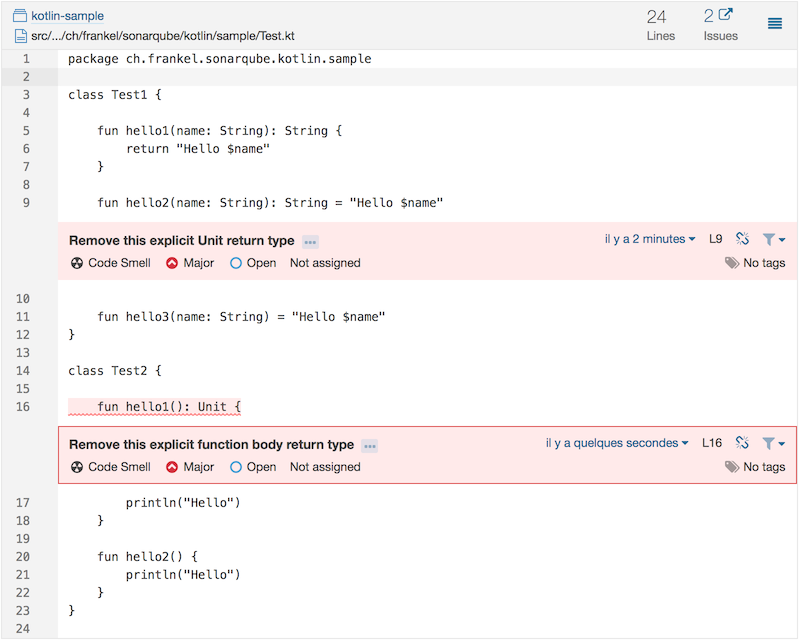
Et voilà, our first SonarQube plugin for Kotlin, checking for our custom-developed violations.
Of course, it has (a lot of) room for improvements:
- Rules need to be activated through the GUI: I couldn’t find how to do it programmatically
- Adding new rules needs updates to the plugin. Rules in third-party plugins are not added automatically, as could be the case for standard SonarQube plugins.
- So far, code located outside of classes seems not to be parsed.
- The walk through the parse tree is executed for every check. An obvious performance gain would be to walk only once and do every check from there.
- A lof of the above improvements could be achieved by replacing ANTLR’s grammar with Sonar’s internal SSLR
- No tests…
That still makes the project a nice starting point for a full-fledged Kotlin plugin. Pull requests are welcome!
The complete source code for this post can be found on GitHub in Maven format.
To Go Further
Published at DZone with permission of Nicolas Fränkel. See the original article here.
Opinions expressed by DZone contributors are their own.