

Advanced Auto Loader Patterns for Large-Scale JSON and Semi-Structured Data
Databricks Auto Loader efficiently ingests JSON and semi-structured files into Delta Lake, handling schema evolution and large-scale streaming.
Join the DZone community and get the full member experience.
Join For FreeDatabricks Auto Loader is a managed feature of Spark that incrementally and efficiently processes new data files as they arrive in cloud storage. It supports JSON and many semi-structured formats and is widely used to handle large-scale ingestion of flexible schemas.
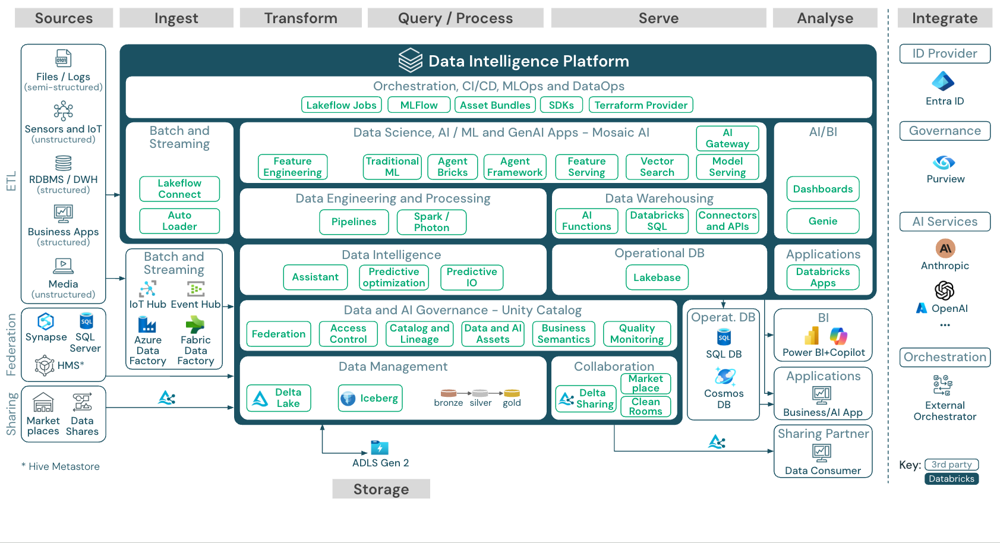
Auto Loader incrementally pulls new JSON or other files from cloud storage and writes them to Delta Lake tables for downstream analytics.
In this pattern, Auto Loader watches a storage folder for newly added JSON files and writes them into Delta Lake tables. This is often set up as a scheduled or streaming job for batch workloads; one can use the Trigger. Once mode to ingest a batch of files and stop when done. Auto Loader can automatically infer or evolve schemas, ensuring that JSON fields are captured in the Delta table. In short, Auto Loader gives an ELT-style pipeline that extracts JSON files, loads them into a Delta Lake table, and later transforms them using SQL or Spark as needed.
Core Auto Loader Ingestion Pattern
The basic Auto Loader pattern uses Spark’s readStream on format cloudFiles. For JSON, one specifies cloudFiles.format = "json". A schemaLocation directory is required to track and evolve the JSON schema over time. The Auto Loader job continuously loads new files and writes to a Delta table. For example:
spark.readStream.format("cloudFiles") \
  .option("cloudFiles.format", "json") \
  .option("cloudFiles.schemaLocation", "s3://bucket/schema/") \
  .load("s3://bucket/incoming/") \
  .writeStream \
  .option("mergeSchema", "true") \
  .option("checkpointLocation", "s3://bucket/checkpoint/") \
  .trigger(availableNow=True) \
  .start("s3://bucket/delta/myTable")
This snippet shows a typical pipeline: Auto Loader reads JSON files from a cloud path, using a checkpoint to track progress, and writes them into a Delta Lake location. The mergeSchema option ensures that when writing, any new columns are merged into the target Delta table.
In practice, one would run this code in a Databricks Job or Delta Live Table pipeline, so that the job can be scheduled or restarted automatically. According to Databricks documentation, this is a recommended pattern to infer the schema with Auto Loader and let Delta Lake handle any new columns.
Schema Inference, Hints, and Evolution
JSON and semi-structured data often have changing or nested schemas. Auto Loader provides several options to manage this complexity. By default, Auto Loader infers only top-level columns and treats unknown nested fields as raw (string) data. You can enable type inference on nested fields using cloudFiles.inferColumnTypes, which will try to infer numeric and struct types instead of defaulting to string.
.option("cloudFiles.inferColumnTypes", "true") For example, the code above can give more precise column types, at the cost of a slightly more expensive schema inference step. In tandem, schema hints let you override or specify types for particular JSON fields. The cloudFiles.schemaHints option accepts a string mapping column names to types. For example, to force two problematic nested fields to come in as strings, one might use:
.option("cloudFiles.schemaHints", "headers map<string,string>, statusCode SHORT")This tells Auto Loader that the headers field is a map of strings and statusCode is a small integer, while inferring other fields normally. Schema hints are especially useful on deep JSON schemas to guard against undesired type inference on known complex fields.
Auto Loader also automates schema evolution. If your incoming JSON adds new fields over time, you can set a cloudFiles.schemaLocation. Auto Loader will then detect new columns and automatically add them to the Delta table. You can control behavior via cloudFiles.schemaEvolutionMode for instance, failOnNewColumns to reject unexpected data, or rescue to capture any bad or unknown fields into a _rescued_data column rather than losing them. In practice, enabling schema evolution means your pipeline can run unattended as JSON evolves, without schema drift causing errors. Delta Lake’s ACID transaction log then ensures the evolving table remains queryable.
Handling Nested JSON
Many JSON sources contain nested objects and arrays. Auto Loader, by default, brings in only top-level columns. To work with deep JSON, Spark’s semi-structured data APIs can parse out nested elements. For example, after loading JSON, you can use selectExpr or from_json to extract nested fields:
df = spark.readStream.format("cloudFiles") \
    .option("cloudFiles.format", "json") \
    .option("cloudFiles.schemaLocation", "/path/schema") \
    .load("/path/nested-json/")
# Flatten nested structure using SQL expressions
df_flat = df.selectExpr(
  "*",
  "tags:page.name as page_name",   # extracts tags.page.name
  "tags:page.id::INT as page_id",  # extracts tags.page.id and casts to int
  "tags:eventType"
)
This example illustrates parsing a nested JSON object called tags with sub-fields page.name, page.id, and eventType. After flattening, you can write df_flat to Delta. If the nested schema is highly dynamic, you may also use Spark’s from_json(column, schema) function or spark.read.json() on the raw text column. In summary, Auto Loader gets the semi-structured data into a DataFrame and then Spark SQL functions can expand or explode nested arrays for analytics.
Performance and Scalability
Auto Loader is designed for large-scale workloads. For best performance, organize source files in lexically sortable directories and enable parallel discovery. You can use file notification modes so Auto Loader is notified of new files instead of scanning entire folders each time. Auto Loader also allows tuning of parallelism via options like cloudFiles.maxFilesPerTrigger or cloudFiles.fetchParallelism to control how many files or events are processed at once.
A key scalability feature is checkpointing and trigger control. Auto Loader’s stream has a checkpoint location that records which files have been ingested. If the job stops or restarts, it will resume without reprocessing older files. By default, Auto Loader runs as a continuous micro-batch stream, but you can set it to trigger once to make it behave like a batch job. Trigger. Once processes all current files and then stops, making it easy to schedule nightly or on-demand runs. This scheduled mode is useful for batch ingestion scenarios. In Databricks Runtime 10.1+, Trigger.AvailableNow offers similar semantics but allows fine-grained rate limiting for very large datasets.
Data partitioning also aids scale. When writing to Delta, partition the table by relevant keys if queries often filter on them. For very large JSON datasets, consider writing each input file as a separate small file in Delta only if needed; otherwise, rely on Delta’s compaction/repartition to combine files post-ingestion. In all cases, Auto Loader’s incremental approach avoids costly full-file scans and ensures that even 10+ terabytes of JSON can be handled efficiently.
Challenges (Considerations)
Working with large JSON brings a few engineering considerations. Schema drift is common: be ready to handle fields added or changed, either by enabling Auto Loader’s evolution or by specifying strict schemas and using the _rescued_data column for anomalies. Nested structures may require additional parsing logic after ingestion. Data volume means you should tune file sizes, parallel discovery, and use cloud-native notification mode if possible. Lastly, ensure checkpoint and retry logic is solidly configured, checkpointing and idempotent writes, so that on failures the pipeline picks up where it left off without duplicates. By anticipating these challenges, a well-designed Auto Loader pipeline can robustly ingest semi-structured data at scale.
Example Pipeline
Putting it all together, an engineer might build a pipeline like this:
- Ingest: Run a Spark Structured Streaming job with format
cloudFiles, source path to JSON data, and target a Delta table. Use.option("cloudFiles.format","json")and pointcheckpointLocationandschemaLocationto stable storage. - Schema management: Enable
cloudFiles.inferColumnTypes=trueand provide any neededcloudFiles.schemaHintsfor known fields. SetcloudFiles.schemaEvolutionMode="addNewColumns"so new JSON fields get added to the Delta table automatically. - Write to Delta: In the
.writeStream, enable.option("mergeSchema","true")so evolving columns are merged. Partition the output table by a date or other key if it improves query performance. - Run mode: Use
.trigger(availableNow=True)(or equivalent) to run as a batch job that finishes when done, and schedule it via Databricks Jobs. Ensure the cluster is sized appropriately to handle the expected daily volume of JSON. - Post-processing: Once data is in Delta, analysts or ETL jobs can use Spark SQL, Delta Live Tables, or SQL Analytics to flatten, join, or aggregate the JSON-derived table as needed.
By following these patterns, teams can ingest JSON at scale with minimal manual intervention. Databricks Auto Loader handles the heavy lifting of file discovery and schema tracking, allowing engineers to focus on transforming the data and building reliable downstream workflows.
Opinions expressed by DZone contributors are their own.
Comments