

Mastering AI Agents: How Agentic Design Patterns Make Agents Smarter
Discover how Agentic Design Patterns can transform your AI workflows by breaking down complex tasks into manageable, specialized AI agents.
Join the DZone community and get the full member experience.
Join For Free"What's the point of agents? Why use something like AutoGen when I can code it myself?" Sounds familiar? If you have ever thought about this, you're not alone. I hear this all the time. And I know exactly where this is coming from.
In this post, we’re going to dive into the world of agentic design patterns — a powerful approach that goes beyond simple code. These patterns can help you build AI systems where agents don’t just complete tasks; they delegate, verify, and even work together to tackle complex challenges. Ready to level up your AI game? Let’s go!
The Two-Agent Pattern
Scenario: Replacing a UI Form With a Chatbot
Let’s start with a common problem: you want to replace a form in your app with a chatbot. Simple, right? The user should be able to create or modify data using natural language.
The user should be able to say things like, “I want to create a new account,” and the chatbot should ask all the relevant questions, fill in the form, and submit it — all without losing track of what’s already been filled.
Challenge
This might seem like an easy example, right? I mean, we can simply shove all the fields we need to ask the user into a system prompt.
Well, this approach might work but you'll notice things get out of hand really quickly.
A single agent might struggle to manage and keep track of long, complex conversations. It might not be able to keep up.
As the conversation drags on, the chatbot might forget which questions it’s already asked or fail to gather all the necessary information. This can lead to a frustrating user experience, where fields are missed or the chatbot asks redundant questions.
Solution
This is where the two-agent pattern comes in.
Instead of letting our chatbot agent respond to the user directly, we make it have an internal conversation with a "companion" agent. This helps delegate some responsibility from the "primary" agent over to the "companion."
In our example, we can divide the work between the following two agents:
- Chatbot agent: Responsible for carrying the conversation with the user, dealing with prompt injection, and preventing the conversation from getting derailed
- Form agent: Responsible for remembering form fields and tracking progress
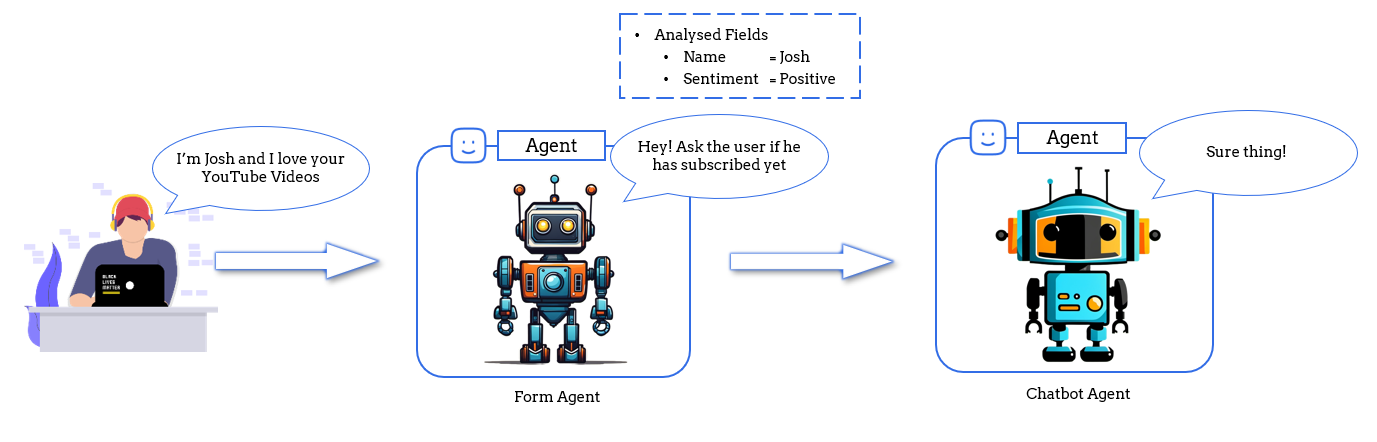
In this solution, whenever our chatbot agent gets a message from the user, it first forwards it to the form agent to identify if the user has provided new information. This information is stored in the form agent's memory. The form agent then calculates the fields that are pending and nudges the chatbot agent to ask those questions.
And since the form agent isn't looking at the entire conversation at once, it doesn't really suffer from problems arising from long and complex conversation histories.
The Reflection Pattern
Scenario: RAG Chatbot Using a Knowledge Base
For our second pattern, let's assume that you’ve built a chatbot that answers user questions by pulling information from a knowledge base. The chatbot is used for important tasks, like providing policy or legal advice.
It’s critical that the information is accurate. We don't really want our chatbot misquoting facts and hallucinating responses.
Challenge
Anyone who has tried to build a RAG-powered chatbot knows the challenges that come alongside it. Chatbots can sometimes give incorrect or irrelevant answers, especially when the question is complex. If your chatbot responds with outdated or inaccurate info, it could lead to serious consequences.
So is there a way to prevent the chatbot from going rogue? Can we somehow fact-check each response our chatbot gives us?
Solution
The two-agent pattern to the rescue — but this time we use a specialized version of the two-agent pattern called reflection.
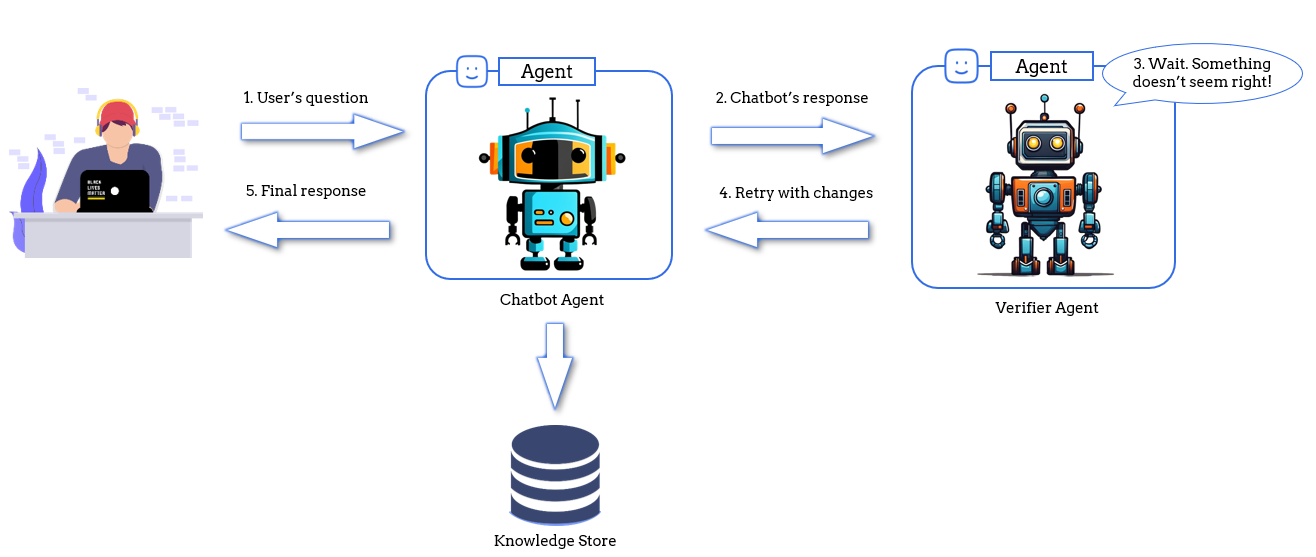
Here we introduce a secondary "verifier" agent. Before the chatbot sends its response, the verifier agent can check for a couple of things:
- Groundedness: Is the answer based on the chunks extracted from the retrieval pipeline, or is the chatbot just hallucinating information?
- Relevance: Is the answer (and the chunks retrieved) actually relevant to the user's question?
If the verifier finds issues, it can instruct the chatbot to retry or adjust the response. It can even go ahead to mark certain chunks as irrelevant to prevent them from being used again.
This system keeps the conversation accurate and relevant, especially in high-stakes environments.
The Sequential Chat Pattern
Scenario: Blog Creation Workflow
Let’s say you’re creating a blog post — just like this one.
The process involves several stages: researching your topic, identifying key talking points, and creating a storyline to tie it all together. Each stage is essential to creating a polished final product.
Challenge
Sure, you could try to generate the entire video script using a single, big, fancy AI prompt. But you know what you’ll get? Something generic, flat, and just... meh. Not exactly the engaging content that’s going to blow your audience away. The research might not go deep enough, or the storyline might feel off. That’s because the different stages require different skills.
And here’s the kicker: you don’t want one model doing everything! You’d want a precise, fact-checking model for your research phase while using something more creative to draft a storyline. Using the same AI for both jobs just doesn’t cut it.
Solution
Here's where the sequential chat pattern comes in. Instead of a one-size-fits-all approach, you can break the workflow into distinct steps, assigning each one to a specialized agent.
Need research done by consuming half the internet? Assign it to a researcher agent. Want to extract the key points from those research notes? There's an agent for that too! And when it's time to get creative, well... you get the point.
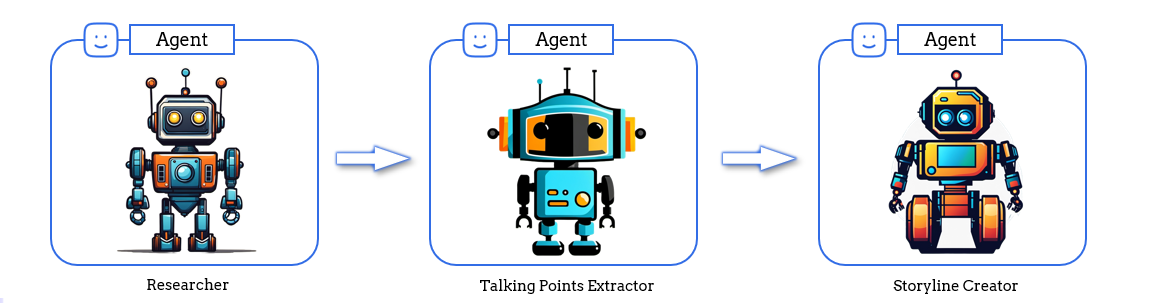
It's important to remember that these agents are not technically conversing with each other. We simply take the output of one agent and pass it on to the next. Pretty much like prompt chaining.
So why not just use prompt chaining? Why agents?
Well, it is because agents are composable.
Agents as Composable Components
Scenario: Improving Our Blog Creation Workflow
Alright, this isn’t exactly a “pattern,” but it’s what makes agents so exciting.
Let’s jump back to our blog creation workflow example. Imagine your talking point analyzer agent isn’t hitting the mark. It’s not aligned with what your audience wants to hear, and the talking points are kinda off. Can we make it better? You bet!
Solution
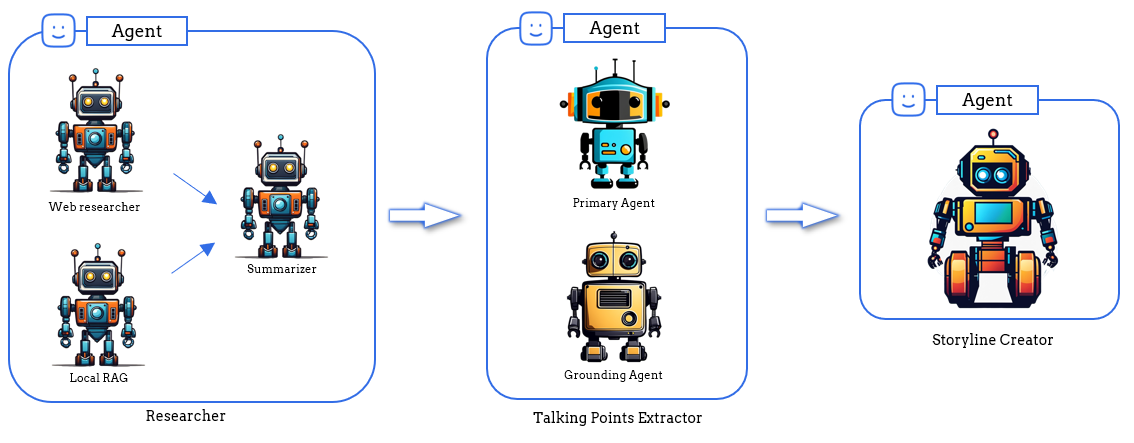
What if we bring in the reflection pattern here? We could add a reflection agent that compares the talking points with what’s worked in previous blog posts — real audience data. This grounding agent ensures that your talking points are always in tune with what your viewers love.
But wait. Does this mean we have to change our entire workflow? No. Not really.
Because agents are composable, to the outside world, everything still works exactly the same! No one needs to know that behind the scenes, you’ve supercharged your workflow. It’s like upgrading the engine of a car without anyone noticing, but suddenly it runs like a dream!
The Group Chat Pattern
Scenario: Building a Coding-Assistance Chatbot
Alright, picture this: you’re building a chatbot that can help developers with all kinds of coding tasks—writing tests, explaining code, and even building brand-new features. The user can throw any coding question at your bot, and boom, it handles it!
Naturally, you’d think, “Let’s create one agent for each task.” One for writing tests, one for code explanations, and another for feature generation. Easy enough, right? But wait, there's a catch.
Challenge
Here’s where things get tricky. How do you manage something this complex? You don’t know what kind of question the user will throw your way. Should the chatbot activate the test-writing agent or maybe the code-explainer? What if the user asks for a new feature — do you need both?
And here’s the kicker: some requests need multiple agents to work together. For example, creating a new feature isn’t just about generating code. First, the bot needs to understand the existing codebase before writing anything new. So now, the agents have to team up, but who’s going first, and who’s helping who? It’s a lot to handle!
Solution
The group chat pattern to the rescue.
Let's introduce a planner agent into the mix. This agent acts like the ultimate coordinator, deciding which agents should tackle the task and in what order.
If a user asks for a new feature, the planner first calls the code-explainer agent to understand the existing code, then hands it off to the feature-generation agent to write the new code. Easy, right?
But here’s the fun part — the planner doesn’t just set things up and leave. It can adapt on the go! If there’s an error in the generated code, it loops back to the coding agent for another round.
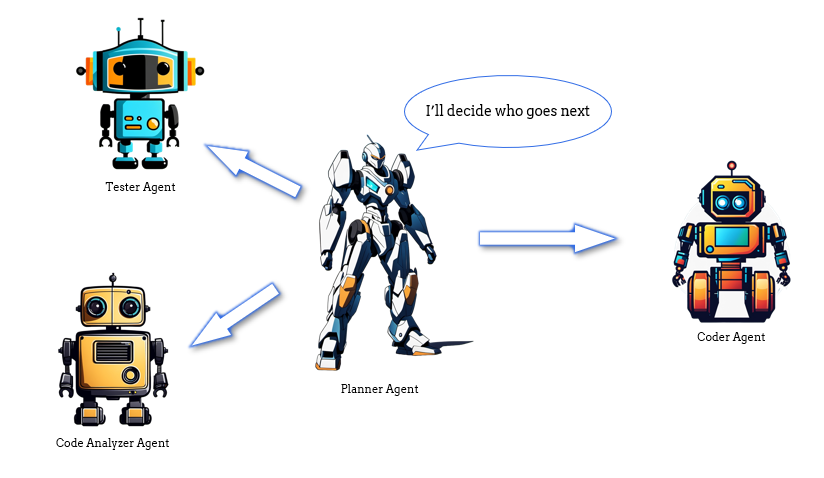
The planner ensures that everything runs smoothly, with agents working together like an all-star team, delivering exactly what the user needs, no matter how complex the task.
Video
Conclusion
To wrap things up, agentic design patterns are more than just fancy names — they’re practical tools that can simplify your AI workflows, reduce errors, and help you build smarter, more flexible systems. Whether you're delegating tasks, verifying accuracy, or coordinating complex actions, these patterns have got you covered.
But the one thing you should absolutely take home is that agents are composable. They can evolve over time, handling increasingly complex tasks with ease.
So, ready to dive deeper? Here are some helpful links to take your journey forward:
Opinions expressed by DZone contributors are their own.
Comments