

Amazon Lambda Connector: Mule 4
Bring your Mule projects to the serverless world.
Join the DZone community and get the full member experience.
Join For FreeAWS Lambda is a serverless architecture that runs your code in response to events and automatically manages the underlying compute resources for you. You can use AWS Lambda to extend other AWS services with custom logic or create your own back-end services that operate at AWS scale, performance, and security.
In this article, I will present how MuleSoft can call AWS Lambda functions using the Amazon Lambda connector in Mule 4.
The Mule 4 Amazon Lambda connector includes the following operation.
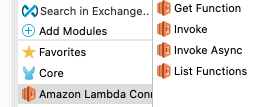
In the following steps, I will present how we can call a Lambda function, list all Lambda functions, invoke async, and get details for particular AWS Lambda functions.
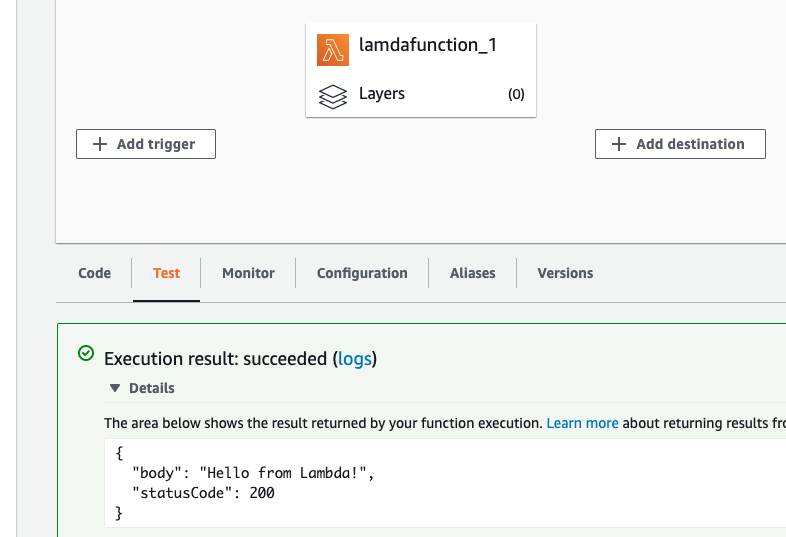
Step 1: Create an AWS Lambda Function
The following screenshot shows lamdafunction_1 and what happens when the Lambda function is called.
Step 2: Make a Secure Connection
- Log into your AWS console.
- Go to IAM, then create one user.
- Assign AWSLambda_FullAccess policy to user.
- Click on the Security Tab and click Access Key.

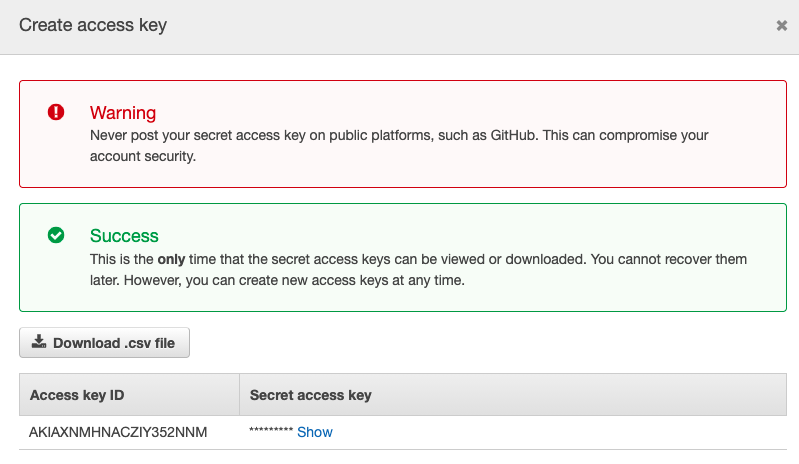
An Access Key ID and Secret Access key will be used to make the Mule 4 AWS Lambda connection with AWS. Below is the screenshot.
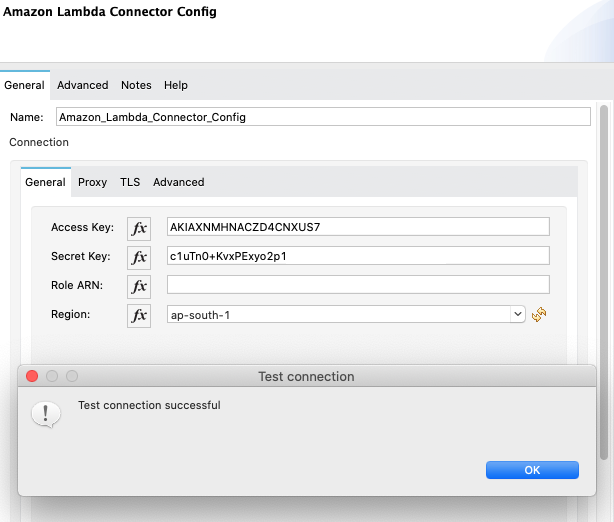
Step 3: Call Different AWS Lambda Connector Functions Using MuleSoft.
List functions:
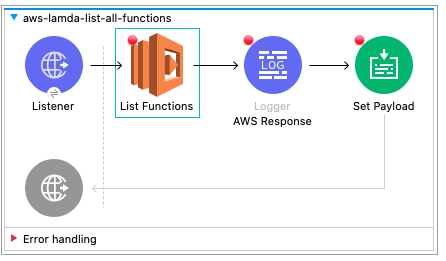 JSON response:
{
    "Functions": [
        {
            "Description": "",
            "TracingConfig": {
                "Mode": "PassThrough"
            },
            "VpcConfig": null,
            "SigningJobArn": null,
            "RevisionId": "7e901225-ef74-4d4e-a8ac-b0faf6099e3e",
            "LastModified": "2021-10-21T07:10:35.842+0000",
            "FileSystemConfigs": null,
            "FunctionName": "lamdafunction_1",
            "Runtime": "java8",
            "Version": "$LATEST",
            "PackageType": "Zip",
            "LastUpdateStatus": null,
            "Layers": null,
            "FunctionArn": "arn:aws:lambda:ap-south-1:509774463154:function:lamdafunction_1",
            "KMSKeyArn": null,
            "MemorySize": 512,
            "ImageConfigResponse": null,
            "LastUpdateStatusReason": null,
            "DeadLetterConfig": null,
            "Timeout": 15,
            "Handler": "example.Hello::handleRequest",
            "CodeSha256": "+5OFdvMKaO8/kzr0r4xnwDOEQnUU0/aHkDjIF2GtoUw=",
            "Role": "arn:aws:iam::509774463154:role/service-role/lamdafunction_1-role-t9qs577q",
            "SigningProfileVersionArn": null,
            "MasterArn": null,
            "CodeSize": 8881,
            "State": null,
            "StateReason": null,
            "Environment": null,
            "StateReasonCode": null,
            "LastUpdateStatusReasonCode": null,
            "Architectures": [
                "x86_64"
            ]
        }
    ],
    "NextMarker": null
}
Invoke function:
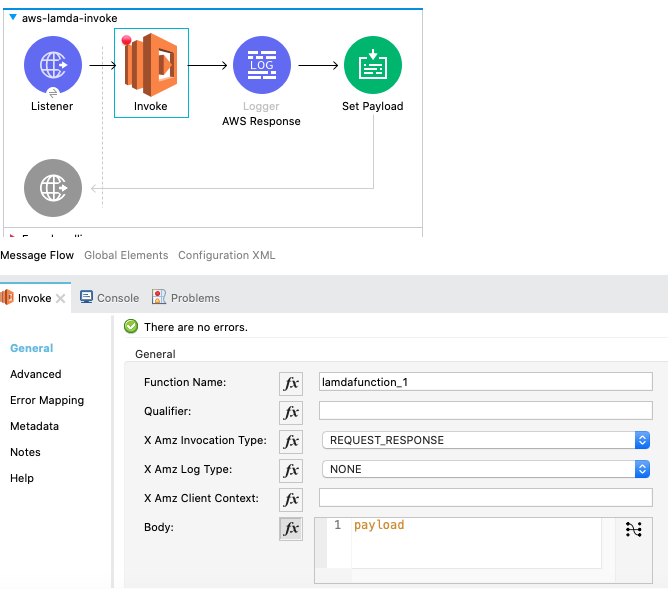
JSON response from AWS Lambda function via MuleSoft connector.
{
    "body": "Hello from Lambda!",
    "statusCode": 200
}
Get function:
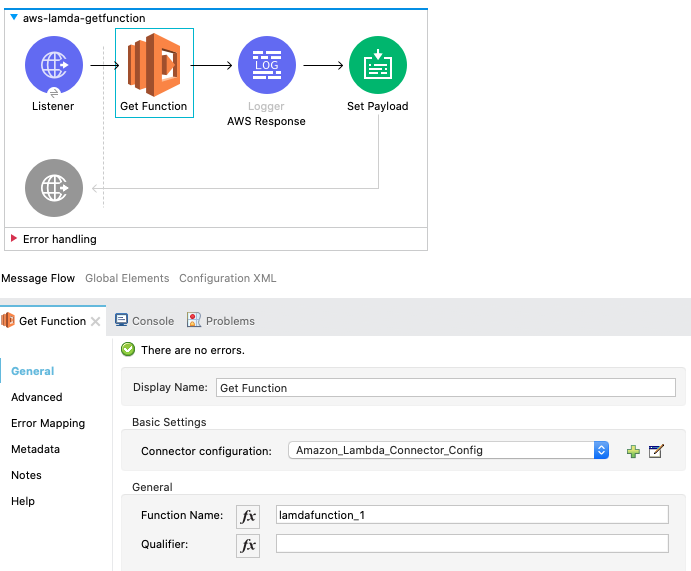
JSON response from AWS Lambda function via MuleSoft connector.
{
    "Configuration": {
        "Description": "",
        "TracingConfig": {
            "Mode": "PassThrough"
        },
        "VpcConfig": null,
        "SigningJobArn": null,
        "RevisionId": "7e901225-ef74-4d4e-a8ac-b0faf6099e3e",
        "LastModified": "2021-10-21T07:10:35.842+0000",
        "FileSystemConfigs": null,
        "FunctionName": "lamdafunction_1",
        "Runtime": "java8",
        "Version": "$LATEST",
        "PackageType": "Zip",
        "LastUpdateStatus": "Successful",
        "Layers": null,
        "FunctionArn": "arn:aws:lambda:ap-south-1:509774463154:function:lamdafunction_1",
        "KMSKeyArn": null,
        "MemorySize": 512,
        "ImageConfigResponse": null,
        "LastUpdateStatusReason": null,
        "DeadLetterConfig": null,
        "Timeout": 15,
        "Handler": "example.Hello::handleRequest",
        "CodeSha256": "+5OFdvMKaO8/kzr0r4xnwDOEQnUU0/aHkDjIF2GtoUw=",
        "Role": "arn:aws:iam::509774463154:role/service-role/lamdafunction_1-role-t9qs577q",
        "SigningProfileVersionArn": null,
        "MasterArn": null,
        "CodeSize": 8881,
        "State": "Active",
        "StateReason": null,
        "Environment": null,
        "StateReasonCode": null,
        "LastUpdateStatusReasonCode": null,
        "Architectures": [
            "x86_64"
        ]
    },
    "Concurrency": null,
    "Code": {
        "ResolvedImageUri": null,
        "RepositoryType": "S3",
        "ImageUri": null,
        "Location": "https://awslambda-ap-s-1-tasks.s3.ap-south-1.amazonaws.com/snapshots/509774463154/lamdafunction_1-56c32c45-9cd9-4052-91f3-ff893eabbd0b?versionId=GMF4Z42m4gSBxUjEOAUJWt3huO0FkVrx&X-Amz-Security-Token=AIhALBMSi7rmnt%2Fj3GiMU%2BrwDz1cRjTN3yi%2FGNN4q2QNwhADclQtfJOe5QIy1v8aYkPEKNRnlXHmPaHcDCzXktiD%2FeX8BD0RDZAhTpHDdgbZTMnPCy3ilsKteHH2FnM%2B9TYkb%2FLGth07SqAYVgRRpb34bigWnoSqvYQTuD1QRLwoUVY2D0MhG2L7gFQLGb023D%3D&X-Amz-Algorithm=AWS4-HMAC-SHA256&X-Amz-Date=20211022T044544Z&X-Amz-SignedHeaders=host&X-Amz-Expires=600&X-Amz-Credential=ASIAX5456DIN37H34JPZ%2F20211022%2Fap-south-1%2Fs3%2Faws4_request&X-Amz-Signature=3343shjhjsds"
    },
    "Tags": null
}
We can also call the AWS Lambda connector asynchronously using the Invoke Async function.
Thanks.
Opinions expressed by DZone contributors are their own.
Comments