

Apollo Client Watchquery: Jasmine Test Case Coverage
In this quick post, we look at how to increase test case coverage for an Angular web application.
In this article, I am going to help increase Apollo test case coverage in Angular.
I have noticed that a lot of developers face an issue where they need to increase the test case coverage for their code written in Apollo and Angular.
To fix this, let's start by creating a 'Apollo Mock Client' TypeScript file to cover Apollo and GraphQL 'watchquery' test cases.
This will help to increase the test coverage in our Agular application on the service side.
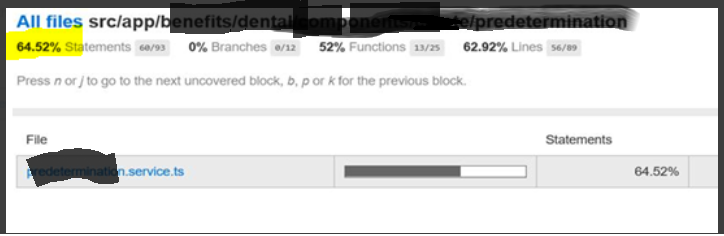
Here's what our code reports looked like before we increased our test coverage :
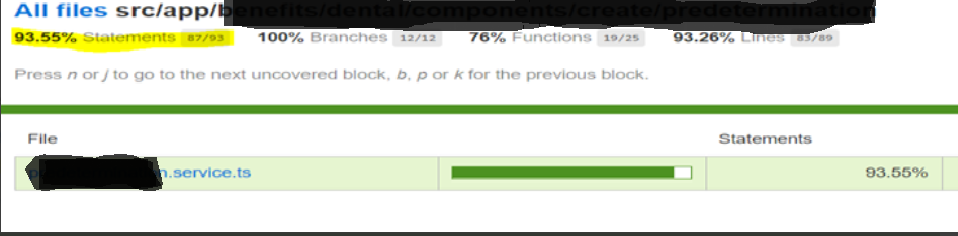
And here's a snapshot of those same metrics after we increased the coverage:
Now, let's dive into the code.
Step 1:
Create a mockLink.ts file
import {
  Operation,
  ApolloLink,
  FetchResult,
  Observable
} from 'apollo-link';

import {print} from 'graphql/language/printer';
import {InMemoryCache} from 'apollo-cache-inmemory';
import {Apollo} from 'apollo-angular';
import {NgZone} from '@angular/core';

export interface MockedResponse {
  request: any;
  result?: FetchResult;
  error?: Error;
  delay?: number;
}

export class MockLink extends ApolloLink {
  private mockedResponsesByKey: {[key: string]: MockedResponse[]} = {};

  constructor(mockedResponses: MockedResponse[]) {
    super();
    mockedResponses.forEach(mockedResponse => {
      this.addMockedResponse(mockedResponse);
    });
  }

  public addMockedResponse(mockedResponse: MockedResponse) {
    const key = requestToKey(mockedResponse.request);
    let mockedResponses = this.mockedResponsesByKey[key];
    if (!mockedResponses) {
      mockedResponses = [];
      this.mockedResponsesByKey[key] = mockedResponses;
    }
    mockedResponses.push(mockedResponse);
  }

  public request(operation: Operation) {
    const key = requestToKey(operation);
    const responses = this.mockedResponsesByKey[key];
    if (!responses || responses.length === 0) {
      throw new Error(
        `No more mocked responses for the query: ${print(
          operation.query,
        )}, variables: ${JSON.stringify(operation.variables)}`,
      );
    }

    const {result, error, delay} = responses.shift()!;
    if (!result && !error) {
      throw new Error(
        `Mocked response should contain either result or error: ${key}`,
      );
    }

    return new Observable<FetchResult>(observer => {
      let timer = setTimeout(() => {
        if (error) {
          observer.error(error);
        } else {
          if (result) {
            observer.next(result);
          }
          observer.complete();
        }
      }, delay ? delay : 0);

      return () => {
        clearTimeout(timer);
      };
    });
  }
}

// Pass in multiple mocked responses, so that you can test flows that end up
// making multiple queries to the server
export function mockSingleLink(
  ...mockedResponses: MockedResponse[]
): ApolloLink {
  return new MockLink(mockedResponses);
}

function requestToKey(request: Operation): string {
  const queryString = request.query && print(request.query);

  return JSON.stringify({
    variables: request.variables || {},
    query: queryString,
  });
}
Step 2:
Create a mockApolloClient.ts file with the following methods:
mockApolloClient ('queryname')- Named QuerymockApolloClinet()
// Mock apollo client with namedquery

export function mockApolloClient(clientName: string) {
  let ngZone: NgZone;
  const apollo = new Apollo(ngZone);

  apollo.createNamed(clientName, {
    link: mockSingleLink(),
    cache: new InMemoryCache(),
  });

  return apollo;
}

// mock Apollo client without name query

export function mockApolloClient() {
  let ngZone: NgZone;
  const apollo = new Apollo(ngZone);

  apollo.create( {
    link: mockSingleLink(),
    cache: new InMemoryCache(),
  });

  return apollo;
}
Step 3:
Create the test.service.ts file.
const query = `
query tasksForUser {
  user(id: 6) { id, name }
}
`;

import {Injectable} from '@angular/core';
import {Apollo} from 'apollo-angular';

@Injectable()
export class TestService {

  constructor( private apollo: Apollo) {}

  callApollo(){
  return this.apollo.use('createdName').watchQuery<OBJECT>({
      query: gql `${query}`, fetchPolicy: 'network-only'
    })
      .valueChanges
      .pipe(
        map(result => (result.data))
      );
  }
}
And then create the test.service.spec.ts file:
describe('TestService', () => {
    const service = new TestService(mockApolloClient());

  it ('call apollo', () => {
    service.callApollo();
    expect(service.callApollo).toBeTruthy();
  });
});
And that's all! Thanks for reading, and happy coding!
Opinions expressed by DZone contributors are their own.