

Architecting a Production-Ready GenAI Service Desk
Building a GenAI chatbot for IT support is easy. Building one that actually solves tickets is hard. Here is a blueprint to boost resolution rates using GenAI.
Join the DZone community and get the full member experience.
Join For FreeInternal IT Service Desks are the nervous system of any enterprise, yet they are often clogged with repetitive queries. Questions like "How do I reset my VPN?" or "What is the expense policy?" make up the bulk of tickets, distracting engineers from critical infrastructure work.
While Generative AI (GenAI) and Large Language Models (LLMs) promise a solution, simply pointing GPT-4 at a PDF repository rarely works in production. The hallucination rate remains high, and specific enterprise context is often lost.
Based on a recent large-scale implementation involving 49 internal services and over 4,000 knowledge articles, this article outlines the architectural patterns required to move a GenAI Service Desk from a Proof of Concept (POC) to a high-performing production system with an 80% success rate.
The Architecture: Retrieval-Augmented Generation (RAG)
To solve domain-specific problems without retraining a model, we use Retrieval-Augmented Generation (RAG). This workflow allows the LLM to act as a reasoning engine while treating internal documentation (wikis, SharePoint pages, PDFs) as the source of truth.
The high-level architecture looks like this:
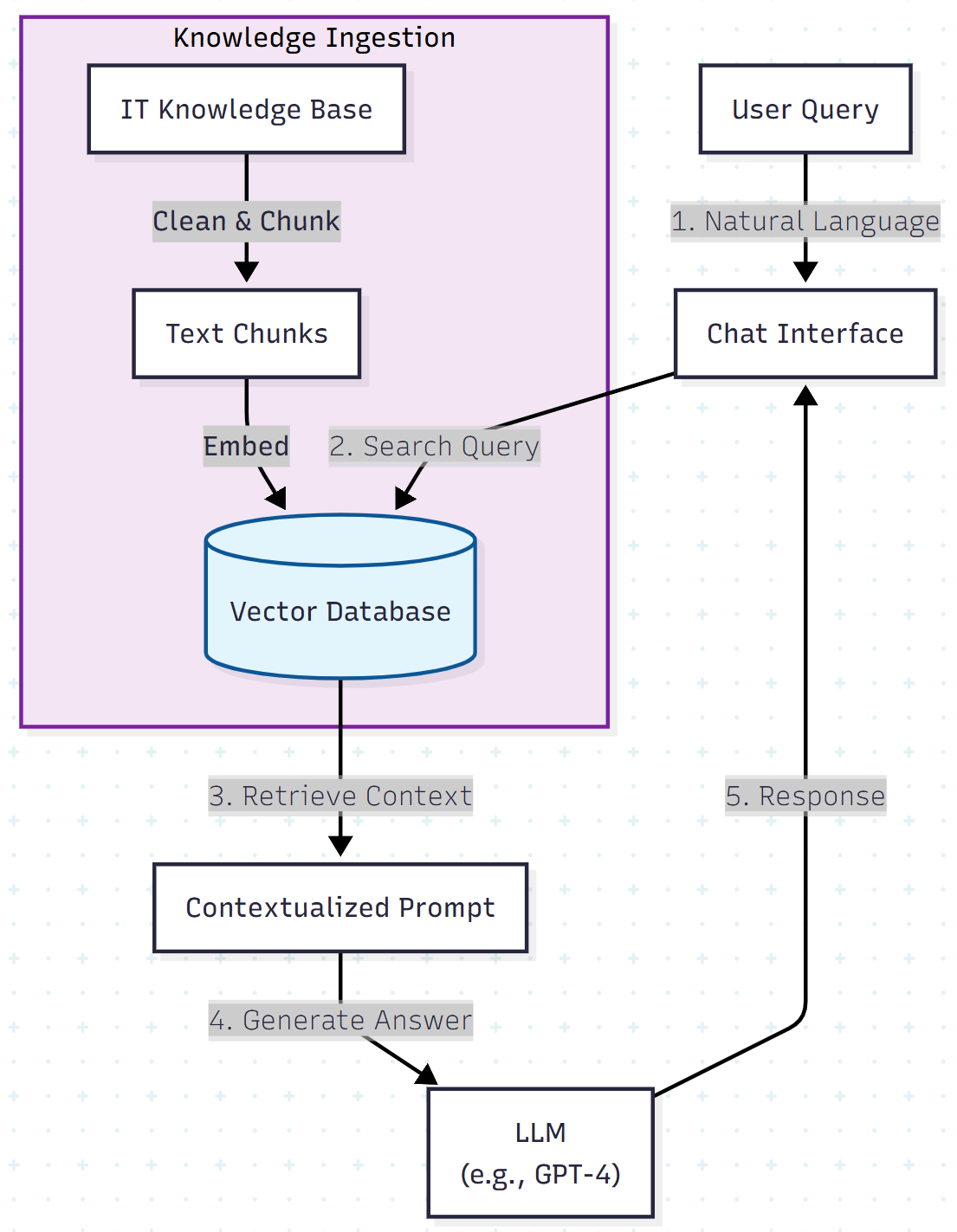
However, deploying this architecture "out of the box" often results in a success rate of only 50%. The following sections detail three specific engineering optimizations required to boost performance to production levels.
Optimization 1: Solving "Image Blindness" in Legacy Data
A major discovery during early trials was that legacy knowledge bases (KBs) rely heavily on screenshots. An article titled "How to Configure Outlook" might contain three lines of text and five screenshots showing where to click.
Standard RAG ingestion pipelines extract text but ignore images. When a user asks, "Where do I click to sync folders?", the LLM fails because that information is trapped in pixels, not text.
The Fix: Textualizing Visual Data
Before vectorizing your data, you must preprocess the source content. We found that appending descriptive text to the ingestion payload significantly improves retrieval accuracy.
Poor data structure (ingestion):
{
  "id": "101",
  "title": "VPN Setup",
  "content": "Download the client. See image below. [img_vpn_01.png]"
}
Optimized data structure:
{
  "id": "101",
  "title": "VPN Setup",
  "content": "Download the client. [Image Context: Screenshot of the login window showing the 'Connect' button in the top right corner and the server address field populated with vpn.company.com]",
  "url": "https://portal.internal/vpn-setup"
}
By explicitly describing image content during ingestion, the vector database can semantically match user queries about UI elements to the correct article.
Optimization 2: Structuring the Unstructured
LLMs are excellent at conversation but poor at guessing URLs or contact information if those details are not explicitly present in the retrieved context. Legacy documentation often assumes users already know where to go for help.
To address this, we moved from raw text ingestion to a structured CSV layout. Every chunk sent to the LLM is enriched with metadata that forces the model to provide actionable next steps.
The "Service Routing" Pattern
We categorize knowledge into defined domains and append routing logic.
| Column | Description | Usage Strategy |
| Service Name | e.g., "HR Portal", "DevCloud" | Used for filtering retrieval scope |
| Category | e.g., "Access Request", "Incident" | Helps the LLM understand intent |
| Contact URL | The direct link to the Help Desk form | Crucial: The LLM is instructed to always append this if it cannot solve the issue |
| Source URL | Direct link to the wiki page | Provides citation for the user to verify |
This ensures that even if the AI generates only a partial answer, it always provides a fallback path for the user.
Optimization 3: Meta-Prompting for Ambiguity
Users are notoriously bad at writing prompts. A user might type "It’s broken" or simply "Password." A standard LLM might hallucinate a generic Gmail password reset instead of the internal Active Directory process.
To counter this, we implemented meta-prompting (system prompt engineering) to explicitly handle ambiguity.
The Conditional Logic Prompt
We inject system instructions that force the model to ask clarifying questions before attempting an answer.
System prompt example:
system_prompt = """
You are an IT Support Assistant. Your goal is to solve user issues based ONLY on the provided context.

RULES:
1. If the user query is too short (e.g., "password", "network"), DO NOT answer immediately.
   Instead, ask: "Are you referring to [System A] or [System B]?"
2. If the context contains a URL, explicitly list it at the end of your response.
3. If the context provided does not contain the answer, reply:
   "I cannot find that information in the internal knowledge base. Please contact the Service Desk here: [Link]"
"""
This simple logic change significantly reduced low-confidence responses and prevented the bot from providing generic, unhelpful advice.
Results: The Impact of Data-First Engineering
By shifting focus from "choosing the best model" to "cleaning the data and refining prompts," the system achieved dramatic improvements in user experience:
- Success rate: Increased from ~50% to 79.2% for supported services
- Deflection: Users self-resolved issues that previously required human intervention
- Traffic: Funnelled adoption via banners and a branded bot persona increased monthly active users by 76% post-launch
Conclusion
The difference between a tech demo and a valuable enterprise tool often lies in the unglamorous work of data engineering.
If you are building a GenAI Service Desk:
- Don’t ignore images: Use OCR or manual tagging to convert screenshots into text
- Structure your ingestion: Don’t just dump PDFs — use structured formats with explicit metadata
- Guide the user: Use meta-prompts to handle vague inputs gracefully
GenAI is a powerful engine, but your internal data is the fuel. If the fuel is dirty, the engine won’t run.
Opinions expressed by DZone contributors are their own.
Comments