

Azure Data Factory: A Contemporary Solution for Modern Data Integration Challenges
Read this insightful article on introduction to Azure data factory, benefits, and best practices for getting started with ADF.
Join the DZone community and get the full member experience.
Join For FreeAs more data is available, it becomes more challenging to handle. Investing in innovative services and tools lets you get more value from data. Modern businesses must embrace effective tools, technologies, and innovative methods to succeed.
This is where the Azure Data Factory comes into play. ADF allows you to orchestrate data processes, analyze the data, and gain insights.
What Is Azure Data Factory?
Azure Data Factory is a Microsoft cloud service offering that provides data integration from various sources. It is part of the Azure platform. ADF is a great option for creating hybrid extract-transform-load (ETL), extract-load-transform (ELT), and data integration pipelines. In simple terms, an ETL tool collects data from various sources, transforms it into useful information, and transfers it to destinations such as data lakes, data warehouses, etc.
How Does ADF Work?
Combine and connect: Gather and combine data from various sources. The data can be structured, semi-structured, or unstructured.
Centralize and store: Transfer and store data from on-premises storage to a centralized location, such as a cloud-based store.
Transform and analyze: After storing data in centralized cloud storage, use computing services such as HDInsight Hadoop, Spark, Data Lake Analytics, and Machine Learning to process or transform the data collected.
Publish: After refining the data and converting it into consumable form, publish it to cloud stores like Azure Data Lake, Azure Datawarehouse, and Azure Cosmos DB, whichever analytics engine your business users can point from to their BI apps.
Visualize and Monitor: For further analysis, visualize the output data using third-party apps like Tableau, Microsoft Power BI, Sisense, etc.
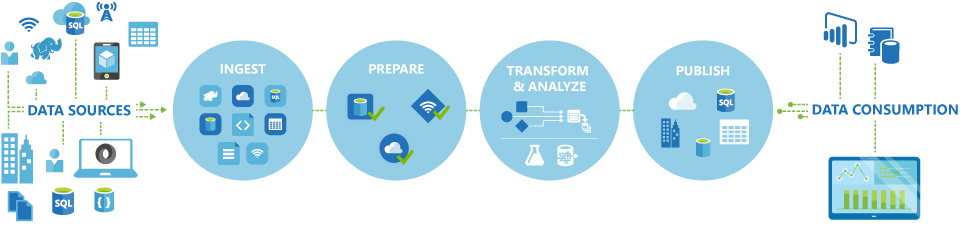
Source: Microsoft
Why Do Companies Need Azure Data Factory?
Every cloud project demands data migration activities across various data sources (such as on-premises or Cloud), networks, and services. Azure Data Factory is a vital enabler for organizations looking to enter the universe of cloud technology.
Below are some of the reasons why companies should adopt ADF to start their data journey:
- Secure data integration
- Easy migration of ETL/Big Data workloads to the Cloud
- Low learning curve
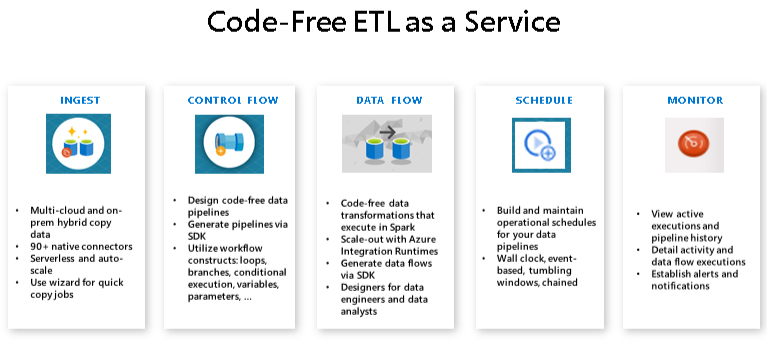
- Code-free and low-code data transformations
- Greater scalability & performance
- Reduce overhead expenses
- Easily run or migrate SSIS packages to Azure
Data Factory is necessary for enterprises taking their initial steps towards the Cloud and thus attempting to integrate on-premise data with the Cloud. Azure Data Factory includes an Integration Runtime engine and a Gateway service that can be placed on-premises and ensures reliable and safe data transfer from and to the Cloud.
What Are the Best Azure Data Factory Implementation Practices?
Your developers should be aware of the following best practices to make Data Factory usage even more efficient.
1. Set up a code repository: To achieve end-to-end development, you must create a code repository for your big data. Azure Data Factory allows you to create a Git repository using either GitHub or Azure Repos to manage your data-related activities and save all your modifications.
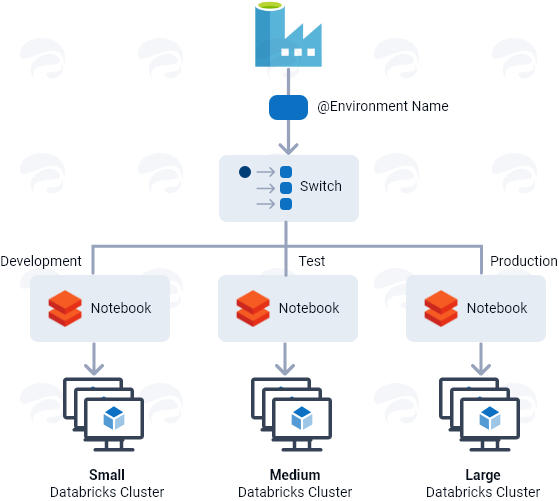
Toggle between different environment setups: A data platform connects development, production, and testing environments. The quantity of computing varies depending on the environment. As a result, various data factories are required to keep up with the workloads of different environments.
However, utilizing the ‘Switch’ activity, Azure Data Factory allows you to manage many environment setups from a single data platform. Each environment is configured with a different job cluster linked to central variable control to move between multiple activity paths.
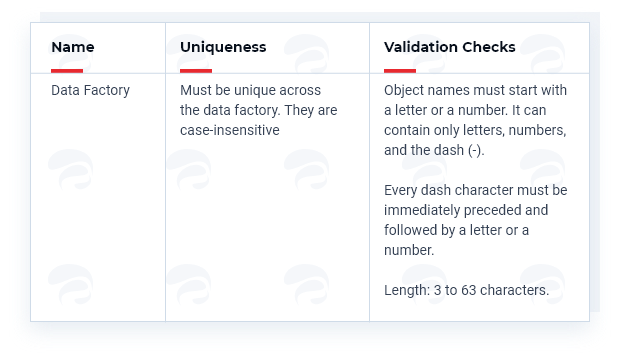
2. Consider standard naming conventions: It is vital to recognize the significance of effective naming conventions for any resource. When using naming conventions, you must know which characters are acceptable. For example, Microsoft has established certain naming conventions for the Azure Data Factory. Refer to the below picture.
3. Consider standard naming conventions: It is vital to recognize the significance of effective naming conventions for any resource. When using naming conventions, you must know which characters are acceptable. For example, Microsoft has established certain naming conventions for the Azure Data Factory. Refer to the below picture.
4. Connect Azure Key Vault for security: To provide an extra level of safety, connect Azure Key Vault to Azure Data Factory. Azure Key Vault enables you to securely store the credentials required to perform data storage/computing operations.
The Azure Key Vault can be linked to access secrets using the key vault’s own Managed Service Identity (MSI). It’s also a smart option to key vaults differently for different environments.
5. Implement automated deployments (CI/CD): Implementing automated deployments for CI/CD is a critical part of Azure Data Factory. However, before you execute Azure Data Factory deployments, you must first answer the following questions:
- What is the best source control tool?
- What is your strategy for code branching?
- Which deployment method do we want to use?
- How many different environments are required?
- What artifacts will we be using?
6. Consider automated testing: The Azure Data Factory implementation is incomplete without testing. Automated testing is a critical component of CI/CD deployment strategies. In Azure Data Factory, you must consider implementing automated end-to-end testing on all associated repositories and pipelines. Testing will aid in monitoring and validating each activity in the pipeline.
Summary
Data Factory makes it simple to combine Cloud and on-premises data. It’s one-of-a-kind in terms of ease of use and modifying and enhancing complex data. It allows for scalable, accessible, and low-cost data integration. This service is now an integral part of all data platforms and machine learning projects.
Published at DZone with permission of Saikiran Bellamkonda. See the original article here.
Opinions expressed by DZone contributors are their own.
Comments