

How to Test a PATCH API Request With REST-Assured Java
This tutorial demonstrates how to test PATCH requests using REST Assured in Java for API testing, including examples of partial data updates.
 CORE
·
CORE
·
Join the DZone community and get the full member experience.
Join For FreeTesting is an essential step in the API development process to ensure that APIs are working correctly. There are multiple HTTP methods in RESTful APIs, including POST, GET, PUT, PATCH, and DELETE. In our earlier articles, we learned how to perform automated testing of POST, PUT, and GET APIs using Rest-Assured Java.
In this tutorial article, we will discuss and cover the following points:
- What is a PATCH API request?
- How to test PATCH API requests using REST-Assured Java?
What Is a PATCH API Request?
A PATCH request is used to update a resource partially. While it is similar to a PUT request, the key difference is that PUT requires the entire request body to be sent, whereas PATCH allows you to send only the specific fields that need to be updated.
Let’s take an example of the following PATCH API that we’ll be using in this tutorial for demonstration purposes:
PATCH (/partialUpdateOrder/{id})
This API endpoint partially updates the existing order in the system as per the provided Order ID.
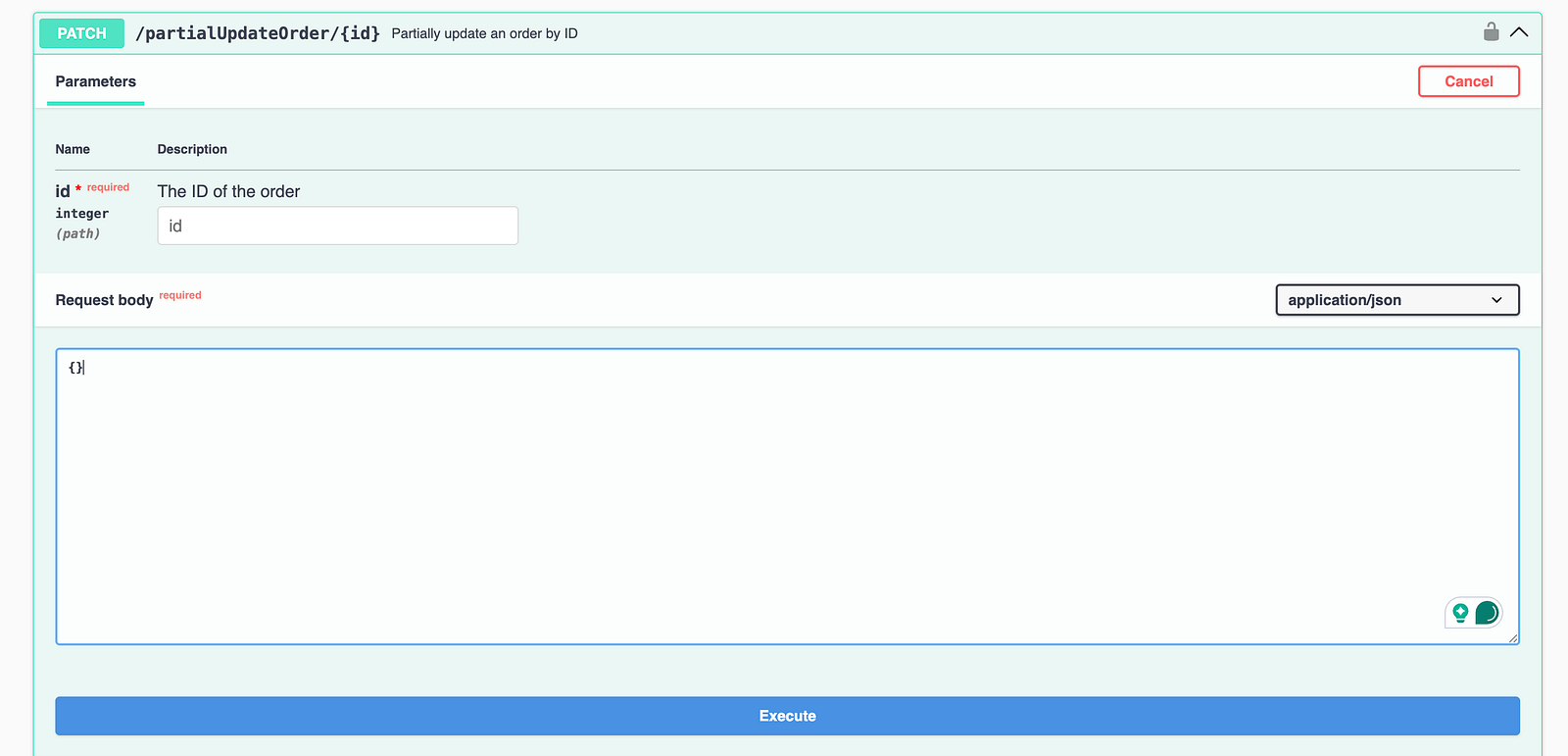
To update an existing order, this API requires the order ID as a path parameter so it knows which record to modify. The updated details should be provided in JSON format in the request body.
Since this is a PATCH request, there’s no need to send the entire payload. Only the required field that needs to be updated should be included in the request body.
Difference Between PATCH and PUT APIs
The following table shows the difference between the PATCH and PUT APIs:
| criteria | patch | put |
|---|---|---|
| Purpose | Partially updates a resource | Partially updates a resource |
| Request Body | Only includes fields that need to be updated | Requires the full resource representation |
| Data Sent | Only changed fields | Entire data payload |
| Idempotency | Not always idempotent | Always idempotent |
| Use Case | Updating specific fields | Replacing an entire record |
| Risk of Data Loss | Low, as the unchanged fields remain intact | High, if some fields are omitted, they may be overwritten or removed |
How to Test PATCH APIs Using REST-Assured Java
Let’s use the PATCH API /partialUpdateOrder/{id} and update an existing order partially in the system.
Test scenario:
## Test Scenario Title: Partially update an existing orders in the system.

## Pre-condition: Valid orders are available in the system

## Test
1. Update the product_name and product_id for the order ID - 2
2. Verify that the Status Code 200 is returned in the response.
3. Assert that the order details have been updated correctly.
Test Implementation
The PATCH API is protected with authentication, so we would need the authentication token to access it successfully. To implement this test scenario, we’ll have to:
- Write a test to hit the Authorization API, generate and extract the token.
- Use the token generated in the first step and hit the PATCH API to update the order partially.
Step 1: Write a test to hit the Authorization API, generate and extract the token.
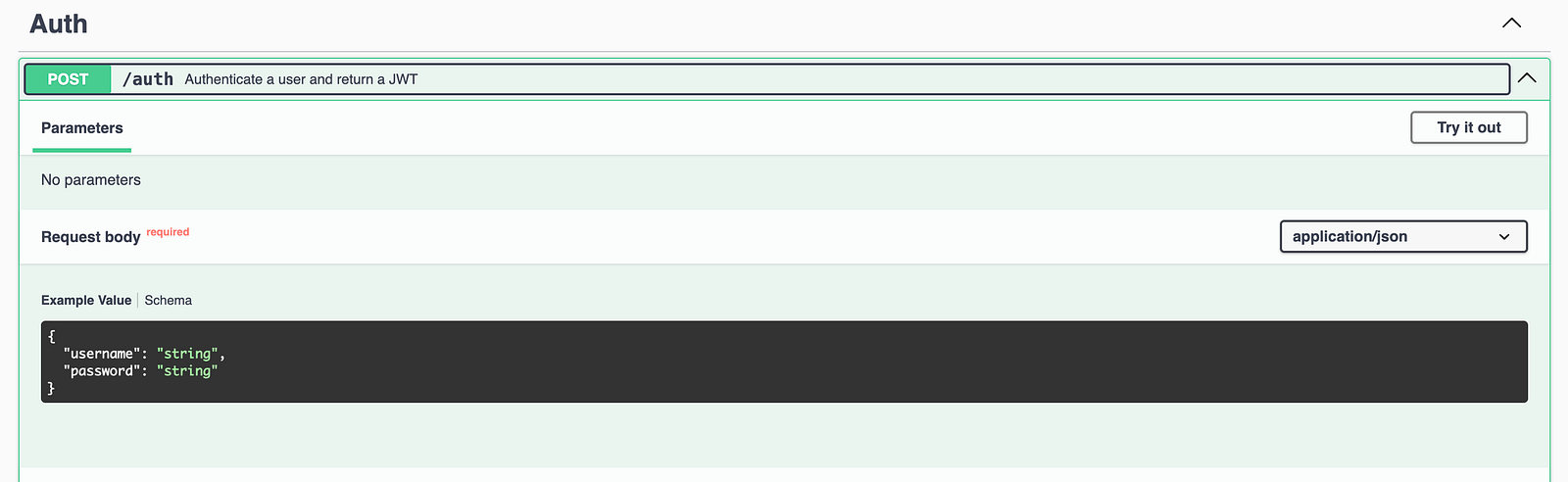
The POST /auth API endpoint should be hit with the following valid credentials to generate the token.
{
  "username": "admin",
  "password":"secretPass123"
}
It returns the following response:
{
  "message": "Authentication Successful!",
  "token": "eyJhbGciOiJIUzI1NiIsInR5cCI6IkpXVCJ9.eyJ1c2VybmFtZSI6ImFkbWluIiwiaWF0IjoxNzc1NjMzMDU5LCJleHAiOjE3NzU2MzY2NTl9.jHQwCyts9IejhwKGAZEm4Uyo9dgu5Kpe4OjTiYw1dm8"
}
The following test method is created to execute the POST /auth API request and extract the token from the response.
@Test
    public void testTokenGeneration () {
        String requestBody = """
            {
              "username": "admin",
              "password": "secretPass123"
            }""";

        token = given ().contentType (ContentType.JSON)
            .when ()
            .body (requestBody)
            .post ("http://localhost:3004/auth")
            .then ()
            .statusCode (201)
            .and ()
            .body ("token", notNullValue ())
            .extract ()
            .p
The testTokenGeneration() test sends a POST request with login credentials to generate an authentication token using REST Assured. It verifies that the response returns a 201 status code and checks that a token is included in the response.
Once the token is received, it’s extracted and stored in a global variable called token, so it can be reused across other test cases.
Step 2: Partially updating the record with a PATCH API request.
In this step, let’s add a new test method, testPartialUpdateOrder(), that sends a partial update request using the PATCH endpoint. The request body needs to be constructed with the required fields,i.e., product_id and product_name. We’ll use the Google Gson and Datafaker library to generate the request body.
public class TestPatchRequestExamples {

  private String token;

 @Test
  public void testPartialUpdateOrder () {

  Faker faker = new Faker ();
  String productId = String.valueOf (faker.number ()
            .numberBetween (1, 2000));
  String productName = faker.commerce ()
            .productName ();

  JsonObject orderDetail = new JsonObject ();
  orderDetail.addProperty ("product_id", productId);
  orderDetail.addProperty ("product_name", productName);

//..
}
This piece of code uses the Faker class from the Datafaker library and generates a random value for the product_id and product_name fields. The JSON object required for the request body is generated using the JsonObject class of the Google Gson library.
The following request body is generated using this code:
{"product_id":"702","product_name":"Sleek Silk Plate"}Next, let’s write the automated test to update the record using the PATCH API endpoint.
@Test
public void testPartialUpdateOrder () {
    int orderId = 2;

//..

  given ().contentType (ContentType.JSON)
    .header ("Authorization", token)
    .when ()
    .log ()
    .all ()
    .body (orderDetail.toString ())
    .patch ("http://localhost:3004/partialUpdateOrder/" + orderId)
    .then ()
    .log ()
    .all ()
    .statusCode (200)
    .and ()
    .assertThat ()
    .body ("message", equalTo ("Order updated successfully!"), "order.product_id", equalTo (productId),
This test sends a PATCH API request for the order ID 2. The request body we created earlier is included in the request, containing only the fields that need to be updated.
- given().contentType(ContentType.JSON): It specifies that the request body will be in JSON format.
- .header(“Authorization”, token): It adds the authentication token to the request header, which is required to authorize the API call.
- .when().log().all(): This statement starts the request execution and logs all request details(headers, body, etc.).
- .body(orderDetail.toString()): It sets the request payload. The
orderDetails(created earlier) JSON contains only the fields that need to be updated. - .patch(“http://localhost:3004/partialUpdateOrder/”+ orderId): It sends the PATCH request to update the order partially with the specified order ID.
- .then().log().all(): It logs the full response for better visibility of the test execution.
- .statusCode(200): It verifies that the API request was sent and the API responded with a 200 OK status.
- .and().assertThat().body(…): It performs multiple assertions on the response body as shown below:
- The value of the “message” field should be “Order updated successfully!”
- The value of the “product_id” and “product_name” fields in the order object should be the same as supplied in the request.
Using a dynamic approach to generate the request body with DataFaker helps eliminate repetitive code and promotes better reusability across test cases.
Check out this tutorial for more information related to response verification

Test Execution
As we discussed in the earlier tutorial on testing PUT API requests with REST Assured, we need to follow the same approach to generate the token first, then use it to hit the PATCH API request.
Let’s create the following testng.xml file for executing the tests sequentially:
<?xml version="1.0" encoding="UTF-8"?>
<!DOCTYPE suite SYSTEM "http://testng.org/testng-1.0.dtd">
<suite name="Restful ECommerce Test Suite">
    <test name="Restful ECommerce End to End tests">
        <classes>
            <class name="restfulecommerce.tutorial.TestPatchRequestExamples">
                <methods>
                    <include name="testTokenGeneration"/>
                    <include name="testPartialUpdateOrder"/>
                </methods>
            </class>
        </classes>
    </test>
</suite>
The following screenshot of test execution shows that the tests were executed successfully and the order was partially updated.
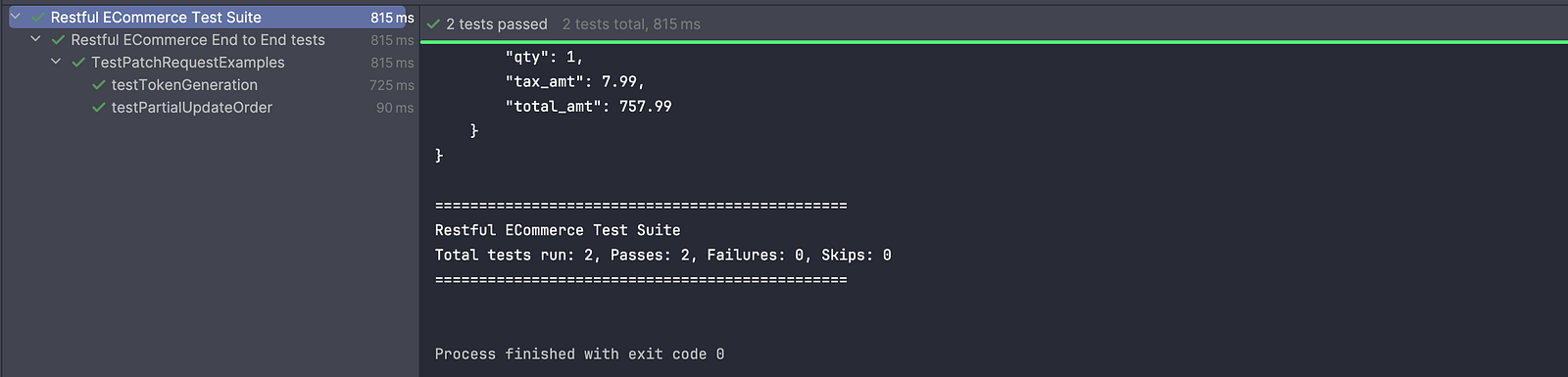
The following log was printed in the console after test execution, showing the request and the response details:
Request method: PATCH
Request URI: http://localhost:3004/partialUpdateOrder/2
Proxy:   <none>
Request params: <none>
Query params: <none>
Form params: <none>
Path params: <none>
Headers:  Authorization=eyJhbGciOiJIUzI1NiIsInR5cCI6IkpXVCJ9.eyJ1c2VybmFtZSI6ImFkbWluIiwiaWF0IjoxNzc1NjMyMDEzLCJleHAiOjE3NzU2MzU2MTN9.A10-amp24LKDrDKrRJ6BW1KKtkVLQ-QK71U_Jl1ctDs
    Accept=*/*
    Content-Type=application/json
Cookies:  <none>
Multiparts:  <none>
Body:
{
    "product_id": "702",
    "product_name": "Sleek Silk Plate"
}
HTTP/1.1 200 OK
X-Powered-By: Express
Content-Type: application/json; charset=utf-8
Content-Length: 188
ETag: W/"bc-NGDglqodj+ZJKoZsbosa9746aT0"
Date: Wed, 08 Apr 2026 07:06:54 GMT
Connection: keep-alive
Keep-Alive: timeout=5

{
    "message": "Order updated successfully!",
    "order": {
        "id": 2,
        "user_id": "1",
        "product_id": "702",
        "product_name": "Sleek Silk Plate",
        "product_amount": 750,
        "qty": 1,
        "tax_amt": 7.99,
        "total_amt": 757.99
    }
}
It can be seen that the two fields product_id and product_name have randomly generated values and are sent in the request along with the order ID 2.
In the response, a 200 OK status code is returned along with the full response body showing the same product_id and product_name. These details, as well as the assertions used in the tests, confirm that the order was successfully updated.
Summary
Effectively testing PATCH APIs in automation involves validating partial updates by sending only the required fields and verifying that unchanged data remains intact.
Using a dynamic approach such as DataFaker, Google Gson, and constructing a request body with POJOs, Builder Pattern, JSON files, or Java Map helps generate fresh test data, reducing duplication issues and easing maintenance.
Following best practices such as proper authentication handling, validating response body and status code, and keeping tests reusable and maintainable ensures robust and scalable API test automation.
Happy testing!
Published at DZone with permission of Faisal Khatri. See the original article here.
Opinions expressed by DZone contributors are their own.
Comments