

How to Test a GET API Request Using REST-Assured Java
Learn about testing GET API requests with REST Assured Java, send requests with headers and params, validate response body, time, and extract data.
 CORE
·
CORE
·
Join the DZone community and get the full member experience.
Join For FreeTesting GET requests is a fundamental part of API automation, ensuring that endpoints return the expected data and status codes. With REST Assured in Java, sending GET requests with query and path parameters, extracting data, verifying the status code, and validating the response body is quite simple.
This tutorial walks through practical approaches to efficiently test GET APIs and build reliable automated checks, including:
- Basic GET Request (Simplest)
- Using Query Parameters
- Using Map for Query Params
- Using Path Parameters
- Using Headers (Auth, Content-Type, etc.)
- Extracting Response
- Using Validations with GET
- Using Authentication (Basic Auth Example)
In earlier tutorials, topics such as API automation for POST requests, response verification, data-driven testing, and more were covered.
Application Under Test
We will be using the following GET APIs from the RESTful e-commerce demo application to write the GET API requests test.
GET /getAllOrders
The GET /getAllOrders API returns the list of all the available orders in the system. The following is the response body of this API:
{
  "message": "Orders fetched successfully!",
  "orders": [
    {
      "user_id": "string",
      "product_id": "string",
      "product_name": "string",
      "product_amount": 0,
      "qty": 0,
      "tax_amt": 0,
      "total_amt": 0
    }
  ]
}
GET /getOrder
The GET /getOrder API returns the single order for the optional query param supplied for “order id,” “user id,” or “product id.” The following response is returned:
{
  "message": "Order found!!",
  "orders": [
    {
      "user_id": "string",
      "product_id": "string",
      "product_name": "string",
      "product_amount": 0,
      "qty": 0,
      "tax_amt": 0,
      "total_amt": 0
    }
  ]
}
Sending a GET Request Using REST-Assured Java
The following is the simplest code that could be written to test a GET /getAllOrders endpoint with REST-Assured Java:
@Test
 public void testGetAllOrders () {
	given ().when ()
		.get ("http://localhost:3004/getAllOrders")
		.then ()
		.statusCode (200);
}
This test method demonstrates a basic GET request using REST Assured to verify an API endpoint.
given()is the starting point where request specifications (like headers, params, and auth) can be defined. In this case, it’s empty since no additional setup is needed.when()specifies the action to be performed, here, sending the request.get("http://localhost:3004/getAllOrders")sends a GET request to the specified endpoint to retrieve all orders.then()is used to validate the response.statusCode(200)asserts that the API responds with HTTP status code 200 (OK), confirming a successful request.
In simple terms, this test checks if the Get All Orders API is reachable and returns a successful response.
Sending a GET Request With Query Parameters
The GET request can be sent using query parameters, which play an important role in filtering, sorting, and customizing the data returned by an API. They allow clients to request only the specific information needed, making API interactions more efficient and flexible.
@Test
public void testGetOrderWithQueryParam () {
        given ().when ()
            .log ()
            .all ()
            .queryParam ("id", 1)
            .get ("http://localhost:3004/getOrder")
            .then ()
            .log ()
            .all ()
            .statusCode (200)
            .and ()
            .body ("orders[0].id", equalTo (1));
    }
The testGetOrderWithQueryParam() test method sends a GET order request to the /getOrder API endpoint using a query parameter and validates the response.
queryParam("id", 1)adds a query parameter to the request, making the final URL:http://localhost:3004/getOrder?id=1get("http://localhost:3004/getOrder")sends the GET request to fetch the order withid = 1.statusCode(200)verifies that the request was successful.and().body("orders[0].id", equalTo(1))validates that the first item in theordersarray has anidof1. This confirms that the order requested via the query parameter is correctly fetched in the response.
This test not only sends a GET request with a query parameter but also ensures that the correct data is returned in the response.
Multiple Query Params
The queryParams() method in REST Assured allows adding multiple parameters. For example, if we need to filter the records using order_id, user_id, and product_id, we can supply the query parameters as shown below:
@Test
public void testGetOrderWithMultipleQueryParam () {
        given ().when ()
            .log ()
            .all ()
            .queryParams ("id", 1, "user_id", "1", "product_id", "1")
            .get ("http://localhost:3004/getOrder")
            .then ()
            .log ()
            .all ()
            .statusCode (200)
            .and ()
            .body ("orders[0].id", equalTo (1));
    }
Similarly, we can also add the different query parameters by calling the queryParam() method multiple times, as shown in the test below:
@Test
public void testGetOrderWithMultipleQueryParameters () {
        given ().when ()
            .log ()
            .all ()
            .queryParam ("id", 1)
            .queryParam ("user_id", "1")
            .queryParam ("product_id", "1")
            .get ("http://localhost:3004/getOrder")
            .then ()
            .log ()
            .all ()
            .statusCode (200)
            .and ()
            .body ("orders[0].id", equalTo (1));
    }
Both approaches are correct; however, as a best practice, we can use Java Map to handle multiple query parameters. This approach is especially useful when dealing with dynamic or large sets of parameters, as all key pairs can be stored in a Map and passed in a single step using queryParams(map) as shown in the code below:
@Test
public void testGetOrderWithMultipleQueryParamWithMap () {
        Map<String, Object> queryParams = new HashMap<> ();
        queryParams.put ("id", 1);
        queryParams.put ("user_id", "1");
        queryParams.put ("product_id", "1");

        given ().when ()
            .log ()
            .all ()
            .queryParams (queryParams)
            .get ("http://localhost:3004/getOrder")
            .then ()
            .log ()
            .all ()
            .statusCode (200)
            .and ()
            .body ("orders[0].id", equalTo (1));
}- A
Map<String, Object> queryParamsis used to store multiple query parameters. queryParams(queryParams)automatically appends all key-value pairs to the URL.- The final request URL would look like:
http://localhost:3004/getOrder?id=1&user&id=1&product_id=1
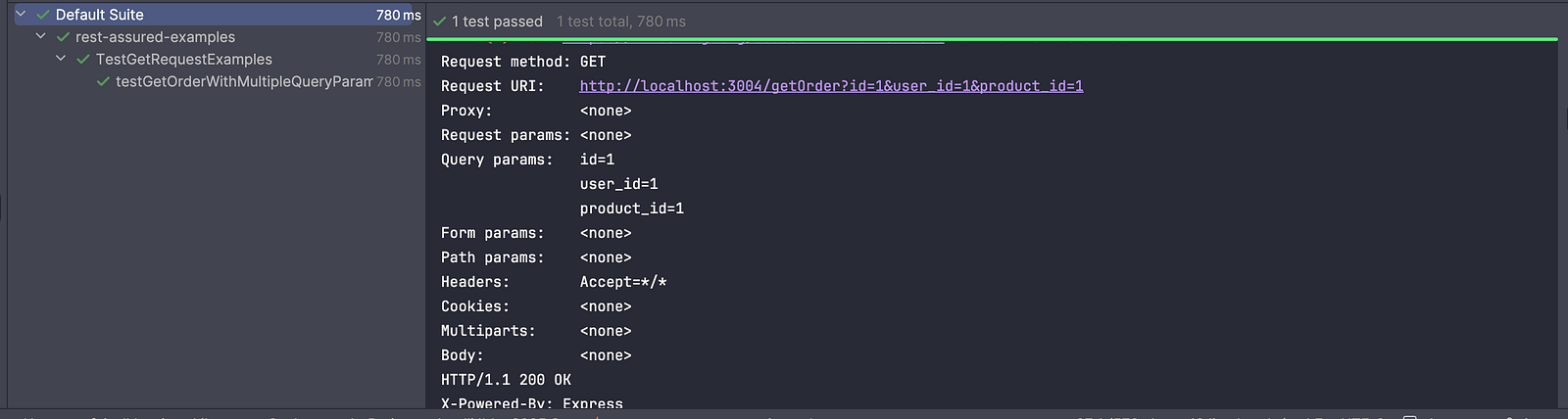
Calling the log().all() method before the queryParams() method is super helpful in logging the request in the console, which helps in understanding how the query parameters are passed in the request.

Sending a GET Request With Path Parameters
The GET request can be sent using path parameters, which are essential for accessing specific resources directly within the API endpoint. They are typically used to uniquely identify a resource, such as an order ID or user ID, making the request more intuitive and RESTful.
Let’s take an example of the GET — GetBooking API from the RESTful-Booker demo application. It fetches the booking details directly using the Path Param.
The following curl can be used to import the GET /booking API in Postman:
curl -i https://restful-booker.herokuapp.com/booking/1The following test script is used for fetching the booking record using Path Params:
@Test
public void testGetBookingWithPathParam () {
    given ().when ()
        .log ()
        .all ()
        .pathParam ("id", 3)
        .get ("https://restful-booker.herokuapp.com/booking/{id}")
        .then ()
        .log ()
        .all ()
        .statusCode (200);
}
The testGetBookingWithPathParam() test method demonstrates how to use a path parameter in a GET request with REST Assured.
pathParam("id", 3)defines a path parameter namedidwith the value3.get("https://restful-booker.herokuapp.com/booking/{id}")sends the GET request. Here,{id}is a placeholder in the URL, and REST Assured replaces it with the value3, making the final request:https://restful-booker.herokuapp.com/booking/3- Finally, an assertion is performed to verify that the GET request was successfully sent and that it returned a successful response with a 200 OK status.
Using the Path param, specific resources can be dynamically accessed and validated by passing values directly within the endpoint URL.
Using Headers in the GET Requests
Headers in a GET request are used to pass additional information, such as authentication tokens, content type, and client details, to the server. They play an important role in securing APIs (e.g., Authorization headers) and ensuring the server understands how to process the request.
Authorization Token in the Header
@Test
public void testAuthHeader () {
  given ().header ("Authorization", "Bearer my-token-123")
    .when ()
    .get ("https://httpbin.org/bearer")
    .then ()
    .log()
    .all()
    .statusCode (200);
}
The testAuthHeader() test method demonstrates how to send a GET request with an Authorization header using REST Assured.
header("Authorization", "Bearer my-token-123")adds an Authorization header with a Bearer token, which is commonly used for securing APIs. This tells the server that the request is authenticated. The “Bearer my token-123” is a valid token for this request. If it is not supplied or an invalid token is supplied, the test will fail, throwing a 401 Unauthorized status.get("https://httpbin.org/bearer")sends the GET request to the endpoint that validates Bearer token authentication.statusCode(200)verifies that the request was successful, meaning the token was accepted.
Similarly, a negative test can be written for the GEET request, supplying an invalid bearer token and verifying that a 401 status is returned in response.
Adding Multiple Headers
The “Content-Type” or “Accept” headers can also be supplied to specify the format of the request and response, such as JSON or XML, ensuring proper communication between the client and server.
We can use a Java Map to add multiple headers and pass it to the test as shown in the test script below:
@Test
public void testGetAllOrdersWithHeaders () {
  Map<String, String> headers = new HashMap<> ();
  headers.put ("Content-Type", "application/json");
  headers.put ("Accept", "application/json");

  given ().headers (headers)
    .when ()
    .get ("http://localhost:3004/getAllOrders")
    .then ()
    .statusCode (200);
 }
The testGetAllOrdersWithHeaders() test demonstrates how to send a GET request with multiple headers using a Java Map in REST Assured. The headers (Content-Type and Accept) are stored in a Map and passed using .headers(headers).
The test then sends a request to fetch all orders and verifies that the API responds with a 200 OK status.
Extracting Response Body and Values
Extracting the response body from a GET request allows capturing and reusing API data for further validations or chaining requests.
Using REST Assured, the values can be extracted using methods like .extract().response() or directly fetch specific fields using JSON path. This is especially useful for validating dynamic data and passing values between API calls in end-to-end test scenarios.
Extracting the Response Body
@Test
public void testExtractResponseBody () {
    String responseBody = given ().when ()
        .get ("http://localhost:3004/getAllOrders")
        .then ()
        .statusCode (200)
        .extract ()
        .response ()
        .asString ();

    System.out.println (responseBody);
}
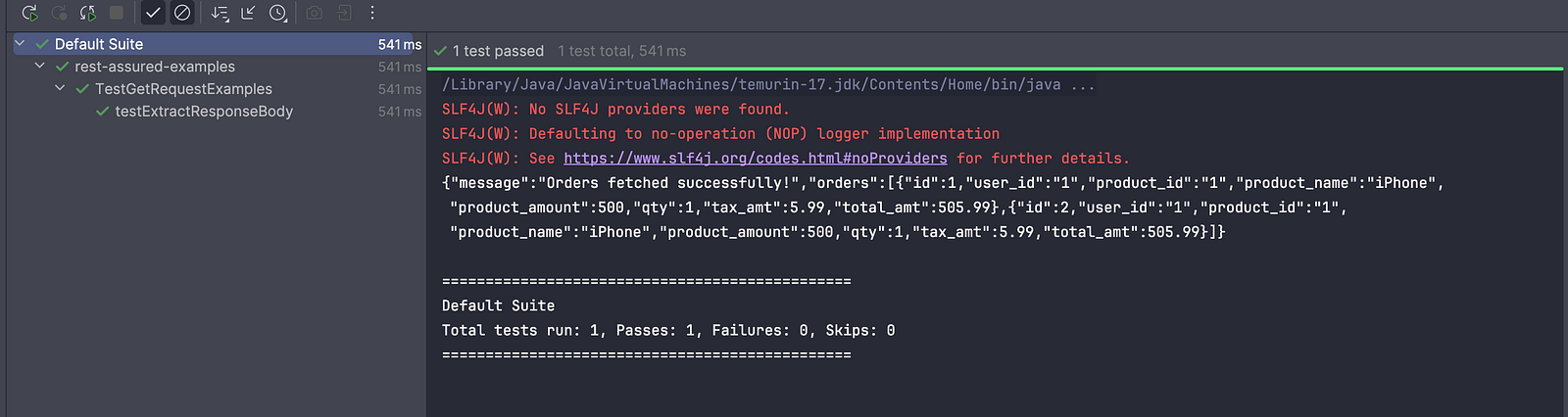
The testExtractResponseBody() method demonstrates how to extract the full response body from a GET request in REST Assured.
extract().response().asString()extracts the complete response body, converts it into a string, and stores it in theresponseBodyvariable for further use.System.out.println(responseBody);prints the response to the console.
Extracting a Specific Field Value From the Response Body
While working with test automation, there are scenarios where we need to extract a specific field value from the response for further use in the test. A classic example is end-to-end testing, where we need the order ID to update or delete an order.
@Test
public void testExtractFiedValueFromResponse () {
    int orderId = given ().when ()
        .get ("http://localhost:3004/getAllOrders")
        .then ()
        .statusCode (200)
        .extract ()
        .response ()
        .path ("orders[0].id");

    System.out.println ("Order id is: " + orderId);
}
The testExtractFieldValueFromResponse() test method extracts the Order ID of the first order from the orders array in the response.
extract().response().path("orders[0].id")extracts a specific value from the response body using a JSON path. In this case, the ID of the first order in theordersarray.- The extracted value is stored in the
orderIdvariable for further use in the test. System.out.println(...)prints the extracted order ID to the console.
Once the value is extracted into a variable, it can be further reused anywhere in the test. The variable can also be declared as a global variable to reuse the value in multiple tests within the same class.
Using Validations With GET Requests
Using validations on the responses from GET requests ensures the API returns the correct, expected data. Status codes, response headers, response time, and the content of the response body can be validated.
These validations help confirm both the functional correctness and performance of the API.
Validating the Response Headers
Validating a response header ensures that the API returns the expected metadata, such as Content-Type, confirming the response format is correct.
@Test
public void testVerifyResponseHeader () {
  given ().when ()
  .get ("http://localhost:3004/getAllOrders")
  .then ()
  .headers ("Content-Type", "application/json; charset=utf-8")
  .statusCode (200);
}
The testVerifyResponseHeader() test validates both the response header and the status code to ensure the API behaves as expected. The .headers("Content-Type", "application/json; charset=utf-8") verifies that the response contains the expected Content-Type header value.
Validating the Response Time
The response time can also be validated using REST Assured to monitor and ensure optimal API performance.
@Test
public void testVerifyResponseTime () {
  given ().when ()
    .get ("http://localhost:3004/getAllOrders")
    .then ()
    .statusCode (200)
    .time (lessThan (500L), TimeUnit.MILLISECONDS);
}
The testVerifyResponseTime() test method ensures the API responds successfully and within an acceptable time (500 MilliSeconds).
This test sends an API GET request to the /getAllOrders endpoint. This test performs two assertions: the first one verifies that the 200 OK status is returned, and the other verifies the response time.
The statement.time(lessThan(500L), TimeUnit.MILLISECONDS)validates the response time and ensures the response is received in less than 500 milliseconds.
The measured time includes:
- Request transmission
- Response reception
- Assertion/validation overhead
If we need to measure just the time for sending the request and receiving the response, the following test script can be used:
public void testResponseTime () {
  Response response = given ().get ("http://localhost:3004/getAllOrders");
  System.out.println (response.getTimeIn (TimeUnit.MILLISECONDS));
}
The testResponseTime() method sends the GET /getAllOrders request and prints the raw response time.
Validating the Response Size
Validating the response size ensures the API returns the expected size of data and helps detect issues like incomplete or excessively large payloads that may impact performance.
@Test
public void testVerifyResponseSize () {
  given ().when ()
    .get ("http://localhost:3004/getAllOrders")
    .then ()
    .statusCode (200)
    .body ("orders.size()", greaterThan (0));
}
The testVerifyResponseSize() method verifies both the success of the API call and that the correct size of data is returned in the response.
given().when().get(...)sends a GET request to fetch all orders from the API..then().statusCode(200)verifies that the response is successful..body("orders.size()", greaterThan(0))validates that theordersarray in the response contains at least one item, ensuring the response is not empty. The greaterThan() is a static method used from the Hamcrest library.
Similarly, response size verification can be performed by using equalTo(), lessThan(), and other such validations from the Hamcrest library, depending on the use case.
Validating the Response Body
Validating the response body ensures that the API returns the correct data and values as expected. It is a core part of functional testing that ensures the API behaves as expected and returns accurate and reliable data.
@Test
public void testResponseBody () {
  given ().when ()
    .queryParam ("id", 1)
    .get ("http://localhost:3004/getOrder")
    .then ()
    .statusCode (200)
    .and ()
    .body ("message", equalTo ("Order found!!"))
    .body ("message", notNullValue ())
    .body ("orders[0].id", equalTo (1));
}
The testResponseBody() test method sends the GET /getAllOrders request by adding a query parameter to fetch a specific order, making the request URL: http://localhost:3004/getOrder?id=1. This method performs an assertion for the response body using the following three statements one by one:
.body("message", equalTo("Order found!!"))validates that the response contains the expected message..body("orders[0].id", notNullValue())ensures that the ID in the first-order object is not null..body("orders[0].id", equalTo(1))checks that the returned order has the ID 1.
In this test, verification for the response body is done step by step as per the code statements, so if the first verification fails, the remaining assertions will not be executed, causing the test to fail immediately.
REST Assured also allows adding multiple verification statements in a single statement, as shown in the code below:
public void testResponseBodyMultipleAssertions () {
  given ().when ()
    .queryParam ("id", 1)
    .get ("http://localhost:3004/getOrder")
    .then ()
    .statusCode (200)
    .and ()
    .body ("message", equalTo ("Order found!!"),
            "orders[0].id", notNullValue (), "orders[0].id", equalTo (1));
 }
The testResponseBodyMultipleAssertions() method performs multiple validations using a single .body() statement.
"message", equalTo("Order found!!")validates the response message."orders[0].id", notNullValue()ensures the order ID is present."orders[0].id", equalTo(1)verifies the correct order is returned.
Using multiple assertions within a single .body() keeps related validations grouped, and reduces repetitive code. It also makes the test more concise while ensuring that multiple aspects of the response are validated in one place.
Using Authentication With GET Requests
Using authentication with GET requests ensures that only authorized users can access protected API resources. Common methods include Basic Auth, Bearer tokens, and API keys, which are typically passed through headers. Incorporating authentication in tests helps validate both security and access control mechanisms of the API.
@Test
public void testBasicAuthWithGetRequest () {
    given ().auth ()
      .basic ("user", "passwd")
      .when ()
      .get ("https://httpbin.org/basic-auth/user/passwd")
      .then ()
      .statusCode (200);
}
The testBasicAuthWithGetRequest() method demonstrates how to send a GET request with Basic Authentication and verify successful access to a secured API endpoint.
given().auth().basic("user", "passwd")sets up Basic Authentication by sending the username and password with the request. Here, the username is “user,” and the password is “passwd”. It sends the credentials in the request.when().get("https://httpbin.org/basic-auth/user/passwd")sends a GET request to an endpoint that requires Basic Auth credentials. The URL includes the username and password only because this specific API is designed to validate them from the path.then().statusCode(200)verifies that the request was successful, meaning the provided credentials were valid.
In short, this test checks whether an API protected by Basic Authentication can be accessed using the correct username and password.
Summary
Testing GET API requests with REST Assured is an efficient way to validate API functionality. By covering scenarios such as query parameters, path parameters, headers, authentication, and validations, it ensures that the API returns accurate and expected responses.
In my experience, while testing a GET API request, it is important to consider negative scenarios, such as validating different status codes when no record is available, using invalid query and path parameters, and adding appropriate assertions. Verifying the response body is a core part of functional testing, ensuring that the API returns accurate and expected data. Additionally, validations for response size, response time, and headers should be included to ensure thorough verification of GET requests.
Happy testing!!
Published at DZone with permission of Faisal Khatri. See the original article here.
Opinions expressed by DZone contributors are their own.
Comments