

Data-Driven API Testing in Java With REST Assured and TestNG: Part 5
Learn how to perform data-driven API automation testing with REST Assured using Excel Files and TestNG's @DataProvider annotation.
 CORE
·
CORE
·
Join the DZone community and get the full member experience.
Join For FreeIn the previous articles, we discussed how to perform data-driven API automation testing with different approaches, including object arrays, iterators, CSV files, and JSON files.
An Excel file can also be used to perform data-driven API testing. It allows testers to store multiple test data in one place, where we can easily add, update, or remove test cases without changing the automation code. It allows non-technical members, such as Business Analysts and Product owners, to understand and edit the test data to perform robust testing.
In this article, we’ll walk through the practical implementation of using Excel files for data-driven testing.
Data-Driven API Testing With an Excel file and TestNG’s @DataProvider
The setup and configuration remain the same as outlined in the previous tutorial. In addition, include the following Apache POI dependency in the pom.xml file to handle the Excel files.
<dependency>
            <groupId>org.apache.poi</groupId>
            <artifactId>poi</artifactId>
            <version>5.5.1</version>
        </dependency>
        <dependency>
            <groupId>org.apache.poi</groupId>
            <artifactId>poi-ooxml</artifactId>
            <version>5.5.1</version>
        </dependency>
For this demonstration, we will use the POST /addOrder API of the RESTful e-commerce demo application. The API schema is provided below:
[
  {
    "user_id": "string",
    "product_id": "string",
    "product_name": "string",
    "product_amount": 0,
    "qty": 0,
    "tax_amt": 0,
    "total_amt": 0
  }
]
We will use a POJO-based object-mapping approach, mapping Excel data directly to custom Java classes. Mapping Excel data to POJOs involves directly converting each column in the sheet into corresponding variables in custom Java classes. This makes test data structured, easy to access, and closely aligned with API request and response models.
The benefit of using this approach is improved maintainability and readability, especially when working with stable and well-defined data formats.
Creating the POJO Class
The following POJO class should be created considering the POST /addOrder API request:
@Data
public class Order {
    @JsonProperty ("user_id")
    private String userId;
    @JsonProperty ("product_id")
    private String productId;
    @JsonProperty ("product_name")
    private String productName;
    @JsonProperty ("product_amount")
    private int    productAmount;
    private int    qty;
    @JsonProperty ("tax_amt")
    private int    taxAmt;
    @JsonProperty ("total_amt")
    private int    totalAmt;
}
Code Walkthrough
- Purpose: This POJO class represents the structure of an Order request and maps the Excel data to the Java objects. It enables easy data handling for API automation testing.
- @Data annotation: It reduces boilerplate code by automatically generating common methods such as getters, setters, toString(), equals(), and hashCode() at runtime.
- @JsonProperty annotation: This annotation is part of the Jackson Databind library and is used to map JSON field names to Java variables. It is especially useful when JSON naming conventions differ from Java naming conventions. For example, it maps the user_id field to the userId variable, and similarly for other fields.
Creating a Utility Class to Read Excel Files
Let’s create a utility class to read Excel files using a POJO-based object mapping approach. This class will read and parse the Excel data by leveraging POJO classes.
public class ExcelDynamicReader {

    public static final Logger LOGGER = Logger.getLogger (ExcelDynamicReader.class.getName ());

    public static List<Map<String, Object>> readExcelAsTable (String filePath, String sheetName) {

        LOGGER.log (INFO, "Getting ready to read excel file....");
        List<Map<String, Object>> rows = new ArrayList<> ();

        InputStream inputStream = ExcelDynamicReader.class.getClassLoader ()
            .getResourceAsStream (filePath);
        if (inputStream == null) {
            throw new RuntimeException ("File not found:");
        }
        try (
            Workbook workbook = new XSSFWorkbook (inputStream)) {

            LOGGER.log (INFO, format ("Reading file {0}", filePath));

            Sheet sheet = workbook.getSheet (sheetName);

            LOGGER.log (INFO, format ("Reading Sheet {0}", sheetName));

            Iterator<Row> rowIterator = sheet.iterator ();
            List<String> headers = new ArrayList<> ();
            if (rowIterator.hasNext ()) {
                Row headerRow = rowIterator.next ();
                for (Cell cell : headerRow) {
                    headers.add (cell.getStringCellValue ());
                }
            }
            LOGGER.log (INFO, format ("Reading rows in the sheet {0}", sheetName));
            while (rowIterator.hasNext ()) {
                Row row = rowIterator.next ();
                Map<String, Object> rowData = new LinkedHashMap<> ();
                for (int i = 0; i < headers.size (); i++) {
                    Cell cell = row.getCell (i);
                    Object value = getCellValue (cell);
                    rowData.put (headers.get (i), value);
                }
                rows.add (rowData);
            }
        } catch (IOException e) {
            LOGGER.log (Level.SEVERE, format ("Error while reading excel file {0}", e));
        }
        return rows;
    }

    private static Object getCellValue (Cell cell) {
        if (cell == null)
            return null;

        return switch (cell.getCellType ()) {
            case STRING -> cell.getStringCellValue ();
            case BOOLEAN -> cell.getBooleanCellValue ();
            case NUMERIC -> cell.getNumericCellValue ();
            case FORMULA -> cell.getCellFormula ();
            case BLANK -> "";
            default -> null;
        };
    }

    public static <T> List<T> getData (List<Map<String, Object>> table, Class<T> pojoClass) {
        ObjectMapper objectMapper = new ObjectMapper ();
        List<T> result = new ArrayList<> ();
        LOGGER.log (INFO, format ("Getting the data from the excel file in table format"));
        for (Map<String, Object> row : table) {
            T obj = objectMapper.convertValue (row, pojoClass);
            result.add (obj);
        }
        return result;
    }
}
Code Walkthrough
The utility class ExcelDynamicReader.java has three methods: readExcelAsTable(), getCellValue(), and getData().
- The readExcelAsTable() method: It reads the Excel file and converts its contents into a structured format. It loads the file, reads the first row as column headers, and then maps each subsequent row’s values to those headers using a Map<String, Object>. Finally, it returns a List of these maps, where each map represents one row of data from the sheet.
- The getCellValue() method: It’s a helper function that extracts data from individual Excel cells. It checks the cell type and returns the appropriate Java value, such as String, Number, Boolean, or a formula. This ensures that different kinds of Excel data are correctly interpreted and stored in a consistent format.
- The getData() method: This method converts table-style data into strongly typed Java objects. It uses Jackson’s ObjectMapper to map each row’s key-value pairs to fields in the specified POJO class. Finally, it returns a List<T> containing fully populated objects, making the Excel data easy to use in API testing and automation workflows.
Writing the Data Provider for the Test
Let’s create a data provider method that returns the test data from the Excel file as Iterator<Object[]>, which is further consumed by the test.
@DataProvider (name = "orderData")
    public Iterator<Object[]> getOrderData () {
        List<Map<String, Object>> table = ExcelDynamicReader.readExcelAsTable ("order_test_data.xlsx", "TestData");
        List<Order> orderData = getData (table, Order.class);

        List<Object[]> data = new ArrayList<> ();
        for (Order order : orderData) {
            data.add (new Object[] { order });
        }
        return data.iterator ();
    }
The getOrderData() method reads test data from an Excel file and converts it into Order POJO objects. It first loads the Excel data as a table, maps each row to an Order object, and then wraps each object in an Object[].
Finally, it returns an iterator so that each Order object can be supplied to the test method for data-driven testing.
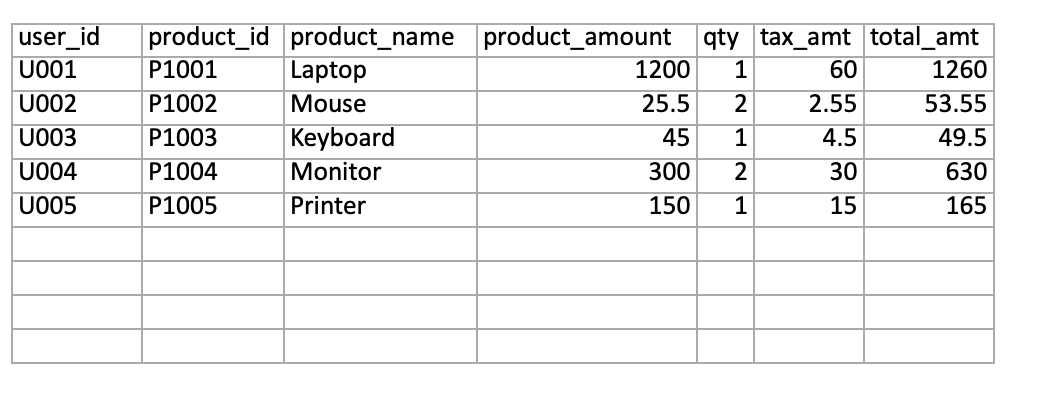
Excel File With Test Data
The following test data is supplied using an Excel file to test the POST /addOrder API:
Writing the API Automation Test
Let’s write the test for the POST /addOrder API that creates orders using the test data supplied from the Excel file through the data provider:
@Test (dataProvider = "orderData")
    public void testCreateOrder (Order order) {
        List<Order> orderList = List.of (order);
        given ().contentType (ContentType.JSON)
            .when ()
            .log ()
            .all ()
            .body (orderList)
            .post ("http://localhost:3004/addOrder")
            .then ()
            .log ()
            .all ()
            .statusCode (201)
            .and ()
            .assertThat ()
            .body ("message", equalTo ("Orders added successfully!"));
    }
Code Walkthrough
The testCreateOrder() method uses the @Test annotation with the orderData data provider to receive test data from an Excel file.
For each test run, the DataProvider supplies an Order object that is mapped from the Excel sheet. The method sends this data as a JSON request body to the /addOrder API using Rest Assured. It then validates that the API responds with a 201 status code and the expected success message, “Orders added successfully!”.
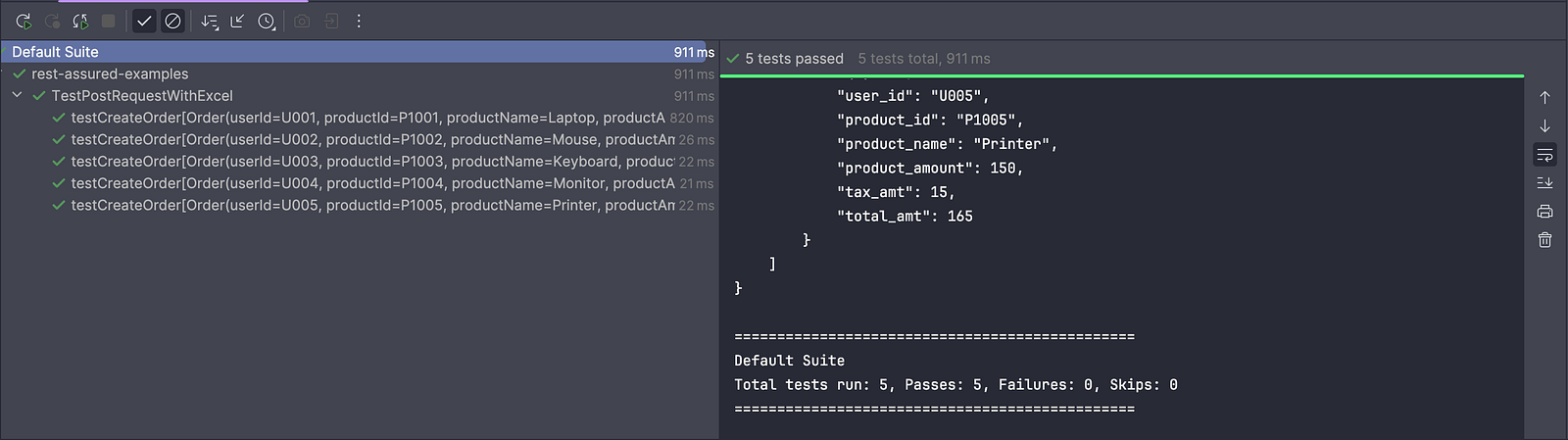
Test Execution
On running the test, TestNG automatically executes the testCreateOrder() method multiple times, each time using a different set of data pulled from the Excel file using the orderData DataProvider.
Summary
Using data-driven testing with Excel files improves test data robustness by enabling multiple test scenarios to be managed in a structured, centralized format. Testers can easily add, modify, or remove test cases without changing the automation code, which helps ensure better coverage of valid, invalid, and edge-case scenarios. This approach makes it easier to validate application behavior under different data conditions.
In this series on Data-Driven API Testing with REST Assured, we explored multiple test data sources, including JSON, CSV, and Excel files. It is up to software teams to evaluate their requirements and choose the data source that best aligns with their testing strategy and overall development process.
Happy testing!
Published at DZone with permission of Faisal Khatri. See the original article here.
Opinions expressed by DZone contributors are their own.
Comments