

Data-Driven API Testing in Java With REST Assured and TestNG: Part 3
Learn how to perform data-driven API automation testing with Rest-Assured using CSV Files and TestNG's @DataProvider annotation.
 CORE
·
CORE
·
Join the DZone community and get the full member experience.
Join For FreeData-driven testing enables testers to execute the same test logic with multiple sets of input data, improving coverage and reliability with minimal effort. By combining CSV files with TestNG’s @DataProvider annotation, test data can be easily separated from the test logic. This approach enables maintainability and makes test automation more scalable and flexible.
This article explains how to implement data-driven testing with CSV files and TestNG in a clear, practical, and easy-to-follow manner.
Data-Driven Testing Using TestNG’s @DataProvider Annotation and CSV Files
The setup and configuration remain the same as discussed in the earlier tutorial. Additionally, the following dependency for Jackson-dataformat-csv should be added to the pom.xml to handle the CSV files.
<dependency>
    <groupId>com.fasterxml.jackson.dataformat</groupId>
    <artifactId>jackson-dataformat-csv</artifactId>
    <version>2.21.0</version>
</dependency>
The POST /addOrder API of the RESTful e-commerce demo application will be used for the demonstration. The schema for the API is given below:
[
  {
    "user_id": "string",
    "product_id": "string",
    "product_name": "string",
    "product_amount": 0,
    "qty": 0,
    "tax_amt": 0,
    "total_amt": 0
  }
]
Creating a POJO Class
The following POJO class should be created to map the CSV file data to the data provider:
@Getter
@Setter
@AllArgsConstructor
@NoArgsConstructor
public class Order {
    @JsonProperty ("user_id")
    private String userId;
    @JsonProperty ("product_id")
    private String productId;
    @JsonProperty ("product_name")
    private String productName;
    @JsonProperty ("product_amount")
    private int    productAmount;
    private int    qty;
    @JsonProperty ("tax_amt")
    private int    taxAmt;
    @JsonProperty ("total_amt")
    private int    totalAmt;
}
Code Walkthrough
The Order POJO simplifies reading the CSV file by mapping each row to a single object, with each column in the row mapped to its corresponding class variable. Using a POJO helps remove hard-coded mapping logic by allowing CSV parsing libraries to automatically bind column names to class fields based on annotations or naming conventions.
Instead of manually extracting values by column index (for example, row[0], row[1], etc.), the POJO maps each CSV column directly to the corresponding property.
The @Getter and @Setter annotations automatically create getter and setter methods for all fields during compilation. The @AllArgsConstructor annotation enables quick creation of fully initialized objects, which is useful when manually creating test data.
The @NoArgsConstructor annotation generates a default constructor with no parameters. Without it, the library may fail to create instances of the POJO during CSV mapping. In this Order class, the @NoArgsConstructor ensures automatic object creation when reading data from CSV files.
If you’d like to dive deeper into testing POST requests with REST Assured in Java, check out this detailed guide.
Creating a Utility to Read CSV Files
The following CSV file will be used to perform data-driven testing:
user_id,product_id,product_name,product_amount,qty,tax_amt,total_amt
"U001","P1001","Laptop",850,1,42,892
"U002","P1002","Smartphone",600,2,60,1260
"U003","P1003","Headphones",120,3,18,378
"U004","P1004","Keyboard",75,2,7,157
"U005","P1005","Mouse",40,4,8,168
"U006","P1006","Monitor",300,1,15,315
"U007","P1007","Tablet",450,2,45,945
"U008","P1008","Printer",200,1,10,210
"U009","P1009","Webcam",90,3,13,283
"U010","P1010","Speaker",150,2,15,315
Let’s create a utility method to read CSV files from the ‘src/test/resources/` folder.
public class CSVReader {
    @SneakyThrows
    public static List<Order> getOrderData (String filename) {
        InputStream inputStream = CSVReader.class.getClassLoader ()
            .getResourceAsStream (filename);
        if (inputStream == null) {
            throw new RuntimeException ("File not found: " + filename);
        }

        CsvSchema schema = CsvSchema.emptySchema ()
            .withHeader ();

        MappingIterator<Order> iterator;
        try {
            iterator = new CsvMapper ().readerFor (Order.class)
                .with (schema)
                .readValues (inputStream);

        } catch (IOException e) {
            throw new RuntimeException (e);
        }
        return iterator.readAll ();
    }
}
Code Walkthrough
The getOrderData() method is static and reads a CSV file, returning a list of Order objects. The following steps explain the CSV file reading process:
- Loading the CSV file: It loads the CSV file from the resources folder (src/test/resources/) using the class loader. If the file is not found, it throws a
RuntimeException.
CsvSchema schema = CsvSchema.emptySchema ()
.withHeader ();- Defining the CSV schema: The above code statement defines the CSV schema for Jackson’s parser. The
emptySchema().withHeader()tells Jackson to use the first row as column headers to map them to the fields in the Order POJO.
MappingIterator<Order> iterator;
try {
    iterator = new CsvMapper ().readerFor (Order.class)
        .with (schema)
        .readValues (inputStream);

} catch (IOException e) {
    throw new RuntimeException (e);
}
return iterator.readAll()- Reading the CSV file: The CSV file is read using the CsvMapper from the Jackson-dataformat-csv library. It maps each row to the Order object using code
readerFor(Order.class).with(schema). The codereadValues(inputStream)creates aMappingIterator<Order>that allows iterating over all rows of the CSV. If any I/O error occurs while reading the file, it is caught and rethrown as aRuntimeExceptionto simplify error handling. Finally, the iterator reads all the remaining rows and returns them as aList<Order>.
Creating a DataProvider Method
The following data provider method returns the test data from the CSV file as Iterator<Object[]>, which is further consumed by the test.
@DataProvider (name = "orderData")
    public Iterator<Object[]> getOrders () {
        List<Order> orderList = CSVReader.getOrderData ("order_data.csv");
        return orderList.stream ()
            .map (order -> new Object[] { order })
            .iterator ();
    }
Code Walkthrough
The getOrders() method reads test data from the “order_data.csv” file. It loads all records as a list of Order objects using the CSVReader utility. The stream operation converts each Order into an Object[] format, and then returns an Iterator, allowing TestNG to efficiently run the same test multiple times with different input data.
Writing the API Automation Test
Let’s write the test for the POST /addOrder API that creates orders using the test data supplied from the CSV files using the data provider:
@Test (dataProvider = "orderData")
    public void testCreateOrder (Order order) {
        List<Order> orderList = List.of (order);
        given ().contentType (ContentType.JSON)
            .when ()
            .log ()
            .all ()
            .body (orderList)
            .post ("http://localhost:3004/addOrder")
            .then ()
            .log ()
            .all ()
            .statusCode (201)
            .and ()
            .assertThat ()
            .body ("message", equalTo ("Orders added successfully!"));

    }
The testCreateOrder() method uses the orderData DataProvider to run the same test multiple times, each time with a different Order object from the CSV file.
Before making the POST request, each order is wrapped inside a List using “List.of(order)” as the POST /addOrder API expects a list of orders in the request body. The test then verifies the response by checking that the status code is 201 and confirming that the success message “Orders added successfully” is returned.
Checkout this detailed tutorial on How to Perform Response Verification in REST-Assured Java for API Testing.
Test Execution
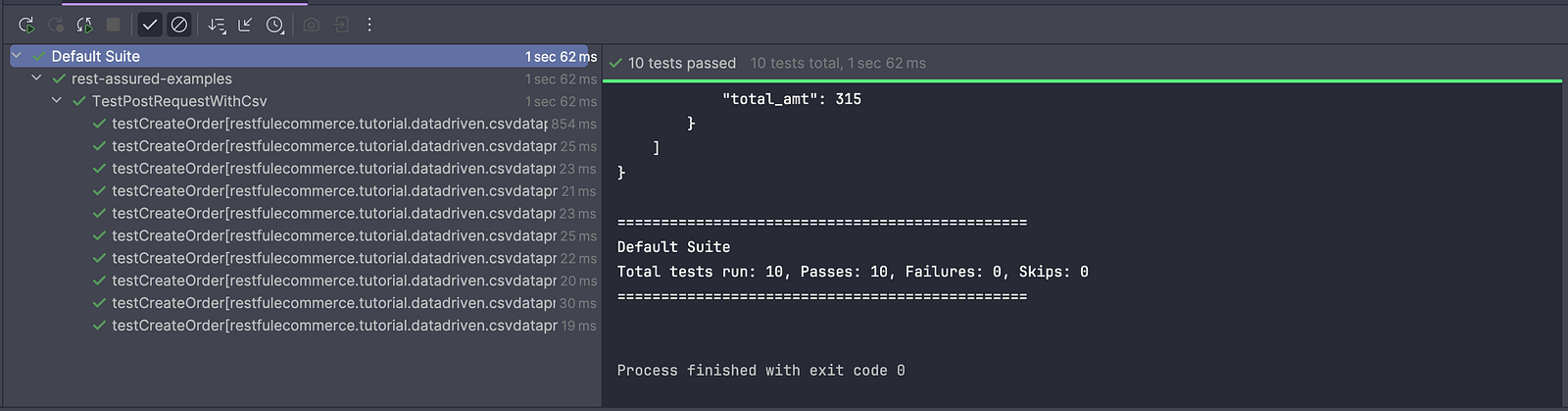
When the test is executed, TestNG automatically runs the testCreateOrder() method multiple times, each time using a different set of test data read from the CSV file through the orderData DataProvider.
Summary
Using CSV files with TestNG’s DataProvider offers a simple and effective way to implement data-driven testing by keeping test data separate from test logic. This approach makes test cases easier to maintain, improves readability, and allows testers to update or extend test scenarios without modifying the code.
Happy testing!
Published at DZone with permission of Faisal Khatri. See the original article here.
Opinions expressed by DZone contributors are their own.
Comments