

Building a Zero-Cost Daily Job Alert Pipeline on GitHub Actions
Run a daily cron job on GitHub Actions for free by committing a JSON file back to the repo as your database, plus the gotchas from 139 production runs.
 ·
·
Join the DZone community and get the full member experience.
Join For FreeI needed a job to run once a day, remember what it did yesterday, and cost nothing to operate. The obvious answer is a small VM with cron, or a Lambda plus DynamoDB. I did not want to pay for either, and I did not want a server to patch. So I pushed the whole thing onto GitHub Actions and used a JSON file committed back to the repo as the database. It has now run 139 times in production on the free tier, tracking just over 1,000 records, and the operating bill is still zero. Here is the part that took the most thought: keeping state across runs that are, by design, completely stateless.
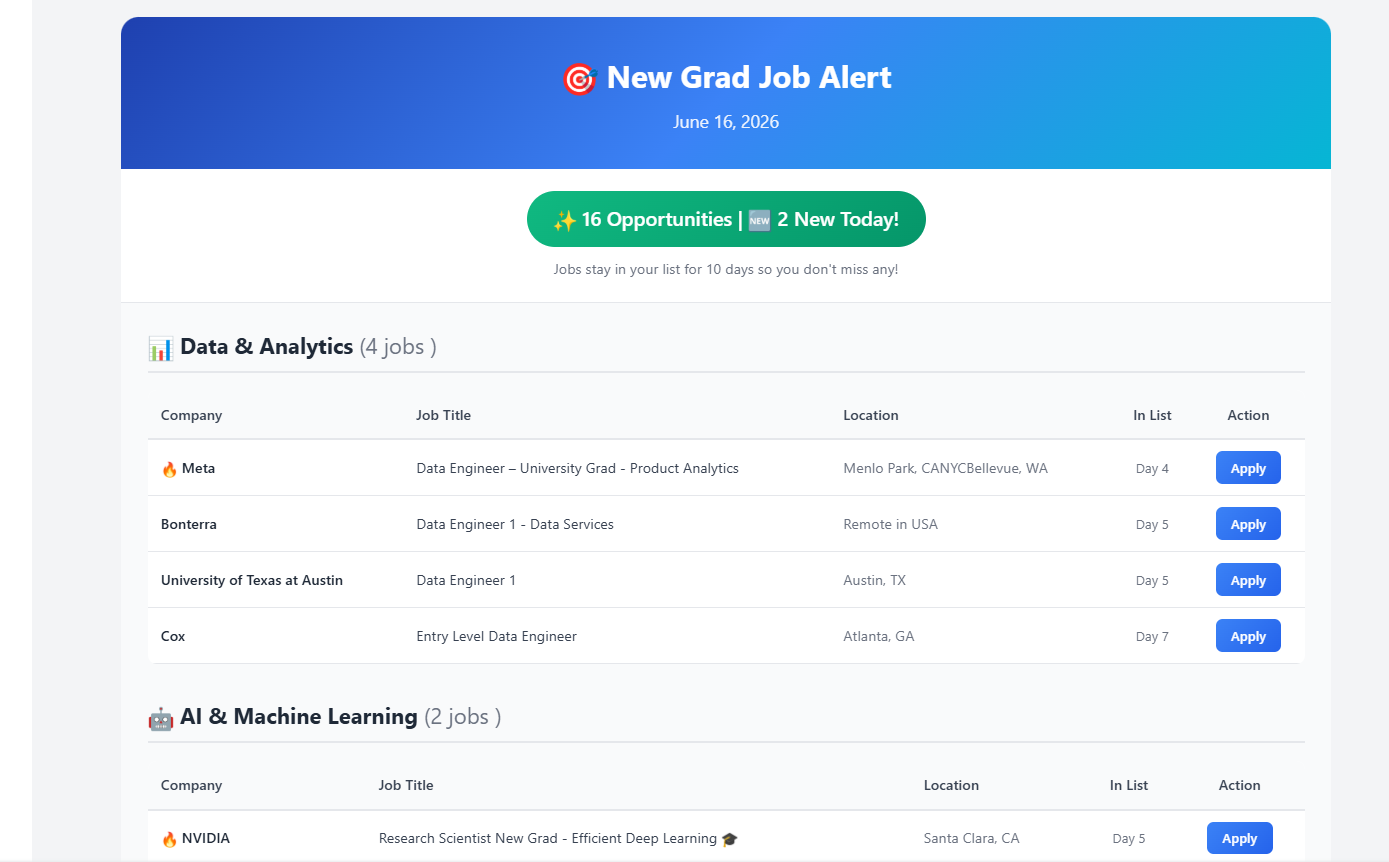
"The daily digest the pipeline sends, with new postings badged."
The Constraint That Shapes Everything
GitHub Actions gives you a cron trigger for free:
on:
   schedule:
     - cron: "0 16 * * *"   # 09:00 EST daily
   workflow_dispatch:        # manual button
That solves scheduling. It does not solve memory. Every run starts on a fresh ubuntu-latest runner with a clean checkout. Anything you write to disk during the run is gone when the job ends. For my use case (a daily digest that must not re-send jobs it already sent), that is the entire problem. The script has to know what it saw yesterday.
The standard fix is an external store. But for a workload that writes a few kilobytes once a day, standing up a database is more operational surface than the actual task. The repo is already there, the runner already has a checkout, and the workflow already has a token. So the store is the repo.
Git as the Database
The pattern is three lines at the end of the workflow: stage the state files, commit if they changed, push.
permissions:
  contents: write          # the default token is read-only; you must opt in
# ... run the script, which writes seen_links.json and job_history.json ...
- name: Commit updated history files
  run: |
    git config user.name  "GitHub Actions Bot"
    git config user.email "[email protected]"
    git add seen_links.json job_history.json 2>/dev/null || true
    git diff --staged --quiet || git commit -m "Update job history [skip ci]"
    git push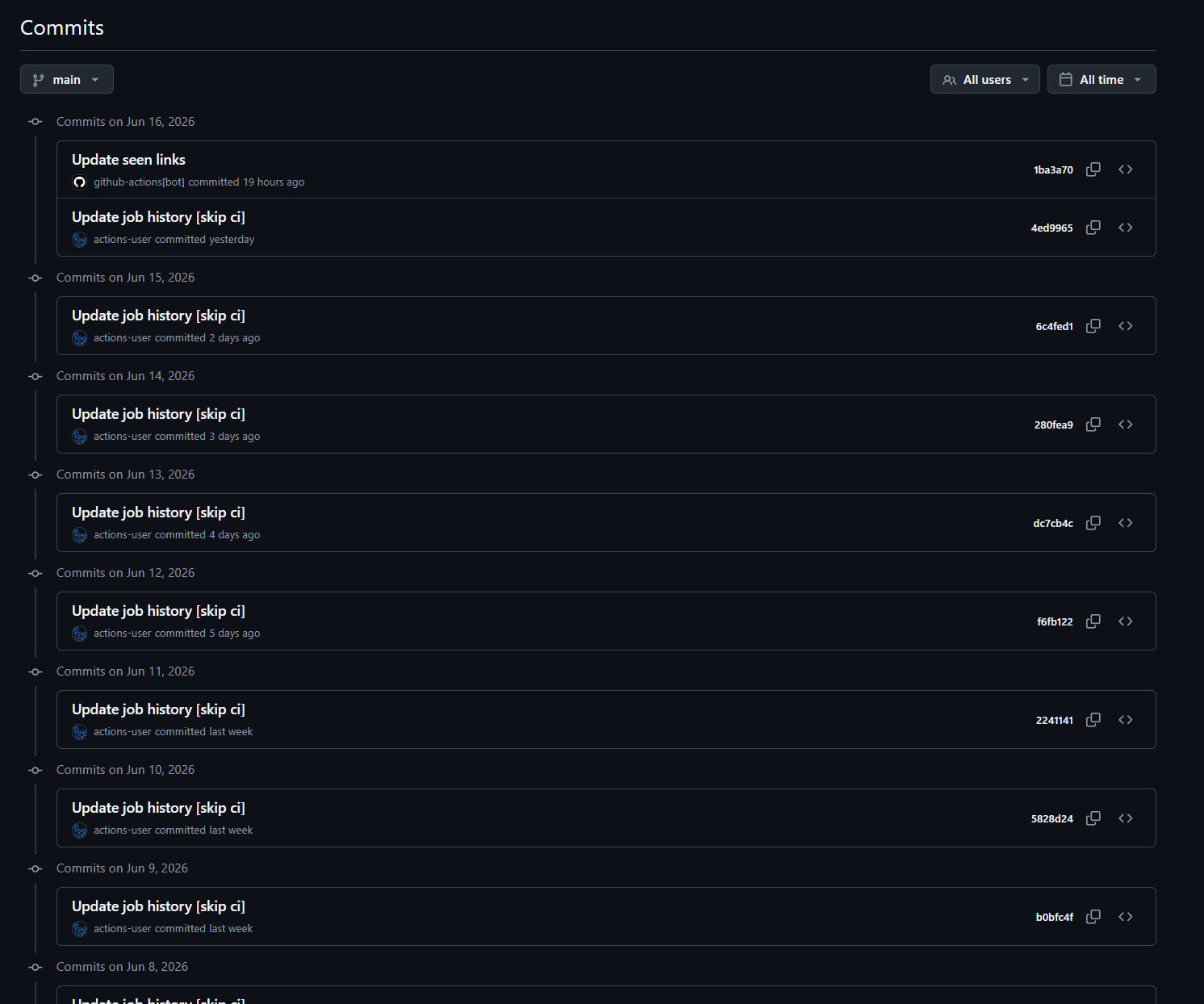
Two details here are not optional, and I learned both the slow way.
First, permissions: contents: write. The GITHUB_TOKEN handed to a workflow is read-only by default. Without this block, the git push fails with a 403, and the failure is at the very end of the run, after the real work succeeded, so it looks like everything worked until you check tomorrow and the state never persisted.
Second, git diff --staged --quiet || git commit. This commits only when something actually changed. Committing an unchanged tree is an error, and a daily job that finds nothing new is a normal Tuesday. The || makes "nothing to commit" a no-op instead of a red X.
The result is that the database lives in git history. Every state change is a commit. I can read yesterday's seen_links.json by checking out yesterday's commit. That is free audit logging I did not have to build.
The Infinite-Loop Trap
Here is the gotcha that will bite anyone who copies this pattern: a workflow that pushes a commit can trigger a workflow that runs on push, which pushes a commit, which triggers the workflow.
The guard is the [skip ci] token in the commit message:
git commit -m "Update job history [skip ci]"
GitHub treats [skip ci] in a commit message as "do not start workflows for this commit." My scheduled workflow uses it. I also had a second, older workflow file in the repo whose commit message was a plain "Update seen links" with no skip token. Because that workflow only ran on schedule (not on push), it never actually looped, but it was one: push line away from a runaway. If your state-committing workflow has any push trigger, the skip token is the difference between a daily job and a billing incident. Put it in from the start.
Decoupling "New" From "Still Worth Showing"
The other decision I am glad I made early was separating two ideas that look like one: a record being new today, and a record being relevant today.
A naive version sends only what is new since the last run. That breaks the moment a run finds nothing, or the moment the user skips a day. So state is two files with two jobs. seen_links.json is a flat set of every URL ever processed, used purely for deduplication. job_history.json is a rolling window: each entry carries a first_seen timestamp, and a record stays in the window for ten days regardless of how many runs happen in between.
def cleanup_old_jobs(history, max_days):
    today = datetime.now().date()
    cleaned = {}
    for category, jobs in history.items():
        cleaned[category] = []
        for job in jobs:
            first_seen = job.get("first_seen")
            seen_date = datetime.fromisoformat(first_seen).date()
            if (today - seen_date).days <= max_days:
               cleaned[category].append(job)
    return cleaned
So "new" is computed per run (anything not in seen_links.json), and "relevant" is the trailing ten-day window. The daily output is never empty, nothing is ever sent twice, and a record ages out on a fixed schedule instead of vanishing the first quiet day. Two files, two responsibilities. Trying to make one structure do both is where this kind of project usually rots.
The Dependency I Refused to Add
The source data is two different table formats from upstream pages: one uses GitHub-flavored markdown tables, the other uses raw HTML tables inside the same document. The clean answer is a parsing library. I chose regex and the standard library instead, and I want to be honest about why and what it costs.
The script tries markdown first, then falls back to HTML:
parsed_jobs = parse_markdown_table(text)
if len(parsed_jobs) == 0:
   parsed_jobs = parse_html_table(text)   # SimplifyJobs uses HTML
The upside is a requirements.txt with exactly one line (requests), which means the install step on a cold runner is near-instant, and there is no transitive dependency that can break a 9 a.m. job. The downside is real, and I will not pretend otherwise: regex table parsing is brittle. When an upstream source changed its column layout, my parser silently returned zero rows for that source. It did not crash. It just quietly stopped finding jobs from one feed, which is the worst failure mode because nothing alerts you.
For a personal tool with one user, that trade is fine: I notice within a day and patch a regex. For anything with real users, I would add a parser and, more importantly, a "parsed zero rows from a source that normally returns dozens" alarm. The lesson is not "regex bad." It is that a zero-result parse should be treated as a failure signal, not a valid empty result.
Cheap Correctness Wins
Two small filters do more work than their size suggests.
Deduplication is a set membership check, which makes the whole pipeline idempotent. Running the workflow twice in one day produces the same output as running it once, because the second pass finds everything already in seen_links.json. For a cron job that you will inevitably trigger manually while debugging, idempotency is what lets you mash the button without consequences.
Link quality is an allowlist of known applicant-tracking domains (Greenhouse, Lever, Workday, Ashby, and friends). Upstream rows mix real application links with company homepages and image badges. Filtering to known ATS hosts drops the noise without trying to validate every URL:
JOB_HOST_HINTS = ("greenhouse.io", "lever.co", "myworkdayjobs.com",
                  "ashbyhq.com", "smartrecruiters.com", "icims.com", ...)
def looks_like_job_link(url):
    return any(h in url.lower() for h in JOB_HOST_HINTS)
An allowlist is the right default here because the failure mode is asymmetric. Letting through a dead homepage link wastes a click; an allowlist that occasionally drops a valid but unusual ATS is a one-line addition when I notice it. I would rather under-include than ship dead links.
What it Actually Costs
The numbers from production: 139 scheduled runs committed back to the repo, 1,062 unique links tracked in the dedupe set, three Python files, one runtime dependency, and one YAML workflow. Infrastructure cost is zero, because GitHub Actions' free tier covers a once-a-day job comfortably and Gmail's SMTP handles the delivery. There is no server, no database, no secret rotation beyond an app password, and nothing to wake up to at 3 a.m.
When is This Pattern the Right Call?
Reach for git-as-a-database when the write volume is low (you are committing on a human timescale, not a request timescale), the state is small and serializable, a single writer is doing the writing (the scheduled job), and you actively want the change history. A daily digest, a status snapshot, a slowly-changing config, a scoreboard: all good fits.
Do not reach for it when you have concurrent writers (two runs racing to push will collide and one will fail the non-fast-forward push), when the state is large enough to bloat the repo, or when you need sub-minute reads or transactions. At that point you have outgrown the trick and a real datastore earns its keep.
For everything in the first bucket, the calculus is hard to beat: the scheduler, the runtime, the storage, and the audit log are all things you already have for free. The only code you write is the part that does the work.
Published at DZone with permission of Mandar Chaudhari. See the original article here.
Opinions expressed by DZone contributors are their own.
Comments