

Configuring Embedded Global Cache for App Connect Enterprise Running in Containers
Step-by-step instructions and important considerations to help you get the new Embedded Global Cache feature in ACE up and running in your containerized platform.
 ·
·
Join the DZone community and get the full member experience.
Join For FreeWith the release of App Connect Enterprise 13.0.3.0, the new Embedded Global Cache has been introduced as a replacement for the older WebSphere eXtreme Scale (WXS) embedded cache, now referred to as the Embedded WXS grid. As outlined in the product’s statement of direction, the Embedded WXS grid is now deprecated, though it will remain functional as long as Java 8 continues to be supported in ACE.
Similar to its predecessor, the Embedded Global Cache allows you to store and reuse data across the same integration flow, between different flows, or even across multiple integration servers—removing the need for alternative persistence solutions like databases.
One of the key advantages of the Embedded Global Cache is its support for both Java 8 and Java 17, along with simplified configuration and operation. It’s optimized for containerized environments and is enabled by default, consuming almost no CPU and memory resources until data is stored. It also functions independently without requiring replication, much like the Local Cache.
In this article, we’ll guide you through the configuration process for setting up the Embedded Global Cache in an Integration Runtime running on a Kubernetes-based environment, such as Red Hat OpenShift. We’ll cover step-by-step instructions and important considerations to help you get ACE up and running smoothly in your containerized platform.
Global Cache Configuration Parameters
We will focus on following parameters of Global Cache configuration stanza in server.conf.yaml.
ResourceManagers:
 GlobalCache:
   #replicateReadsFrom: 'exampleServer1,exampleServer2' # A comma-separated, ordered list of server names, set in the ReplicationServers block, which should be read from in the order specified when replicating a "read" operation.

   #replicateWritesTo: 'exampleServer1,exampleServer2' # A comma-separated, unordered list of server names, set in the ReplicationServers block, which should be written to when replicating a "write" operation.

   #ReplicationServers:
   ## Each block here describes a server that could be connected to during replicated read and write operations. Configure one entry here
   ## for each server you want to connect to. The names given to each server must be unique within this server.
   #exampleServer1:
   # Hostname: 'localhost'   # Set the hostname of the remote server
   # Port: 7901              # Set the port number that the replication listener is listening on
    #EnableTLS: true         # Set this to false to disable TLS. You must configure the TLS parameters below to complete TLS setup.

   #ReplicationListener:
   ## The replication listener allows other integration servers to communicate with the embedded cache inside this integration server.
   ## Enable this listener if you want to allow other servers to replicate reads from this server and/or replicate writes to this server.

   #StartListener: false    # Set this to true to start the replication listener for the embedded cache
   #EnableTLS: true         # Set this to false to disable TLS. You must configure the TLS parameters below separately to complete the setup of TLS.

   #ListenerPort: 7900      # Set non-zero to set a specific port, defaults to 7900
Example Cache Configuration With Three Integration Runtimes
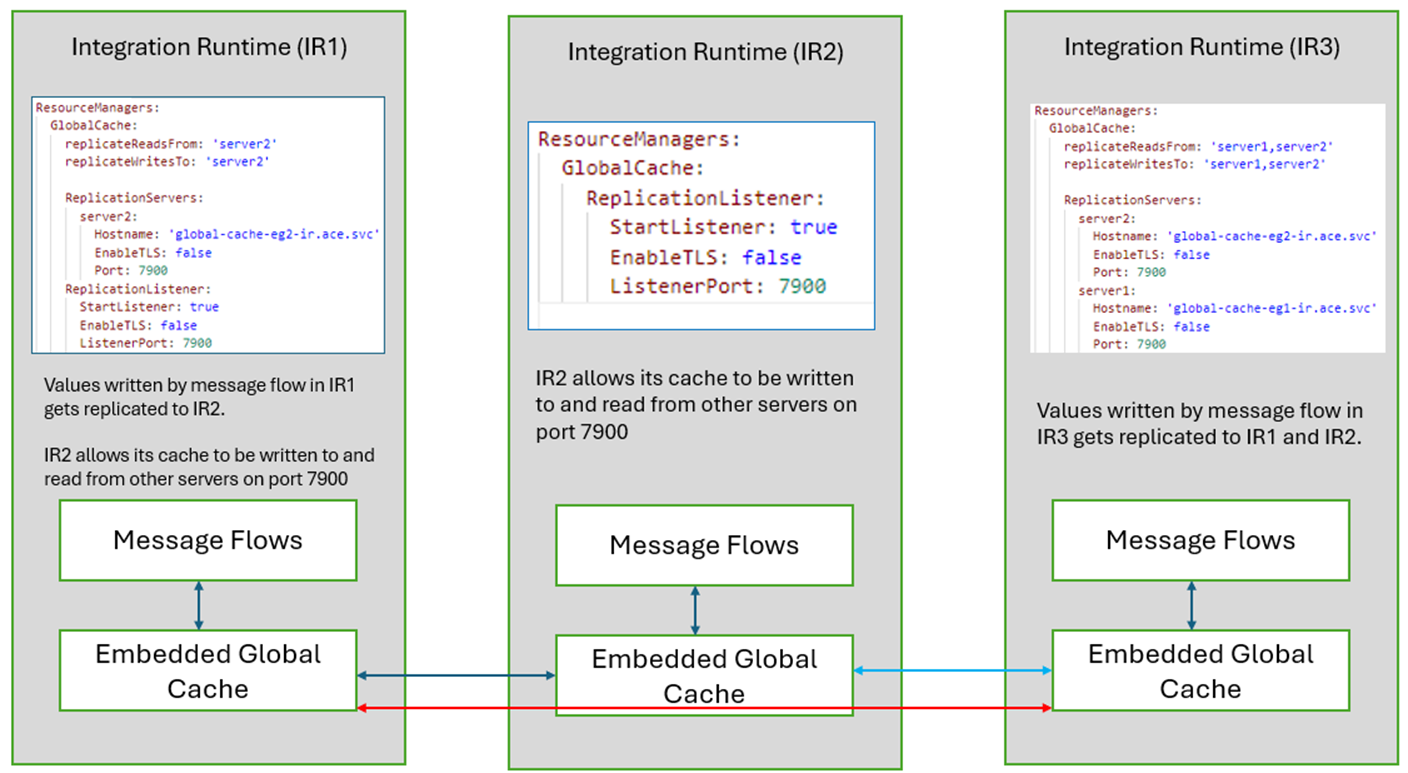
In each Integration Runtime, we deploy message flows that interact with the Embedded Global Cache in that server. The following configuration is setup in server.conf.yaml for each Integration Runtime:
Integration Runtime IR1
replicateWritesTo:IntegrationRuntime IR1is configured to replicate cache writes from its own message flows toIntegrationRuntime IR2, so any values put or updated by IR1’s message flows to IR1’s embedded cache will get asynchronously replicated to IR2. If multiplereplicationWritesToservers were configured, asynchronous write requests would be sent to all the configured integration servers.replicateReadsFrom: IR1 is configured to replicate any missing reads from server 2, i.e. if the value does not exist in IR1’s embedded cache, it will synchronously request that value from IR2 before continuing.ReplicationListener: IR1 is also configured to allow other servers to read and write to its own cache through the replication listener on port7900.
Integration Runtime IR2
ReplicationListener:IntegrationRuntime IR2is configured to allow other servers to read and write to its own cache through the replication listener on port 7900.
Integration Runtime IR3
replicateWritesTo:IntegrationRuntime IR3is configured to replicate cache writes from its own message flows toIntegrationRuntime IR1andIntegrationRuntime IR2. So any values put or updated by IR3’s message flows to IR3’s embedded cache will get asynchronously replicated to IR1 & IR2.replicateReadsFrom: IR3 is configured to replicate any missing reads from IR1 and IR2, i.e. if the value does not exist in IR3’s embedded cache, it will synchronously request that value from IR1 & IR2 before continuing.
In the Kubernetes environment, each IntegrationRuntime runs as a POD. In order to communicate between the IRs for reads and writes of Cache, the ReplicationListener port must be exposed within the cluster.
You can do this at the time of creation of an IntegrationRuntime by additionally configuring the service on IntegrationRuntime CR.
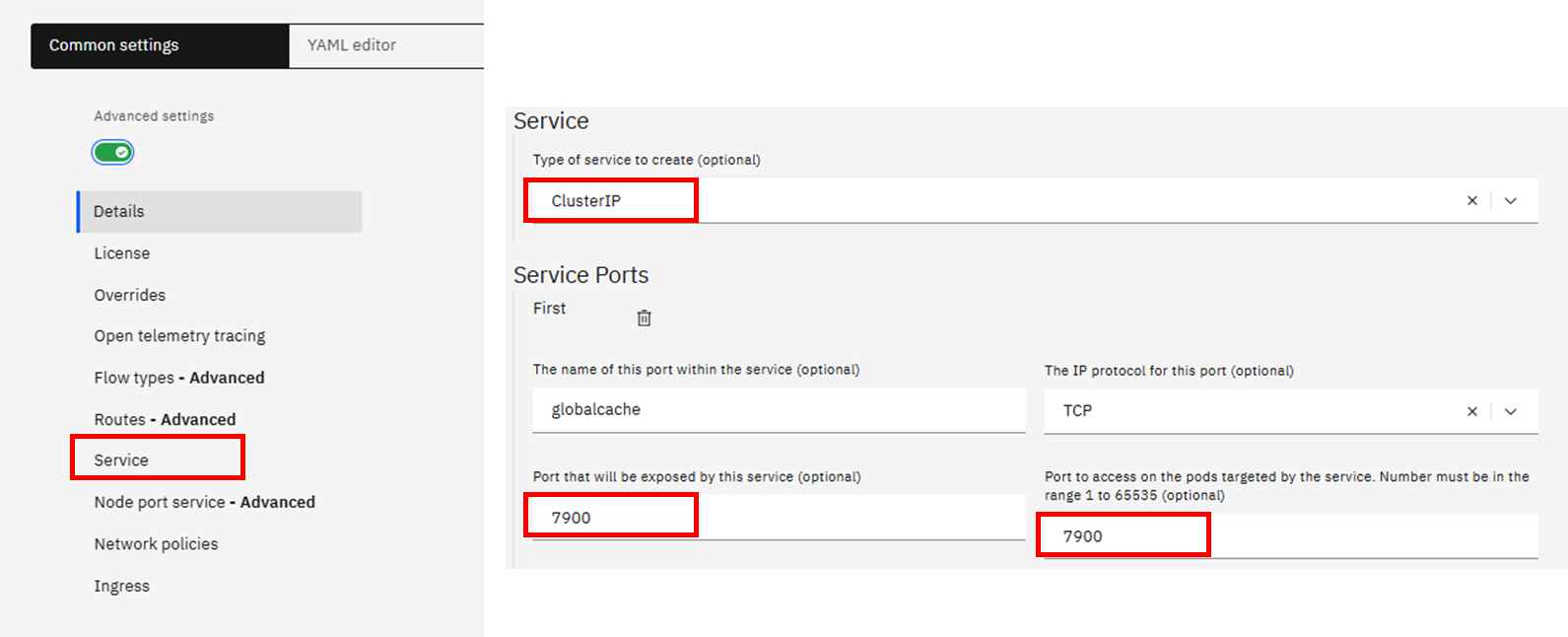
You may also edit existing IR editing the YAML by adding following stanza under specs:
spec:
  service:
    ports:
      - name: globalcache
        port: 7900
        protocol: TCP
        targetPort: 7900
   type: ClusterIP
Once the IR is created / updated with service details, you can observe the port 7900 being available against that service, in this example, global-cache-eg1-ir.

You can then use the service name as the hostname to communicate between the pods over the exposed port. As you may have noticed, we used following hostname and port for configuration under ReplicationServers. Hostname takes the form : [service name].[namespace].svc
ReplicationServers: server2: Hostname: 'global-cache-eg2-ir.ace.svc' EnableTLS: false Port: 7900
You can now test your message flows by processing some messages that write data to cache in IR1 and retrieve/read the value in another message flow running in IR2 or IR3.
Administering Cache in Containers
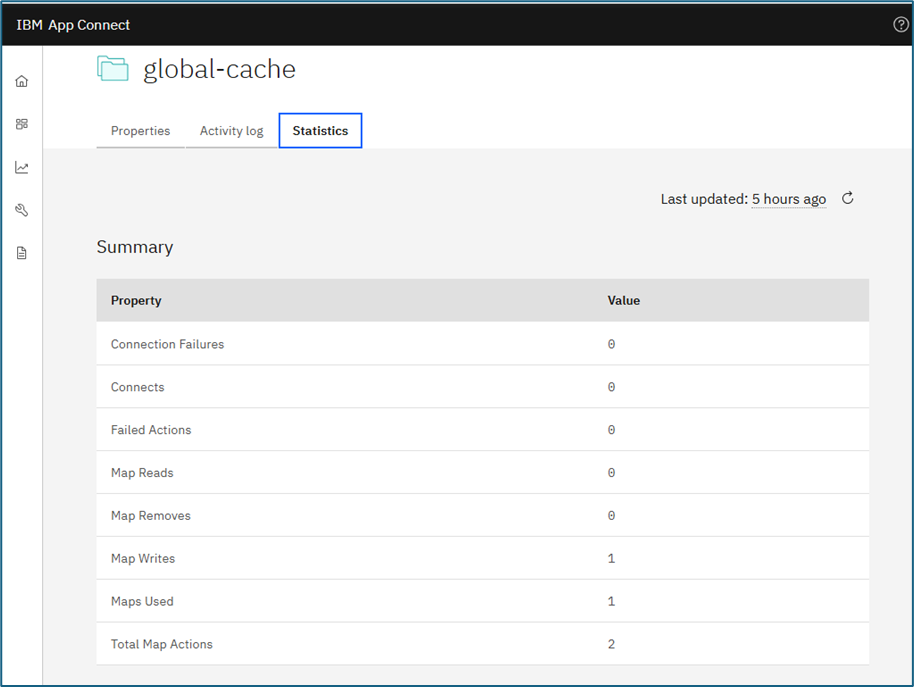
Administration of the new Embedded Global Cache is done through 2 new ibmint commands, ibmint display cache and ibmint clear cache if you are running in on-prem VM environments. In a container environment, you can use global-cache resource manager to query the Maps statistics.
To view the list of maps:
curl --unix-socket /home/aceuser/ace-server/config/IntegrationServer.uds http://localhost/apiv2/resource-managers/global-cache/maps?depth=3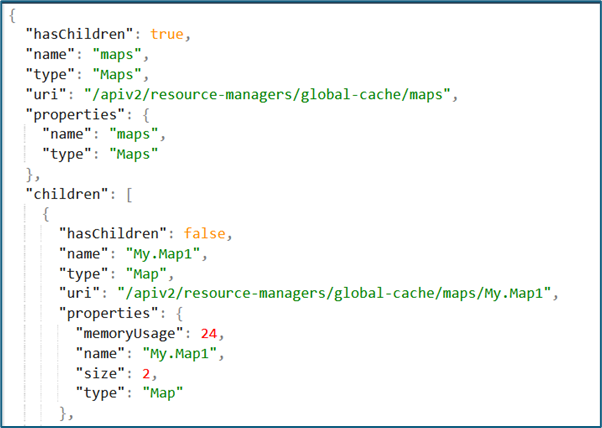
You can also view it via ACE Dashboard UI.
To clear the cache from a particular map:curl --unix-socket /home/aceuser/ace-server/config/IntegrationServer.uds -X POST http://localhost/apiv2/servers/{server}/resource-managers/global-cache/maps/{global-cache-map-name}/clear
Some additional Admin APIs:
- Get the Global Cache Replication Listener object.
GET /apiv2/servers/{server}/resource-managers/global-cache/replication-listener - List the Global Cache Replication Server objects.
GET /apiv2/servers/{server}/resource-managers/global-cache/replication-servers - Get the details of a specific map.
GET /apiv2/servers/{server}/resource-managers/global-cache/maps/{global-cache-map-name}
Considerations While Using Embedded Global Cache in Containers
In a container environment, it is recommended to have a 'mesh' setup with every IR configured to read and write to all the other IRs so that cache data is up to date in all copies of it in all IRs. One possible risk is, if you have a cache item you update regularly, without any expiry and with an unreliable connection, you may end up with different servers having different values for that cache item, where an update managed to write the update to e.g. 3 out of 4 other servers, but the connection to the 4th server got interrupted, so server 4 still has the old value, and because server 4 has a value, it doesn't ask the other servers what the value is.
If you have multiple replicas of your IR Pod, the cache values can be different in each replica depending on how the messages get routed to each replica. This factor should be kept in mind while designing Cache topology in a multi replica scenario.
Published at DZone with permission of Amar Shah. See the original article here.
Opinions expressed by DZone contributors are their own.
Comments